Buildinggadgets: Large FPS drop using Destruction tool on Max Area
As mentioned in #123 there is a bug / performance issue with the destruction tool when it's area is set to 16x16x16.
With a Mid -> Pretty Okay gaming PC (GTX 1070, I5, 16GB Ram with 4GB Ram dedicated to MC) and having the max area active on the tool, you will notice an FPS drop of about 90%. It's something due to how you are highlighting the blocks. I've done some messing around and found that it's this method https://github.com/Direwolf20-MC/BuildingGadgets/blob/master/src/main/java/com/direwolf20/buildinggadgets/tools/ToolRenders.java#L363 that is causing the issue.
A simple fix might be to switch over to using your renderBox method or changing the overlay to large box instead of highlighting each block separately and causing render updates each tick.
 MichaelHillcox
All 10 comments
Yea I definitely need to try fixing that :). For now you can press the Range hot key to hide the render.
 Direwolf20-MC
on 3 Nov 2018
Direwolf20-MC
on 3 Nov 2018
FYI this is a part of the reason it’s still beta. I need to clean this up.
Direwolf20-MC
on 3 Nov 2018
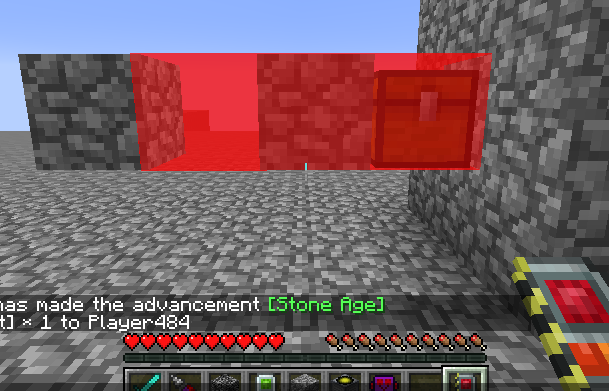
So heres the thing, I can draw it as one big box, but then it also draws over things it doesn't actually touch (Like air, chests, bedrock, etc). Or I can draw each box separately, and it causes lag.
I haven't really decided how I want to handle this yet. Its a tricky one :). For now, I'm pushing a change that improves the FPS hit, but it definitely still exists on large areas.
Direwolf20-MC
on 6 Nov 2018
In theory you could try to avoid drawing it around blocks, which are sourrnded by opaque cubes...
Though, evaluating that would decrease Performance when selecting an area (but I guess not by that much, checking 6 blocks around shouldn't be that much of a Problem)
Reasoning for this: Usually in a large Area destruction the Player won't see all the blocks of what he/she is destructing. So the unseen blocks (surrounded by opaque cubes) can safely be clipped away.
I know that this doesn't clip all blocks away, but it is a start and much simpler to implement than full clipping.
 MajorTuvok
on 6 Nov 2018
MajorTuvok
on 6 Nov 2018
@Direwolf20-MC I think highlighting a large area is a good way to go about it due to the performance hit that doing them separately. Of course, you could always start a new Thread to handle the rending and do the computation out of the main loop.
Maybe a solution to fix the highlighting would be to do a large area at the same time as implementing #120. By listing the blocks to be destroyed you could also list a count of tileEntities that won't be destroyed. This shouldn't be too hard to compute and rendering the items on the screen should be as easy and maintaining a List<ItemStack> and clear it each tick unless the starting block is the same as the previous starting block.
MichaelHillcox
on 6 Nov 2018
That’s kind of how I do it now. Problem is if I draw one big box around the area it’s not easy to exclude specific blocks. Since it’s one big box.
I think I’ll keep it how it is for now. Can y’all test and see if it’s better? It should be. But you’ll still notice a hit for large areas. Use the range hotkey to hide the render.
Direwolf20-MC
on 6 Nov 2018
I'll give it a test in a little bit and see if I see a boost. :) Maybe as a middle option, have up to like 5 x 5 x 5 as a single block selector then higher than that change over to a single layer. If the rendering code is different to the literal destruction and removal queue then having it switch should be to much more work from what you have so far. I'll keep thinking about it and see if I can come up with a good middle ground solution
MichaelHillcox
on 6 Nov 2018
Grab 2.4.4 off curse.
Direwolf20-MC
on 6 Nov 2018
I just tested this. My PC is not great (especially the graphics, as they're integrated -- I don't even have a dedicated graphics card) and even when rendering all 4096 boxes, my FPS drops to 30 in a flat world.
I also found that rendering all 6 quads has the same effect on FPS as drawing only 1 quad. The solution I implemented was to prevent rendering for blocks with no sides to render (#129). With that, FPS only drops by a few even when set to max range.
 Phylogeny
on 6 Nov 2018
Phylogeny
on 6 Nov 2018
Accepted @Phylogeny's PR and pushed to curseforge as v2.4.5
Direwolf20-MC
on 6 Nov 2018
Related issues
MajorTuvok
·
3Comments
 WenXin20
·
4Comments
WenXin20
·
4Comments
 douyabian
·
6Comments
MichaelHillcox
·
4Comments
douyabian
·
6Comments
MichaelHillcox
·
4Comments
 generrosity
·
5Comments
generrosity
·
5Comments
Most helpful comment
FYI this is a part of the reason it’s still beta. I need to clean this up.