Browser: bitwarden doesn't ask me to save a new profile
Hi,
I've just created an account on https://www.wunderground.com
I didn't have the notification at the top of the screen to suggest me to save the credentials for this website so I have to do it manually.
This is not the first time that I have to deal with it.
Thank you.
 Primokorn
All 38 comments
I've seen this also. In fact I've created new logins in the past few weeks and haven't seen a message to save my login info. I have seen it a few times in the past.
I have to manually set up a new login. I'm on Fx56 Nightly btw.
 streetwolf
on 15 Jul 2017
streetwolf
on 15 Jul 2017
@streetwolf if you are seeing it happen that often that is probably because your vault is locked. We can't offer to save the login while your vault is locked.
 kspearrin
on 15 Jul 2017
kspearrin
on 15 Jul 2017
How do I tell if my vault is locked? I have the lock option set to never lock. Is that the option that controls locking the vault?
If I don't have my vault locked it could be the new features that are enabled in Nightly, like Stylo and advanced layers.
btw... Any ETA on the next release of BW?
streetwolf
on 15 Jul 2017
If you are using never lock then the vault would not be locked. Maybe something with nightly causes it to break.
We are hoping to get our next version out in the next week or two.
kspearrin
on 17 Jul 2017
This is happening on chrome as well so it's not only happening on firefox, just installed BW and have been having to manually setup new login information on every single site I use because nothing comes up to suggest saving login credentials at all and I haven't ever locked my vault either (have the lock option set to "never lock")
 JourneyOver
on 3 Aug 2017
JourneyOver
on 3 Aug 2017
@JourneyOver It doesn't ever work or only on some sites?
kspearrin
on 3 Aug 2017
it eventually worked for a small number of sites (google/reddit/twitter and a couple others) but for most I had to do manually, I eventually just gave up for the time being and went back to using lastpass since I've been using it for years without any trouble. Might try BW again at some point once things feel a bit more fleshed out and working since I do like the whole open source thing this has going on vs something like lastpass.
JourneyOver
on 3 Aug 2017
you could show a notification to unlock the db and then save the site when BW is locked, instead of showing nothing?
 jeroen7s
on 4 Aug 2017
jeroen7s
on 4 Aug 2017
@jeroen7s The problem is that when the vault is locked it cannot be read from either, which means we don't know if you already have the login stored or not. We would have to prompt you for every login, which would be annoying.
kspearrin
on 4 Aug 2017
maybe you could prompt only when you're creating a new account? shouldn't be too hard since almost every form you fill in to create accounts have 2 password fields, to confirm you have the correct password typed in. you could detect that and then ask to save even if your database is locked?
jeroen7s
on 5 Aug 2017
also i really don't think that asking to unlock bitwarden at every login is an issue, i would prefer to have that option available as a setting. rather than not having my password saved.
i'd just add "ask to unlock at site login" as an option, and i would always ask to unlock at account creation forms, since that would always have an account that's not stored yet in bitwarden.
jeroen7s
on 5 Aug 2017
@Primokorn I just tested this on weather underground and it worked fine for me??
kspearrin
on 8 Aug 2017
It's working too. Could it be related to a recent update of the Firefox addon?
Anyway please keep this issue opened for now. I'm pretty sure I'll find other websites.
I don't know if it's a planned feature or a bug but I don't think that we have the notificaiton when changing our password from a website.
Example:
If I change my password in the Settings of Github website I shoud have a notification from bitwarden asking me to update the existing credentials of Github.
Primokorn
on 8 Aug 2017
@Primokorn Yes, that feature is not yet implemented.
kspearrin
on 8 Aug 2017
@Primokorn The most recent update didn't address any of these issues so I am not sure why it was not working for you before.
kspearrin
on 8 Aug 2017
@kspearrin could you implement a checkbox so we can choose weather or not BitWarden will prompt to unlock on login? (to save the password in BW)
jeroen7s
on 10 Aug 2017
@Primokorn I've made several enhancements to catch edge cases that were not accounted for before. This should hopefully improve things with detecting login/registration form submissions in the next release.
kspearrin
on 12 Aug 2017
kspearrin
on 12 Aug 2017
@kspearrin Thanks. I didn't registrer in a new website but I keep this issue in mind.
Primokorn
on 14 Aug 2017
@kspearrin please try with this website. I have no notification on my end.
https://www.appbrain.com/signup?li_cont=https%3A%2F%2Fwww.appbrain.com%2F
Primokorn
on 23 Aug 2017
@Primokorn This is still one of the few cases I am unsure how to handle. The login form does not follow HTML standards by placing a submit button inside the actual form.
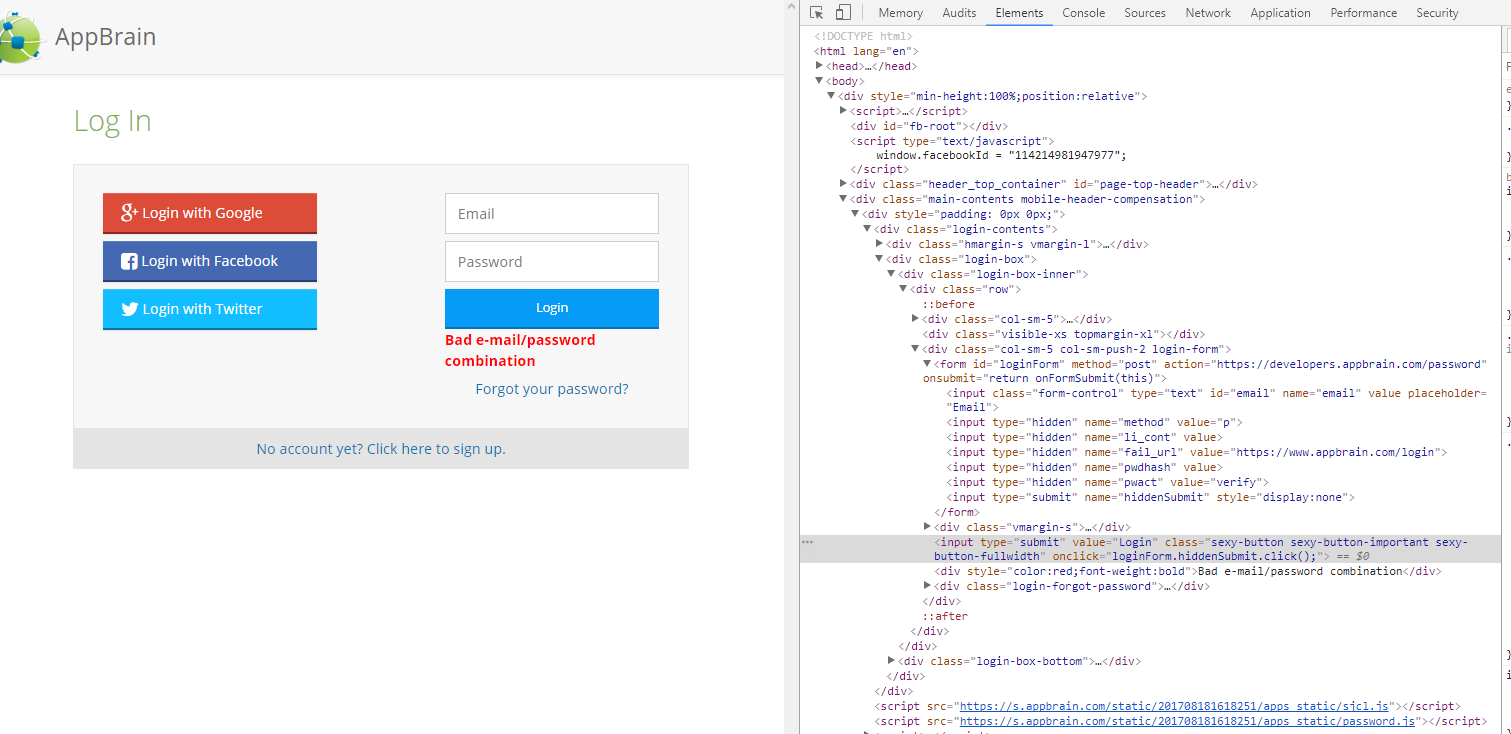
Therefore I don't really know that the button being clicked is for that login form. Of course there may be some way for us to visually determine that, but a solution that works for all cases I am still unsure of.
kspearrin
on 23 Aug 2017
wow that's incredibly weird behavior from the site, so the submit button on the form is hidden but they use a custom input button to trigger the submit button inside the form? like wtf?
jeroen7s
on 23 Aug 2017
@jeroen7s Exactly...
kspearrin
on 23 Aug 2017
OK I understand. I'll report other websites to see if it's the same issue.
Primokorn
on 23 Aug 2017
@Primokorn One possible solution to get better detection would be to monitor network traffic with the webRequest API. I could scan all forms on the page, get their action/method and look for that to occur in the network traffic. This is probably a lot more complex to handle but may subvert the need to monitor the DOM directly like we do today.
kspearrin
on 23 Aug 2017
@kspearrin that will probably cause a lot of trouble for detection, especially with stuf like forms using angular where the url the form is using is hidden somewhere in the javascript code
jeroen7s
on 23 Aug 2017
@jeroen7s Indeed. Here is another website that does the same exact thing as the one @Primokorn shared. Form with a hidden submit button and then another button outside the form that submits the actual form. My proposed solution about the network traffic would not work since there is no action on the form:
https://store.steampowered.com//login/

kspearrin
on 23 Aug 2017
I guess it's the same behaviour with this website: https://www.generation-nt.com/
Unfortunately it seems that we have this issue on many websites.

Primokorn
on 23 Aug 2017
No, that website is fine and bitwarden worked correctly for me there???
kspearrin
on 23 Aug 2017
I don't have the notification when creating a new account.
Firefox portable 55.0.2 (32 bits)
Primokorn
on 23 Aug 2017
Hmm, not sure. It's working for me.
kspearrin
on 23 Aug 2017
@Primokorn Nevermind. Looks like it doesn't work on Firefox for some reason. I think the improvements I have made in the next version will work with it though.
kspearrin
on 23 Aug 2017
@kspearrin I don't know what to say.
Except the websites that don't respect HTML standards I normally get the notification with Firefox.
However I have many tweaks so I tried with Firefox Beta 56.x (no tweaks at all) and the notification worked too.
Primokorn
on 23 Aug 2017
By tweaks do you mean addons?
kspearrin
on 23 Aug 2017
Addons and a modded version of Ghacks' user.js to imrove security & privacy. Some stuff are broken sometimes :)
Primokorn
on 23 Aug 2017
@Primokorn v1.15.x has gone live with these improvements.
kspearrin
on 2 Sep 2017
Note that they are general improvements and do not fix the few other cases of bad HTML that we pointed out here.
kspearrin
on 2 Sep 2017
Closing this issue since the original reported issue was resolved. Feel free to open another issue if there are other things.
kspearrin
on 29 Sep 2017
Related issues
 timint
·
18Comments
timint
·
18Comments
 0b10011
·
25Comments
kspearrin
·
62Comments
0b10011
·
25Comments
kspearrin
·
62Comments
 h-town
·
20Comments
h-town
·
20Comments
 minmarble
·
16Comments
minmarble
·
16Comments