Browser-laptop: Improvements to about:passwords
Description
The page suggests users go to _Preferences > Security_ to change how passwords are managed. Brave, however, doesn't have a Preference menu option. Instead, it should probably say _Settings › Security_.
Additionally, this should probably be a direct link to that resource, rather than directions.
Steps to Reproduce
Visit about:passwords in Brave.
Actual result:
Misleading, static text.
Expected result:
Hyperlink with accurate labeling.
Reproduces how often:
100%
Brave Version
0.22.13
about:brave info:
Brave: 0.22.13
V8: 6.5.254.41
rev: a8cfb160479f1d00d0769368eb440030182bb83b
Muon: 5.1.2
OS Release: 10.0.16299
Update Channel: Release
OS Architecture: x64
OS Platform: Microsoft Windows
Node.js: 7.9.0
Brave Sync: v1.4.2
libchromiumcontent: 65.0.3325.181
Reproducible on current live release:
Yes
 jonathansampson
All 7 comments
about:passwords should also not show usernames/emails, and instead have a slider like this one
Just an idea.
 Blankbook2081
on 11 Apr 2018
Blankbook2081
on 11 Apr 2018
I think MacOS use _Preferences_ while Windows and Linux use _Settings_ if I'm not wrong? And about:preferences said _Preferences_ as a title.
 eljuno
on 11 Apr 2018
eljuno
on 11 Apr 2018
Yes, the directions are accurate for Mac, but not for Windows and Linux because the option reads "Settings" instead.
Seems like an easy fix, but what about localization? I think we'd have to create a new string (or more) for Windows and Linux?
For example:
passwordDisableInstructions=To change how passwords are managed, go to Preferences > Security
passwordDisableInstructionsWindowsLinux=To change how passwords are managed, go to Settings > Security
 jevuu
on 12 Apr 2018
jevuu
on 12 Apr 2018
How's this approach?
In passwords.js:
const isDarwin = require('../../app/common/lib/platformUtil').isDarwin()
...
<div className={css(styles.passwordInstructions)}>
<span data-l10n-id='passwordDisableInstructions' />
<span className={css(styles.passwordInstructionsLink)}
data-l10n-id={isDarwin?'passwordInstructionsLinkDarwin':'passwordInstructionsLink'}
onClick={aboutActions.createTabRequested.bind(null, {
url: 'about:preferences#security'
})} />
</div>
...
const styles = StyleSheet.create({
passwordInstructionsLink: {
color: 'rgb(255, 80, 0)',
textDecoration: 'underline',
cursor: 'pointer',
':hover': {
color: 'black',
}
},
passwords.properties:
passwordDisableInstructions=To change how passwords are managed, go to
passwordInstructionsLinkDarwin=Preferences > Security
passwordInstructionsLink=Settings > Security
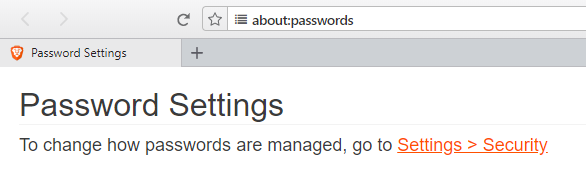
Result (in Windows):
jevuu
on 13 Apr 2018
@jevuu Looks pretty good; though I suspect we have a variable someplace that could replace the explicit rgb color value seen here:
color: 'rgb(255, 80, 0)',
@bsclifton Thoughts on this approach?
jonathansampson
on 14 Apr 2018
Cool. I'll look through it and see if there is a variable for that.
Is it alright if I submit a pull request and continue the discussion there, or should I wait for a response?
jevuu
on 19 Apr 2018
@jevuu you're always welcome to submit a PR (as you noticed 😄). Your PR was marked as work-in-progress... how's it going?
 bsclifton
on 26 Apr 2018
bsclifton
on 26 Apr 2018
Related issues
 briannyeko
·
3Comments
briannyeko
·
3Comments
 lukemulks
·
3Comments
lukemulks
·
3Comments
 luixxiul
·
3Comments
luixxiul
·
3Comments
 stevespringett
·
3Comments
stevespringett
·
3Comments
 antiroyalty
·
3Comments
antiroyalty
·
3Comments