Browser-laptop: Restoring a wallet backup (wallet v2) sometimes fails and then only shows "a"
Test plan
- Fresh profile
- Launch with extra command line param:
LEDGER_NO_DELAY=true Visit Preferences>Paymentsand enable Brave PaymentsVisit Preferences>Advanced>Backup your walletand copy the keywordsVisit Preferences>Advanced>Recover your wallet- Restore wallet using keywords from step 4
- Repeat step 6 over and over again (with the
LEDGER_NO_DELAYflag, it will try to runsyncevery 5 seconds. Running sync at the same time that restore happened appeared to be the root cause). Visit Preferences>Advanced>Backup your walletand verify key is NOTa
Description
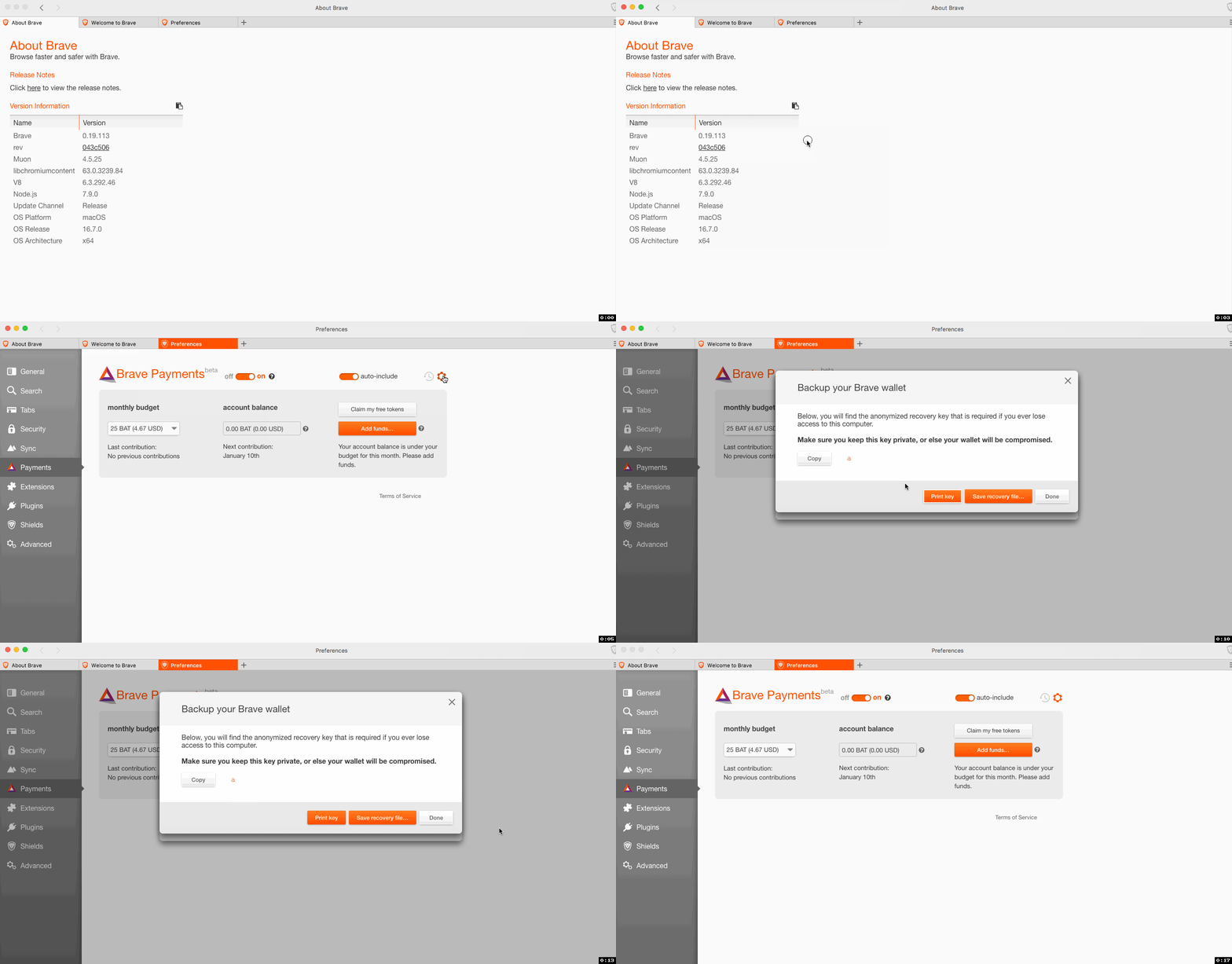
I migrated from wallet 1 to 2 and did the backup/recover process. Now that I've restored, the backup screen simply shows "a" as the keyword?

Steps to Reproduce
~1. Have a wallet with v2 (BAT) that is displaying and working properly~
~2. Go to advanced => backup~
~3. Copy the keywords to clipboard and store somewhere~
~4. Go to advanced => restore~
~5. Input the keywords copied from step 3~
~6. After recovery finishes, go to advanced => backup~
Updated steps per @srirambv via his post below
- Upgrade from 0.18.36 with wallet created
- Wait for the transition to complete
- Recover wallet using different wallet backup codes
- Recover wallet without selecting any file or typing any code and ensure it fails
- Repeat steps 3 & 4 around 4-5 times
- Change reconcile stamp in ledger-state.json
- Relaunch payments tab open up with the code as
a
Actual result:
See screenshot
Expected result:
Should be showing all 32 words
Reproduces how often: [What percentage of the time does it reproduce?]
Brave Version
about:brave info:
Brave: 0.19.34
rev: d87b7caf57ae9d4aa88a275abca46b4a4619e34d
Muon: 4.4.25
libchromiumcontent: 61.0.3163.100
V8: 6.1.534.41
Node.js: 7.9.0
Update Channel: Beta
OS Platform: macOS
OS Release: 16.7.0
OS Architecture: x64
Reproducible on current live release:
no
Additional Information
 bsclifton
All 20 comments
Per @NejcZdovc's request, I checked my seed in ledger-state.json and it appears that is the issue:
{
  // snip
  "properties": {
    "setting": "adFree",
    "fee": {
      "currency": "BAT",
      "amount": 10
    },
    "days": 30,
    "wallet": {
      "keyinfo": {
        "seed": {
          "0": 0,
          "1": 0
        }
      },
      // snip
tried to reproduce this one, but without success
 NejcZdovc
on 9 Oct 2017
NejcZdovc
on 9 Oct 2017
Per discussion w/ @NejcZdovc, we suspect this may be because I was switching between staging and production URLs several times (also, some updates had to be made for the endpoint; cc: @evq). I'll close this issue for now and we can re-open if we see again
bsclifton
on 9 Oct 2017

Seeing this on 0.19.41
STR I followed
- Upgrade from 0.18.36 with wallet creaeted
- Wait for the transition to complete
- Recover wallet using different wallet backup codes
- Recover wallet without selecting any file or typing any code and ensure it fails
- Repeat steps 3 & 4 around 4-5 times
- Change reconcile stamp in ledger-state.json
- Relaunch payments tab open up with the code as
a
 srirambv
on 11 Oct 2017
srirambv
on 11 Oct 2017
@srirambv based on your steps, it seems there is an intermittent failure somewhere which we need to be handling. I'm going to update the text of this issue to reflect that
bsclifton
on 17 Oct 2017
Reproduced on 0.19.93.
 LaurenWags
on 15 Nov 2017
LaurenWags
on 15 Nov 2017
+1 from community: https://community.brave.com/t/backup-your-wallet-showing-a-as-the-anonymised-recovery-key/11610
LaurenWags
on 4 Dec 2017
+1 from @jenn-rhim and also +1 from @disfit (still troubleshooting with them via https://github.com/brave/browser-laptop/issues/12122)
bsclifton
on 6 Dec 2017
Here are some steps I can easily reproduce the problem
- Clean profile
- Launch Brave in staging
LEDGER_ENVIRONMENT=staging npm run start
- Enable payments
- Go to advanced (gear icon), restore, and then use the following words:
straightest cooker ringer beslime larch earthliest carabineer necrophilism hexed jerusalem sherry tart stratospheric casuistical damson cooeyed
- Quit Brave
- Relaunch (same as step 2)
- Go to advanced (gear icon), backup, and then notice it shows "a"
bsclifton
on 7 Dec 2017
@bsclifton thx for the steps, taking a look now
NejcZdovc
on 7 Dec 2017
This is reproducible on 0.19.48 and all hotfix release.
srirambv
on 7 Dec 2017
Works fine on 0.19.113
srirambv
on 11 Dec 2017
Reproduced issue using steps from https://github.com/brave/browser-laptop/issues/11383#issuecomment-349818315 on MacOS using 0.19.113
LaurenWags
on 11 Dec 2017
Moving issue back a milestone. The problem was happening 100% of the time, which I instead captured with https://github.com/brave/browser-laptop/issues/12254. It now works, but as seen above, it seems to intermittently fail
We'll need to continue investigating to understand to find the root cause
bsclifton
on 11 Dec 2017
Moving to 0.19.x hotfix 12
bsclifton
on 9 Jan 2018
Fixed in 0.19.x with 395e12bf36a961f9872fcb1490278df4e58edbbc
bsclifton
on 9 Jan 2018
Verified the steps mentioned in test plan. Repeated step 6, 10-12 times in quick succession and was still able to get the backup code. 👍
srirambv
on 11 Jan 2018
this is still happening to me. i'm on vs. 0.19.134.
 jenn-rhim
on 16 Jan 2018
jenn-rhim
on 16 Jan 2018
sorry, scratch the above comment. @LaurenWags just pinged me that i should restore my wallet key first and see if the key sticks. it looks like it's sticking. i'll keep an eye on it. thanks @LaurenWags!
jenn-rhim
on 16 Jan 2018
thanks @jenn-rhim 😄
LaurenWags
on 16 Jan 2018
Related issues
 eljuno
·
3Comments
eljuno
·
3Comments
 luixxiul
·
3Comments
luixxiul
·
3Comments
 bbondy
·
3Comments
bbondy
·
3Comments
bbondy
·
3Comments
bbondy
·
3Comments
 jonathansampson
·
3Comments
jonathansampson
·
3Comments
Most helpful comment
sorry, scratch the above comment. @LaurenWags just pinged me that i should restore my wallet key first and see if the key sticks. it looks like it's sticking. i'll keep an eye on it. thanks @LaurenWags!