Browser-laptop: Pressing tab on highlighted autofill entry doesnt complete the user id field
Did you search for similar issues before submitting this one?
YesDescribe the issue you encountered:
Pressing tab on highlighted autofill entry doesnt complete the user id fieldPlatform (Win7, 8, 10? macOS? Linux distro?):
Windows 10 x64, ia32Brave Version (revision SHA):
Brave 0.15.312
rev cc653ff
Muon 3.0.202Steps to reproduce:
- Visit https://trac.torproject.org/projects/tor/login
- Login once so that the autofill entry is stored for the site
- Reopen/refresh the page and click on the login field to show the autofill suggestion to popup
- Highlight the autofill suggestion using down arrow button and press Tab
- Enter text is retained in the user id field, doesn't complete the user id from autofill suggestion
- Password gets autofilled correctly
Actual result:
Pressing tab on highlighted autofill entry doesnt complete the user id fieldExpected result:
Should autocomplete the userid field when Tab is pressedWill the steps above reproduce in a fresh profile? If not what other info can be added?
YesIs this an issue in the currently released version?
Not checked yet to confirmCan this issue be consistently reproduced?
YesExtra QA steps:
- Ensure password length is less or more than the user id to help count the characters. Having same amount of char for both doesn't help in knowing if the password field is getting the password or the userid
2.
3.
- Ensure password length is less or more than the user id to help count the characters. Having same amount of char for both doesn't help in knowing if the password field is getting the password or the userid
Screenshot if needed:

Any related issues:
7132
 srirambv
All 10 comments
@srirambv wdcd?
 alexwykoff
on 13 Jun 2017
alexwykoff
on 13 Jun 2017
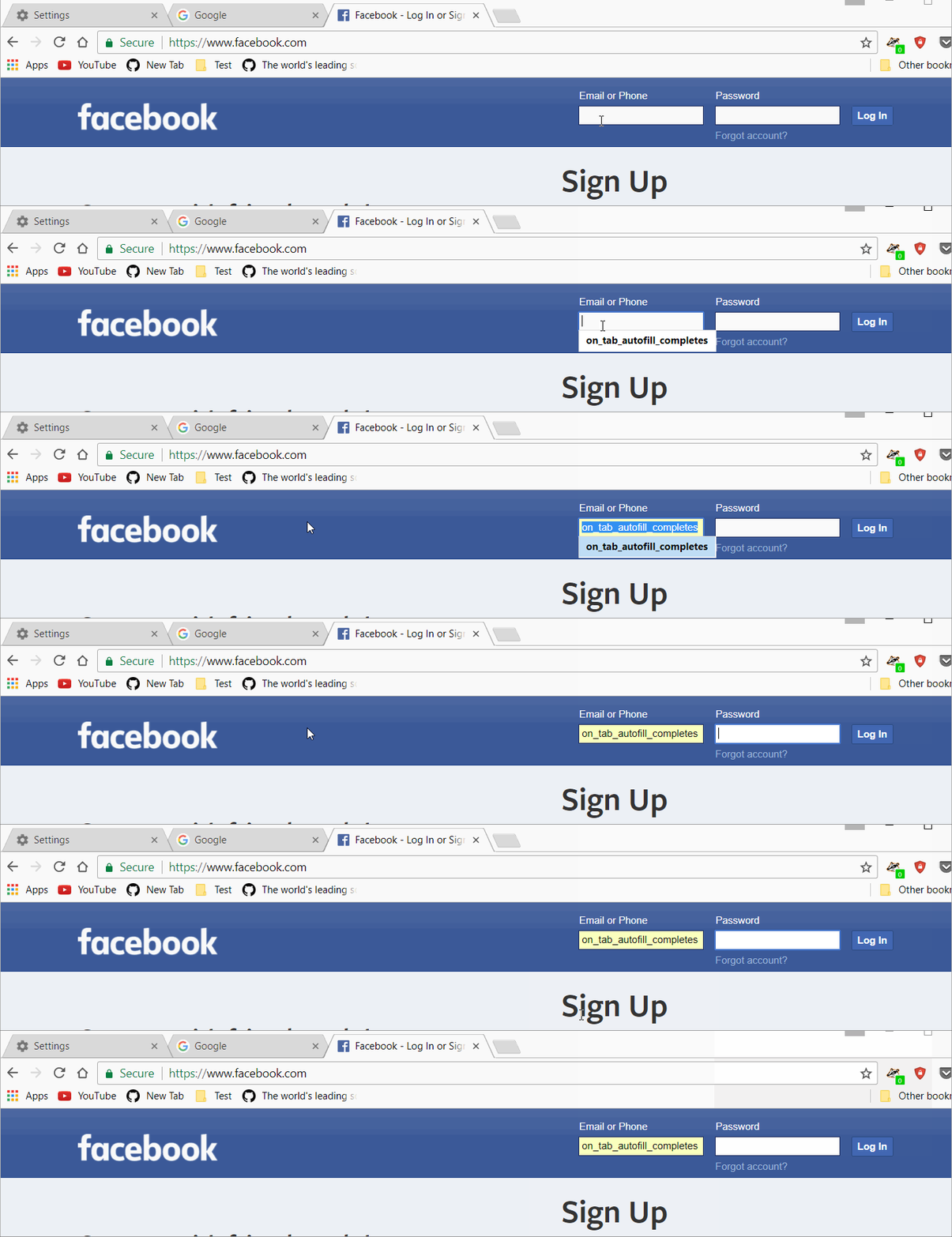
@alexwykoff Chrome Behavior
srirambv
on 13 Jun 2017
I'm also seeing a variation of this in Linux, even if the password isn't stored.
steps.
1) log into website
2) Don't have Brave remember password
3) log out
4) Highlight password field
4b optional) start typing email address
5) Down arrow to select desired email address
6) Press tab
expected behavior.
Email field is filled in with selected address.
actual behavior
The email field remains with what ever was (or was not) typed
The password field receives the email address.
Brave 0.15.314
rev 75ffa36
Ubuntu 17.04
 morganrallen
on 27 Jun 2017
morganrallen
on 27 Jun 2017
+1
 patrick99e99
on 12 Jul 2017
patrick99e99
on 12 Jul 2017
@NejcZdovc you are assigned to this (and IIRC, you originally implemented this). Would you be able to check this out?
 bsclifton
on 13 Jul 2017
bsclifton
on 13 Jul 2017
I did test it out and the problem is exactly what @morganrallen said. So when you press tab key focus is changed to the next input field and in this next field we put autofill content. We could easily fix this with e.preventDefault(), but then tab key would act as enter key and would not switch to the next input. You would need to press tab twice, first to fill the input and then to go to the next one.
 NejcZdovc
on 13 Jul 2017
NejcZdovc
on 13 Jul 2017
This is really annoying folks, just my two cents.
 F1r3Hydr4nt
on 7 Aug 2017
F1r3Hydr4nt
on 7 Aug 2017
@freddiehonohan it'll be fixed. please hang tight.
 luixxiul
on 7 Aug 2017
luixxiul
on 7 Aug 2017
I hit this many times a day. Sometimes my fingers remember the workaround (hit enter before tab), sometimes they don't. But there are enough things I like about Blaze that it's now my default browser.
 nonbob
on 17 Oct 2017
nonbob
on 17 Oct 2017
+1 from @paulizleet via 12383
srirambv
on 22 Dec 2017
Related issues
 jonathansampson
·
3Comments
jonathansampson
·
3Comments
 antiroyalty
·
3Comments
antiroyalty
·
3Comments
 jkup
·
3Comments
jkup
·
3Comments
 shortstuffsushi
·
3Comments
jonathansampson
·
3Comments
shortstuffsushi
·
3Comments
jonathansampson
·
3Comments
Most helpful comment
I'm also seeing a variation of this in Linux, even if the password isn't stored.
steps.
1) log into website
2) Don't have Brave remember password
3) log out
4) Highlight password field
4b optional) start typing email address
5) Down arrow to select desired email address
6) Press tab
expected behavior.
Email field is filled in with selected address.
actual behavior
The email field remains with what ever was (or was not) typed
The password field receives the email address.
Brave 0.15.314
rev 75ffa36
Ubuntu 17.04