Browser-laptop: Pinned tabs lose order after re-launch
Did you search for similar issues before submitting this one?
YesDescribe the issue you encountered:
Updated Brave today and after relaunch my pinned browser tabs were no longer in the correct order. Thought it was an update bug, so put them back in order, but after quitting and re-launching they returned to the same incorrect order.Platform / Revision
Brave: 0.15.0
rev: 71fb73001617949528cc6473e288a49e76fcd4d5
Muon: 2.58.7
libchromiumcontent: 58.0.3029.81
V8: 5.8.283.32
Node.js: 7.9.0
Update Channel: dev
os.platform: darwin
os.release: 15.4.0
os.arch: x64
Steps to reproduce:
- Pin some tabs,
- Change pin order,
- quit, re-open
Actual result:
Pinned in different orderExpected result:
Pinned in same order as when closed.Will the steps above reproduce in a fresh profile? If not what other info can be added?
Hard to say, I don't want to wipe my profile / haven't set up a dev environment yet.Is this an issue in the currently released version?
yesCan this issue be consistently reproduced?
yes, but as per above.Screenshot if needed:
https://cl.ly/1K2w1G03162O
 danielrob
All 33 comments
We've had an additional report of this in the Brave Community:
https://community.brave.com/t/oh-my-god-stop-with-the-tabs-to-new-windows/2473/6?u=luke.mulks
Feedback
Just having a bit of an issue with the tabs since the latest update.
The pinned tabs are in different order, when repositioned and open a new window, they still show in the wrong order.
Also, when open a new window, normally the new tab in the window should be the active one, instead it's the last one of the pined ones. I have checked the preferences and the new tab is expected to be the active one.
Browser Profile
Brave   0.15.0
rev 71fb730
Muon    2.58.7
libchromiumcontent  58.0.3029.81
V8  5.8.283.32
Node.js 7.9.0
Update Channel  dev
os.platform darwin
os.release  16.6.0
os.arch x64
 lukemulks
on 28 Apr 2017
lukemulks
on 28 Apr 2017
Update: We've released an update (v0.15.1) this evening that addresses some tab issues.
I've checked with the two Brave Community contributors that experienced/observed the issue, and requested that they check to see if v0.15.1 resolves for them.
Community URL:
https://community.brave.com/t/oh-my-god-stop-with-the-tabs-to-new-windows/2473/8
I'll report back here with what the contributors in the Community respond back with after they test.
lukemulks
on 30 Apr 2017
+1 from community: https://community.brave.com/t/pinned-tab-shuffle-and-lost-focus-changing-tabs-in-v0-15-0/2522/2
Still not fixed with 0.15.1 sadly :confused:
 Jacalz
on 30 Apr 2017
Jacalz
on 30 Apr 2017
Not resolved for me :(
Name Version
Brave 0.15.1
rev ea5024d
Muon 2.58.8
libchromiumcontent 58.0.3029.81
V8 5.8.283.32
Node.js 7.9.0
Update Channel dev
os.platform darwin
os.release 16.6.0
os.arch x64
 rojour
on 30 Apr 2017
rojour
on 30 Apr 2017
Still broken here too.
Brave: 0.15.1
rev: ea5024d1f3e47d34de79b70e3cd74f1408c985ce
Muon: 2.58.8
libchromiumcontent: 58.0.3029.81
V8: 5.8.283.32
Node.js: 7.9.0
Update Channel: dev
os.platform: darwin
os.release: 15.4.0
os.arch: x64
The other Brave Community contributor confirmed re-ordering still remains an issue in 0.15.1
Community URL:
https://community.brave.com/t/oh-my-god-stop-with-the-tabs-to-new-windows/2473/15?u=luke.mulks
Still not working for me
Brave   0.15.1
rev ea5024d
Muon    2.58.8
libchromiumcontent  58.0.3029.81
V8  5.8.283.32
Node.js 7.9.0
Update Channel  dev
os.platform win32
os.release  10.0.15063
os.arch x64
Note: 0.15.1 wasn't specifically pushing a fix for this issue, but did include some changes to tab behavior, so given that some contributors were reporting this issue on the same thread as another tab issue in Community I had requested a quick check to see if this issue persisted.
lukemulks
on 1 May 2017
Hi all-
I just merged a great fix by @romamatusevich; this fix will be in our next release, 0.15.2 😄
 bsclifton
on 1 May 2017
bsclifton
on 1 May 2017
I can't reopen this issue it seems, but this is re-broken. Same repro steps.
Brave: 0.15.2
rev: af7ef42ad622f899312a38bdd0e2138154393627
Muon: 2.58.9
libchromiumcontent: 58.0.3029.96
V8: 5.8.283.37
Node.js: 7.9.0
Update Channel: dev
os.platform: darwin
os.release: 15.4.0
os.arch: x64
The fix should be ready on the next release, which is 0.15.3 (0.15.2 is a hotfix release).
 luixxiul
on 6 May 2017
luixxiul
on 6 May 2017
I waited forever to get 0.15.3 and the issue is not fixed yet. Tabs are now in a different order that in 0.15.1 (change by themselves) and if you reorder them, when the window is closed, if you open a new window, the order is back to what it was....
I also need to say that having the tabs pined, makes opening a new page sooooooo slooooooow. It will not allow anything to be done until pages are loaded... I have 7 of them and it is a pain in the wasooo...
I love the browser, but since the 0.15.1 update, it's not been that fun.
rojour
on 27 May 2017
@rojour is correct.
I thought this was perhaps a migration problem for existing users.
I moved /Users/daniel/Library/Application Support/brave to brave-backup and started over. With two tabs, it worked, so I reinstated my standard dock of ~20 tabs. (I _love_ using Brave pinned tabs as my 'web-dock'). On reboot the tab order was neither the order of pinning, nor the post-pinning selected order. I've retested after a fresh download, and using 3 tabs too. The same repro steps apply, and this is not fixed.
Brave: 0.15.310
rev: 6b5e4e2d300959848e0e848817aa40385447f2eb
Muon: 3.0.201
libchromiumcontent: 58.0.3029.110
V8: 5.8.283.38
Node.js: 7.9.0
Update Channel: dev
os.platform: darwin
os.release: 15.6.0
os.arch: x64
I can confirm that this issue is actual for the latest master branch. Also I did testing for the commit 31e8cdd which includes initial fix and can't reproduce this issue. Looks like this issue was reintroduced later.
 romamatusevich
on 30 May 2017
romamatusevich
on 30 May 2017
+1 from @alexwykoff (via https://github.com/brave/browser-laptop/issues/9087)
+1 from community
bsclifton
on 5 Jun 2017
Reopening after finding ways to continually reproduce the issue. I believe the issue is a race condition.
We've been moving information out of the frames object (which is part of the window store) into the tab state (which is part of the app state). The pinned tabs themself get created here:
https://github.com/brave/browser-laptop/blob/19dc1812ccff7208bf693daf2d31879d03f097e3/app/browser/windows.js#L88
This action triggers the tab reducer which then makes the call to Muon (our fork of electron) to create the actual tab:
https://github.com/brave/browser-laptop/blob/19dc1812ccff7208bf693daf2d31879d03f097e3/app/browser/tabs.js#L695
It seems that (depending on how long the page takes to load) the pinned tabs can load out of order. Most of the time, they'll load properly... but not always.
Here are some steps to reproduce:
- Have a clean session
- Visit twitter.com and pin it
- Visit brianbondy.com and pin it
- Visit https://twitter.com/i/moments/880534228135534593 and pin it
- Open a new tab
- Quit and relaunch Brave several times. Observe the order. Most of the time, it loads in this order:
twitter / brianbondy.com / twitter
but every once and a while, it loads brianbondy.com first
cc: @bridiver for comment since he's more familiar with the Muon side than I am 😄
bsclifton
on 30 Jun 2017
we shouldn't be expecting them to load in the order they are created. If they should have a specific index that index needs to be set on creation
 bridiver
on 30 Jun 2017
bridiver
on 30 Jun 2017
I did follow what you ask, and it does what you say. However I am finding other issues (I assume all related).
- In order to make this work, I had to unpin all my existing pins. The last one to unpin, happens to be linkedin. Now, every time I open a new window, linkedin page will be open and pined.
- When opening a new window, I am expecting to have the window to open on a new tab. It will always open on the last pinned tab.
- Every window opened. I will load all the pages of the tabs not allowing anything to happen until that is done. In general this would not be an issue, but if the last time you used Brave (and quit), and you happen to had several windows open, it will not allow work to be done until the pinned tabs in all the windows are open. That makes it very slow to open. I have tested other browsers, and that behavior does not happen.
Just some points for you to consider.
rojour
on 30 Jun 2017
Still seeing this issue on 0.17.14. This happens when you open a new tab from an existing pinned tab and then pin it.
STR: (same behavior for session and normal tabs)
- Open a session 1 tab visit a site and pin it
- Open another 2 session 1 tabs and visit sites in them and pin them
- Right click open a new tab from the first pinned tab
- Pin the newly opened tab(child tab), gets pinned next to the first pinned tab(parent tab)
- Move the child tab to the end order being parent tab, second s1 tab, third s1 tab, child tab
- Quit and restart the browser
- Tab order is child tab, parent tab, second s1 tab, third s1 tab
Able to consistently reproduce this on 0.17.14 build
 srirambv
on 10 Jul 2017
srirambv
on 10 Jul 2017
Setting milestone as too many reports of this behavior
srirambv
on 10 Jul 2017
+1 from user on Twitter
bsclifton
on 22 Jul 2017
Please test versus master when you have a moment @LaurenWags
 alexwykoff
on 15 Aug 2017
alexwykoff
on 15 Aug 2017
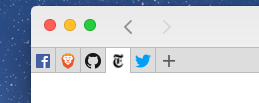
Tested against master using STR from original description. Pinned tabs did not retain order. This is the order I pinned them in:
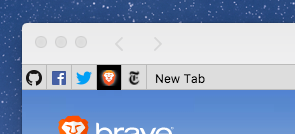
I then closed and reopened Brave. This is the order they displayed in (this was also the order in which they were opened prior to pinning):
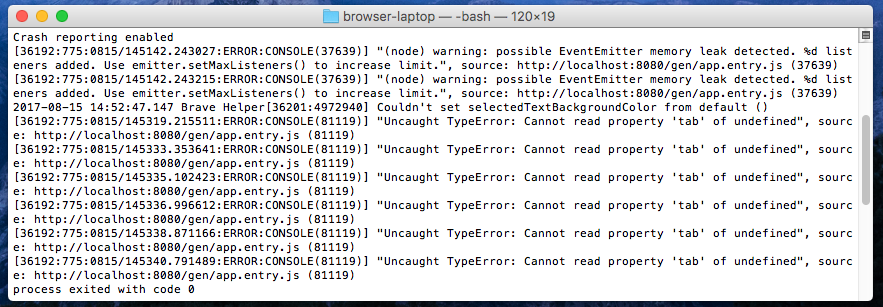
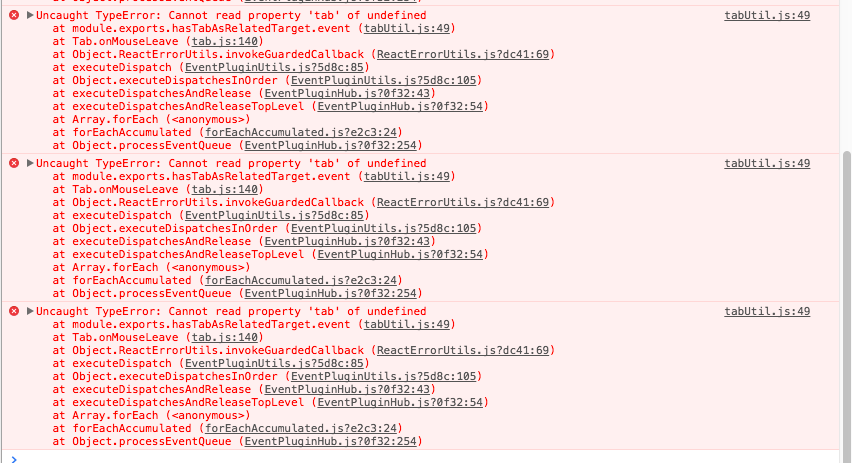
Additionally, this was displayed in my terminal while pinning the tabs:
 LaurenWags
on 15 Aug 2017
LaurenWags
on 15 Aug 2017
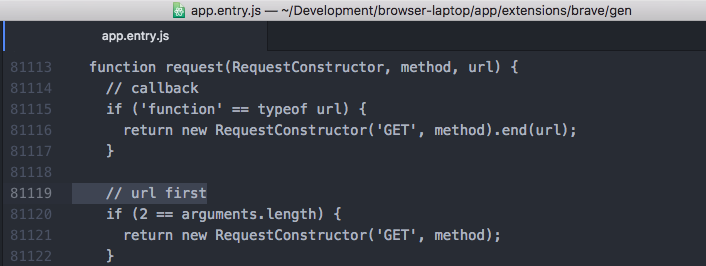
@LaurenWags can you please paste what is on that line (81119)? Thank you
 NejcZdovc
on 15 Aug 2017
NejcZdovc
on 15 Aug 2017
@NejcZdovc
LaurenWags
on 15 Aug 2017
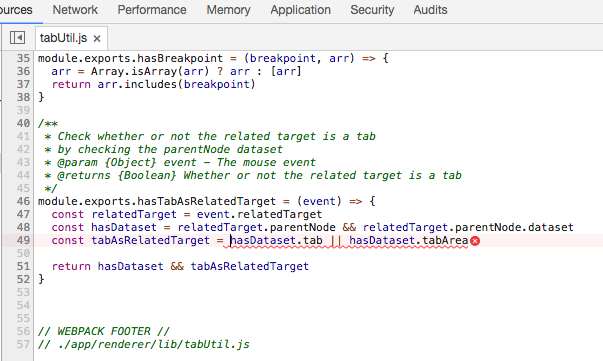
@LaurenWags this doesn't look right. Can you please open dev tools and click on the error there You should be redirected to the source and please print screen that line
NejcZdovc
on 15 Aug 2017
Is this more what you're looking for?
LaurenWags
on 16 Aug 2017
Yes this is what I was looking for. This will help
NejcZdovc
on 16 Aug 2017
Order of pinned tabs changes when a new window is launched. No console errors seen as mentioned by @LaurenWags . This is on the latest 0.18.23 upgrade.

srirambv
on 20 Aug 2017
@LaurenWags your error should be fixed with #10591
NejcZdovc
on 20 Aug 2017
The order of tabs, whether pinned or not, seems to change arbitrarily. That is, it is very hard to order tabs, especially the pinned ones, because the tab jumps to a seemingly random location as soon as I drop the tab in the preferred location. The pinned tabs are in a different order for each window I open. Furthermore, normal tabs also reorder as soon as I switch tabs, assuming I've manually rearranged them (not sure whether they switch back to their original order).
Using 0.18.36 on Windows 10. Having the pinned tabs (a feature I only discovered recently) makes the reordering much less annoying, because the 'normal' tabs will never interfere with pinned tabs. Actually, pinned tabs might be the feature I love the most about brave.
 hugobuddel
on 18 Sep 2017
hugobuddel
on 18 Sep 2017
+1 from https://community.brave.com/t/tabs-freeze-all-the-time/11568 on 0.19.105
srirambv
on 5 Dec 2017
bsclifton
on 23 Feb 2018
Verified on Windows x64
- 0.22.6 e6ff4ea
- libchromiumcontent: 65.0.3325.162
- muon: 5.1.0
Verified on macOS 10.12.6 x64 using the following build:
- 0.22.6 https://github.com/brave/browser-laptop/commit/e6ff4ea43ed740d1449a4c72005e22ce5235447e
- libchromiumcontent: 65.0.3325.162
- muon: 5.1.0
Verified on Ubuntu 10.10 x64
- 0.22.7 8bb7e77f
- libchromiumcontent: 65.0.3325.181
- muon: 5.1.1
srirambv
on 22 Mar 2018
I have downloaded latest version of Brave (as a possible new user) 0.22.13 on Win10 64bit and I can't order my tabs, neither the pinned ones neither normal ones. Also if I pin it doesn't put it to the most right side, but assigns the tab some random position.
 tadeasbucha
on 10 Apr 2018
tadeasbucha
on 10 Apr 2018
Related issues
 jkup
·
3Comments
jkup
·
3Comments
 shortstuffsushi
·
3Comments
luixxiul
·
3Comments
lukemulks
·
3Comments
bsclifton
·
3Comments
shortstuffsushi
·
3Comments
luixxiul
·
3Comments
lukemulks
·
3Comments
bsclifton
·
3Comments
Most helpful comment
Hi all-
I just merged a great fix by @romamatusevich; this fix will be in our next release, 0.15.2 😄