Brave-ios: GitHub security key registration option is hidden if no keys are registered previously
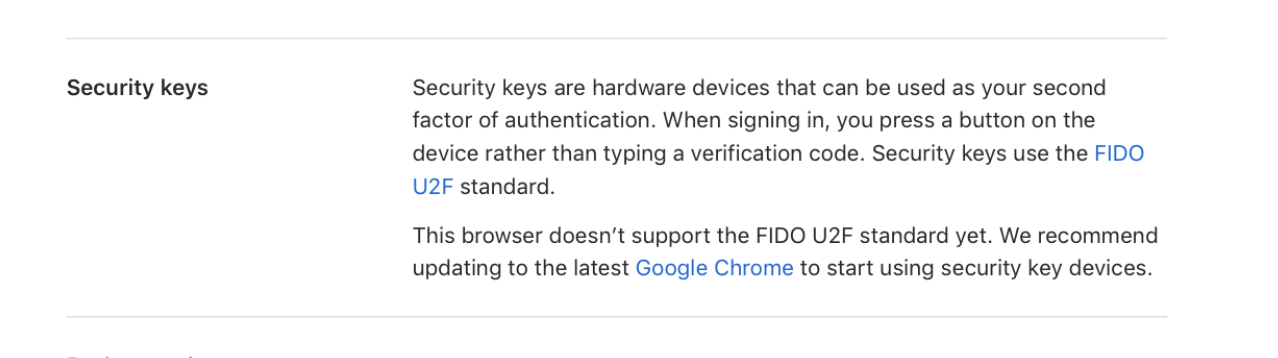
GitHub shows an error while registering a security-key for the first time
Security keys are hardware devices that can be used as your second factor of authentication. When signing in, you press a button on the device rather than typing a verification code. Security keys use the FIDO U2F standard.
This browser doesn’t support the FIDO U2F standard yet. We recommend updating to the latest Google Chrome to start using security key devices.
STR
- Navigate to github.com/
- Login and navigate to Settings > Security
- Click on Security Keys
- If
Security Keyis not present the option toRegister New Deviceis not available.
 jumde
jumde
All 6 comments
Reproduced using iPhone 6s+ iOS 12.4 using 1.11.1 (19.08.13.17)
CCing @LaurenWags ☝️Just a heads up if you're going to be trying GH for the 1.11.1 release.
 kjozwiak
on 13 Aug 2019
kjozwiak
on 13 Aug 2019
We just switched to https://github.com/github/webauthn-json/ , which should is less strict about about WebAuthn feature detection. However, WebAuthn registration still seems to be failing and I haven't been able to debug why (since I don't know a way to access the JS console in iOS Brave).
 lgarron
on 20 Aug 2019
lgarron
on 20 Aug 2019
I have a debug build, investigating what's going on. Thanks for your help for fixing the authentication workflow.
jumde
on 20 Aug 2019
I have a debug build, investigating what's going on. Thanks for your help for fixing the authentication workflow.
Any luck on this yet/anything we could do to help?
lgarron
on 21 Aug 2019
Conclusion from debugging: we were checking that navigator.credentials instanceof CredentialsContainer mainly to get around Flow's typing. Now that https://github.com/github/webauthn-json handles the interaction with navigator.credentials for us, we can (and will) remove this code. There's no general need for Brave to implement a hack for CredentialsContainer, since there are many such possible ones and this was a quirk specific to GitHub's setup.
lgarron
on 21 Aug 2019
Verified fixed, registration and authentication works with GitHub.
jumde
on 22 Aug 2019
Related issues
kjozwiak
·
5Comments
 LaurenWags
·
8Comments
LaurenWags
·
8Comments
 iccub
·
4Comments
iccub
·
4Comments
 srirambv
·
9Comments
srirambv
·
3Comments
srirambv
·
9Comments
srirambv
·
3Comments