Brave-ios: Block All Cookies Settings Option
Description:
Block all cookies doesn't block like it should
Steps to Reproduce
- Set
Block all cookiesfrom settings - Visit https://jsfiddle.net in a new tab
- Page loads correctly even with block cookies set
Actual result:
Page laods when block all cookies is set
Expected result:
Page should not load when Block all cookies is set
Reproduces how often: [Easily reproduced, Intermittent Issue]
Easy
Brave Version:
1.7 (18.11.28.22)
Device details:
All
Website problems only:
- did you check with Brave Shields down?
- did you check in Safari/Firefox (WkWebView-based browsers)?
Additional Information
This is regressed on 1.6.6 as well. On b-c and Android when Block all cookies is set the page doesn't load which is the expected behaviour
 srirambv
All 9 comments
WKWebView does not use shared cookie policy rather we have to add observer for its internal cookie store and remove cookies depending on policy set.
 danishjafri88
on 29 Nov 2018
danishjafri88
on 29 Nov 2018
iOS cookie control on 1.7 currently does not work. It uses WKWebView / Safari’s default which is to block all 3rd party cookies. However the API we use to block 1st party cookies does not work in 1.7.
I found a couple of related radars:
https://bugs.webkit.org/show_bug.cgi?id=140191
https://bugs.webkit.org/show_bug.cgi?id=140205
Also, FF and Chrome do _not_ allow users to configure this (no public API). However, there are two potential work arounds:
- Put a lock on the iOS Cookies folder
- Override
document.cookieby injecting a script into each web page some thing like:
```
var cookieDesc = Object.getOwnPropertyDescriptor(Document.prototype, 'cookie') ||
Object.getOwnPropertyDescriptor(HTMLDocument.prototype, 'cookie');
if (cookieDesc && cookieDesc.configurable) {
Object.defineProperty(document, 'cookie', {
get: function () {
return nil;
},
set: function (val) {
cookieDesc.set.call(document, "");
}
});
}
danishjafri88
on 29 Nov 2018
Currently all third party cookies are disabled, and settings to control this have been disabled.
 jhreis
on 5 Dec 2018
jhreis
on 5 Dec 2018
While experimenting with Cookie control, this is what I have figured out:
-> Persistent data(cookies, cache etc) can be locked by locking their respective folders as shown below
-> In memory data is not reachable. This is basically where WKProcessPool comes into picture.
Though we can change the processPool but any document call will have data from the source pool. Hence cookies received from document response cannot be stopped from being sent in other requests.
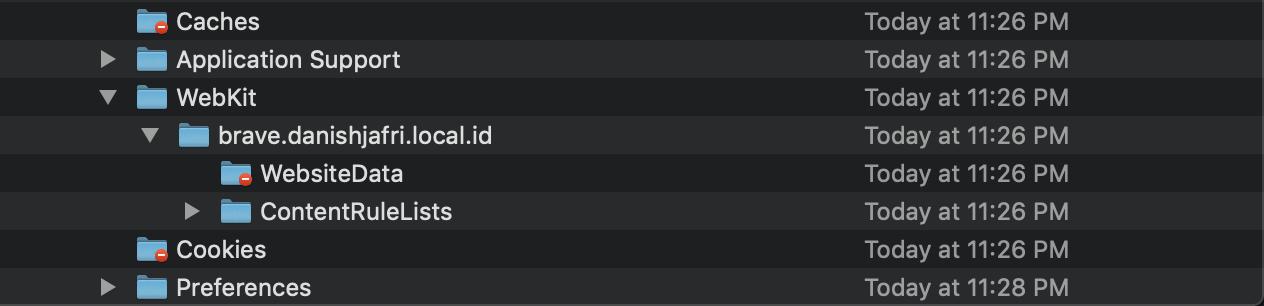
->The only way where it has been possible is by overriding the js cookie property.
To be noted that the current WKWebView implementation has cookie policy as always with something new called ITP 2.0 (Intelligent Tracking Prevention) which basically blocks third party cookies ONLY if its from a cross-site context. (ie it will not block all third party cookies)
danishjafri88
on 13 Dec 2018
What is the difference between a third-party cookie and a third-party cookie from a cross-site context?
 tomlowenthal
on 13 Dec 2018
tomlowenthal
on 13 Dec 2018
Not all third party cookie may be used for tracking, rather they might be used in embedded content for services user is already signed up with their first party cookie. These should not be blocked. WebKit ITP 2.0 Uses ML to classify cookies and trackers based on contexts.
More details here:
ITP
ITP 2.0
Storage Access API
danishjafri88
on 14 Dec 2018
After some discussion we have decided to do both approaches listed above:
- Put a lock on the iOS Cookies folder
- Override document.cookie by injecting a script into each web page
This allows us to catch cookies immediate and if for some reason the JS method breaks, the directory lock will prevent any cookies from being written to disk (although potentially still persistent in memory).
jhreis
on 18 Dec 2018
Is there a separate issue open for blocking third-party cookies specifically?
tomlowenthal
on 19 Dec 2018
@tomlowenthal created an issue for third party cookies: #662
danishjafri88
on 20 Dec 2018
Related issues
 kylehickinson
·
6Comments
kylehickinson
·
6Comments
 kjozwiak
·
4Comments
jhreis
·
5Comments
kjozwiak
·
4Comments
jhreis
·
5Comments
 tmancey
·
4Comments
tmancey
·
4Comments
 ryanbr
·
5Comments
ryanbr
·
5Comments