Brave-browser: How can I disable HTTPS Everywhere?
Description
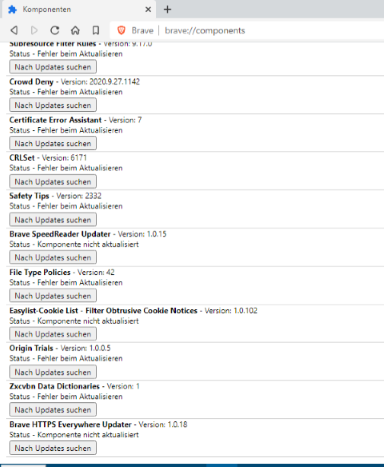
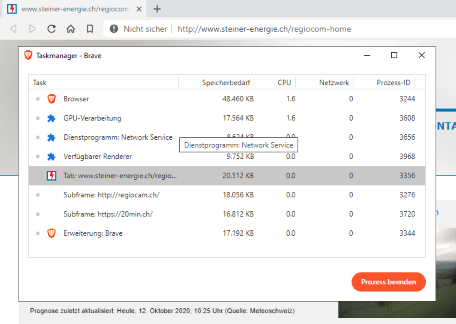
If you deactivate HTTPS EveryWhere in the settings, HTPPS Everywhere still appears under the components and in the task manager.
Steps to Reproduce
- disable HTTPS Everywhre in the settings
3.
Actual result:
HTPPS Everywhere still appears under the components and in the task manager.
Expected result:
HTPPS Everywhere should not appear under the components and in the task manager.
Reproduces how often:
always
Brave version (brave://version info)
Brave 1.15.72 Chromium: 86.0.4240.75 (Offizieller Build) (32-Bit)
Überarbeitung c69c33933bfc72a159aceb4aeca939eb0087416c-refs/branch-heads/4240@{#1149}
Betriebssystem Windows 10 OS Version 1909 (Build 18363.592)
 Johann999
All 7 comments
Unless I'm misunderstanding something here, if you turn HTTPS everywhere off in settings then it's OFF. Just make sure this setting is toggled off and you should be good.

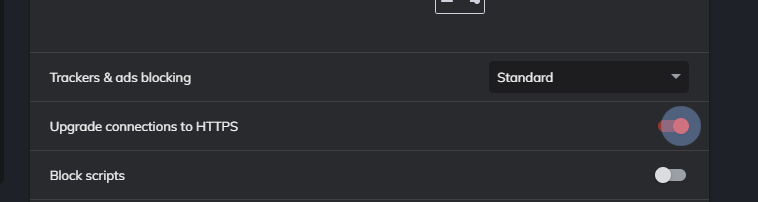
The component part has nothing to do with if its on or off. Brave shields tells you that like so:

As long as its off in settings and Brave's shields tells you its off then its off. Components are a completely separate entity.
I'm not sure what you mean by HTTPS everywhere appears...
in the task manager.
as I can't read that language and I don't think it displays in the Brave Task Manager regardless.
Cheers.
 ACodingGenie
on 12 Oct 2020
ACodingGenie
on 12 Oct 2020
You misunderstood something.
I don't want to change the shield settings
I want to remove HTTPS Everywhere from Brave.
Johann999
on 14 Oct 2020
For me personally, the HTTPS Everywhere extension is of no use.
A few years ago this extension (maybe) made sense.
Nowadays I find HTTPS Everywhere redundant.
Johann999
on 14 Oct 2020
I want to remove HTTPS Everywhere from Brave.
I see. I am not sure if this is possible without compiling your own modified source code of Brave without HTTPS everywhere.
For me personally, the HTTPS Everywhere extension is of no use.
I find HTTPS Everywhere redundant.
But, going back to the point I made earlier, if you just want it off (which is essentially what it seems like), then turning it off globally from Brave's settings does just that.
Perhaps a developer can chime in and shed more light on this issue.
ACodingGenie
on 14 Oct 2020
Hey, what is the name of the process of HTTPS Everywhere extension in the task manager, cause i don't see it? If you are referring to Utility: Network Service, that is a task added by google chrome, it is not HTTPS Everywhere extension
 dodieboy
on 16 Oct 2020
dodieboy
on 16 Oct 2020
The HTTPS Everywhere extension is the task 'Erweiterung Brave'.
Johann999
on 17 Oct 2020
Hey, what is the name of the process of HTTPS Everywhere extension in the task manager, cause i don't see it? If you are referring to Utility: Network Service, that is a task added by google chrome, it is not HTTPS Everywhere extension
I don't think it'll show HTTPS Everywhere as a process - there isn't a way to remove it. The next best thing would be to disable it via brave://settings/shields with the setting Upgrade connections to HTTPS
Network service is what Chromium uses for sending all connections - you're not going to want to kill that (nothing will work!)
 bsclifton
on 19 Oct 2020
bsclifton
on 19 Oct 2020
Related issues
 bbondy
·
3Comments
bbondy
·
3Comments
 hollons
·
3Comments
hollons
·
3Comments
 AlexeyBarabash
·
3Comments
AlexeyBarabash
·
3Comments
 GeetaSarvadnya
·
3Comments
GeetaSarvadnya
·
3Comments
 AlexCombas
·
3Comments
AlexCombas
·
3Comments
Most helpful comment
Unless I'm misunderstanding something here, if you turn HTTPS everywhere off in settings then it's OFF. Just make sure this setting is toggled off and you should be good.

The component part has nothing to do with if its on or off. Brave shields tells you that like so:

As long as its off in settings and Brave's shields tells you its off then its off. Components are a completely separate entity.
I'm not sure what you mean by HTTPS everywhere appears...
as I can't read that language and I don't think it displays in the Brave Task Manager regardless.
Cheers.