Brave-browser: Native IPFS support in Brave
Overview
Before the work described in this issue, Brave supports IPFS through the installation of the IPFS Companion extension. A user can install this extension from the Chrome Web Store, or by toggling a switch in chrome://settings in the Extensions section.
Once IPFS Companion is installed, the user can go to IPFS Companion’s settings and make it use “External + chrome.sockets (experimental)”. This avoids the user needing to manually install a local daemon, and uses js-ipfs instead; however, js-ipfs is behind go-ipfs on several fronts. It would be ideal to use go-ipfs instead of js-ipfs.
Our objective is to seamlessly connect Brave users to the IPFS network, including allowing Brave users to easily use dApps that run on IPFS. This spec describes the handling and installation of the go-ipfs daemon via use of the Brave component update server. The functionality will feel built-in and not require the user to separately install a daemon for full IPFS support out of the box.
Targeted Platforms
Desktop (Windows, macOS, Linux)
Description
The work can be broken down into the following sections:
- Native protocol support
- IPFS onboarding experience
- Installing and updating go-ipfs daemon component
- IPFS keyed service and proxy configuration
- Processes
- Non top level navigations
- Settings
- Diagnostic page - brave://ipfs-internals
- HTTP gateway fallback
- Interstitial page when there are no peers
- Admin policy
- The role of IPFS Companion and new chrome.ipfs API
- Landing and shipping code behind a flag
- Privacy-Preserving Product Analytics (P3A) (for those that have P3A on)
- Guest windows, Tor windows, and incognito windows
Native protocol support
The following 2 protocols will be handled by Brave automatically:
ipfs:// and ipns://
When the user navigates to a URL such as:
ipfs://bafybeiemxf5abjwjbikoz4mc3a3dla6ual3jsgpdr4cjr3oz3evfyavhwq/wiki/Vincent_van_Gogh.html
If IPFS is not yet configured, the user will have the IPFS page loaded through the gateway https://dweb.link. The IPFS onboarding experience mentioned below will ask the user if they’d like to install the full node and serve it through a local gateway instead. The ipfs:// and ipns:// URLs in the URL bar will not be preserved unless a local node is used.
If the IPFS full node is installed, the content will be loaded through that node.
Other URL types which would activate this same UI are described here:
https://github.com/ipfs/in-web-browsers/blob/master/ADDRESSING.md
When a user requests via a base58 encoding:
ipfs://QmbWqxBEKC3P8tqsKc98xmWNzrzDtRLMiMPL8wBuTGsMnR
It gets redirected to gateway path:
https://dweb.link/ipfs/QmbWqxBEKC3P8tqsKc98xmWNzrzDtRLMiMPL8wBuTGsMnR
And the gateway does the DNS-safe conversion and redirects to base32:
https://bafybeigdyrzt5sfp7udm7hu76uh7y26nf3efuylqabf3oclgtqy55fbzdi.ipfs.dweb.link/
The base32 conversion can be done directly as an optimization.
IPFS onboarding experience
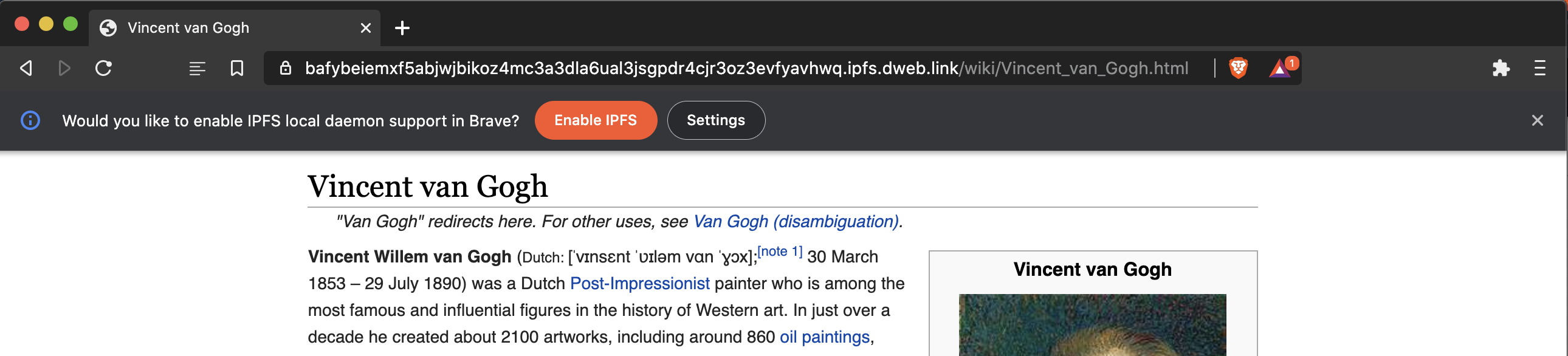
An infobar will be displayed when the user navigates to a gateway URL with URL pattern */ipfs/* or */ipns/*:
|
If the user selects to “Enable IPFS” the go-ipfs component will be installed and the daemon will be used for all future requests. After installation, the infobar goes away and future URL loads will load through the local node.
If the user selects “Settings”, they will be redirected to chrome://settings and they will see the advanced settings available such as using a gateway.
Installing and updating go-ipfs daemon component
The go-ipfs daemon binary will be packaged into a crx file and installable via the component updater. There will be a different package per platform (Windows, macOS, and Linux x64) each with a different component extension ID.
Updates will occur as part of the normal component update flow in Brave described here: https://github.com/brave/brave-browser/wiki/Component-Extensions
When a new go-ipfs version is released, it doesn’t need to always be updated in Brave. We’ll start with having a process of Protocol Labs asking Brave to update. When Brave receives a request to update, we’ll run a Jenkins job which packages, signs, and publishes a new component. The binary will be pulled from Protocol Labs at https://dist.ipfs.io/go-ipfs.
ipfs.bravesoftware.com should be used so that if an antivirus wants to block IPFS, then it can do so without blocking Brave completely.
Code for brave-core-crx-packager can be found here: https://github.com/brave/brave-core-crx-packager/search?q=ipfs
IPFS keyed service and proxy configuration
A new Chromium keyed service and related code will be added inside of brave/components/ipfs/ to manage the go-ipfs daemon.
A SOCKS5 proxy is not needed, we instead map URL traffic to http://{cid}.ipfs.localhost:<port>
Default ports are changed as to not conflict with a previously installed go-ipfs node on a user's machine.
Processes
There are 3 processes that come into play:
- Browser process
- Utility: IPFS Service process (visible from Chromium task manager)
- go-ipfs process (visible outside of Chromium)
All of the Brave code that is added is browser process level code.
Brave will also start the utility process which is sandboxed and who's sole purpose is to manage the go-ipfs process.
Both the Utility process and go-ipfs process will only be started when IPFS is being used. It will be lazily started.
Similar to how Tor is handled, there is handling for if go-ipfs crashes.
Non top level navigations
Subresources are allowed to use the ipfs:// and ipns:// schemes, and the handling can be found here.
Settings
In addition to the toggle that already exists in brave://settings, we will have:
- A drop down which allows the user to select between Ask, Gateway,Local node, Disabled
- A setting which will allow the user to select which gateway to use (Not implemented yet)
- A setting which will allow the user to turn on automatic redirection of IPFS gateway resources to use the local node instead. (Not implemented yet)
- A setting which allows the user to fallback to the public gateway when a local node cannot be accessed.
Diagnostic page - brave://ipfs-internals
To help troubleshoot IPFS in Brave, and to see daemon status, a new Chromium WebUI page is added.
This page will show if the IPFS daemon is started, and allow a user to start / stop the IPFS daemon.
It will also show the API, gateway, and swarm addresses.
A user will be able to get at standard output from the go-ipfs daemon inside this page. (Not implemented yet)
The user will have the ability to pass environment variables the user specifies, so that things like log verbosity can be changed. (Not implemented yet)
This page will also get API info from the local API endpoint:
https://docs-beta.ipfs.io/reference/http/api/
In particular for example, the number of peers:
https://docs-beta.ipfs.io/reference/http/api/#api-v0-swarm-peers
HTTP gateway fallback
If the user chooses in chrome://settings to use a gateway instead of a local go-ipfs node, then all requests to ipfs:// and similar will be redirected to the configured IPFS gateway.
Interstitial page when there are no peers
If there are no peers but an IPFS or IPNS URL is accessed, an interstitial page (such as bad SSL certificate) will be displayed telling the user that the node doesn’t seem to be started or there are no connected peers. An option will be given on the page to use the default gateway fallback and to continue to do so automatically in the future when there are no peers.

Admin policy
A top level IPFS enabled setting will be added and tied to an admin policy to completely disable all IPFS detection and functionality.
Browser tests will be added to browser/policy/brave_policy_browsertest.cc
The role of IPFS Companion and new chrome.ipfs API
IPFS Companion will be compatible but not required to be installed. We’ll leave it to Protocol Labs to optionally enhance IPFS Companion but we’ll assist via adding APIs that would be helpful.
Installing IPFS Companion will be a separate action and will not be bundled with the installation of the go-ipfs binary. Users will continue to get updates from the Chrome Web Store and can continue to install IPFS Companion from chrome://settings.
The following new API have been exposed to IPFS Companion only:
// Checks if a feature flag is enabled
chrome.ipfs.getIPFSEnabled((enabled: boolean) => {})

// Obtains a string representation of the resolve method
// method is one of the following strings:
// "ask" uses a gateway but also prompts them to install a local node
// "gateway" uses a gateway but also prompts them to install a local node
// "local" uses a gateway but also prompts them to install a local node
// "disabled" uses a gateway but also prompts them to install a local node
// Throws an error if IPFS feature flag is not enabled
chrome.ipfs.getResolveMethodType((method: string) => {})

// Launches a daemon
// Throws an error if IPFS feature flag is not enabled
// Throws an error if a local node is not installed
chrome.ipfs.launch((success: boolean) => {})

// Shutsdown a daemon
// Throws an error if IPFS feature flag is not enabled
// Throws an error if a local node is not installed
chrome.ipfs.shutdown((success: boolean) => {})

// Obtains the config contents of the local IPFS node
// Throws an error if IPFS feature flag is not enabled
// Throws an error if a local node is not installed
chrome.ipfs.getConfig((success: boolean, config: string) => {})

// Checks if the local node is installed
chrome.ipfs.getExecutableAvailable((available: boolean) => {})
Landing and shipping code behind a flag
In order to land code and not wait for the entire feature to be implemented, we’ll start by adding a flag in chrome://flags which will allow you to toggle on the experimental IPFS support.
Privacy-Preserving Product Analytics (P3A)
Pending review approval by the privacy team:
- IPFS companion installed? i) No, ii) Yes
- How many lifetime times are IPFS detection prompts shown without installing? i) 0 times, ii) 1, iii) 2-5 times, iv) 5+ times or more?
- IPFS Gateway setting - Ask (0), Gateway (1), Local Node (2), Disabled (3)
- How long did the IPFS daemon run? i) 0-5min, i) 5-60min, ii) 1h-24h, iii) 24h+?
Guest windows, Tor windows, and incognito windows
To avoid leaking IPs and other potential privacy issues, we've disable this feature in these contexts.
QA Plan
Admin policy
- Make sure admin policy disables all IPFS detection on a new profile
- Make sure if a user is using and installs the binary, and then uses the admin policy, the go-ipfs binary is no longer used and all functionality acts as if it was disabled on a new profile.
Settings
- Make sure each setting functions immediately as changes are made.
Component install UI - Make sure navigating to an ipfs:// URL prompts for installing
- Make sure navigating to an ipns:// URL prompts for installing
- Make sure navigating to an https:// URL with /ipfs/[CID] prompts for installing
- Make sure navigating to an https:// URL with /ipns/[CID] prompts for installing
- Make sure navigating to an http:// URL with /ipfs/[CID] prompts for installing
- Make sure navigating to an http:// URL with /ipns/[CID] prompts for installing
- Make sure navigating to a top level page that contains any of the above in mixed content prompts for installing
- Make sure Guest windows, Tor windows, and incognito windows do not resolve IPFS.
Generic functionality
- Make sure loading an ipfs:// URL works correctly after IPFS is installed
- Make sure session restore works correctly with a tab left open with ipfs://
More detailed QA plan to be posted as things are developed.
 bbondy
All 9 comments
What's the current status of this implementation? Can we expect native IPFS support and/or verification of IPFS hashes that appear in trusted gateways URLs any time soon?
On a sidenote, it would be great to pair this with native ENS domains support, in such a way that after searching for "website.eth" resolving to an IPFS hash, the address bar would keep displaying "website.eth" instead of the unreadable IPFS has.
 experiencedft
on 31 Oct 2020
experiencedft
on 31 Oct 2020
Most of this is implemented, you can test it out by enabling it here brave://flags/#brave-ipfs
We're tracking ENS support separately.
bbondy
on 2 Nov 2020
Thank you @bbondy I shall try this myself soon. Is this a full IPFS integration, just trusted gateway IPFS hash verification or both?
Also, could you point me to the issue where ENS support is discussed?
Thanks.
experiencedft
on 2 Nov 2020
@experiencedft you can set it to use a public gateway behind the scenes or a local gateway. In either case the CID will be verified against the content hash before the content is served.
The ENS issue is tracked here:
https://github.com/brave/brave-browser/issues/11708
bbondy
on 4 Nov 2020
By local gateway, it is meant that IPFS must be installed separately right? My understanding of fully native IPFS integration on Brave would be that the browser itself would integrate an IPFS node. Is that the case?
Sorry about all the questions I'm just very excited about the potential of a decentralized and transparent transfer protocol and looking forward to it being seemless for non tech users.
experiencedft
on 5 Nov 2020
@experiencedft, please, read the very first message of this thread:
When the user navigates to a URL such as:
ipfs://bafybeiemxf5abjwjbikoz4mc3a3dla6ual3jsgpdr4cjr3oz3evfyavhwq/wiki/Vincent_van_Gogh.htmlIf IPFS is not yet configured, the user will have the IPFS page loaded through the gateway https://dweb.link. The IPFS onboarding experience mentioned below will ask the user if they’d like to install the full node and serve it through a local gateway instead. The ipfs:// and ipns:// URLs in the URL bar will not be preserved unless a local node is used.
If the IPFS full node is installed, the content will be loaded through that node.
And also look at __IPFS onboarding experience__ section of the first message in this thread, it has a screenshot. IPFS daemon will be installed and launched by Brave, no need to install it yourself.
 ilyaigpetrov
on 5 Nov 2020
ilyaigpetrov
on 5 Nov 2020
Thank you @ilyaigpetrov. I understand that this is indeed a goal in the context of this issue as per the first message of this thread -- my inquiry was about the current state of the implementation seeing as bbondy said "most of it" was implemented without explaining precisely the extent, which obviously I understand considering the team has a lot on their plates. Sorry if this is obvious to others.
The best way to go would probably be to test it myself from that point and wait for further releases. Thanks everyone for the replies!
experiencedft
on 5 Nov 2020
No manual installs needed, but if you pick to use a local node it will silently setup a for Brave use only go-ipfs node, it's quite easy to use. Just enable it on brave://flags/#brave-ipfs and then visit an IPFS resource like:
ipfs://bafybeiemxf5abjwjbikoz4mc3a3dla6ual3jsgpdr4cjr3oz3evfyavhwq/wiki/Vincent_van_Gogh.html
More communication to come about it once it gets enabled by default on Nightly, and probably a blog post once it is on Release channel.
bbondy
on 5 Nov 2020
Please, fix https://github.com/brave/brave-browser/issues/12015 before shipping native IPFS with the Release channel.
Thanks.
ilyaigpetrov
on 6 Nov 2020
Related issues
 jonathansampson
·
3Comments
jonathansampson
·
3Comments
 AlexeyBarabash
·
3Comments
AlexeyBarabash
·
3Comments
 moritzhaller
·
3Comments
moritzhaller
·
3Comments
 kjozwiak
·
3Comments
kjozwiak
·
3Comments
 pitsi
·
3Comments
pitsi
·
3Comments
Most helpful comment
What's the current status of this implementation? Can we expect native IPFS support and/or verification of IPFS hashes that appear in trusted gateways URLs any time soon?
On a sidenote, it would be great to pair this with native ENS domains support, in such a way that after searching for "website.eth" resolving to an IPFS hash, the address bar would keep displaying "website.eth" instead of the unreadable IPFS has.