Brave-browser: Brave and Jitsi Meet
With the Desktop Release Channel v1.5.123 on macOS I have found an issue using Jitsi Meet. I have to use a platform, WeSchool, for video lessons which uses Jitsi Meet.
Now, when Jitsi Meet is loaded in a tab of the browser, the first time it asks for permission to use the videocamera and the microphone, I give the permission and both the microphone and the videocamera are enabled.. but not working... The camera is on (its light is on) but no images and when I speak to the microphone, it is really mute. I should see an icon with my image and when I speak I should see some blue dots to blink. I see only a black icon and no dots when I speak.
I want to stress that both camera and microphone result enabeld!.
I tested this with Brave just installed and without any personal settings or extensions. The same with Chromium works as expected.
 angelog0
All 12 comments
Hello
This is likely due to the autoplay setting which is blocked by default.
In the address bar of the jitsi meet tab, you probably see this icon:

Click on it and allow autoplay.
That should resolve your issue 🙂
 Maxime-J
on 10 Apr 2020
Maxime-J
on 10 Apr 2020
Hi, I've the same issue: this is very common problem that people are encountering in these days.
SOLUTION PROPOSAL
I believe UI/UX should be improved opening automatically the autoplay popup in a similar way is done with mic and camera.
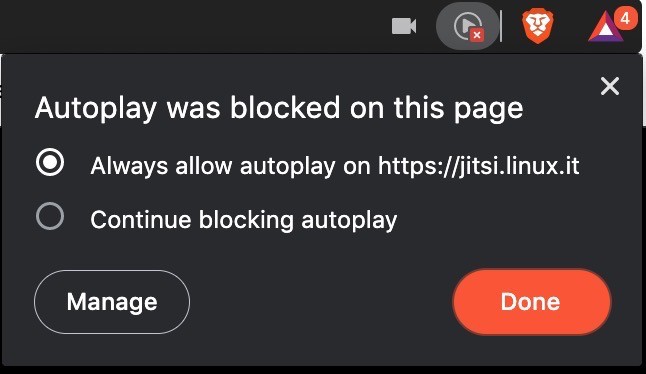
 rebelcode-xr
on 12 Apr 2020
rebelcode-xr
on 12 Apr 2020
cc @rebron
 NejcZdovc
on 12 Apr 2020
NejcZdovc
on 12 Apr 2020
I believe UI/UX should be improved opening automatically the autoplay popup in a similar way is done with mic and camera.
Actually there already is that kind of popup when the general autoplay setting is set to ask (chrome://settings/content/autoplay)
But it's blocked by default, with some exceptions:
https://github.com/brave/autoplay-whitelist/blob/master/data/autoplay.json
Problem, Jitsi solution can be hosted on multiple domains
And IMO, this whole autoplay whitelist system isn't a clean way, users can't see that and apparently can't override it.
Maxime-J
on 12 Apr 2020
Why not just "show the popup"? So the user notices and allows it.
 360fun
on 13 Apr 2020
360fun
on 13 Apr 2020
many ("not techy") people are having problems using Jitsi due to this issue: please fix it asap, we need it now. 🙏
rebelcode-xr
on 15 Apr 2020
I do not understand the logic behind this choice of Brave developers. Jitsi Meet asks me, the first time, the consent to use microphone and fotocamera. I give it the OK and microphone and fotocamera are blocked in any case...
angelog0
on 15 Apr 2020
@angelog0 it's definitely not intentional. Autoplay blocking is intended to help prevent unwanted items from playing without consent and consuming bandwidth. Weird that it would require autoplay in order to work? Maybe the video preview itself is trying to render but gets blocked
We do have some autoplay changes coming - maybe @rebron or @pes10k can comment about those 😄
 bsclifton
on 15 Apr 2020
bsclifton
on 15 Apr 2020
Hi @angelog0, we originally shipped restrictions on what sites could autoplay, because we saw a lot of abuse of autoplay online, mostly by advertisements our users didn't want. This was added ~> 2 years ago.
Since then though, Chrome/chromium has gotten better in its handling of autoplay, and now does a better job of managing what can play without user interaction. As a result, we've removed our custom autoplay changes, and starting in 1.8, will just rely on the Chromium behavior. That change is currently in nightly and being tested, but once 1.8 rolls out, it'll be the default on all platforms.
 pes10k
on 15 Apr 2020
pes10k
on 15 Apr 2020
Alternative proposal:
Automatically allow autoplay if microphone or webcam permission is being given.
But using the autoplay handling of the current Chromium also seems good (because in Chromium Jitsi currently works without problems).
But whatever solution you (Brave developers) choose: Please fix it soon!
A lot of people are currently starting to use video conferencing. And it would be great it they'd be using free software like Jitsi & Brave.
 kolAflash
on 28 Apr 2020
kolAflash
on 28 Apr 2020
Fixed for me with :-)
https://github.com/brave/brave-browser/releases/tag/v1.8.86
Thanks!
Tested with Brave-1.8.86 on openSUSE-LEAP-15.1 Linux with a fresh browser profile.
kolAflash
on 2 May 2020
@angelog0 Working for you now as well with 1.9.72, our latest?
I'm going to go ahead and close per comment above. Please reopen if still an issue.
 rebron
on 22 May 2020
rebron
on 22 May 2020
Related issues
 AlexeyBarabash
·
3Comments
AlexeyBarabash
·
3Comments
 simonhong
·
3Comments
bsclifton
·
3Comments
simonhong
·
3Comments
bsclifton
·
3Comments
 GeetaSarvadnya
·
3Comments
GeetaSarvadnya
·
3Comments
 moritzhaller
·
3Comments
moritzhaller
·
3Comments
Most helpful comment
Hi @angelog0, we originally shipped restrictions on what sites could autoplay, because we saw a lot of abuse of autoplay online, mostly by advertisements our users didn't want. This was added ~> 2 years ago.
Since then though, Chrome/chromium has gotten better in its handling of autoplay, and now does a better job of managing what can play without user interaction. As a result, we've removed our custom autoplay changes, and starting in 1.8, will just rely on the Chromium behavior. That change is currently in nightly and being tested, but once 1.8 rolls out, it'll be the default on all platforms.