Brave-browser: Youtube video does not play
Description
When I try to play a youtube video it shows an error and didn't play. If I disable Shields it play (with ads)
Steps to Reproduce
- Enter youtube site https://www.youtube.com/ (I am logged in with my google account)
- Choose any video like https://www.youtube.com/watch?v=7TcCIcE1hr8
- Click play
Actual result:
"An error occurred, please try again later. (Playback ID:....)"
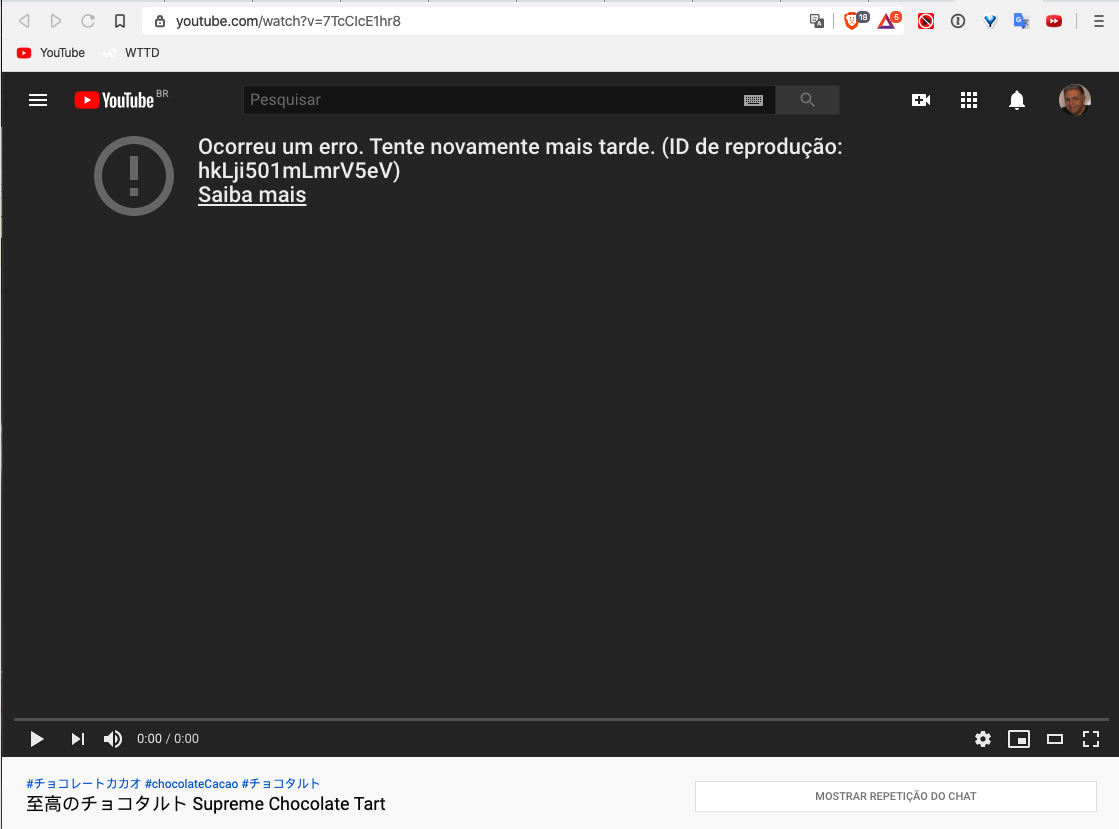
Expected result:
Video played normally
Reproduces how often:
Easily reproduced
Brave version (brave://version info)
Brave 1.5.115 Chromium: 80.0.3987.149 (Official Build) (64-bit)
Revision 5f4eb224680e5d7dca88504586e9fd951840cac6-refs/branch-heads/3987_137@{#16}
OS macOS Version 10.15.3 (Build 19D76)
JavaScript V8 8.0.426.27
Flash (Disabled)
User Agent Mozilla/5.0 (Macintosh; Intel Mac OS X 10_15_3) AppleWebKit/537.36 (KHTML, like Gecko) Chrome/80.0.3987.149 Safari/537.36
Command Line /Applications/Brave Browser.app/Contents/MacOS/Brave Browser --enable-dom-distiller --disable-domain-reliability --no-pings --extension-content-verification=enforce_strict --extensions-install-verification=enforce --sync-url=https://no-thanks.invalid --enable-features=PasswordImport,WebUIDarkMode,SimplifyHttpsIndicator --disable-features=AutofillServerCommunication,LookalikeUrlNavigationSuggestionsUI,NotificationTriggers,AllowPopupsDuringPageUnload,AudioServiceOutOfProcess,SmsReceiver,WebXR,VideoPlaybackQuality,WebXrGamepadModule --flag-switches-begin --flag-switches-end --enable-audio-service-sandbox --disable-webrtc-apm-in-audio-service --disable-sync
Executable Path /Applications/Brave Browser.app/Contents/MacOS/Brave Browser
Profile Path /Users/debiasi/Library/Application Support/BraveSoftware/Brave-Browser/Default
Other Additional Information:
- Does the issue resolve itself when disabling Brave Shields?
Yes - Does the issue resolve itself when disabling Brave Rewards?
No - Is the issue reproducible on the latest version of Chrome?
No, worked on crome and I use two adblocks (on chrome) - uBlock Origin and Adblock
Miscellaneous Information:
 debiasi
All 14 comments
Since updating Brave to 1.5.115, I am also experiencing this. Shields down (and Ublock disabled) and I still have this issue. I don't have Chrome installed to check against. If I open youtube.com everything seems fine. Click on any video and it attempts to load for a long time, then i get "If playback doesn’t begin shortly try restarting your device" and the macOS beach ball cursor. I can sometimes close the tab, but the entirety of Brave is still unresponsive and I have to force quit the app.
Brave | 1.5.115 Chromium: 80.0.3987.149 (Official Build) (64-bit)
Revision | 5f4eb224680e5d7dca88504586e9fd951840cac6-refs/branch-heads/3987_137@{#16}
OS | macOS Version 10.15.3 (Build 19D76)
Addendum: after several attempts at previous versions (tried the last 3 from homebrew/cask commit history), they all gave me this issue. I'm not sure what the culprit was, but also noticed other apps (though not all?) being affected in strange ways. I decided to do a typical macOS reboot (haven't yet applied today's 10.15.4 update), and youtube once again is running fine... even on Brave 1.5.115.
 scottrbaxter
on 24 Mar 2020
scottrbaxter
on 24 Mar 2020
I've been running into something similar but it usually happens when I leave a TY tab idling in another tab for an extended period of time. Also happens when I restart the browser and my session loads with several YT tabs that have been left opened. When I switch over, I run into the same error. Refreshing the tab usually works.
@debiasi @scottrbaxter when you run into the above, does refreshing the tab work? Are you seeing this appear in the middle of your video while watching? Or when you switch back to a previously opened YT tab?
Example:
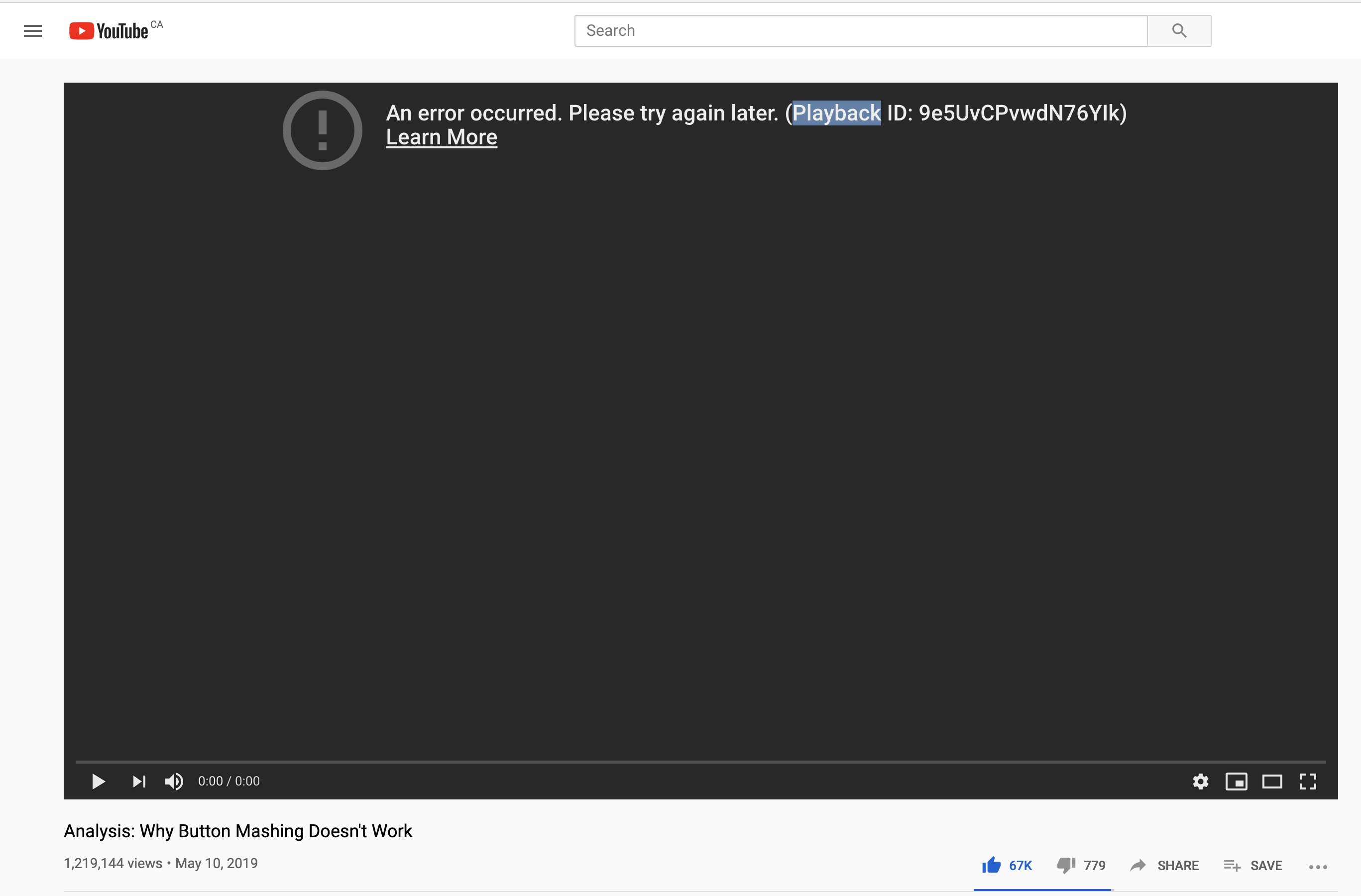
Using the following build when I ran into the above a few times:
Brave | 1.8.40 Chromium: 81.0.4044.69 (Official Build) nightly (64-bit)
-- | --
Revision | 6813546031a4bc83f717a2ef7cd4ac6ec1199132-refs/branch-heads/4044@{#776}
OS | macOS Version 10.15.3 (Build 19D76)
 kjozwiak
on 25 Mar 2020
kjozwiak
on 25 Mar 2020
@kjozwiak that was not my experience, however your message does look related to the original post, and mine feels like a red herring at this point. I also confirmed with another that has been experiencing your same issue for the past few days. Here's their chrome://version
Google Chrome   80.0.3987.149 (Official Build) (64-bit)
Revision    5f4eb224680e5d7dca88504586e9fd951840cac6-refs/branch-heads/3987_137@{#16}
OS  macOS Version 10.15.3 (Build 19D76)
I feel this issue is upstream, sadly i'm not experiencing it myself, so not sure how to reproduce it.
scottrbaxter
on 25 Mar 2020
@scottrbaxter assuming it's upstream as well or a general issue with YT right now. Appreciate the information though! We'll keep an eye on this in case it gets worse but we've been seeing more reports. I'm going to logout/login out of my Gmail/Google accounts to see if it's possible related to some type of session issue on their end.
kjozwiak
on 25 Mar 2020
Maybe related to Youtube reducing their streaming quality, first in Europe and now globally due to the spike in usage. https://www.bloomberg.com/news/articles/2020-03-24/youtube-to-limit-video-quality-around-the-world-for-a-month
I was able to view this video fine: https://www.youtube.com/watch?v=7TcCIcE1hr8 with shields up in 1.5.115 in logged in state.
 rebron
on 25 Mar 2020
rebron
on 25 Mar 2020
I was able to view this video fine: https://www.youtube.com/watch?v=7TcCIcE1hr8 with shields up in 1.5.115 in logged in state.
This error happens intermittently. Videos work fine for me as well but you'll get that error when switching to a video that has been paused for a while or a tab that's lazy loaded. Seems some users hit it more often. Could definitely be related to traffic/server issues with YT due to the COVID-19 traffic.
kjozwiak
on 25 Mar 2020
A redditor may have solved this issue. It's a bug with uBlock Origin, not Brave. The suggested fix corrected the problem for me.
 Huuuze
on 25 Mar 2020
Huuuze
on 25 Mar 2020
Here's an interesting detail: I use the chrome extension AutoPlay stopper and if I disable it, playback seems to work fine with shields up. When i turn it back on, I see the error message mentioned above.
 damassi
on 30 Mar 2020
damassi
on 30 Mar 2020
cc: @ryanbr To keep an eye on. Intermittent issue, could be on YT's side.
rebron
on 31 Mar 2020
@debiasi I had similar problems and after doing some research I found the following setting fixed this for me.
Settings > Additional Settings > System > (disable) Use hardware acceleration when available
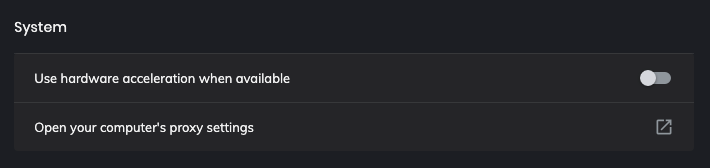
@rebron @ryanbr
_Source: https://windowsreport.com/an-error-occurred-please-try-again-later-youtube/#4_
 panchalkalpesh
on 5 Apr 2020
panchalkalpesh
on 5 Apr 2020
Which GPU do you have @panchalkalpesh ? Does a re-install of the drivers help?
 ryanbr
on 5 Apr 2020
ryanbr
on 5 Apr 2020
Intel HD Graphics 6000 1536 MB
Currently, disabling hardware acceleration in the settings fixes the youtube playback error for me.
Which GPU do you have @panchalkalpesh ? Does a re-install of the drivers help?
panchalkalpesh
on 5 Apr 2020
I would suspect some GPU drivers are more buggy than others, which is why we saw issues on the other browsers. So not a Brave-specific issue
ryanbr
on 5 Apr 2020
A few days ago it started working again. I still updated to version 1.5.123.
debiasi
on 7 Apr 2020
Related issues
 pitsi
·
3Comments
pitsi
·
3Comments
 bsclifton
·
3Comments
bsclifton
·
3Comments
 GeetaSarvadnya
·
3Comments
GeetaSarvadnya
·
3Comments
 simonhong
·
3Comments
kjozwiak
·
3Comments
simonhong
·
3Comments
kjozwiak
·
3Comments