Brave-browser: General sync issues / Cross - platform
Description
Creating an issue where we can link to reviews or feedback from users that have sync issues.
Often users don't provide too much info so it will be hard to troubleshoot.
I'm having issues Syncing all my devices. I have two Windows 10 PC's which refuse to Sync unless they start the sync chain. Two Android devices and a third Windows 10 PC have no issues syncing. Update: Same issue after update, but now bookmark shortcut changed
https://appfigures.com/reviews/266342430751LzMqRLxy4v3w4SZOpoIRpow
 anthonypkeane
All 9 comments
@srirambv can you take a look? lots of devices btw.
@anthonypkeane in future we need reproducible steps, easier for QA.
 rebron
on 5 Apr 2019
rebron
on 5 Apr 2019
Another one here: https://community.brave.com/t/sync-has-stopped-and-no-longer-syncs/49651/2
As I mentioned ^^, users won't provide that detailed info @rebron
anthonypkeane
on 12 Apr 2019
Some more reports:
https://community.brave.com/t/desktop-sync-error-couldn-t-contact-sync-servers/50543
https://community.brave.com/t/brave-sync-is-really-buggy/48125
https://community.brave.com/t/desktop-sync-error-couldnt-contact-sync-servers/44272/16
https://www.reddit.com/r/brave_browser/comments/bb9vg8/android_sync_keeps_disappearing/
https://www.reddit.com/r/brave_browser/comments/bcdej5/sync_windowsmacos/
 Brave-Matt
on 12 Apr 2019
Brave-Matt
on 12 Apr 2019
I'm not sure what we're doing with this particular ticket. Any issues that we file should be reproducible/actionable. A tally of positive/negative feedback we can track elsewhere?
What's the next step when we compile a long list of unreproducible feedback issues? Those individual reports should be handled via support, investigated further to be filed as separate issues, or duped against existing issues. If we can't get any further information from the user, don't have any next steps, only a tally of feedback.
rebron
on 13 Apr 2019
I also have a similar issue. Syncing between my private devices works fine. If I add a device in my company to the sync chain, the sync only works for initial. After that new changes (adding/removing bookmarks) do not sync. I also can't remove the device from the sync-chain! It just shows the endless loading window:
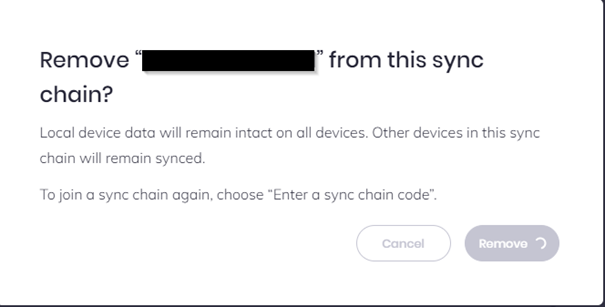
So I have to completely remove brave from my device for disabling sync. But other devices still think that the faulty device is connected and can't be removed because the remove request isn't processed/accepted by the faulty device.
Suspect reason: The proxy server by the company
And I don't have access to this part of the network. So I can't check what is blocked or different to the initial sync.
In addtion to that I have the issue that the shield stats are always on zero. Maybe also an issue with proxy:

 Gaeger
on 16 Apr 2019
Gaeger
on 16 Apr 2019
Updates to the last post:
After a while the faulty device has been removed from the sync chain (by removing on my Android). But the faulty device still thinks it is part oft the chain.
Gaeger
on 17 Apr 2019
I have 2 Windows 10 PCs and one first-gen Pixel XL running Android 10.0 Q BETA 2. When I was on Pie I had the same error: Every time I try to create a new Sync chain with my new Windows 10 laptop it fails. It will either not show me the encryption/decryption code or it just won't do anything after I scan the bar code with my phone or type in the correct code text...
So, to bring this on point: I had successfully created a sync chain to my Pixel XL with my old Windows 10 PC when it was still running Android 9.0 Pie. But also back then it failed to create a sync connection with my Windows 10 laptop. I think that is, because it only allows me to add new devices from the "mother ship device" (in this case my old Windows 10 PC), but doesn't allow my Pixel XL to add another device. I'll try to verify this theory later this day.
Hope this helped :)
 HennyBro
on 4 May 2019
HennyBro
on 4 May 2019
Info being gathered in this thread: https://twitter.com/dkxkee/status/1149352270942887937
 LaurenWags
on 12 Jul 2019
LaurenWags
on 12 Jul 2019
I am trying to sync my android phone to my windows 10 browser but entire folders are missing and the support isn't helping me, I was told to come here to get help, is that true?
 Jaydon2908
on 20 Apr 2020
Jaydon2908
on 20 Apr 2020
Related issues
 kjozwiak
·
3Comments
kjozwiak
·
3Comments
 bsclifton
·
3Comments
bsclifton
·
3Comments
 Sondro
·
3Comments
Sondro
·
3Comments
 bbondy
·
3Comments
bbondy
·
3Comments
 simonhong
·
3Comments
simonhong
·
3Comments
Most helpful comment
I also have a similar issue. Syncing between my private devices works fine. If I add a device in my company to the sync chain, the sync only works for initial. After that new changes (adding/removing bookmarks) do not sync. I also can't remove the device from the sync-chain! It just shows the endless loading window:

So I have to completely remove brave from my device for disabling sync. But other devices still think that the faulty device is connected and can't be removed because the remove request isn't processed/accepted by the faulty device.
Suspect reason: The proxy server by the company
And I don't have access to this part of the network. So I can't check what is blocked or different to the initial sync.
In addtion to that I have the issue that the shield stats are always on zero. Maybe also an issue with proxy:
