Brave-browser: Can't login to ProtonMail
Description
Cannot login to ProtonMail with Shields down
Steps to Reproduce
- Open Brave latest release (currently using 58.18)
- Turn shields off
- Go to https://mail.protonmail.com/login
Actual result:
Site prompts with msg that cookies need to be enabled; click OK
Site compatibility message is displayed which says that WebCrypto (PRNG) and Web Storage are enabled by current browser
Expected result:
Repeat same steps on Chrome and site shows login form (username and password fields)
Reproduces how often:
Easily reproduced
Brave version (brave://version info)
Version 0.58.18 Chromium: 71.0.3578.98 (Official Build) (64-bit)
Reproducible on current release:
- Does it reproduce on brave-browser dev/beta builds?
Don't know. Downloaded latest beta build for Mac. When I run it, blows up. Crash report sent to Apple.
Website problems only:
- Does the issue resolve itself when disabling Brave Shields?
No - Is the issue reproducible on the latest version of Chrome?
No
Additional Information
 groovinfingers
All 13 comments
What is the shields settings for that page? Have you blocked all cookies globally? You've mentioned it doesn't resolve with shields down which is highly unlikely. Could you take a screen shot of this or have a recording done? Also please mention the platform where you experience this issue
 srirambv
on 4 Jan 2019
srirambv
on 4 Jan 2019
Works for me on latest stable release with the below.
Tried two urls
https://app.protonmail.ch/login
https://mail.protonmail.com/login
Shields on
Ads and trackers blocked
3rd Party Cookies blocked
Device recognition blocked
All scripts allowed
Connections Encrypted
Blocking scripts led to a message about requiring JS. Reallowing JS removed this message and loaded fine.
Blocking all cookies led to the same issues as groovinfingers experienced. Re-allowing cookies didn't stop this message going away. I cleared all cookies/sitedata etc and even closed/re-opened browser and going to the url I had tested disabled cookies on redirected me to
https://protonmail.com/compatibility
which showed everything was available. I could click the login link and login still so everything was working but something is still telling Protonmail that my browser has issues. I tried enabling disable cache while dev tools is open to make sure it was properly connecting to the server again and still it redirected me.
 IOI-655321
on 4 Jan 2019
IOI-655321
on 4 Jan 2019
Closing can't reproduce.
 rebron
on 4 Jan 2019
rebron
on 4 Jan 2019
I think I can help provide more info here. There is definitely an issue here. For me, Protonmail hangs on the loading screen on first attempt to login. Upon refresh, I'm able to log in with the second attempt. I'm a Manjaro Linux user if that affects anything, using Brave .59.35... Here is a screenshot of my console log.
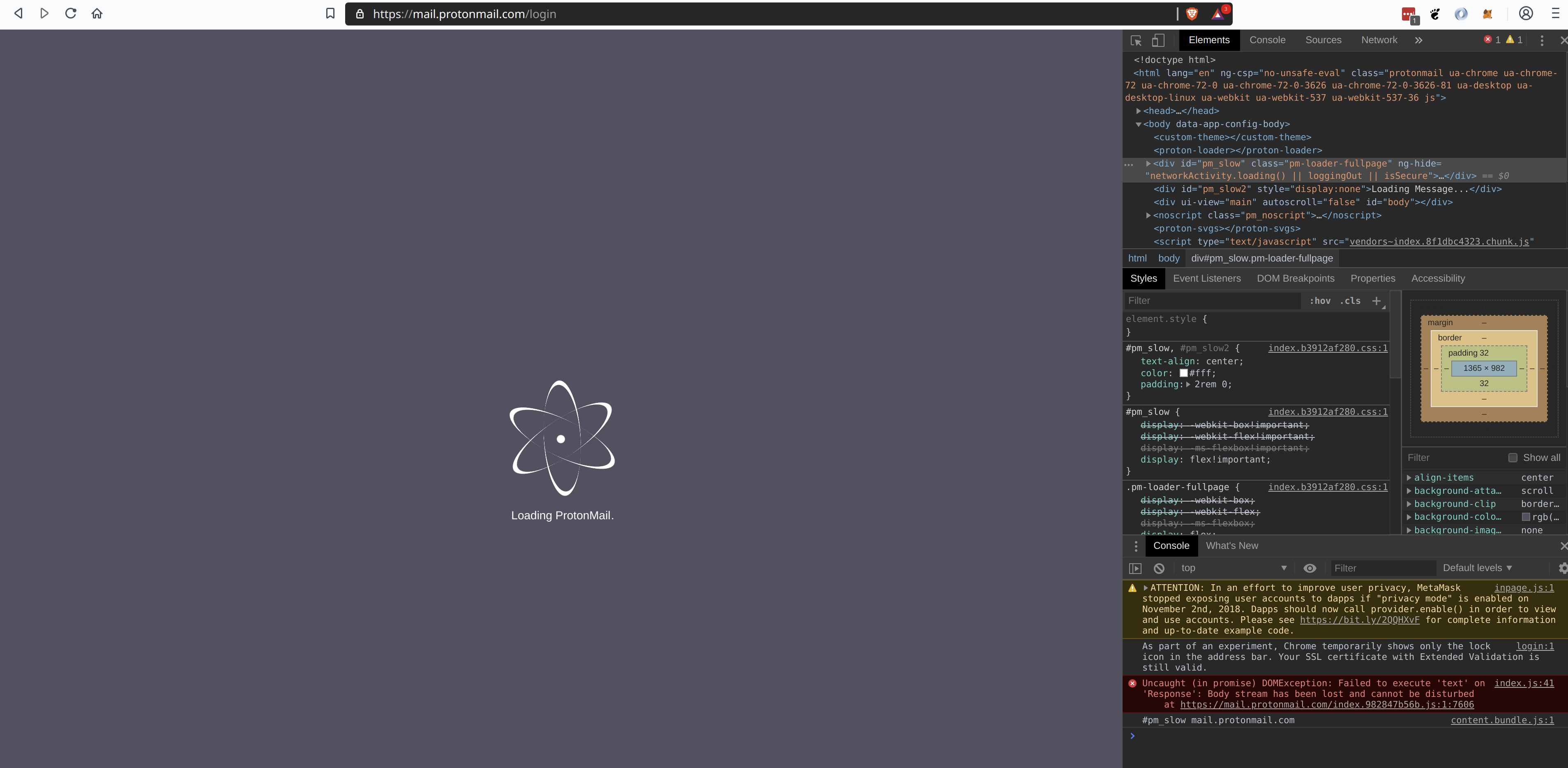
 jacobcantele
on 27 Feb 2019
jacobcantele
on 27 Feb 2019
+1 from Community:
https://community.brave.com/t/protonmail-not-loading-in-brave/46079/17
 Brave-Matt
on 19 Mar 2019
Brave-Matt
on 19 Mar 2019
cc: @kjozwiak
rebron
on 14 May 2019
Works fine first time for me with shields and without shields. Also there is no error being shown in the console. Tried it 3 times, still no issue.
| Title | Value |
|------------- |------------------------------------------------------------------------- |
| Version | 0.65.120 Chromium: 75.0.3770.90 ( Offizieller Build ) (64-Bit) |
| Revision | a6dcaf7e3ec6f70a194cc25e8149475c6590e025-refs/branch-heads/3770@{#1003} |
| OS | Windows 10 OS Version 1903 (Build 18362.145) |
| Java Script | V8 7.5.288.23 |
 AstroGD
on 19 Jun 2019
AstroGD
on 19 Jun 2019
Thanks for taking a look @AstroGD. I tried reproducing the above many times on different channels and couldn't reproduce either. Had no issues logging into ProtonMail using the default shields settings.
@groovinfingers can you still reproduce this issue with the latest Brave which is 0.65.120 Chromium: 75.0.3770.90 ATM?
 kjozwiak
on 19 Jun 2019
kjozwiak
on 19 Jun 2019
@jacobcantele are you able to try also?
 bsclifton
on 19 Jun 2019
bsclifton
on 19 Jun 2019
Bumped to p4 as this looks like login to protonmail is working generally.
rebron
on 19 Jun 2019
I'm not having this issue (using https://beta.protonmail.com/) Have you tried disabling extensions?
Title | Value
-- | --
Brave | 0.66.99 Chromium: 75.0.3770.100 (Official Build) (64-bit)
Revision | cd0b15c8b6a4e70c44e27f35c37a4029bad3e3b0-refs/branch-heads/3770@{#1033}
OS | Windows 10 OS Version 1809 (Build 17763.557)
JavaScript | V8 7.5.288.23
 ChildishGiant
on 12 Jul 2019
ChildishGiant
on 12 Jul 2019
@groovinfingers can you still reproduce this issue with the latest version of Brave which should be 0.70.121 Chromium: 78.0.3904.70?
kjozwiak
on 31 Oct 2019
Fwiw, I am no longer able to reproduce this issue on Brave .68 or .70. I think this is safe to close.
jacobcantele
on 14 Nov 2019
Related issues
bsclifton
·
3Comments
 Sondro
·
3Comments
Sondro
·
3Comments
 qingxiang-jia
·
3Comments
kjozwiak
·
3Comments
qingxiang-jia
·
3Comments
kjozwiak
·
3Comments
 simonhong
·
3Comments
simonhong
·
3Comments
Most helpful comment
Fwiw, I am no longer able to reproduce this issue on Brave .68 or .70. I think this is safe to close.