Brave-browser: CORS issue because of Brave Shields
Consolidated Test plan from all related issues
Test plan
Open https://eslint-config-development.netlify.com.
2. Console should not log any CORS erros
Visit chart.js
Ensure chats are not broken
3. Console should not log any CORS erros
Visit https://www.wikiloc.com/mountain-biking-trails/la-quinta-cove-226486
Ensure maps shows correctly for both Satellite and Map
3. Console should not log any CORS erros
Open a new issue on Github with default shields settings
- Try to upload an image
Should be able to upload image without any issues
4. Console should not log any CORS erros
Visit www.reddit.com
Locate a posted video hosted by reddit (https://www.reddit.com/r/Seattle/comments/9uhb5h/snoqualmie_falls_with_foliage_thanks_wa/)
3. Ensure video plays without any issue
Visit https://d.tube and open any video
Video should start streaming
3. Console should not log any CORS erros
Go to namecheap.com
- Search for a domain
Search result should show up
4. Console should not log any CORS erros
- Login shuold be successful
- Console should not log any CORS erros
Original issue Description
I have a website deployed on netlify that makes requests to the server that deployed to heroku, they both are on different domains. I enabled CORS in my server setup but I keep getting error Access to fetch at 'https://eslint-config-api-server.herokuapp.com/' from origin 'https://eslint-config-development.netlify.com' has been blocked by CORS policy: Response to preflight request doesn't pass access control check: Redirect is not allowed for a preflight request.. Works like that only in Brave.
Steps to Reproduce
- Open https://eslint-config-development.netlify.com.
- Open console.
Brave version (brave://version info)
0.56.15 Chromium: 70.0.3538.110 (Official Build) (64-bit)
Reproducible on current release:
- Does it reproduce on brave-browser dev/beta builds? I don't know, I don't use such builds.
Website problems only:
- Does the issue resolve itself when disabling Brave Shields? Yes.
- Is the issue reproducible on the latest version of Chrome? No.
 SilencerWeb
All 32 comments
Can confirm I'm seeing the same issue when trying to log in to https://prisma.io. Issue fixes itself when Shields are disabled.
Brave version
Version 0.56.15 Chromium: 70.0.3538.110 (Official Build) (64-bit)
 charlescrtr
on 28 Nov 2018
charlescrtr
on 28 Nov 2018
I experience the same problem when trying to perform a CORS request with Brave:
Brave | 0.56.15 Chromium: 70.0.3538.110 (Official Build) (64-bit)
-- | --
Revision | ca97ba107095b2a88cf04f9135463301e685cbb0-refs/branch-heads/3538@{#1094}
 OrKoN
on 29 Nov 2018
OrKoN
on 29 Nov 2018
I think this is because Brave is stripping out the Origin header from the initial OPTIONS request.
 dwwoelfel
on 3 Dec 2018
dwwoelfel
on 3 Dec 2018
I am seeing this all over the place now that I am looking for it. (In fact, I'm seeing it on this github page right now.) It has caused me some problems with calls to non-origin servers in my own work and broken dApp usage with Brave.
 JFrankfurt
on 6 Dec 2018
JFrankfurt
on 6 Dec 2018
Azure Portal is unusable in Brave because of this even with Shields down
 LukeDearden
on 10 Dec 2018
LukeDearden
on 10 Dec 2018
Some of the charts from chart.js brokes because of this:


Here is the link to this example - https://www.chartjs.org/samples/latest/charts/line/multi-axis.html
SilencerWeb
on 10 Dec 2018
Several +1s from https://github.com/brave/browser-laptop/issues/15319
 bsclifton
on 13 Dec 2018
bsclifton
on 13 Dec 2018
I also have this error but even with shields down.
I am collecting sensitive information within an iframe with a cross-domain src (do I have to manually whitelist the iframe domain from brave shield also?).
The iframe page makes a fetch call to POST the information. I'm noticing the CORS preflight OPTIONS request has the origin set to null as @dwwoelfel mentioned. Not sure if that's why its failing? Things work in Firefox & Chrome.
 renschler
on 13 Dec 2018
renschler
on 13 Dec 2018
Same problem here. Gmail 2FA broken because of this.
On our website, https://www.wikiloc.com, we use Apple MapkitJS and all maps are broken as well.
More users reporting the same issue: https://community.brave.com/t/latest-update-broke-cors-for-my-webapp/39135
Breakage on The Guardian, Facebook and Instagram: https://community.brave.com/t/too-many-redirects-fb-ig-the-guardian/39543/2
 sudokai
on 13 Dec 2018
sudokai
on 13 Dec 2018
Got a similar problem that I described there : https://github.com/brave/browser-laptop/issues/15319
 jamendub
on 14 Dec 2018
jamendub
on 14 Dec 2018
Gosh, these shields block even request from Figma!
SilencerWeb
on 16 Dec 2018
The users profile image doesn't load with Shields Up on the Azure Portal. Shields Down allows the profile image and some panes to load. However, the majority of panes don't load regardless of Shield settings.
Version 0.57.18 Chromium: 71.0.3578.80 (Official Build) (64-bit)
 jmadkins
on 17 Dec 2018
jmadkins
on 17 Dec 2018
I'm experiencing the same cross-origin issue, with a javascript http request from one of my clients websites; requesting data from the service where they store their content. It seems like the Shield option for blocking cookies is responsible.
 petethompson
on 17 Dec 2018
petethompson
on 17 Dec 2018
This change seems to break all preflight CORS requests and hence all CORS requests that require preflight: https://github.com/brave/brave-core/pull/754/files
Since we always clean referrer for cross-origin requests, all these requests become redirects, and preflight redirects are not allowed by policy.
@bbondy @yrliou
 iefremov
on 18 Dec 2018
iefremov
on 18 Dec 2018
Also affects:
https://github.com/brave/brave-browser/issues/2034
https://github.com/brave/brave-browser/issues/1999
https://github.com/brave/brave-browser/issues/1581
iefremov
on 18 Dec 2018
CORS Policy breaks image upload on vistaprint.com. The only way to upload image is to disable shields and use the site.
 srirambv
on 25 Dec 2018
srirambv
on 25 Dec 2018
@iefremov the following issues are all CORS related.
- #2034
- #1999
- #1581
- #2341
- #2286
- #2411
- #2414
srirambv
on 27 Dec 2018
+1 spent a longer than reasonable amount of time trying to debug this for a project I am developing, affects Brave Browser ~only regardless of~ shields up ~or down~. Exact same project works fine under Firefox, Safari, and Chrome.
 tsujp
on 30 Dec 2018
tsujp
on 30 Dec 2018
@hito Are you sure that the issue you were facing is the same issue discussed here? The issue being discussed here is usually resolved by lowering the shields (or specifically, modifying the cookie-related settings, AFAIK). Are you able to share a link to the issue you're facing? Perhaps a reduced project to help us identify/confirm the root issue?
 jonathansampson
on 31 Dec 2018
jonathansampson
on 31 Dec 2018
@jonathansampson A repro case, but perhaps not the same one as @hito.
- Go to https://convopage.com
- Put
1077284887202316289in the box, hit 'get convopage'
This works fine with shields down, but fails with an error [1] with shields up, desktop mac brave version [2] below.
[1] Access to XMLHttpRequest at '
[2] Version 0.59.12 Chromium: 72.0.3626.17 (Official Build) beta (64-bit)
 johnspurlock
on 31 Dec 2018
johnspurlock
on 31 Dec 2018
Apologies @jonathansampson this isn't an issue with shields disabled, I mucked up there and will strike this part out of my response – this doesn't detract from the fact that silently editing CORS headers with the shield active (something almost all users will have) means this literally breaks some applications unless a proxy is used specifically for Brave, or if detection is added in js for Brave (all you could then do is display a modal asking to remove shields for this site.. which I wouldn't do if some random website asked me to).
Both of these aren't great. I think this needs to be the highest priority ticket to fix, especially given the number of issues surrounding CORS with Brave.
I've had to tell my friends who test my stuff sometimes to specifically disable their shields on test domains I give them, not good. I'd have to detect Brave and issue a modal for other users on production, or rebuild the entire API I am using through some proxy. Both of which I don't want to do.
tsujp
on 2 Jan 2019
+1 from Community https://community.brave.com/t/cant-load-aws-logs/41473?u=eljuno
 eljuno
on 2 Jan 2019
eljuno
on 2 Jan 2019
+1 from Community (most likely):
https://community.brave.com/t/problem-with-spotify/41580/4
☝️ It seems to be causing Spotify to skip to a random track (when first attempting playback), land on one, but not actually play it. This can be consistently produced until Shields are dropped or All Cookies are allowed.
Console view:

 Brave-Matt
on 4 Jan 2019
Brave-Matt
on 4 Jan 2019
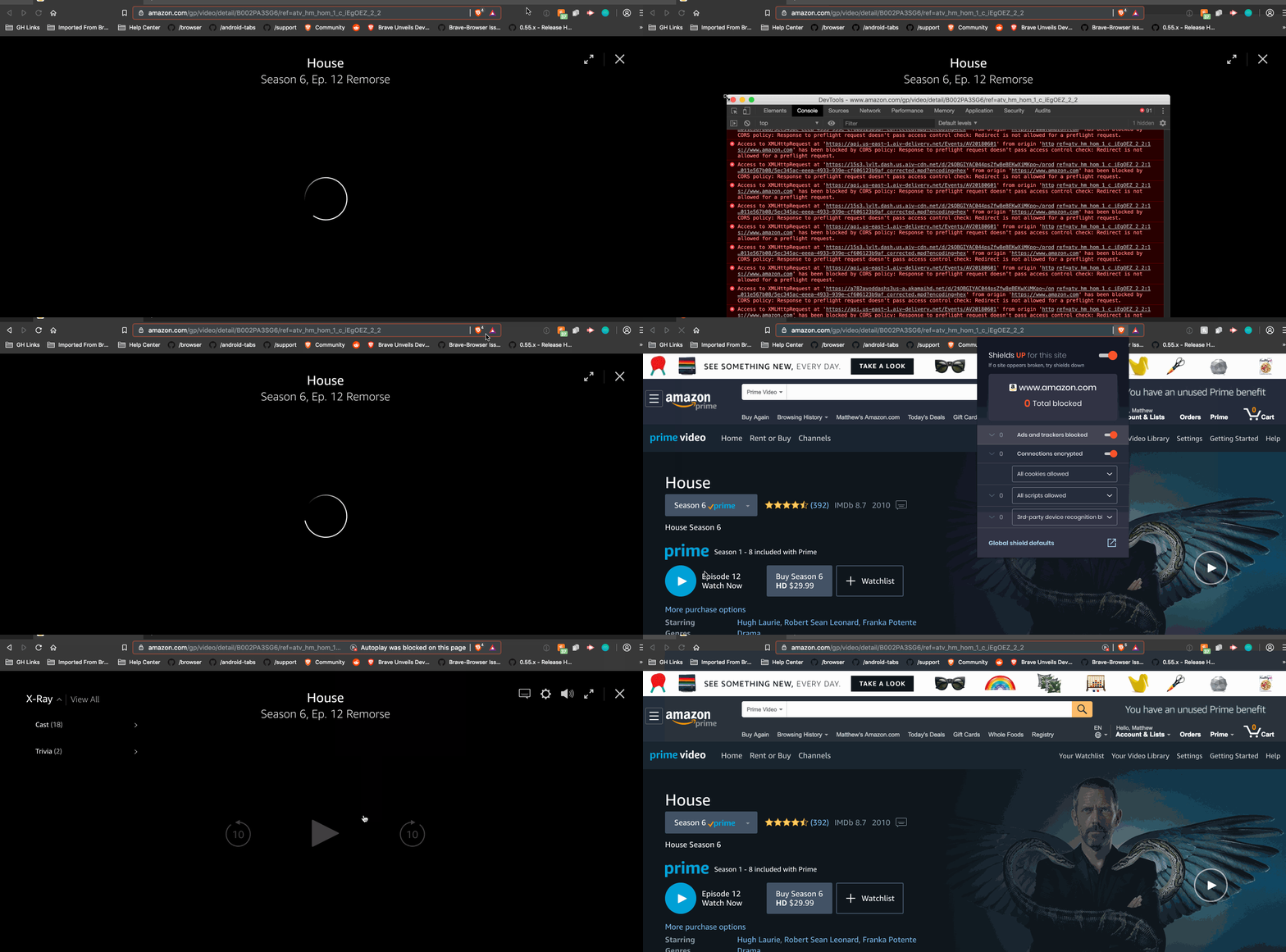
I also get the same error on Amazon Prime video, but only in the Beta channel release (v0.59.14):
Brave-Matt
on 4 Jan 2019
I'm seeing this on https://portal.azure.com as well. Original issue.
I'm on Brave v0.58.18
 MisinformedDNA
on 4 Jan 2019
MisinformedDNA
on 4 Jan 2019
Azure Portal is unusable in Brave because of this even with Shields down
Ditto. Here's screen of messages in console when trying to approve credit card on Azure Signup Portal.

 cemerson
on 8 Jan 2019
cemerson
on 8 Jan 2019
Closed all dupes I could find.
Not sure about #2580, cant test it quickly.
2286 is not related to this issue.
iefremov
on 9 Jan 2019
Verification passed on
Brave | 0.58.20 Chromium: 71.0.3578.98 (Official Build) (64-bit)
-- | --
Revision | 15234034d19b85dcd9a03b164ae89d04145d8368-refs/branch-heads/3578@{#897}
OS | Windows 7
Used test plan from OP.
Verified passed with
Brave | 0.58.20 Chromium: 71.0.3578.98 (Official Build) (64-bit)
-- | --
Revision | 15234034d19b85dcd9a03b164ae89d04145d8368-refs/branch-heads/3578@{#897}
OS | Mac OS X
- Verified test plan from description
Verification PASSED on Mint 19.3 x64 VM using the following build:
Brave | 0.58.20 Chromium: 71.0.3578.98 (Official Build) (64-bit)
--- | ---
Revision | 15234034d19b85dcd9a03b164ae89d04145d8368-refs/branch-heads/3578@{#897}
OS | Linux
 btlechowski
on 9 Jan 2019
btlechowski
on 9 Jan 2019
Updated to 0.58.21 on Mac OS and it now works perfectly !
I love u guys ;)
Keep the good work up !!!!
jamendub
on 12 Jan 2019
I am having this issue right now on Version 0.63.48 Chromium: 74.0.3729.108 (Official Build) (64-bit).
Access to fetch at 'http://some/api/url' from origin 'http://localhost:3000' has been blocked by CORS policy: Response to preflight request doesn't pass access control check: No 'Access-Control-Allow-Origin' header is present on the requested resource. If an opaque response serves your needs, set the request's mode to 'no-cors' to fetch the resource with CORS disabled.
 maketroli
on 6 May 2019
maketroli
on 6 May 2019
0.63.55 Chromium: 74.0.3729.131 (Official Build) (64-bit)
I'm receiving the same CORS preflight error as others. prevents signing in to medium.com (via email, twitter, google, and fb). Issue persists with 'allow all cookies' enabled and with shields down
 tggir1
on 9 May 2019
tggir1
on 9 May 2019
Also happens on https://my.playstation.com/ for me with Brave 1.8.96 on Linux and works fine in Firefox
 michaeltintiuc
on 15 May 2020
michaeltintiuc
on 15 May 2020
Related issues
bsclifton
·
3Comments
jonathansampson
·
3Comments
 AlexeyBarabash
·
3Comments
AlexeyBarabash
·
3Comments
 GeetaSarvadnya
·
3Comments
GeetaSarvadnya
·
3Comments
 bbondy
·
3Comments
bbondy
·
3Comments
Most helpful comment
Updated to 0.58.21 on Mac OS and it now works perfectly !
I love u guys ;)
Keep the good work up !!!!