Brave-browser: Grammarly extension not working for several users
Description
Both @TravisEz13 and @limonte have reported that the Grammarly extension is having issues with brave-core (reported here)
Steps to Reproduce
- Install Grammarly extension
- Try typing into a text field
- Notice that a weird icon shows up
Actual result:
@TravisEz13 reports seeing this:

@limonte reports seeing this (on github.com):
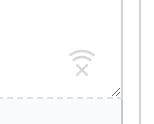
Expected result:
Extension should work
Reproduces how often:
Brave version (chrome://version info)
BraveDev latest (Version 0.55.3 Chromium: 70.0.3538.12 (Official Build) dev (64-bit))
Reproducible on current release:
Website problems only:
- Does the issue resolve itself when disabling Brave Shields?
no - Is the issue reproducible on the latest version of Chrome?
unknown
Additional Information
 bsclifton
All 12 comments
Is the issue reproducible on the latest version of Chrome?
unknown
I mentioned in https://github.com/brave/browser-laptop/issues/12289#issuecomment-421457707 that the same extension works with latest Chrome and Opera.
 limonte
on 15 Sep 2018
limonte
on 15 Sep 2018
The issue is still presented in the latest relese of a stable channel (0.55.18)
limonte
on 20 Oct 2018
Has anyone been able to log into Grammarly Premium and have the browser extension recognize it? If I go to app.grammarly.com it shows I am logged in. If I open the extension it says "Grammarly is active, but key features are missing" because I am not logged in.
Steps to Reproduce
- Install Grammarly extension
- Open extension popup and follow login directions
- Popup sends me to https://app.grammarly.com/?utm_medium=internal&utm_source=signinHook where I sign in
- app.grammarly.com shows I am signed in, but Grammarly extension does not.
I have not tried turn shields off. I'm not sure how shields effect browser extensions compared to websites.
Brave version (chrome://version info)
BraveDev latest (Version 0.57.2 Chromium: 70.0.3538.67 (Official Build) dev (64-bit))
 christianjuth
on 24 Oct 2018
christianjuth
on 24 Oct 2018
@christianjuth same problem here.
Brave version (chrome://version info)
0.55.20 Chromium: 70.0.3538.67 (Official Build) (64-bit)
 ergenekonyigit
on 24 Oct 2018
ergenekonyigit
on 24 Oct 2018
+1
 gp187
on 29 Oct 2018
gp187
on 29 Oct 2018
+1
 MikePryn
on 31 Oct 2018
MikePryn
on 31 Oct 2018
Guys, please stop spamming subscribers of this issue with "+1" comments, use GitHub reactions instead.
limonte
on 31 Oct 2018
I got it to work.
In short, I think all you need is to click the login link and then restart the browser.
All the steps I have taken:
- Install Grammarly extension
- Go to https://app.grammarly.com and login (for extra measure, I logged out and logged back in, not sure if it's needed)
- Disable the shields on https://app.grammarly.com (not sure this part is necessary)
- Click the login link in extension window (you should already be logged in at https://app.grammarly.com)
- Restart Brave browser
- (If you did the step 3.) Go to https://app.grammarly.com and re-enable the shields
macOS Mojave 10.14, Version 0.56.12 Chromium: 70.0.3538.77 (Official Build) (64-bit)
 markogresak
on 12 Nov 2018
markogresak
on 12 Nov 2018
I just noticed that without any additional actions (except keeping Brave up-to-date of course), the Grammarly extension started to work for me 🎉
Windows, Version 0.56.12 Chromium: 70.0.3538.77 (Official Build) (64-bit)
limonte
on 12 Nov 2018
I have Grammarly working on Brave Dev. I am also running a few other extensions (DuckDuckGoEssentials, Dashlane, and Honey) with no issues.
Mac, Version 0.57.4 Chromium: 71.0.3578.31 (Official Build) dev (64-bit)
christianjuth
on 12 Nov 2018
It was working for me on the dev build, but I quit using for reasons not relevant for this issue. I'm fine if this issue is closed.
 TravisEz13
on 26 Nov 2018
TravisEz13
on 26 Nov 2018
All known issues should be resolved now
bsclifton
on 14 Sep 2020
Related issues
 traffisco
·
3Comments
traffisco
·
3Comments
 qingxiang-jia
·
3Comments
qingxiang-jia
·
3Comments
 moritzhaller
·
3Comments
moritzhaller
·
3Comments
 GeetaSarvadnya
·
3Comments
GeetaSarvadnya
·
3Comments
 kjozwiak
·
3Comments
kjozwiak
·
3Comments
Most helpful comment
I mentioned in https://github.com/brave/browser-laptop/issues/12289#issuecomment-421457707 that the same extension works with latest Chrome and Opera.