Brackets: Another "Installation failed. Unknown internal error"
Hello first I want to thank you for that very useful and beautiful soft,
But, since last week i've got troubles installing extensions.
Each time I try to there's this error message showing
"Installation failed. Unknown internal error".
So i try to reinstall bracket but that didn't solve the problem.
I checked if everything was ok with my extension folder in Application Support (the cmd+shift+g thing),
and everything was ok.
I don't have any extension on bracket. And my internet connection don't pass trough
a proxy server.
As my Bracket version was in french i tried to switch it to english but that didn't solve the problem.
And unfortunately I can't install my extensions manually too. I tried with Emmet. It appears in the list of
installed extension but indicate that there is an error with it.
To finish i precise that i'm on mac os Mavericks and bracket 0.44 (I tried with each bracket version between 0.40 and 0.44).
Any idea?
 paulbonneau
All 77 comments
Same thing here, but the problem i dont know, it did this, and then worked again after a while!
 abdelouahabb
on 28 Oct 2014
abdelouahabb
on 28 Oct 2014
What did you do exactly?
paulbonneau
on 29 Oct 2014
Nothing, i just left it, and some days ago, i got it working again!
i thought it was because some weird extension, but it was not.
and if you want to install them manually, you have to bring them from github (click on more info) and then unzip it, and put it in C:\Users\{you-name}\AppData\Roaming\Brackets\extensions you can get the folder by help then show extension folder
abdelouahabb
on 29 Oct 2014
The quickest way to get the extension file to install is to go to the registry web site and click on the extension there. That will give you the zip file. You can then put the file into the folder given by Help > Show Extensions Folder.
@paul2802 Did you change any settings on your computer since the last time extension installation worked for you? (Especially in the Security settings...)
 dangoor
on 29 Oct 2014
dangoor
on 29 Oct 2014
@dangoor Yes i tried this way and it didn't work. Maybe it was because I didn't use npm install in the folder after copying the extension... So now I can install my extensions manually, thanks all !
About a change in the security settings: not a big change that I remember. For the automatic install I will wait and see if the problem is fixing himself as abdelouahabb.
paulbonneau
on 30 Oct 2014
@paul2802 now that 0.45 is shipping sooner, so the problem will be fixed ;)
abdelouahabb
on 30 Oct 2014
@paul2802 You shouldn't have to run npm install in an extension folder, unless you get a zip file that was auto-created by GitHub. The zip files on the registry site should be ready to install without additional steps.
@abdelouahabb The next release is shipping soon, but we haven't found the cause of this problem yet, so there's no fix in place. I'd love to put in a fix, but we haven't gotten to the root cause yet.
dangoor
on 30 Oct 2014
@paul2802 updating may repair it, i am trying to make it happen here but no way, i try more.
abdelouahabb
on 30 Oct 2014
Also receiving this error.
Was working before, just reinstalled Windows 8.1 Pro onto an SSD followed by Brackets (also on the SSD).
Console error is "Unknown installation error extensionManager domain is undefined".
Can place extensions in the directory manually - works without issue.
 ShaneDM
on 1 Nov 2014
ShaneDM
on 1 Nov 2014
Adding needs review - from the bug description its not clear what the root cause is for this - we need reproducible steps.
 pthiess
on 2 Nov 2014
pthiess
on 2 Nov 2014
i same problem,
but i solved it by disable my local proxy and now work like a charm :)
@paul2802
 alirezaDavid
on 6 Nov 2014
alirezaDavid
on 6 Nov 2014
@alirezaDavid I believe the error would be slightly different if you use a proxy. @paul2802 also mentioned that he doesn't run his connection through a proxy.
@ShaneDM "extensionManager domain is undefined" is different from "unknown internal error". I suggest filing a separate issue so that we can try to track down the problem you're running into. Most commonly, that would be caused by a firewall that prevents Brackets from talking to its separate Node process.
@paul2802 If you open the developer tools (from the Debug menu), do you see any errors in the console there when you try to install an extension?
dangoor
on 6 Nov 2014
Also receiving this issue with any action within the Extension dialog, an alert message occurs when trying to install or remove or manage my extensions, "Unknown internal error".

Developer Tools console shows: Unknown installation error extensionManager domain is undefined /extensibility/Package.js:408
OS: Mac 10.9.5 (Build: 13F34) Using Chrome 38.0.2125.111 (Build:290379) JavaScript V8 3.28.71.17
 connerturner
on 8 Nov 2014
connerturner
on 8 Nov 2014
@connerturner Take a look at the troubleshooting page and if that doesn't help, please file a new issue. This particular issue is dependent on system configuration and I'm concerned that getting to the bottom of it will be difficult if we're working through the configurations of multiple people at the same time.
dangoor
on 10 Nov 2014
Everything's working for me since the 1.0 .
Problem solved !
Thanks Bracket dev' you are the best.
paulbonneau
on 14 Nov 2014
I am this problem, but I know what causes it. Thus, I'll share here so everyone can benefit.
Many internet accountability apps, like X3Watch and CovenantEyes, use a proxy server in order to monitor the Internet usage. This causes problems with Brackets and prevents extension installations.
I'm trying to find out from the X3Watch support team what the proxy URL is, so I can add it to Brackets' preferences and, I hope, get Brackets working again.
 theDanielJLewis
on 15 Nov 2014
theDanielJLewis
on 15 Nov 2014
That's super weird.
I was easily able to break the whole Node connection by just setting up a simple proxy (Win 8.1).
That is, Windows routes localhost through the proxy. But you can easily set Windows up to disable proxying localhost:

(Sorry for the German Settings, but you should be able to get the context)
 MarcelGerber
on 15 Nov 2014
MarcelGerber
on 15 Nov 2014
Well, the "Installation failed. Unknown internal error" strike again on 1.0
And I really don't understand why.
Someone else?
paulbonneau
on 3 Dec 2014
I have also same problem with Ubuntu 14.04, extention installation get failed .
 kuldipem
on 25 Jan 2015
kuldipem
on 25 Jan 2015
Get this issue in Windows (8.1) and OSX (Yose) rock n roll
 ChrisMcKee
on 29 Jan 2015
ChrisMcKee
on 29 Jan 2015
I had this error. After deleting Ad-Aware and restarting the computer the problem was resolved
 vanjir89
on 11 Feb 2015
vanjir89
on 11 Feb 2015
I'm still having this problem, on both my computers. :(
 kurisubrooks
on 3 Mar 2015
kurisubrooks
on 3 Mar 2015
This just happened to me aswell.
In my case it was related to switching language, after language had been switched it would throw an error, but after manually restarting the whole app, it worked correctly.
 Ignasimg
on 10 Mar 2015
Ignasimg
on 10 Mar 2015
This happened to me, but I was running multiple instances of the application. Closing the additional instances and using only the first instance allowed me to install the extension.
 daball
on 10 Mar 2015
daball
on 10 Mar 2015
For me, I've always had this problem. I've never been able to install an
extension successfully after the 1.1 update. On both machines. With only 1
copy running at any time. Full reinstalls do nothing.
kurisubrooks
on 11 Mar 2015
Surprised this bug has been there for so long, but still no official response or fix. Saddening :disappointed:
kurisubrooks
on 15 Mar 2015
@kurisubrooks Sorry for not being able to look at this! We have lot of inflow of issues/PRs and feature work because of which we were not able to address this.
Could you tell us whether you are on Win/Mac/Linux?
If Win: Is your system running a Firewall: Some Firewall policies disable creating/opening of ports that are required by our Extension Manager to work.
Also you could try what @dangoor had proposed above.
If you open the developer tools (from the Debug menu), do you see any errors in the console there when you try to install an extension?
 nethip
on 18 Mar 2015
nethip
on 18 Mar 2015
I'm on Mac, on both Machines. Installed Brackets on my Linux but extensions install and work perfectly fine.
I get this error in the Console: /extensibility/Package.js:408 Unknown installation error extensionManager domain is undefined
Gonna try the troubleshooting now.
kurisubrooks
on 18 Mar 2015
Tried troubleshooting, localhost is pointing to the right IP, but Terminal still outputs;
Kurisu-iMac:~ Kurisu$ ping localhost
ping: cannot resolve localhost: Unknown host
Here's my hosts file:
##
# Host Database
#
# localhost is used to configure the loopback interface
# when the system is booting.  Do not change this entry.
##
127.0.0.1       localhost
broadcasthost

255.255.255.255 broadcasthost
::1             localhost
Interesting!!! I played around in the hosts, and now it works just fine :) My new hosts file is as follows:
##
# Host Database
#
# localhost is used to configure the loopback interface
# when the system is booting.  Do not change this entry.
##
127.0.0.1       localhost
255.255.255.255 broadcasthost
::1             localhost
fe80::1%1o0     localhost

kurisubrooks
on 18 Mar 2015
@kurisubrooks Good to hear you were able to solve this. I think the duplicate broadcasthostentry might have been the culprit. I checked the host file on my MAC system and I see 255.255.255.255 broadcast host
nethip
on 18 Mar 2015
It's strange though, because I haven't changed my hosts file at all. I'm on my other Mac now, and it has the same settings as my other machine did. I removed the broadcasthost entry, but extensions still don't work. I think the 4th entry, fe80::1%1o0 localhost is the magic maker here.
kurisubrooks
on 19 Mar 2015
That apparently isn't the case. Using the same hosts file as my iMac had, but i'm getting the error again here on my Laptop. Darn.
kurisubrooks
on 19 Mar 2015
Same issue here … it just happened today and I can't imagine what causes this problem.
First I got the message "too many connections" caused by the git extension. I even couldn't uninstall this extension, I had to manually delete it. But this didn't solve the issue.
Btw: I'm on Mac.
 vuhrmeister
on 25 Mar 2015
vuhrmeister
on 25 Mar 2015
Had the same issue. I ran Brackets as admin, and searched for the extension I wanted (go-lang). I then hit install at which point Windows firewall prompt showed up. I simply hit accept and the package installed just fine. So for me it was just the windows firewall.
 rushone2010
on 31 Mar 2015
rushone2010
on 31 Mar 2015
Seems to be a networking issue then. Hope they can fix it :(
On Tuesday, 31 March 2015, rushone2010 [email protected] wrote:
Had the same issue. I ran Brackets as admin, and searched for the
extension I wanted (go-lang). I then hit install at which point Windows
firewall prompt showed up. I simply hit accept and the package installed
just fine. So for me it was just the windows firewall.—
Reply to this email directly or view it on GitHub
https://github.com/adobe/brackets/issues/9723#issuecomment-88016056.
kurisubrooks
on 31 Mar 2015
I could "solve" it. I had a second instance running with a different user. I closed all instances across logins and it worked again!
vuhrmeister
on 2 Apr 2015
Hello there, I've just had the same issue few minutes ago.
It didn't work with the install button or drag&drop of a zip file, when I saw in this issue that it could be a network issue, I tryed to turn off my vagrant machine. and Voila, it was working again with both installation ways.
(it may be fault positive)
 leokun
on 13 Apr 2015
leokun
on 13 Apr 2015
I had the same issue, and in my case it is network-related. If I connect directly, it works. If I connect using a VPN (using Viscosity —an OpenVPN client) I get the "Installation Failed" error.
The console shows:
Unknown installation error extensionManager domain is undefined /extensibility/Package.js:408
Strangely, I can connect without issues to other websites. Also, the Brackets available extensions list loads without problems.
 fdb
on 3 Jun 2015
fdb
on 3 Jun 2015
I fix the problem by delete the brackets folder in /Library/Application Support/Brackets
 ForeverPx
on 10 Sep 2015
ForeverPx
on 10 Sep 2015
I fixed the problem by fixing my hosts file (OSX). I'd screwed with it a bit and needed to return it to plain vanilla:
127.0.0.1       localhost
255.255.255.255 broadcasthost
::1             localhost
 jcrben
on 12 Sep 2015
jcrben
on 12 Sep 2015
I'm on win8.1, I fixed the problem by closing the window firewall.
 fxsiran
on 2 Dec 2015
fxsiran
on 2 Dec 2015
I know a solution , that is to set the editor for the English language , and the world peace
 OllivanderMe
on 24 Dec 2015
OllivanderMe
on 24 Dec 2015
I have the same problem using Windows 7 x64 using v1.6. I get the "Unknown installation error extensionManager domain is undefined" message when debugging in console. I disabled Windows Firewall, modified the hosts file as recommended above. The only solution that worked for me was to uninstall v1.6 and install v1.0. I was able to install any extension I wanted in the old version.
 superdan54
on 21 Jan 2016
superdan54
on 21 Jan 2016
I fixed it on my machine by opening an empty project, in my case the project opened at start had more than 30k files, once i closed it and opened an empty one, i could install extensions again.
 ShadOoW
on 28 Jan 2016
ShadOoW
on 28 Jan 2016
I had the same issue in Mac, but in my case the problem was that I had Brackets opened also in another user account.
Once I closed the first one, everything was ok at the second user account.
I hope this will be helpful to someone.
 xBau
on 15 Feb 2016
xBau
on 15 Feb 2016
You also might want to check and see what services are running. There may be some other 3rd party software interfering with Brackets. In my case I had a SQL Server Performance Monitor called Ignite PI that was conflicting with Live Preview & Brackets extension installation. Disabling it fixed my issues.
superdan54
on 15 Feb 2016
@alirezaDavid was right!!! i follow his way,and the problem was solveed!! THANKS @alirezaDavid !!!
 dajiangqingzhou
on 5 Mar 2016
dajiangqingzhou
on 5 Mar 2016
Same Error - Windows version still not working
It sould be not about "cheats" or workarounds - This product should work out of the box.
Installing manually some plugins I got my Brackets frozen.
 sorinnn
on 25 Mar 2016
sorinnn
on 25 Mar 2016
when i turn off the system proxy, everything works fine!
 wenxingxing
on 28 Mar 2016
wenxingxing
on 28 Mar 2016
- OS: ArchLinux (x64)
- Kernel: 4.6.2-1-ARCH
- GNOME Shell 3.20.2
- Brackets: sprint 7 Experimental build 1.7.0-16898 (release b0a363b71)
Same Error. Suddenly, I can't install or uninstall any extension via Extension manager and extension "Git Brackets" stopped work. I think these 2 problems is interrelated, thats why I post message here.
 Relz
on 16 Jun 2016
Relz
on 16 Jun 2016
Same here.
- OS: LinuxMint17.3
- Kernel: 3.19.0.59
- Cinnamon 2.8.8
- Brackets 1.7.0-16898 (release b0a363b71)
- Build Timestamp Wed Jun 08 2016 11:23:30 GMT+0000
Update June 21, 2016: plugins didn't work with this build either. It was installed from ppa:webupd8team/brackets
 rylabo
on 17 Jun 2016
rylabo
on 17 Jun 2016
There was an issue with 1.7 Linux 64 builds. It was to do with the brackets unable to connect to Node. We have now fixed the problem and refreshed the builds. Could you guys download the 1.7 builds again from brackets.io and check?
nethip
on 17 Jun 2016
I reinstalled brackets and now I have
Brackets sprint Experimental build 6 1.6.0-0.
All works fine.
Relz
on 19 Jun 2016
All works fine after installing from brackets.io site using the 64-bit .deb. The plugins work as well.
Installed from brackets.io:
Release 1.7 experimental build 1.7.0-16898 (release b0a363b71)
build timestamp: Wed Jun 15 2016 10:33:42 GMT+0000
rylabo
on 21 Jun 2016
I dont know if this helps someone, but in my case, the dir under /home/user/.config/Brackets had as owner the root user in my system. I changed the ownership of the dir, making my user the new owner and it solved my problem, cmd:
$sudo chown -R user:group /home/user/.config/Brackets
 tv-nieri
on 9 Aug 2016
tv-nieri
on 9 Aug 2016
Latesst brackets, .config/Brackets owned by me, cannot install due to the same error. Ubuntu 16.04.
 vadi2
on 19 Oct 2016
vadi2
on 19 Oct 2016
I have the same issue. I already checked the proxy, firewall and also tried to install the extensions manually and open Brackets as super user. In: openSUSE 42.1
 ViniciusBRodrigues
on 29 Oct 2016
ViniciusBRodrigues
on 29 Oct 2016
SOLUCION EN WINDOWS 7
Descargar la extension de la web, ejemplo:
https://github.com/dnbard/brackets-documents-toolbar
expandir el archivo comprimido en su carpeta en:
C:\Users\tuusuario\AppData\Roaming\Brackets\extensions\user
Esta carpeta se las indica la aplicacion BRACKETS en su menu...AYUDA...ABRIR CARPETA DE EXTENSIONES.
(es una carpeta oculta).... para verla.. en el explorador... habilitar: ORGANIZAR... OPCIONES DE CARPETA Y BUSQUEDA...VER.. MOSTRAR ARCHIVOS , CARPETA Y UNIDADES OCULTAS)
importante!!: que al descomprimir NO quede duplicada una carpeta dentro de otra, es decir:
C:\Users\tuusuario\AppData\Roaming\Brackets\extensions\user\extension1\extension1
mi mail: [email protected]
Cerrar la aplicacion Brackets y volver a abrirla.
PRONTO!!

 danielodella
on 25 Nov 2016
danielodella
on 25 Nov 2016
I just downloaded Brackets 1.8 today and I can't install Emmet either. Running on Windows 7 Professional and the 3 places I have tried all the options to download the file from, file manager, GitHub URL, drag and drop section on the lower left and none of them work. I have gone into AppData and put the file there and it didn't work. danielodella's solution looks interesting, but I don't even know what language that is, tried translating both French and Italian but that didn't work. Any other ideas?
 pabrunson
on 29 Nov 2016
pabrunson
on 29 Nov 2016
@pabrunson maybe this: https://github.com/adobe/brackets/issues/12918#issuecomment-261337603
 zaggino
on 29 Nov 2016
zaggino
on 29 Nov 2016
I was unable to install extensions n a 32 bit win10 machine running 1.8 (1.7 was fine) but it was fixed by
the replacement of node version
#12918 (comment)
ficristo commented on 17 Nov
@K-Thompson is your platform a 32 bit one?
If so could you try to replace the node executable you find in C:\Program Files\Brackets with the one you can dowload from http://nodejs.org/dist/v6.3.1/win-x86/?
 nicksoph
on 20 Dec 2016
nicksoph
on 20 Dec 2016
So I found my solution for this. I'm running Windows 10 and I was unable to install extension with an error "extensionManager domain is undefined". I tried to start node.exe inside brackets folder (Program Files/Brackets) and it failed to start. So I tried to download and install nodejs from http://nodejs.org. Open the nodejs folder (Program Files/nodejs), copy the node.exe into brackets folder (Program Files/Brackets), reload brackets and try installing extension. Windows firewall will prompt you to allow nodejs, allow the firewall for nodejs and you are good to go. Hope this help, sorry for my bad english.
 charlesfebryanto
on 22 Jan 2017
charlesfebryanto
on 22 Jan 2017
@charlesf288 thank you so much, i'm using win 7 32bit and i'm follow your instruction, now my problem solved and don't worry my english is bad too, LOL
 rererojenk
on 6 Mar 2017
rererojenk
on 6 Mar 2017
@charlesf288 your solution working fine for me win 10. Thanks a lot.
 Mukeysh
on 15 Mar 2017
Mukeysh
on 15 Mar 2017
@nyteksf see above, maybe this will help you
zaggino
on 15 Mar 2017
@charlesfebryanto This worked for me too!
 Xikura
on 9 Aug 2017
Xikura
on 9 Aug 2017
Had the same issue
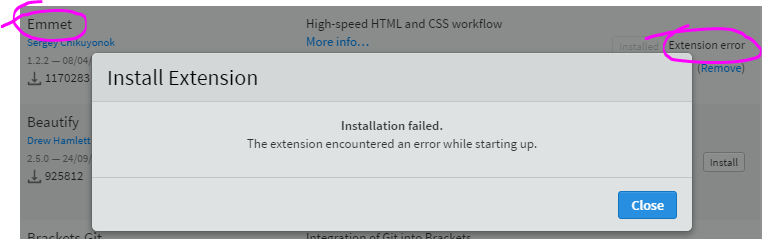
Windows 10
Brackets Release 1.11 build 1.11.0-17524
No proxy
So, I did the @dangoor 's suggestion:
"_The quickest way to get the extension file to install is to go to the registry web site and click on the extension there. That will give you the zip file. You can then put the file into the folder given by Help > Show Extensions Folder._"
And it worked! Thanks
 carlos-teixeira314
on 15 Nov 2017
carlos-teixeira314
on 15 Nov 2017
Try this>>
Download .zip from site
unzip it
/opt/brackets/www/extensions/default [Follow path]
for default directory do chmod 777 default
copy ur unzipped extension file there(CAREFULLY INCLUDE ALL FILES IN ONE FOLDER)
Start brackets
WOOO! u have ur extensions....
still its temp. solution>>
 ghost
on 2 Jan 2018
ghost
on 2 Jan 2018
I was having the same problem on a brand new install of Linux Mint 18.3. The issue has been solved changing the language locale to english from the original install in Spanish.
 crivote
on 20 Feb 2018
crivote
on 20 Feb 2018
Use ubuntu or kali
ghost
on 20 Feb 2018
Try modifying the extension to use "view/WorkspaceManager" instead of "view/PanelManager". I had problem installing the most of the extensions too. The following made it to work for me:
- After installing an extension I got an "extension error" but I could see that it was downloaded under:
Help -> Show Extensions Folder - So I checked the issue in the Error console
Debug -> Show Developer Tools -> Consoleand the error was the following "Error: Module name "view/PanelManager" has not been loaded yet for context" - It appears that many extensions are still using "view/PanelManager" which is deprecated
- I updated the following line in main.js from
brackets.getModule("view/PanelManager")tobrackets.getModule("view/WorkspaceManager")and it appears to solve the issue - After restarting Bracket the extensions were functional
Debug -> Reload With Extensions
It's sad that Brackets have no better way to troubleshoot this simple issue.
 hrvojegolcic
on 19 Mar 2018
hrvojegolcic
on 19 Mar 2018
Try modifying the extension to use "view/WorkspaceManager" instead of "view/PanelManager". I had problem installing the most of the extensions too.
https://github.com/adobe/brackets/issues/11960#issuecomment-374403225
hrvojegolcic
on 19 Mar 2018
I got the same issue for month, and I fixed it just moments ago by remove extensions for preference and editor config.
I also change proxy in my proxy setting. (need to reload: ctrl+f5 on dev tool [f12] ).
After that I don't see any console error related to domain or web socket anymore, and the installation was successful.
I hope this helps.
 greencopycat
on 14 Aug 2018
greencopycat
on 14 Aug 2018
Hello first I want to thank you for that very useful and beautiful soft,
But, since last week i've got troubles installing extensions.
Each time I try to there's this error message showing
"Installation failed. Unknown internal error".So i try to reinstall bracket but that didn't solve the problem.
I checked if everything was ok with my extension folder in Application Support (the cmd+shift+g thing),
and everything was ok.
I don't have any extension on bracket. And my internet connection don't pass trough
a proxy server.
As my Bracket version was in french i tried to switch it to english but that didn't solve the problem.And unfortunately I can't install my extensions manually too. I tried with Emmet. It appears in the list of
installed extension but indicate that there is an error with it.To finish i precise that i'm on mac os Mavericks and bracket 0.44 (I tried with each bracket version between 0.40 and 0.44).
Any idea?
Same error when trying to install but after force close and relaunching bracket it worked.
 Hooda7
on 22 Dec 2018
Hooda7
on 22 Dec 2018
Related issues
 declanmarks
·
3Comments
ghost
·
3Comments
zaggino
·
4Comments
declanmarks
·
3Comments
ghost
·
3Comments
zaggino
·
4Comments
 KSSS10
·
3Comments
KSSS10
·
3Comments
 udaykapur
·
4Comments
udaykapur
·
4Comments
Most helpful comment
Nothing, i just left it, and some days ago, i got it working again!
i thought it was because some weird extension, but it was not.
and if you want to install them manually, you have to bring them from github (click on
more info) and then unzip it, and put it inC:\Users\{you-name}\AppData\Roaming\Brackets\extensionsyou can get the folder byhelp then show extension folder