Botframework-webchat: Timed out while waiting for activity
Screenshots

Version
WebChat 4.11.0
Describe the bug
Webchat times out and shows a waring message under the browser console for the first welcome message. Due to timed out it takes some time to show the welcome message.
It appears the reply to message has a wrong id or none existent ID.
This happens in the latest version of webchat v4.11.0 but I believe it happens in the previous v4.10.1 without logging in the consol.
Expected behavior
WebChat should not timed out for the initial welcome message.
Code to trigger the welcome message
    if ('DIRECT_LINE/CONNECT_FULFILLED'.equalsTo(action.type)) {
      // When we receive DIRECT_LINE/CONNECT_FULFILLED action, we will send an event activity using WEB_CHAT/SEND_EVENT
      this.directLine.postActivity({
        from: { id: this.user.id, name: this.user.name },
        name: 'webchat/join',
        type: 'event',
        value: 'token'
      }).subscribe(
        id => console.log(`Posted activity, assigned ID ${id}`),
        error => console.log(`Error posting activity ${error}`)
      );
    }
 arman-g
All 25 comments
Assigning to @stevkan for repro support. Feel free to remove the Support label and assign back to me if there's a repro.
@hcyang FYI.
 corinagum
on 30 Nov 2020
corinagum
on 30 Nov 2020
@arman-g, is the code you supplied part of a test you are running? I see the .equalsTo() bit of code, but I'm unsure why that is being used.
 stevkan
on 1 Dec 2020
stevkan
on 1 Dec 2020
FYI, the replyToId, from the SDK, is always random and never associated with a true activity. This is not something Web Chat is able to change.
corinagum
on 1 Dec 2020
@arman-g, is the code you supplied part of a test you are running? I see the
.equalsTo()bit of code, but I'm unsure why that is being used.
Hi @stevkan, no it is not a test code. The ".equalsTo()" is just a function that compares two string ignoring the case.
String.prototype.equalsTo = function (target: string, caseSensitive: boolean = false): boolean {
  const sensitivity = caseSensitive ? 'case' : 'base';
  return String(this).localeCompare(target, 'en', { sensitivity: sensitivity }) === 0;
}
Having the same issue here...
 abelfubu
on 2 Dec 2020
abelfubu
on 2 Dec 2020
@stevkan, any update?
 hcyang
on 5 Dec 2020
hcyang
on 5 Dec 2020
I haven't been able to repro. Just double checking, @arman-g and @abelfubu, do either of you have the 'Always on' feature enabled in your bot's configuration in ABS?
stevkan
on 7 Dec 2020
hi @stevkan, I did not specifically set that feature. On the bot side I am using Microsoft.Bot.Builder.Dialogs. I like to test it if you could show me where and how to set that setting.
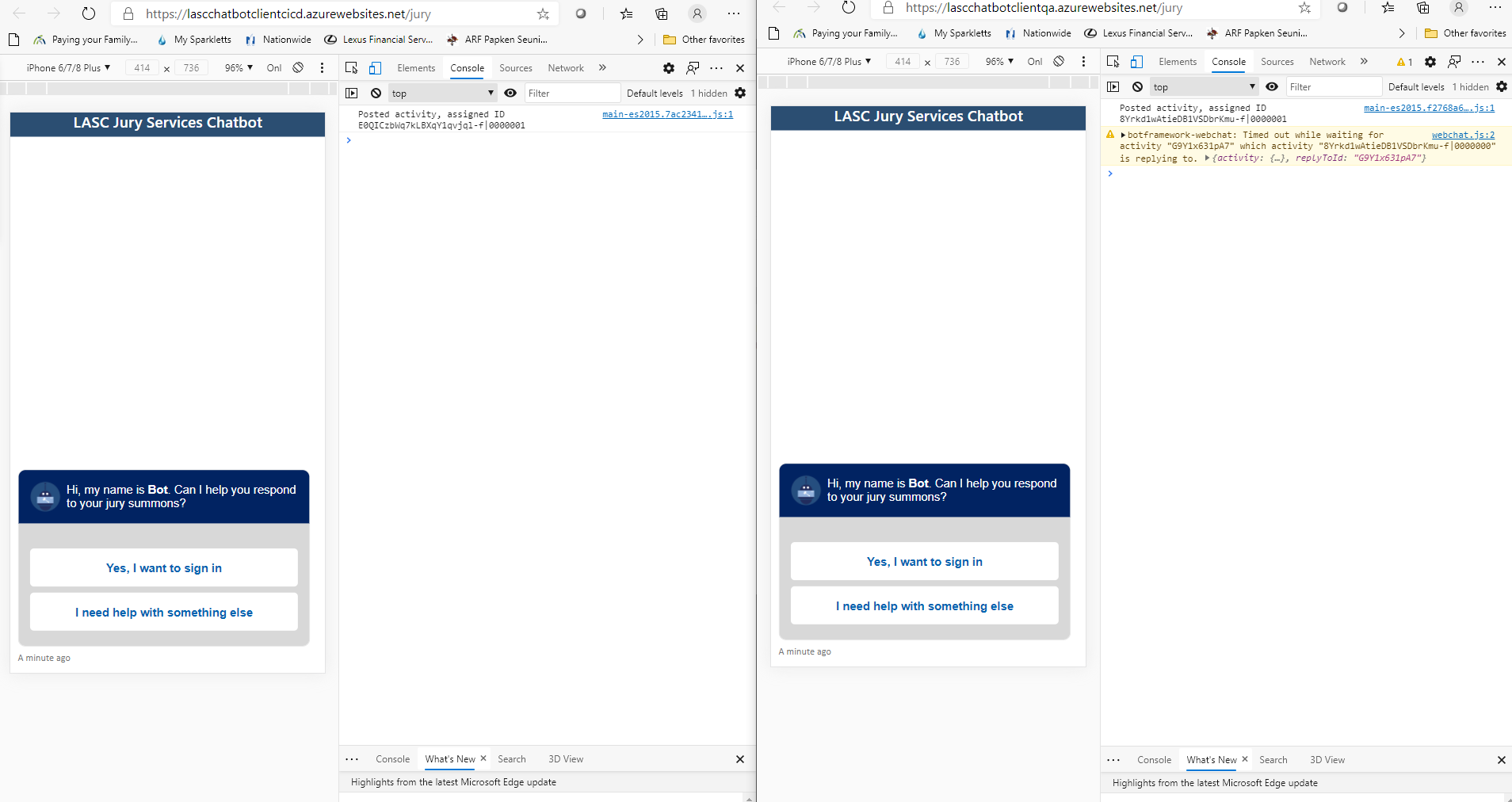
The warning is shown in Webchat v4.11.0 but not in previous versions. Now, it might be that problem still exist in the previous versions but it was not set to print the warning in the browser, I am not sure. Bellow I am providing two links to the same chatbot. One uses Webchat v4.10.1 and other v4.11.0. For the v4.11.0 you should see the warning under browser dev tools. The initial load might not show but refreshing the browser you will see it.
v4.10.1
https://lascchatbotclientcicd.azurewebsites.net/jury
arman-g
on 7 Dec 2020
@arman-g, unfortunately, I'm not receiving the warning even after multiple refreshes / hard refreshes. I did verify that each site is running the version of Web Chat you had specified. I'm not sure what else to offer to help repro this and find why it's proving an issue for you.
As for the 'Always on' feature, navigate to your bot's app service, click on 'Configuration' on the left, under' Settings', to open up the associated blade. Then, click 'General settings' and look for 'Always on' about half way down the list of options and verify that it is set to 'On'.
This feature keeps the service, and by virtue of that, the bot, from going to a sleep state during periods of inactivity. With this feature set to 'Off', on an initial message to the bot from anyone, the user will experience a slight delay. This _could_ be driving the timeout issue.
stevkan
on 8 Dec 2020
hi @stevkan, that is very wired indeed. It would be good if someone could confirm this since I am still seeing the warning. Here a screenshot of the two instances side by side in Edge browser.
arman-g
on 8 Dec 2020
ABS
Yes, We have the "Always On" option activated.
abelfubu
on 9 Dec 2020
@stevkan for these two app services we are using "D1 Shared" app service plan so always on is off. But this should not matter since the two servers has the same setting and only one of them always shows the warning message.
arman-g
on 9 Dec 2020
@arman-g, @abelfubu - Ok, I was finally able to repro the issue on my own using the 04.api/a.welcome-event sample coupled with the (03.welcome-users)[https://github.com/microsoft/BotBuilder-Samples/tree/main/samples/javascript_nodejs/03.welcome-users].
What I discovered is that the below code, which sends an event activity in Web Chat on DIRECT_LINE/CONNECT_FULFILLED, is pre-empting the message activity sent by the bot in the onMembersAdded activity handler (code below). Because the bot is busy sending it's own message, it can't respond to the Web Chat message until it completes it's own business. Hence, the Timed out while waiting for activity... message in the browser's dev console.
The solution, in my instance, was to do one of the following: Set a timeout (~500-1000ms) in Web Chat that delays the event from being sent until the bot's welcome message is received (or some similar solution); change the action.type in Web Chat's store from DIRECT_LINE/CONNECT_FULFILLED to DIRECT_LINE/CONNECT (works for an event, but a message still requires setting a timeout or it gets swallowed up); or, change how the bot sends messages when a member is added.
Web Chat
const store = window.WebChat.createStore( {}, ( { dispatch } ) => next => action => {
    if ( action.type === 'DIRECT_LINE/CONNECT_FULFILLED' ) {
        setTimeout(() => {
            dispatch( {
                type: 'WEB_CHAT/SEND_EVENT',
                payload: {
                    name: 'webchat/join',
                    value: { language: window.navigator.language }
                }
            } );
        }, 1000);
    }
    return next( action );
} );
bot.js
this.onMembersAdded(async (context, next) => {
    // Iterate over all new members added to the conversation
    for (const idx in context.activity.membersAdded) {
        // Greet anyone that was not the target (recipient) of this message.
        // Since the bot is the recipient for events from the channel,
        // context.activity.membersAdded === context.activity.recipient.Id indicates the
        // bot was added to the conversation, and the opposite indicates this is a user.
        if (context.activity.membersAdded[idx].id !== context.activity.recipient.id) {
            await context.sendActivity(`Welcome to the 'Welcome User' Bot. This bot will introduce you to welcoming and greeting users.`);
            await context.sendActivity(`You are seeing this message because the bot received at least one 'ConversationUpdate' ` +
                `event, indicating you (and possibly others) joined the conversation. If you are using the emulator, ` +
                `pressing the 'Start Over' button to trigger this event again. The specifics of the 'ConversationUpdate' ` +
                `event depends on the channel. You can read more information at https://aka.ms/about-botframework-welcome-user`);
            await context.sendActivity(`You can use the activity's 'locale' property to welcome the user ` +
                `using the locale received from the channel. ` +
                `If you are using the Emulator, you can set this value in Settings. ` +
                `Current locale is '${ context.activity.locale }'`);
            await context.sendActivity(`It is a good pattern to use this event to send general greeting to user, explaining what your bot can do. ` +
                `In this example, the bot handles 'hello', 'hi', 'help' and 'intro'. ` +
                `Try it now, type 'hi'`);
        }
    }

    // By calling next() you ensure that the next BotHandler is run.
    await next();
});
Web Chat w/o setTimeout() & Web Chat w/ setTimeout()
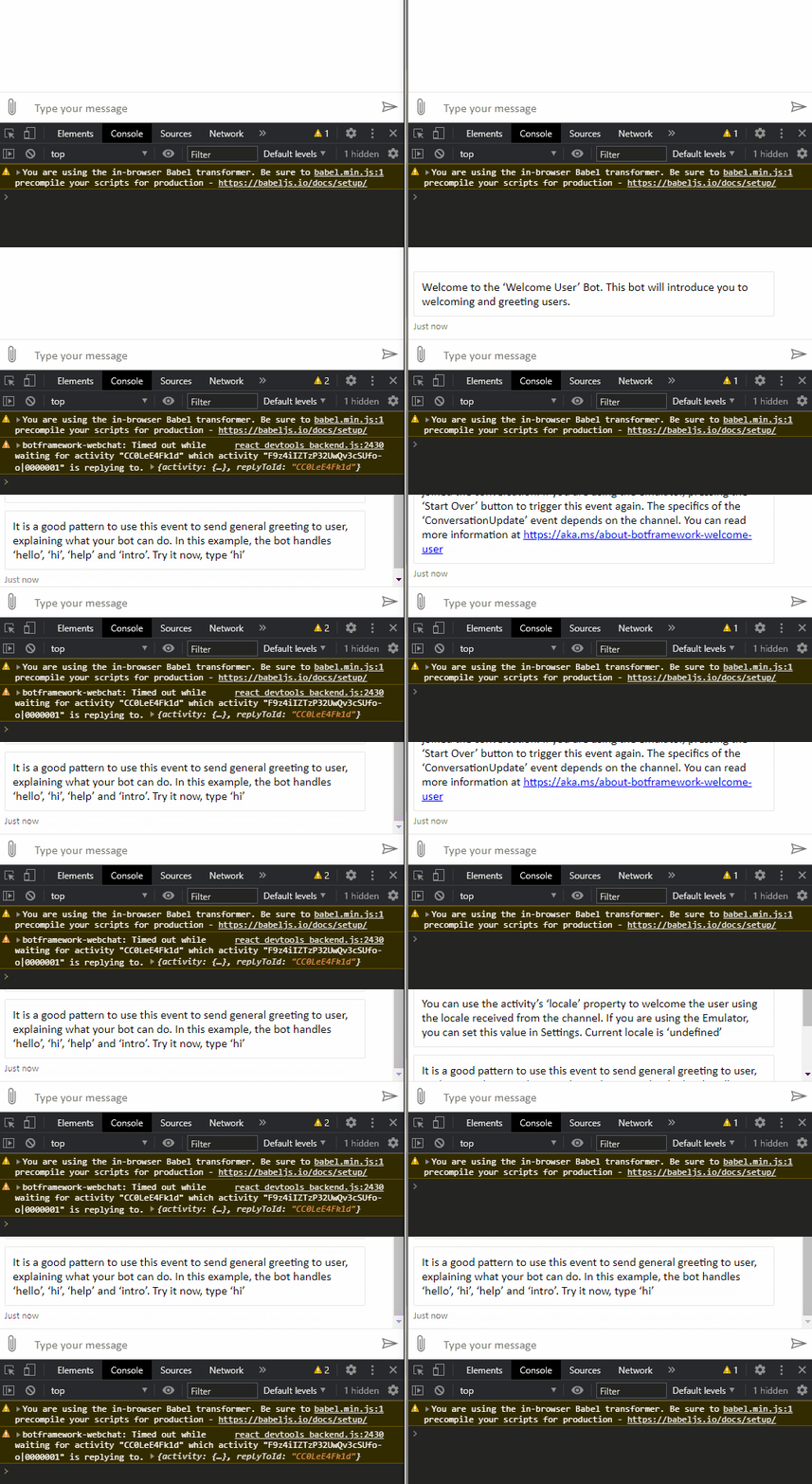
I can't say specifically that this is the root cause in your cases, but I'd suggest looking at these areas and see if something like the above is happening.
stevkan
on 10 Dec 2020
Yes! this did the trick for me, thanks @stevkan !!
abelfubu
on 10 Dec 2020
FYI, I don't think the action.type matters as much as the first message happening while the bot is already preoccupied and waiting for it to finish processing. In other words, the issue may be present in your code without, specifically, using CONNECT_FULFILLED and/or CONNECT.
stevkan
on 10 Dec 2020
@stevkan in my case it did not work. Still getting the timeout message. What I don't understand is why version 4.10.1 does not show the warning but v4.11.0 does.
arman-g
on 14 Dec 2020
@arman-g, I did some additional testing and I can only get this problem to present itself when, as described above, a message sent from Web Chat to the bot is delayed because the bot is busy sending an initial message during onMembersAdded. Outside of CONNECT_FULFILLED and CONNECT, are there any other instances (action.type's) where a message is being sent to the bot at start up?
It may take some digging around, but it would be worth double checking what each side is specifically doing when the error occurs.
stevkan
on 17 Dec 2020
Hi @stevkan, I found the answer to my question why 4.10.1 was not showing the warning. As I assumed at the beginning of this thread is that printing the warning under the console was added in the latest version with this commit fe64eac. Now, I need to understand why it is timing out.
By the way, this is my bot service activity handler C# code:
using lasc.services.jurybot.Services;
using Microsoft.Bot.Builder;
using Microsoft.Bot.Builder.Dialogs;
using Microsoft.Bot.Schema;
using Microsoft.Extensions.Logging;
using System;
using System.Collections.Generic;
using System.Threading;
using System.Threading.Tasks;

namespace lasc.services.jurybot
{
    public class JuryBot<T> : ActivityHandler where T : Dialog
    {
        private readonly Dialog _dialog;
        private readonly IBotStateService _botStateService;
        private readonly ILogger _logger;

        public JuryBot(
            IBotStateService botStateService,
            T dialog,
            ILogger<JuryBot<T>> logger)
        {
            _botStateService = botStateService ?? throw new ArgumentNullException(nameof(botStateService));
            _dialog = dialog ?? throw new ArgumentNullException(nameof(dialog));
            _logger = logger ?? throw new ArgumentNullException(nameof(logger));
        }

        public override async Task OnTurnAsync(ITurnContext turnContext, CancellationToken cancellationToken = default)
        {
            await base.OnTurnAsync(turnContext, cancellationToken);
            // Saves values into storage. Needed for dialog state.
            await _botStateService.ConversationState.SaveChangesAsync(turnContext, false, cancellationToken);
        }

        protected override async Task OnMessageActivityAsync(ITurnContext<IMessageActivity> turnContext, CancellationToken cancellationToken)
        {
            _logger.LogInformation("Running dialog with Message Activity: {@Activity}", turnContext.Activity);

            await _dialog.RunAsync(turnContext, _botStateService.DialogStateAccessor, cancellationToken);
        }

        protected override async Task OnMembersAddedAsync(IList<ChannelAccount> membersAdded, ITurnContext<IConversationUpdateActivity> turnContext, CancellationToken cancellationToken)
        {
            _logger.LogInformation("Running dialog with Message Activity: {@Activity}", turnContext.Activity);

            foreach (var member in membersAdded)
            {
                if (member.Id != turnContext.Activity.Recipient.Id)
                {
                    await _dialog.RunAsync(turnContext, _botStateService.DialogStateAccessor, cancellationToken);
                }
            }
        }
    }
}
@stevkan, ok my last tests show that using dispatch takes about 5 seconds and then shows the timeout message in the console.
dispatch({
          type: 'WEB_CHAT/SEND_EVENT',
          payload: {
            name: 'webchat/join',
            value: { language: window.navigator.language }
          }
        });
Using this code below takes 1.5 seconds and does not timeout. This is my initial code that was showing timeout message before but now it does not. The only difference is that I replaced the value from 'token' to '{ language: window.navigator.language }'. Not sure why it works now even with 'token' as the value. If you check the two links in my previous post you will not see timeout and v4.11.0 is used in both.
      this.directLine.postActivity({
        from: { id: this.user.id, name: this.user.name },
        name: 'webchat/join',
        type: 'event',
        value: { language: window.navigator.language }
      }).subscribe(
        id => console.log(`Posted activity, assigned ID ${id}`),
        error => console.log(`Error posting activity ${error}`)
      );
There is defenfatly something wrong with the dispatch approach.
At this point I don't have the issue anymore using the later code.
arman-g
on 18 Dec 2020
@arman-g, I'm glad you were able to find a workable solution.
At @corinagum, this seems like a bug that didn't exist prior to v4.11.0. How a Cx has setup their web chat store + bot seems to determine whether the issue presents itself or not.
stevkan
on 18 Dec 2020
@stevkan Thanks for the investigation and FYI! I will add this to our list for scheduling.
corinagum
on 18 Dec 2020
I have exactly the same problem. Something seems to be off with the dispatch method as it works as expected with directline.postActivity but times out with dispatch. Very strange...
 itpropro
on 23 Dec 2020
itpropro
on 23 Dec 2020
I believe this is not just a problem which occurs while sending welcome messages, but also for proactive messages.
When I run the proactive messages sample as a bot and launch the webchat using the getting started sample, then I also get the same warnings for the proactive messages.

 dominiquehunziker
on 2 Jan 2021
dominiquehunziker
on 2 Jan 2021
needs investigation: is this related to other direct line timeout issues already filed?
corinagum
on 13 Jan 2021
fixed by PR #3705
I verified that with above PR i no longer see the timeout for the after the initial send event activity is sent
 amal-khalaf
on 5 Feb 2021
amal-khalaf
on 5 Feb 2021
Related issues
 naveen-vijay
·
4Comments
naveen-vijay
·
4Comments
 AndreMantas
·
4Comments
AndreMantas
·
4Comments
 Kellym-Kainos
·
4Comments
Kellym-Kainos
·
4Comments
 1Copenut
·
3Comments
1Copenut
·
3Comments
 marcasmar94
·
3Comments
marcasmar94
·
3Comments