Botframework-webchat: How to enable mic soon after the welcome message?
I am trying to enable the mic soon after voicing out the welcome message. I want to know if there is any flag that indicates the message has been voiced out by the bot. Right now, I am enabling the mic through click method by giving a timeout of 4 seconds. Which fails in some cases when the bot takes time to initialize and voice out the message. So in those cases while the mic turns on, the message stops voicing out suddenly.
 deena211
All 4 comments
Currently, we don't have hooks for controlling speech input, it's a pending work item #2211.
However, you can look at the useActivities and grab a list of activities, look at their channelData.speak property to see if the bot response completed synthesize or not.
Since channelData is not an official support API, once we implement #2211 or speech hooks, we might remove this flag.
 compulim
on 23 Jun 2020
compulim
on 23 Jun 2020
Thank you for your response. But sorry, I forgot to mention that I am not using hooks, instead I use javascript for webchat which is running on an angular application.
deena211
on 24 Jun 2020
This level of customization requires React as you need to subscribe for changes.
compulim
on 24 Jun 2020
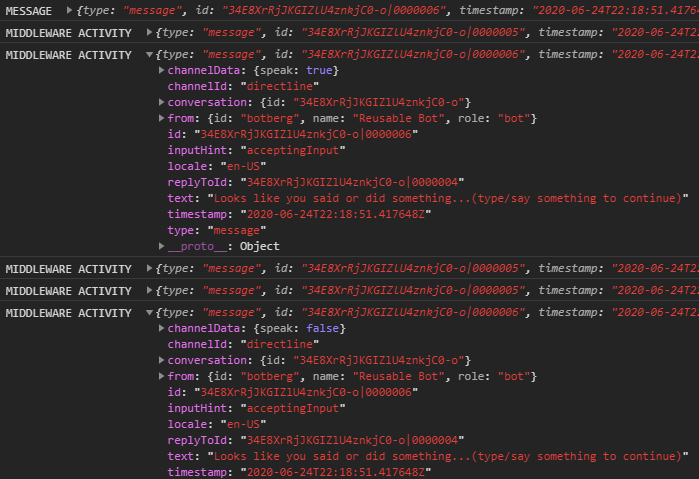
@deena211, if you are using the renderWebChat() flavor of Web Chat, then it's possible you can still capture the activities with the channelData.speak property via one of the middleware, such as activityMiddleware.
The useActivities hook is a nice feature because it presents a nice package of the processed activities. However, if you can't use the hook, then access them as I mentioned above. Just be aware that you will need to introduce processing logic of your own to filter and narrow them down as you need.
I mention above that "it's possible" to do this as I have only tested in a standard html page. I haven't tested this in an Angular project.
const activityMiddleware = () => next => ( { activity, ...otherArgs } ) => {
  const { channelData } = activity;

  if (channelData && channelData.speak === true || channelData && channelData.speak === false) {
    console.log('MIDDLEWARE ACTIVITY ', activity)
  }

  return next( { activity, ...otherArgs });
}

[ ... ]

window.WebChat.renderWebChat(
  {
    directLine: window.WebChat.createDirectLine( {
      token: token
    } ),
    webSpeechPonyfillFactory: webSpeechPonyfillFactory,
    activityMiddleware: activityMiddleware
  },
  document.getElementById( 'webchat' )
);
 stevkan
on 25 Jun 2020
stevkan
on 25 Jun 2020
Related issues
 GewoonMaarten
·
3Comments
compulim
·
3Comments
GewoonMaarten
·
3Comments
compulim
·
3Comments
 marcasmar94
·
3Comments
marcasmar94
·
3Comments
 electrobabe
·
4Comments
electrobabe
·
4Comments
 AndreMantas
·
4Comments
AndreMantas
·
4Comments
Most helpful comment
@deena211, if you are using the
renderWebChat()flavor of Web Chat, then it's possible you can still capture the activities with thechannelData.speakproperty via one of the middleware, such asactivityMiddleware.The
useActivitieshook is a nice feature because it presents a nice package of the processed activities. However, if you can't use the hook, then access them as I mentioned above. Just be aware that you will need to introduce processing logic of your own to filter and narrow them down as you need.I mention above that "it's possible" to do this as I have only tested in a standard html page. I haven't tested this in an Angular project.