Botframework-webchat: The brand needs the Avatar of the Bot to be a square instead of a circle
Describe the suggestion or request in detail
The brand needs the Avatar of the Bot to be a square instead of a circle
Describe alternatives you have considered
Currently we are changing this style with jQuery command:
jQuery('#webchat').find('div').filter('.avatar').not('.from-user').css('border-radius', '0%')
But sometimes webchat is not rendering as we like and happens this:

and of course it is not efficient to do so
Additional context
I would like to use new styleOptions like:
botAvatarShapeAsCircle _(boolean)_
userAvatarShapeAsCircle _(boolean)_
const styleOptions = {
    ...
    botAvatarImage: baseUrl.concat('/img/avatar_bot_squ.png'),
    botAvatarInitials: 'BOT',
    botAvatarBackgroundColor: 'white',
    botAvatarShapeAsCircle: false,
    userAvatarImage: webchatItem.userAvatar,
    userAvatarInitials: 'USER',
    userAvatarBackgroundColor: 'white',
    userAvatarShapeAsCircle: true,
    ...
}
With an implementation similar to this on createAvatarStyle... :
export default function createAvatarStyle({
  accent,
  avatarSize,
  botAvatarBackgroundColor,
  botShapeAsCircle,
  primaryFont,
  userAvatarBackgroundColor
}) {
  var borderRadiusValue = '50%'
  if !botShapeAsCircle borderRadiusValue = 'inherit'

  return {
    alignItems: 'center',
    borderRadius: borderRadiusValue,
    ...
 eduardmartos
All 6 comments
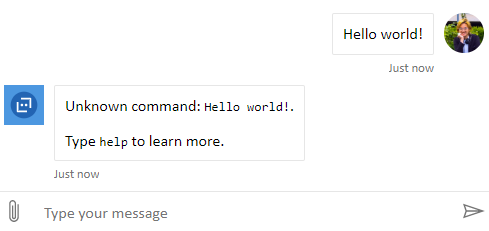
@eduardmartos You can currently modify the style set to change the avatars border radius. Take a look at the code snippet below.
Screenshot

Web Chat v4.7.1
const styleOptions = {
  botAvatarImage:
    'https://docs.microsoft.com/en-us/azure/bot-service/v4sdk/media/logo_bot.svg?view=azure-bot-service-4.0',
  botAvatarInitials: 'BF',
  userAvatarImage: 'https://github.com/compulim.png?size=64',
  userAvatarInitials: 'WC'
};

const styleSet = window.WebChat.createStyleSet(styleOptions);

styleSet.avatar = {
  ...styleSet.avatar,
  borderRadius: 0
};

window.WebChat.renderWebChat(
  {
    directLine: window.WebChat.createDirectLine({ token }),
    styleSet
  },
  document.getElementById('webchat')
);
Additional Context
https://github.com/microsoft/BotFramework-WebChat/issues/1977
@corinagum @compulim Should we consider adding userAvatarBorderRadius and botAvatarBorderRadius to the default style options?
 tdurnford
on 5 Feb 2020
tdurnford
on 5 Feb 2020
@tdurnford my vote is yes :)
 corinagum
on 5 Feb 2020
corinagum
on 5 Feb 2020
Ok. If I understand your code...
With this:
const styleSet = window.WebChat.createStyleSet(styleOptions);
styleSet.avatar = {
...styleSet.avatar,
borderRadius: 0
};
you can override all the values you need of every styleSet?
And the process is always the same?
styleSet.[ClassName] = {
[“ThreeDots”]styleSet.[ClassName],
cssAttributeToOverride1: newCssAttributeValue1,
cssAttributeToOverride2: newCssAttributeValue2,
“and so on...”
};
I assume that with this override that you are proposing we change user and bot avatars at same time... So if I want user to be a circle or another geometry I can use photoshop to create it as png image with transparent background.
That sounds nice!
But for other more basic implementations it could be nice to have the two additional styles that your are proposing:
botAvatarBorderRadius
userAvatarBorderRadius
eduardmartos
on 5 Feb 2020
@eduardmartos If you're overriding the style set, you can add the style depending on if it's from the user or not. Adding the style options is a better option though.
Screenshot
Style Set
styleSet.avatar = {
  ...styleSet.avatar,
  '&:not(.from-user)': {
    borderRadius: 0
  },

  '&.from-user': {
    borderRadius: '50%'
  }
};
should we close this as duplicate in favor of #1977?
corinagum
on 5 Feb 2020
Closing as dupe of #1977
tdurnford
on 5 Feb 2020
Related issues
 compulim
·
3Comments
compulim
·
3Comments
compulim
·
3Comments
compulim
·
3Comments
 vikramdadwal
·
3Comments
vikramdadwal
·
3Comments
 joshm998
·
3Comments
joshm998
·
3Comments
 Kellym-Kainos
·
4Comments
Kellym-Kainos
·
4Comments
Most helpful comment
@eduardmartos You can currently modify the style set to change the avatars border radius. Take a look at the code snippet below.
Screenshot
Web Chat v4.7.1
Additional Context
https://github.com/microsoft/BotFramework-WebChat/issues/1977
@corinagum @compulim Should we consider adding
userAvatarBorderRadiusandbotAvatarBorderRadiusto the default style options?