Botframework-webchat: Blocked: Web Chat Message and reply swapped the positions due to modified Date object
Hi
We are running the below html script on one of our MS Dynamics 365 portals. Facing a weird problem regarding the chat component. When we run the script on a plane HTML page we see no issues. But when we are running the script on a dynamics 365 portal page We are seeing the reply message before the user message. I have attached the screenshot for reference. I am running out of ideas of why this is occurring and happening only dynamics portal. Would you be able to give some ideas of why this might happen.
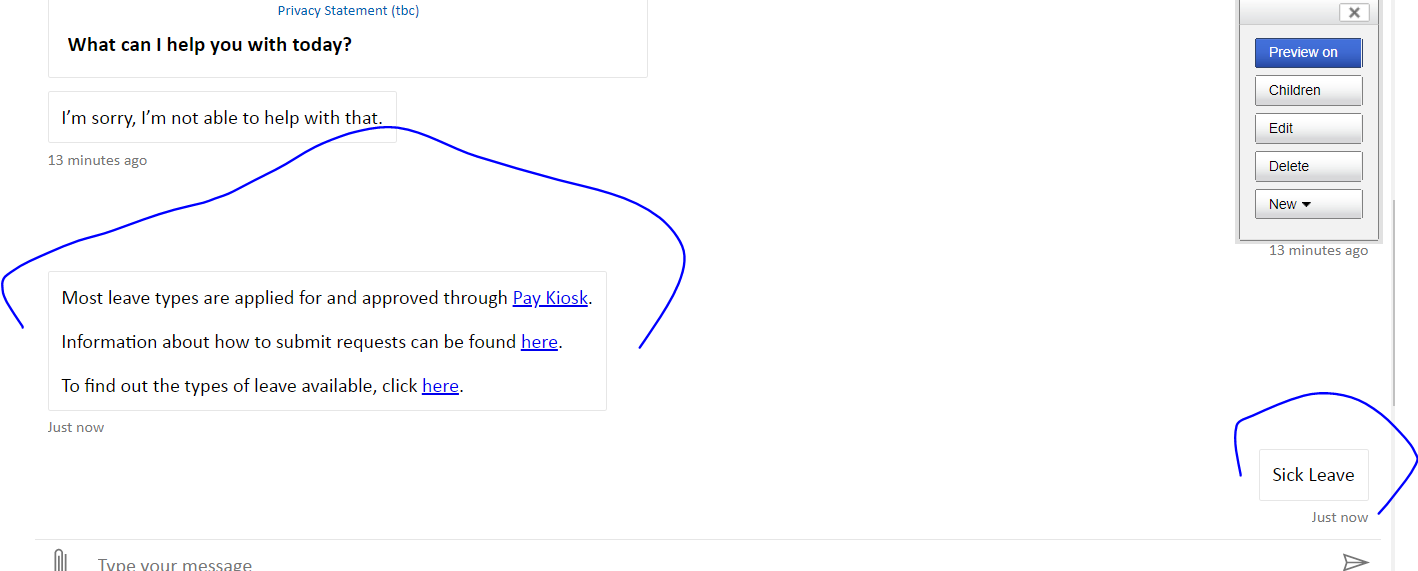
When user types a message it comes back with a reply but the reply is rendered above the user message.
I have also ripped off all CSS to see if this is a CSS issue. But I can confirm that this is not a CSS issue as we are running the component without any CSS in the screenshot and this still happens. Looking for some ideas from your end.
Screenshots
Version
script pasted above
Describe the bug
When user types a message it comes back with a reply but the reply is rendered above the user message.
I have also ripped off all CSS to see if this is a CSS issue. But I can confirm that this is not a CSS issue as we are running the component without any CSS in the screenshot and this still happens. Looking for some ideas from your end.
Expected behavior
We want to see the reply after the user message.
Additional context
Looking for some ideas of what might be the cause that this would happen
[Bug]
 vksantoshsunny
All 19 comments
@stevkan can you please attempt a repro?
 CoHealer
on 25 Nov 2019
CoHealer
on 25 Nov 2019
@vksantoshsunny We are very interested in fixing this bug, there are few reports about message ordering but we can't repro them on our side.
Could you capture network trace as a HAR file (or Fiddler's SAZ file) and send it to us Please remove PII if it contains any.
 compulim
on 25 Nov 2019
compulim
on 25 Nov 2019
We have had a little progress on this issue. I could see the below script that is running on the dynamics 365 portal is causing the message ordering issue. Screenshot attached. If we block the marked script from running then the message ordering is correct as expected.
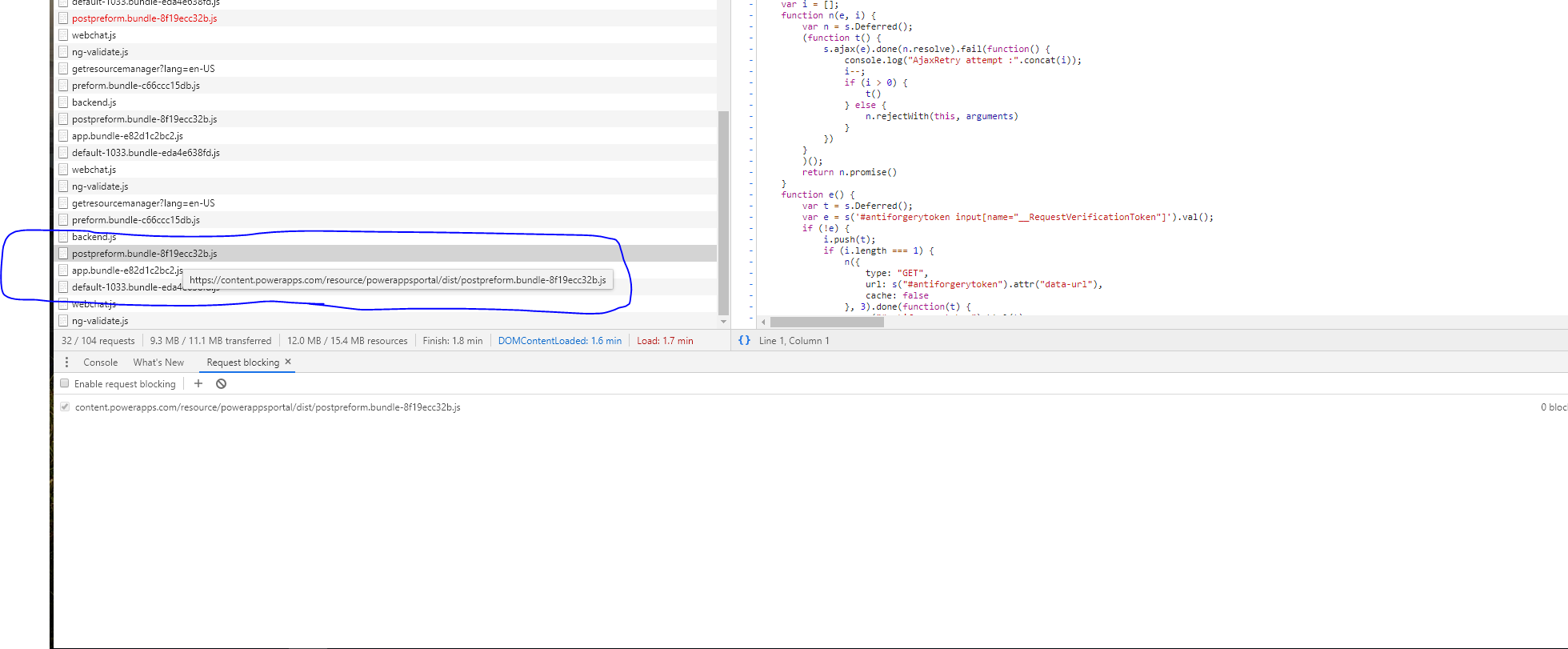
https://content.powerapps.com/resource/powerappsportal/dist/postpreform.bundle-8f19ecc32b.js
Do you think the webchat team can do anything to stop this happening. As this might occur on any site on which the component is delivered.
vksantoshsunny
on 25 Nov 2019
Will prettify this file and understand what is going on. Thanks for debugging, super helpful. 🥰
compulim
on 25 Nov 2019
Still investigating. I included part of the postpreform.js which polyfilled JavaScript Date. And I am seeing it.
Trying to scope down on what goes wrong.
compulim
on 27 Nov 2019
I found the discrepancies, postpreform.js polluted Date.parse.
In a standard browser:
Date.parse('2019-11-26T23:52:24.513388Z') === 1574812344513
Date.parse('2019-11-26') === 1574726400000
With postpreform.js:
Date.parse('2019-11-26T23:52:24.513388Z') === null
Date.parse('2019-11-26') === new Date('Tue Nov 26 2019 00:00:00 GMT-0800 (Pacific Standard Time)')
Can you confirm if this postpreform.js is added by Dynamics 365 but not any of your custom code running inside the portal?
If yes, I can escalate it to Dynamics 365 team, but it won't unblock you immediately.
Can you put an IFRAME to host Web Chat in a clean environment?
(Including the problematic part in postpreform.js)
compulim
on 27 Nov 2019
Thank you for your analysis. Yes it was added by the Dynamics 365 product but not any of out Web chat code. Please forward this request to fix the postpreform.js to Dynamics team. Thank you.
vksantoshsunny
on 27 Nov 2019
Sure, I will find internal contacts to forward the bug to.
The custom Date.parse is incompatible with the W3C standard. I doubt it can be fixed easily because of the broad impact.
BTW, can you host Web Chat on IFRAME to unblock?
compulim
on 27 Nov 2019
I am trying to do it the iFrame way so that the chat will be isolated from the postpreform.js script. Previously I have deployed a React component on to the dynamics portal. So now moving that to iframe would be a bit extra work and we are close to the release date. Are there any recommendations I should take if I am taking the iFrame approach. This will be a temporary work around until dynamics fix the issue.
vksantoshsunny
on 27 Nov 2019
You can try this hack, I am unsure if it will work or break any other Dynamics 365 Portal code.
If the input string contains letter "T", i.e. it is parsing an ISO-formatted time. Then use new Date(str).getTime(). Otherwise, use their original Date.parse.
const d365DateParse = Date.prototype.parse;

Date.prototype.parse = str => {
  if (typeof str === 'string' && ~str.indexOf('T')) {
    return new Date(str).getTime();
  } else {
    return d365DateParse(str);
  }
};
You can also use
RegExpto detect if the input is an ISO date time string.
compulim
on 27 Nov 2019
Does the React web chat component use any of the dates inside it?
If I am using the above script how do I make sure that my react component uses the above d365DateParse .
Where do I copy the above script? Could you please help.
Just to be clear.. we are not in control of the postpreformscript.js... so not sure where I will have to use your hack
vksantoshsunny
on 27 Nov 2019
It's difficult to guarantee what React component is using the browser's implementation.
The code will only guarantee, if it is parsing a date string with a letter T, it will return a number (instead of null).
I am new to Dynamics 365 Portal. Do you have any places to drop a <script> tag on the page?
compulim
on 27 Nov 2019
Hi
Yes we do have a script tag under which we are copying the build version of the react component js. Want to know how I can run the above hack.
Do you think adding the above script in to the script tag would override the postpreform.js script date functionality?
vksantoshsunny
on 27 Nov 2019
Can you try add the script after postpreform.js is loaded?
compulim
on 27 Nov 2019
Sorry we are not in control to do the delay as above.. Is there any way I can control / swap the last two messages in the webchat react app..
vksantoshsunny
on 27 Nov 2019
Sorry there is no way to just swap two messages.
Web Chat need to sort activities when they arrive. We do insertion sort to minimize the cost.
The main reason we need to sort is because Direct Line channel to send messages out-of-order. If you look at the network traffic, you will see user's message come later than the bot's response. This OOO behavior is a design of the platform, similar to read receipts in email or "double blue ticks" in WhatsApp.
The order problem you observed in Web Chat is because of this OOO behavior. As Web Chat cannot get a correct timestamp from the activity, we are using their organic order (as item arrives, i.e. append).
Since user message was received later than the bot message, Web Chat showed user message after the bot message.
While I am asking engineers from Dynamics 365 Portal to look at this issue, it will be helpful to open a support ticket to them to track their work.
Sorry we couldn't help much about polluted application host.
I am closing this issue because it is not caused by Web Chat and also outside of Web Chat's reach.
compulim
on 27 Nov 2019
@compulim I'm going to reopen this issue and label it as blocked. I think other users may come across this problem, and we'll want them to be able to find this information relatively easily. I think it's also a good idea for us to track the problem, so in the future we can approach Dynamics with more data if there are more people affected by this problem.
 corinagum
on 9 Dec 2019
corinagum
on 9 Dec 2019
The script below fixed the issue until Dynamics team gives a resolution. This is a work around.
<script>

window.onload = function() {
  var d365DateParse = Date.parse;

  Date.parse = function(str) {
    if (typeof str === "string" && ~str.indexOf("T")) {
      return new Date(str).getTime();
    } else {
      return d365DateParse(str);
    }
  };
};

</script>
Closing due to available workaround.
 vishwacsena
on 2 Jan 2020
vishwacsena
on 2 Jan 2020
Related issues
 Stardox
·
3Comments
Stardox
·
3Comments
 naveen-vijay
·
4Comments
naveen-vijay
·
4Comments
 filipjakov
·
4Comments
filipjakov
·
4Comments
 mmalaiarasan-conga
·
3Comments
mmalaiarasan-conga
·
3Comments
 joshm998
·
3Comments
joshm998
·
3Comments