Botframework-webchat: Often getting 401 from Directline API within Webchat
Screenshots
Version
Latest CDN: https://cdn.botframework.com/botframework-webchat/latest/webchat.js
Describe the bug
In an Angular application we use the bot secret to generate a new token and then pass the token to the webchat. Below are snippets of code:
(Note that some portions are omitted and replaced with ellipsis)
directline-token-provider.ts
_Retrieves a secret from our web app and uses that to retrieve a token_
import { Injectable } from '@angular/core';
import { HttpClient, HttpHeaders } from '@angular/common/http';

//Will be modified to hold onto a token in RAM and in cookies

@Injectable({
  providedIn: 'root',
})
export class DirectlineTokenProvider {
  constructor(private httpClient: HttpClient) { }

  getDirectLineToken(conversationId: string, continueConversation: boolean) {
    //MODIFY THIS URL TO TARGET A REMOTE SOURCE
    return this.httpClient.get<DirectLineTokenResponse>('/api/configuration/directlinetoken').toPromise()
      .then(r => {
        const directlineSecret = r.directLineToken;
        console.log(`Requested continue conversation: ${!!continueConversation}`);
        if (!!continueConversation && !!conversationId) {
          console.log(`Continuing Conversation ID: ${conversationId}`);
          return this.continueConversation(directlineSecret, conversationId);
        }

        console.log('Generating new token for new conversation');
        return this.generateNewToken(directlineSecret);
      });
  }

  private continueConversation(directlineSecret: string, conversationId: string) {
    const httpOptions = {
      headers: new HttpHeaders({
        'Content-Type': 'application/json',
        'Authorization': `Bearer ${directlineSecret}`
      })
    };

    return this.httpClient.get<any>(`https://directline.botframework.com/v3/directline/conversations/${conversationId}`, httpOptions).toPromise()
      .then(r => r.token);
  }

  private generateNewToken(directlineSecret: string) {
    const httpOptions = {
      headers: new HttpHeaders({
        'Content-Type': 'application/json',
        'Authorization': `Bearer ${directlineSecret}`
      })
    };

    return this.httpClient.post<any>('https://directline.botframework.com/v3/directline/tokens/generate', null, httpOptions).toPromise()
      .then(r => r.token);
  }
}

export class DirectLineTokenResponse {
  directLineToken: string;
}
We do seem to be getting a valid token via the _https://directline.botframework.com/v3/directline/tokens/generate_ endpoint.
We then consume the token in a component here:
  ngOnInit() {
    ...

    var params = new URLSearchParams(window.location.search);
    var continueConversation = params.get("continueConversation") === 'true';
    var conversationId = this.getCookie("conversationId");

    this.userInfoProvider.getUserInfoAsync().then((portalUser: string | PortalUser) => {
      this.portalUser = portalUser;
      return this.directlineTokenProvider.getDirectLineToken(conversationId, continueConversation);
    }).then(token => {
      console.log(`Using token: ${token}`)
      this.createConnection(token);
    });

   ...
}
Here is "createConnection":
  createConnection(directLineToken: string) {

    var directLine = this.botWebChat.createDirectLine({ token: directLineToken });

     ...

    const store = this.botWebChat.createStore(
      {},
      ({ dispatch }) => next => action => {
        // This switch statement works. considered removing it from this post but left it for context
        switch (action.type) {
          case 'WEB_CHAT/SET_SUGGESTED_ACTIONS':
            this.addHoverText();
            break;
          case 'DIRECT_LINE/INCOMING_ACTIVITY':
            if (action.payload.activity.type === 'X_FeedbackRequest') {
              this.feedbackRequestObservable.next(action.payload);
            }
            break;
          case 'DIRECT_LINE/POST_ACTIVITY':
            action = window.simpleUpdateIn(action, ['payload', 'activity', 'channelData', 'PortalUser'], () => this.portalUser);
            break;
          default:
            break;
        }

        return next(action);
      }
    );

    this.botWebChat.renderWebChat(
      {
        directLine: Object.assign({}, directLine, {
          postActivity: function (activity) {
            activity.channelData.hostUrl = window.location.href;
            return directLine.postActivity(activity);
          }
        }),
        styleSet: styleSet,
        store
      },
      this.webchat.nativeElement
    );
    this.botWebChat["directLine"] = directLine;

     ...
  }
Randomly we get a 401 unauthorized response from directline when posting messages. Maybe I am missing something, but I can't tell of a race condition where the webchat is initialized before the token is ready. This was my first instinct.
Any thoughts? We also have this issue with the following non-angular code:
(Uses the actual direct line secret without negotiating for a token)
function createConnection(directLineSecret) {

     const store = window.WebChat.createStore(
          {},
         ({ dispatch }) => next => action => {
            ...
            return next(action);
        });

    window.WebChat.renderWebChat(
        {
            directLine: window.WebChat.createDirectLine({ token: directLineSecret}),
            styleSet: styleSet,
            store
        },
        document.getElementById('webchat')
    );

    ...
}
 JIoffe
All 12 comments
Are you running your bot locally and connecting to the Bot Channels Registration through a tunneling service like Ngrok? I would recommend double checking your bot's app id and password in the .env or appsettings.json file.
 tdurnford
on 19 Sep 2019
tdurnford
on 19 Sep 2019
Hi @JIoffe, on top of what @tdurnford purposed, a few things:
- Do you see anything inside the HTTP response while receiving 401?
- I would assume it is returned from directline.botframework.com, is that correct?
- Could you send us the bot ID, conversation ID and time of occurrence with time zone? With these information, I can loop in the service team to see what's going on.
 compulim
on 20 Sep 2019
compulim
on 20 Sep 2019
Thank you both for responding!
I have observed this while testing locally and running on a deployed web app, each pointing to different Bot Channels Registration resources. It seems that the app ID/Password is correct as well as the direct line secret in each.
Yes the 401 originated from directline.botframework.com. At that point it seems traffic does not even hit our bot code. As luck has it, I cannot reproduce the issue this morning, even across multiple attempts and environments in incognito browsers. I do recall the caller being in webchat.js, thus leading me here. Of course, I could not reliably reproduce it at the time to prepare a screenshot. This is what bothers me most about this, the randomness.
If it's alright, I will leave this open and provide more details if it can be reproduced. If not, I will likewise comment and close. Thank you :)
JIoffe
on 20 Sep 2019
It happened!
I am attaching screenshots of the error messages from Chrome's Network and Console tabs.
Time: ~11:45 AM EST, 9/20/2019
ConversationID: 70lGn6uALwzDSWfygsbHUI-5
Bot App ID: bcee4746-c328-4208-aee6-51d468f567f4
Note that we are using a token we have successfully negotiated using the https://directline.botframework.com/v3/directline/tokens/generate endpoint and our directline secret.
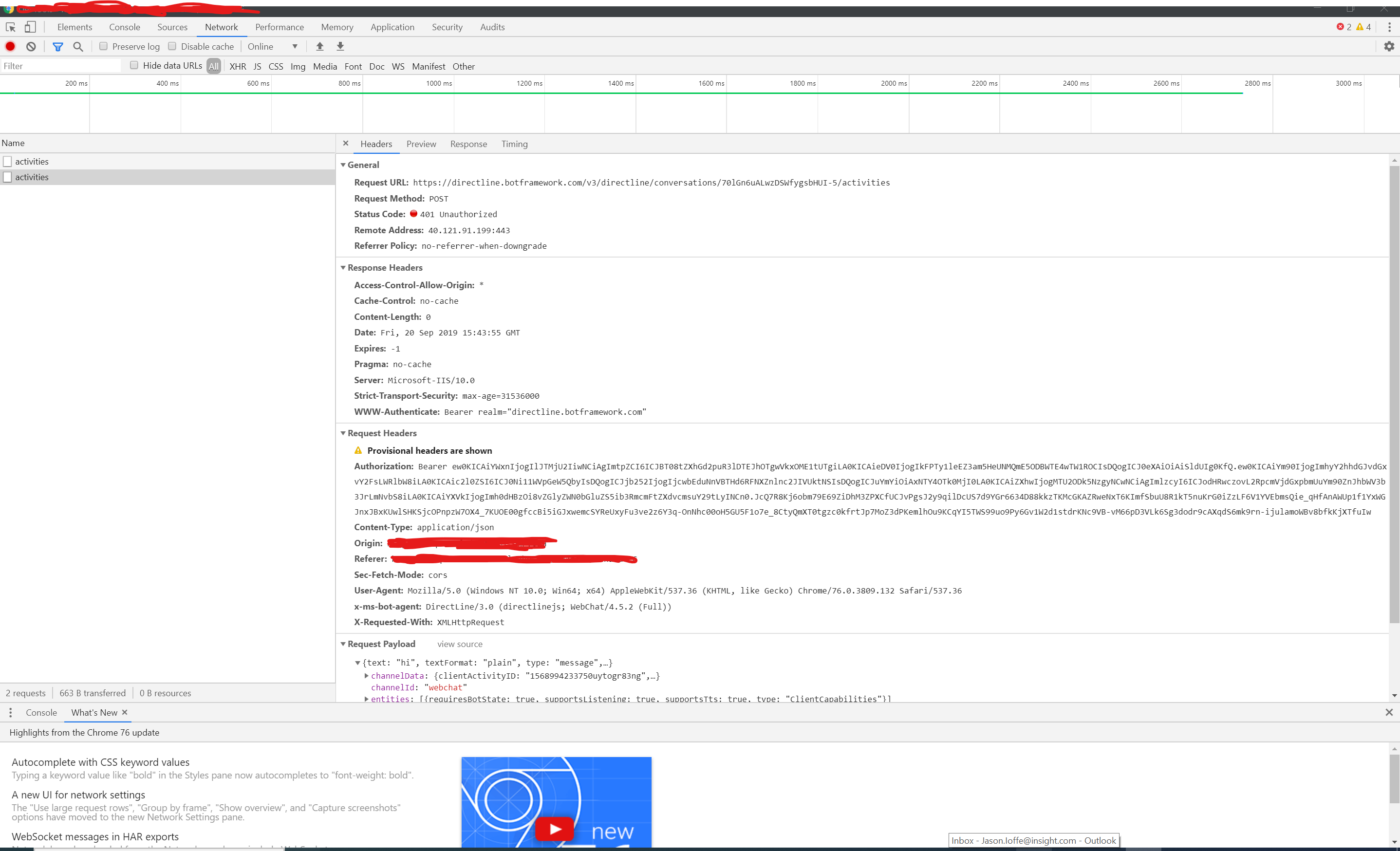

Additionally, I see a request succeed right before with a 200 response, but the Authentication header is not sent. I'm not sure if it's helpful, but here is a stack frame snippet from Chrome:
x | @ | polyfills.js?cdv=3245:1
| t.scheduleTask | @ | polyfills.js?cdv=3245:1
| onScheduleTask | @ | polyfills.js?cdv=3245:1
| t.scheduleTask | @ | polyfills.js?cdv=3245:1
| e.scheduleTask | @ | polyfills.js?cdv=3245:1
| e.scheduleMacroTask | @ | polyfills.js?cdv=3245:1
| v | @ | polyfills.js?cdv=3245:1
| (anonymous) | @ | polyfills.js?cdv=3245:1
| C.i.
| o | @ | webchat.js:1
| t.send | @ | webchat.js:1
| t | @ | webchat.js:1
| t._subscribe | @ | webchat.js:1
| e._trySubscribe | @ | webchat.js:1
| e.subscribe | @ | webchat.js:1
| e.call | @ | webchat.js:1
| e.subscribe | @ | webchat.js:1
| e.call | @ | webchat.js:1
| e.subscribe | @ | webchat.js:1
| t.subscribeToResult | @ | webchat.js:1
| t._innerSub | @ | webchat.js:1
| t._tryNext | @ | webchat.js:1
| t._next | @ | webchat.js:1
| t.next | @ | webchat.js:1
| t._next | @ | webchat.js:1
| t.next | @ | webchat.js:1
| t.notifyNext | @ | webchat.js:1
| t._next | @ | webchat.js:1
| t.next | @ | webchat.js:1
| t.subscribeToResult | @ | webchat.js:1
JIoffe
on 20 Sep 2019
@JIoffe I pinged an engineer who is on server-side, offline. Will give you more information hopefully early next week or sooner. It's Friday noon here. 😁
compulim
on 21 Sep 2019
@JIoffe I was working with engineers and we are pretty sure this is the cause:
- When Web Chat start conversation, it will send a request to
directline.botframework.com - On
directline.botframework.com, when it receive "create conversation" call, it will contact the bot with aconversationUpdateactivity - If the activity cannot be delivered to the bot,
directline.botframework.comwill response to step 1 with HTTP 401, instead of the usual 502 Gateway Timeout
We looked at our server log for 401 with the conversation ID you referenced. The bot timed out on step 2, when we send conversationUpdate activity. Thus, directline.botframework.com returned 401.
As the root cause has been identified, I am closing this issue for now.
Thanks @EricDahlvang and @p-nagpal for server-side debugging. 👍🏻
compulim
on 21 Sep 2019
I have filed a bug https://github.com/microsoft/BotFramework-Services/issues/133 and recommend a fix on our service side to better reflect the real issues (bot timeout).
compulim
on 21 Sep 2019
Thank you! Yes, I can confirm that I've seen the 401 from requests that failed to our bot service. Thank you for all of the help! I agree that a 502 would be more intuitive :)
JIoffe
on 22 Sep 2019
Thank you for reporting this issue. We should have a fix deployed in the next few weeks. We will revert to the original behavior.
 NickEricson
on 1 Oct 2019
NickEricson
on 1 Oct 2019
@NickEricson can you please advise (1) if this has been rolled back yet, (2) if not an ETA, (3) when we will be notified, and (4) should we expect any further issues? You will roll back DirectLine, resolve the issue there, test it, and deploy in a way which should not introduce further issues....correct? Thanks.
 dmprantz
on 4 Oct 2019
dmprantz
on 4 Oct 2019
Hi @dmprantz - (1) This has not been rolled back. (2) We are planning on shipping a fix next week (the fix is checked in already). The fix rolls out world-wide over the week - typically west us is Thursday.
(3) I can reply to this thread when the fix goes out.
(4) The bug that is being fixed is this:
When DirectLine sends a message to a bot and the send call fails (ie it times out or the bot responds with a 500 status code) then DirectLine typically converts the response code to a 502 and returns that to the client. With this bug the response code is being converted to a 401 instead which is clearly wrong and makes it difficult to track down issues. If the bot responds with a 200 then it is not converted (with or without the bug).
The fix will be to return to the original behavior of returning a 502. So this won't fix the actual communication with a bot - just change the response code we forward.
We will (and have been) testing the fix.
NickEricson
on 4 Oct 2019
A fix was deployed world wide for this last week. Please let me know if you are still seeing this issue.
NickEricson
on 14 Oct 2019
Related issues
 adriantan08
·
3Comments
adriantan08
·
3Comments
 vikramdadwal
·
3Comments
vikramdadwal
·
3Comments
 corinagum
·
3Comments
corinagum
·
3Comments
 filipjakov
·
4Comments
corinagum
·
3Comments
filipjakov
·
4Comments
corinagum
·
3Comments
Most helpful comment
@JIoffe I was working with engineers and we are pretty sure this is the cause:
directline.botframework.comdirectline.botframework.com, when it receive "create conversation" call, it will contact the bot with aconversationUpdateactivitydirectline.botframework.comwill response to step 1 with HTTP 401, instead of the usual 502 Gateway TimeoutWe looked at our server log for 401 with the conversation ID you referenced. The bot timed out on step 2, when we send
conversationUpdateactivity. Thus,directline.botframework.comreturned 401.As the root cause has been identified, I am closing this issue for now.
Thanks @EricDahlvang and @p-nagpal for server-side debugging. 👍🏻