Botframework-webchat: Direct Line Speech Button is not visible
What project is affected?
The Virtual Assistant - especially The Direct Line Channel
What language is this in?
C#
What happens?
On thuseday i added the direct Line Channel to communicate with the Bot via Webchat.
Now on Friday i changed nothing and the Button isnt there anymore.
What are the steps to reproduce this issue?
- Deploy the VA
- Add Direct Line Channel
- Wait 3 Days
- The Button to insert Speech is away
(I think this isnt reproducable)
What were you expecting to happen?
See a Button to speak wioth the bot
Can you share any logs, error output, etc.?
/
Any screenshots or additional context?
 danieldangler
All 5 comments
Appears to be a WebChat issue as VA uses the channel like any other Bot. @danieldangler might help if you can share the webchat code your using?
 darrenj
on 26 Jul 2019
darrenj
on 26 Jul 2019
@danieldangler Have you added the webSpeechPonyfillFactory prop to Web Chat?
// Note, for simplicity we are using the subscription key on the client side; however, the client should
// always authenticate against your server to avoid exposing the subscription key to any part of your client code.
const webSpeechPonyfillFactory = await window.WebChat.createCognitiveServicesSpeechServicesPonyfillFactory({
  region: '<region>',
  subscriptionKey: <subscriptionKey>
});

window.WebChat.renderWebChat({
  directLine: window.WebChat.createDirectLine({ token }),
  webSpeechPonyfillFactory
}, document.getElementById('webchat'));
Take a look at the Cognitive Services Speech Services Web Chat sample for more details.
 tdurnford
on 26 Jul 2019
tdurnford
on 26 Jul 2019
I commented with an error that I ran into testing speech bots, but it turns out that was specific to my machine only. I tested out Mock Bot speech and everything seems to be functioning as expected (microphone button is showing up and speech interaction works)

 corinagum
on 26 Jul 2019
corinagum
on 26 Jul 2019
@danieldangler Did that resolve your issue?
tdurnford
on 30 Jul 2019
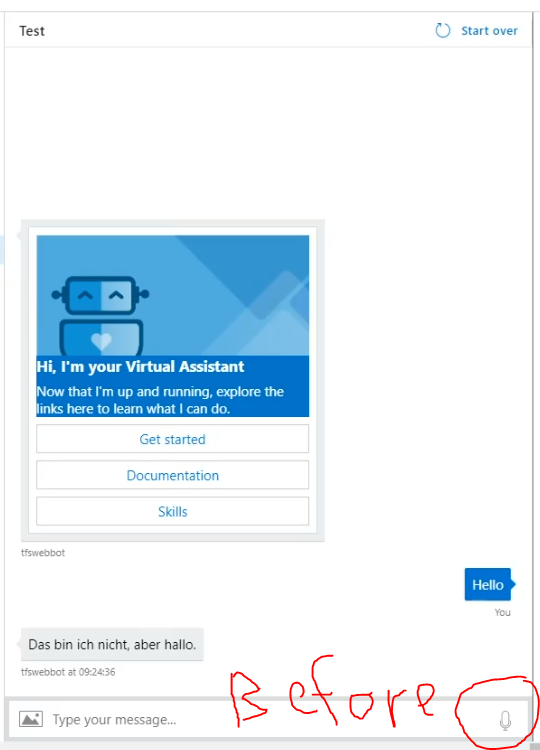
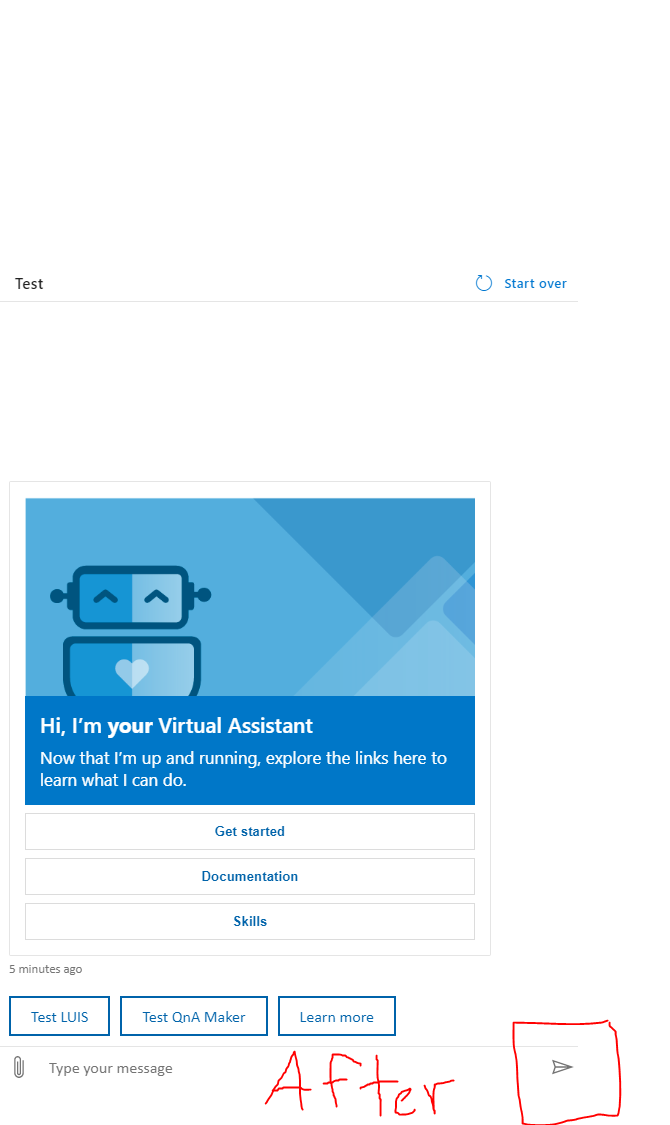
The first screenshot is from Azure Portal with Web Chat v3, and the second is from v4.
We recently bumped Web Chat in the "Test in Web Chat" blade to v4.
In Web Chat v3, we provide free trial of Bing Speech in "Test in Web Chat" blade. Since Cognitive Services team is deprecating Bing Speech around mid-October this year, we are also taking away the speech button when we bump to v4.
To use speech, please obtain your Speech Services subscription key and set it in Web Chat. You can find instructions in this sample, https://github.com/microsoft/BotFramework-WebChat/tree/master/samples/06.c.cognitive-services-speech-services-js.
 compulim
on 2 Aug 2019
compulim
on 2 Aug 2019
Related issues
 marcasmar94
·
3Comments
marcasmar94
·
3Comments
 AndreMantas
·
4Comments
compulim
·
3Comments
corinagum
·
3Comments
AndreMantas
·
4Comments
compulim
·
3Comments
corinagum
·
3Comments
 naveen-vijay
·
4Comments
naveen-vijay
·
4Comments
Most helpful comment
The first screenshot is from Azure Portal with Web Chat v3, and the second is from v4.
We recently bumped Web Chat in the "Test in Web Chat" blade to v4.
In Web Chat v3, we provide free trial of Bing Speech in "Test in Web Chat" blade. Since Cognitive Services team is deprecating Bing Speech around mid-October this year, we are also taking away the speech button when we bump to v4.
To use speech, please obtain your Speech Services subscription key and set it in Web Chat. You can find instructions in this sample, https://github.com/microsoft/BotFramework-WebChat/tree/master/samples/06.c.cognitive-services-speech-services-js.