Botframework-webchat: Image Upload returns default placeholder from directline
[edit by corinagum]: See https://github.com/microsoft/BotFramework-WebChat/issues/2138
Version
4.4
Describe the bug
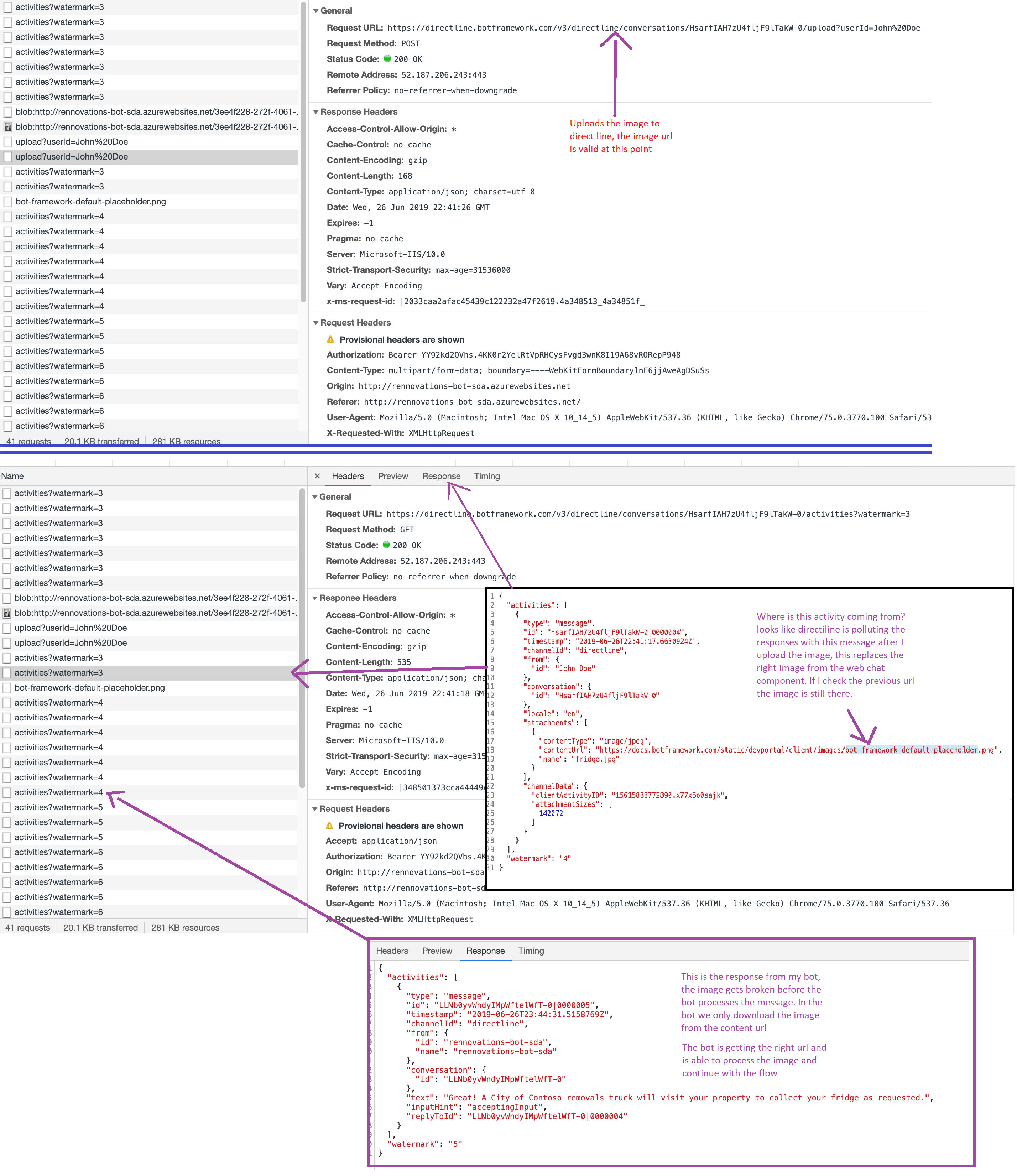
Directline is returning a default placeholder after uploading an image, causing the image to break in the webchat ui.
To Reproduce
Use the Web Chat to upload an image using directline:
- Setup the bot using the WebChat react component and directline.
- Click on upload and select an image.
- The image is uploaded but after it's sent to directline it returns an activity message with the wrong image url, which breaks the image displayed in the chat.
- See error here https://www.screencast.com/t/VHdbgjQiTnr
- The bot is able to process the correct image url from the back-end, you can see the bot responding in the video attached.
- Also tested in Azure Web Chat and it works there, seems that the issue doesn't occur when using WebSockets but all of our projects use DirectLine API so we really need a fix ASAP.
- See the image attached with the requests detail.
Expected behavior
After we upload the image we shouldn't get an activity message from directline with a default placeholder, it should keep the valid url so it doesn't break image displayed in the webchat ui.
[bug]
 gsegares
All 7 comments
A couple questions:
- Are you using CDN / ReactWebChat to generate the webchat ui or are you using the React component driven model (like sample 17.chat-send-history)? What is the version?
- Can you post your code for this part of the dialog (i.e. the step before, during, and after the request for photo)? It'll help in diagnosing.
- For connecting to direct line, are you passing your direct line secret or are you generating a token and passing that?
 stevkan
on 28 Jun 2019
stevkan
on 28 Jun 2019
- I'm using the React component of the web chat (that github repo you mentioned), the bot from the example provided uses 4.1.0 but we also made a test using the latest version and the issue was still there.
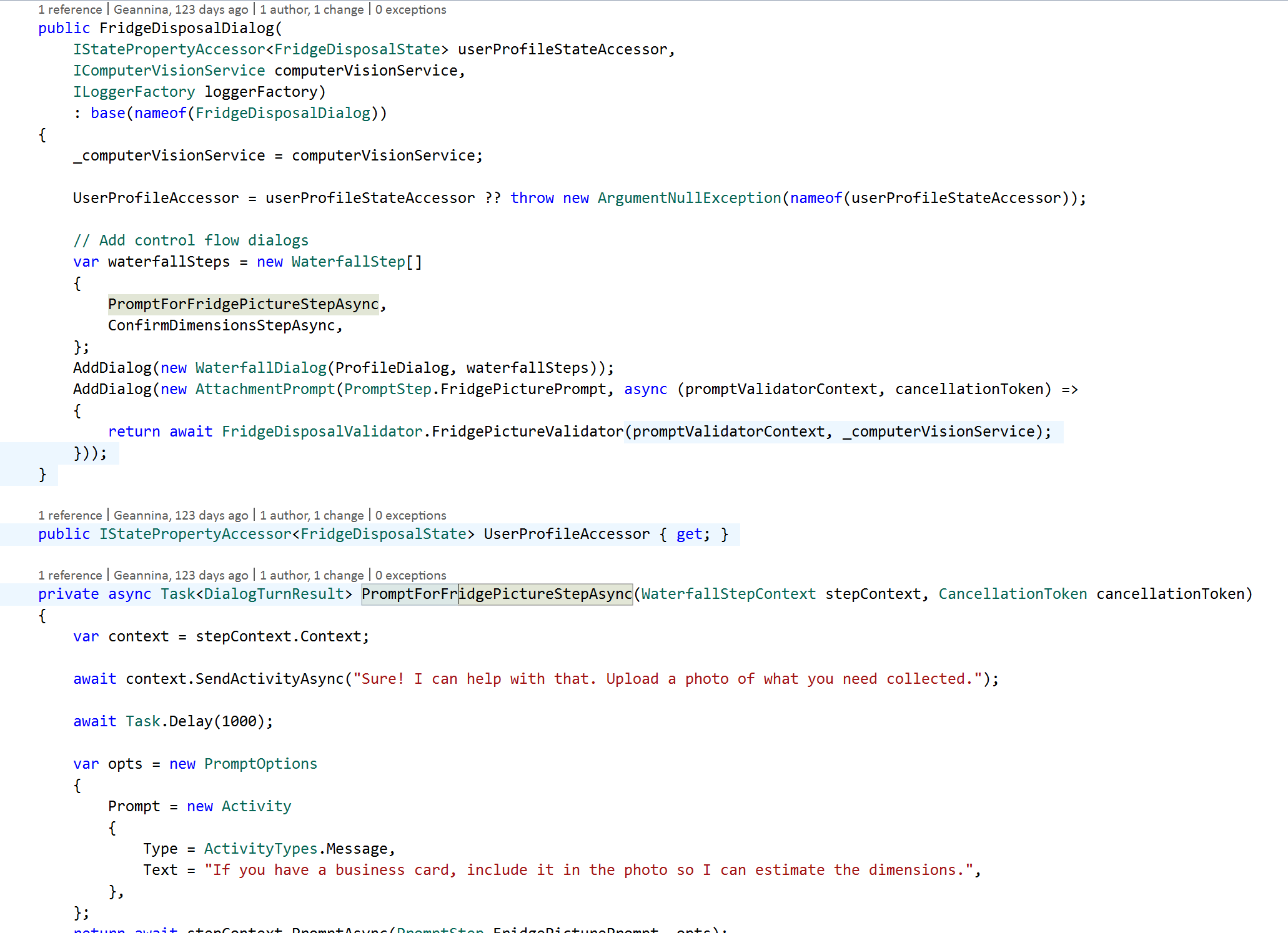
- I attach some screenshots of the code, we have a simple dialog with 2 steps, the first one uses an AttachmentPrompt to get a picture from the user and then downloads that picture (using the HttpClient) to perform some validations on the image using Computer Vision.
- We use direct line secret

gsegares
on 1 Jul 2019
Hey there! Is there any update on this issue? It is currently impacting many of our solutions. Are there any workarounds?
 jamiewilbraham
on 3 Jul 2019
jamiewilbraham
on 3 Jul 2019
Possibly related to https://github.com/microsoft/BotFramework-WebChat/issues/2138
 tdurnford
on 4 Jul 2019
tdurnford
on 4 Jul 2019
Hey Jamie, here is the client side work around we discussed. If you have any questions, feel free to ask them here.
• We should respect aspect ratio and limit the size to maximum 480px
• We should downscale image only, and leave non-image files as-is
• This works with multiple attachments
  (async function () {
    // In this demo, we are using Direct Line token from MockBot.
    // To talk to your bot, you should use the token exchanged using your Direct Line secret.
    // You should never put the Direct Line secret in the browser or client app.
    // https://docs.microsoft.com/en-us/azure/bot-service/rest-api/bot-framework-rest-direct-line-3-0-authentication

    const res = await fetch('https://webchat-mockbot.azurewebsites.net/directline/token', { method: 'POST' });
    const { token } = await res.json();

    // We are using a customized store to add hooks to connect event
    const store = window.WebChat.createStore({}, ({ dispatch }) => next => action => handleWebChatUpload(next, action));

    window.WebChat.renderWebChat({
      directLine: window.WebChat.createDirectLine({ token }),
      store
    }, document.getElementById('webchat'));

    function eventToPromise(target, name) {
      return new Promise((resolve, reject) => {
        const handler = event => {
          target.removeEventListener(name, handler);
          resolve(event);
        };

        target.addEventListener(name, handler);
      });
    }

    async function downscaleImage(imageURL, contentType, maxSize) {
      const image = document.createElement('img');
      const imageLoadPromise = eventToPromise(image, 'load');

      image.src = imageURL;

      await imageLoadPromise;

      const canvas = document.createElement('canvas');

      canvas.height = image.height > image.width ? maxSize : ~~(image.height / image.width * maxSize);
      canvas.width = image.width > image.height ? maxSize : ~~(image.width / image.height * maxSize);
      canvas.getContext('2d').drawImage(image, 0, 0, canvas.width, canvas.height);

      const dataURL = canvas.toDataURL(contentType);

      return dataURL;
    }

    async function handleWebChatUpload(next, action) {
      if (action.type === 'DIRECT_LINE/POST_ACTIVITY') {
        if (action.payload.activity && action.payload.activity.attachments) {
          const downscaledImages = await Promise.all(
            action.payload.activity.attachments.map(
              ({ contentType, contentUrl }) => /^image\//.test(contentType) ? downscaleImage(contentUrl, contentType, 480) : null
            )
          );

          (action.payload.activity.channelData || (action.payload.activity.channelData = {})).thumbnails = downscaledImages;
        }
      } else if (action.type === 'DIRECT_LINE/INCOMING_ACTIVITY') {
        const activity = action.payload.activity;

        if (activity && activity.attachments && activity.channelData && activity.channelData.thumbnails) {
          action.payload.activity.attachments = activity.attachments.map((attachment, index) => ({
            ...attachment,
            contentUrl: activity.channelData.thumbnails[index] || attachment.contentUrl
          }));
        }
      }

      return next(action);
    }

    document.querySelector('#webchat > *').focus();
  })().catch(err => console.error(err));
 CoHealer
on 5 Jul 2019
CoHealer
on 5 Jul 2019
The WebChat team is tracking this work on https://github.com/microsoft/BotFramework-WebChat/issues/2138 - we'll keep this open as a duplicate until #2138 is resolved.
 cwhitten
on 8 Jul 2019
cwhitten
on 8 Jul 2019
Closing as resolved :)
 corinagum
on 6 Nov 2019
corinagum
on 6 Nov 2019
Related issues
 mmalaiarasan-conga
·
3Comments
mmalaiarasan-conga
·
3Comments
 joshm998
·
3Comments
joshm998
·
3Comments
 GewoonMaarten
·
3Comments
GewoonMaarten
·
3Comments
 compulim
·
3Comments
compulim
·
3Comments
 electrobabe
·
4Comments
electrobabe
·
4Comments
Most helpful comment
Hey Jamie, here is the client side work around we discussed. If you have any questions, feel free to ask them here.
• We should respect aspect ratio and limit the size to maximum 480px
• We should downscale image only, and leave non-image files as-is
• This works with multiple attachments