Botframework-webchat: User messages at the top, using desktop browsers.
[Edit by @corinagum] (Adding more detail to issue)
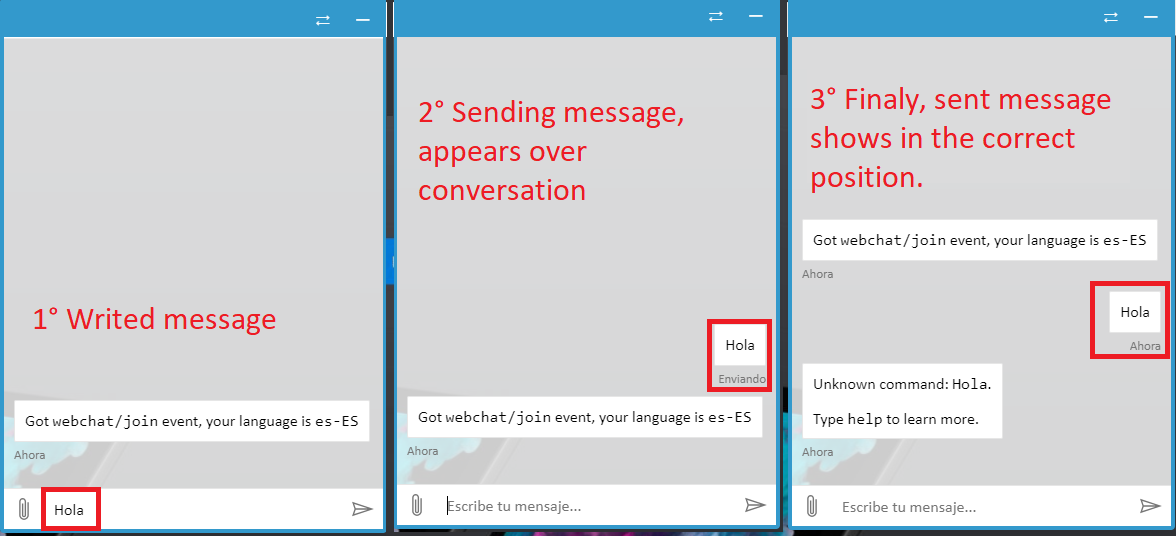
https://microsoft.github.io/BotFramework-WebChat/12.customization-minimizable-web-chat/, you can see how, by an instant, while messages are sending, they shows up, over any previous sent message.
-- Original message below --
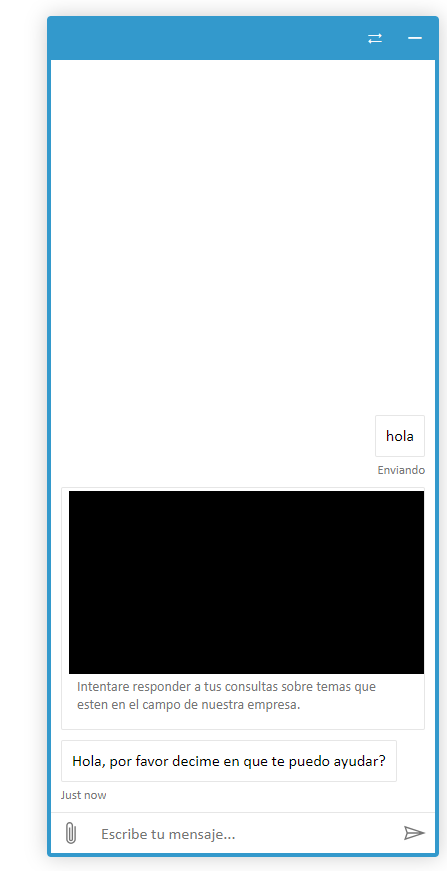
User messages are displayed at the top while they are sent, using desktop browsers (Chrome, Firefox, IE, Edge, etc). The problem does not occur from mobile devices.
We are using WebChat v4 sample #12
 Slayouth
All 11 comments
Hi @Slayouth, this is an ongoing discussion about the differences between Emulator, other channels, and Web Chat. Please look at https://github.com/Microsoft/BotFramework-WebChat/issues/1665
 corinagum
on 11 Apr 2019
corinagum
on 11 Apr 2019
Moving comment from #1665
Sorry @corinagum, but my exposed error, is not like this. Using https://microsoft.github.io/BotFramework-WebChat/12.customization-minimizable-web-chat/, you can see how, by an instant, while messages are sending, they shows up, over any previous sent message.
@Slayouth, thank you for providing screencaps, this is very helpful. :) Sorry for the misunderstanding. I am reopening this issue pending investigation. Could you add some details?
- Are there any console errors when this occurs? (Probably not, but good to check)
- How long would you say it takes for the message to appear in the correct spot?
- Are you using DirectLineJS via Web Chat? Or are you using your own version of DLJS?
corinagum
on 12 Apr 2019
About the console: I'll review it, but I do not think so.
When the message is Sent, inmediatly goes down. The error is just while the message is in sending state.
I'm using the native DirectLineJS vía Web chat. But you can see the error in the previous link sent. The error only occurs from a desktop navigator
Slayouth
on 13 Apr 2019
Recently i was testing this issue from a Linux (Ubuntu 18.04) computer, and discover that the problem only occurs from windows 10 (1809). Both OS on English language and Chrome at the last update.
Slayouth
on 16 Apr 2019
I think the clockskew between browser, bot (your server), and the channel (our server) maybe causing the issue.
Anyone have time to look at it? The code is here, https://github.com/Microsoft/BotFramework-WebChat/blob/master/packages/core/src/reducers/activities.js#L25. We put a lot of comments there to help people understand it.
Ultimate goal: even there is clockskew between any of the machines, if no one override the timestamp, it should appears in natural order.
 compulim
on 16 Apr 2019
compulim
on 16 Apr 2019
Well, finally we have found the cause !! The problem exists only when a computer has delayed time respect official time. Maybe we can solve problems, implementing some kind of message id.
Slayouth
on 26 Apr 2019
Glad you figured it out @Slayouth. This bug will be helpful to others if they come across the same problem in the future. I'm going to close this issue, but if something else comes up please feel free to comment and I can reopen.
corinagum
on 29 Apr 2019
@Slayouth How did you fix the issue?
 harisuru
on 2 May 2019
harisuru
on 2 May 2019
I am experiencing the same problem as @Slayouth when using WebChat (https://cdn.botframework.com/botframework-webchat/latest/webchat.js) and botbuilder 4.4.0. Works as expected in Bot Emulator.
I deployed to Azure Web App which has UTC timezone. I configured my local dev machine to run UTC as well.
Unfortunately, this is a show stopper.
 MStumpp
on 3 Jun 2019
MStumpp
on 3 Jun 2019
Well, finally we have found the cause !! The problem exists only when a computer has delayed time respect official time. Maybe we can solve problems, implementing some kind of message id.
I am also experiencing the same problem @Slayouth using WebChat
(https://cdn.botframework.com/botframework-webchat/latest/webchat.js). Please help us with the issue and crack this official time and implementing the message id.
@corinagum I am still facing this issue. could you please help out with resolution.
Unfortunately, this is a show stopper.
 uppalapraveen
on 17 Mar 2020
uppalapraveen
on 17 Mar 2020
This is not trivial to solve due to Direct Line protocol issue that is out of our control. We have a pending issue tracking this, #2991.
- Bot activities are in random order due to distributed nature of the system
- Although activity ID seems monotonic increasing, protocol team do not recommend us to use it for sorting, i.e. we can't use it
- Thus, there are only 2 fields we can use for sorting:
timestampandreplyToId
Currently, we are sorting based on timestamp. For incoming activities, we receive this timestamp field. For outgoing activities, we receive this timestamp field after the server successfully sent the activity. This also means, after the bot completely processed the activity.
As the system is distributed, outgoing activities may not receive "server-blessed" timestamp before the bot response. Thus, Web Chat need to use local clock for timestamp before receiving server-blessing.
We know there may be clock skew (especially when client set to wrong time zone).
Thus, in our previous PR, we attempted to measure/correct the clock skew between client and server. But it's not perfect since there could be milliseconds differences (bigger on mobile devices), user may see jitter of messages as recorded by @Slayouth.
Emulator works because the timestamp field is always local clock.
In #2991, we are planning to use another field, replyToId to act as another hint on sorting.
Please vote on #2991 so we can prioritize this work during triage.
FYI, we may not reply to closed issue because of poor visibility.
compulim
on 17 Mar 2020
Related issues
 vikramdadwal
·
3Comments
vikramdadwal
·
3Comments
 felixhauserch
·
3Comments
corinagum
·
3Comments
compulim
·
3Comments
felixhauserch
·
3Comments
corinagum
·
3Comments
compulim
·
3Comments
 marcasmar94
·
3Comments
marcasmar94
·
3Comments