Botframework-webchat: Last button not appearing on HeroCard in IE11 on SharePoint
Hi,
The last button is not displaying in HeroCard on IE11 but works fine on Chrome and Microsoft Edge.
Note that it is on SharePoint in an iframe.
Code Below:
Function
var messageBuilder = function (txt, buttons, session) {
  var msg = new builder.Message(session)
    .attachmentLayout(builder.AttachmentLayout.list)
    .attachments([
      new builder.HeroCard(session)
        .text(escapes(txt))
        .buttons(buttons),
    ]);
  session.endDialog(msg);
}
Calling the function
var buttons = [];
      var msgText = jsonContent.satisfait;
      buttons.push(builder.CardAction.imBack(session, "Oui", "Oui"),
      builder.CardAction.imBack(session, "Non", "Non"));
      messageBuilder(msgText, buttons, session);
Output:
Should be
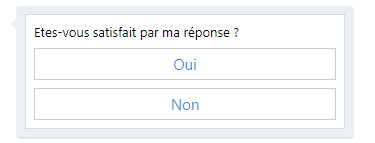
Instead of
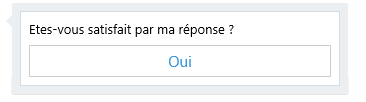
Thanks to help.
 EnnamGopaulen
All 17 comments
Hello @EnnamGopaulen does this repro outside of the Iframe in IE11 ?
 danmarshall
on 7 Sep 2017
danmarshall
on 7 Sep 2017
Hi @danmarshall , thanks for your reply.
No, it does not repro. Only on SharePoint in IE11.
EnnamGopaulen
on 8 Sep 2017
Can you use your browser's F12 and inspect the element? Perhaps it is there but invisible...
Also, can you see if there are any errors in the console alerting why this button could not be added.
danmarshall
on 8 Sep 2017
Hello @danmarshall,
Please find below screenshot:

No errors in the console.
Thanks.
EnnamGopaulen
on 12 Sep 2017
@dclaux - do you have any idea why the last button won't render in SharePoint?
danmarshall
on 12 Sep 2017
If the DOM has the button element, then the renderer has done its job... I have no idea why the second wouldn't display if present in the DOM, aside from the host decided to give the card an explicit height that isn't enough for both buttons...
 dclaux
on 12 Sep 2017
dclaux
on 12 Sep 2017
Hi @dclaux,
Thanks for your reply.
Please note that this was working fine before on the SharePoint.
EnnamGopaulen
on 13 Sep 2017
@EnnamGopaulen I am at a loss here, sorry. I'd need more insights on how SharePoint is rendering cards, which version of the Adaptive renderer they use...
dclaux
on 13 Sep 2017
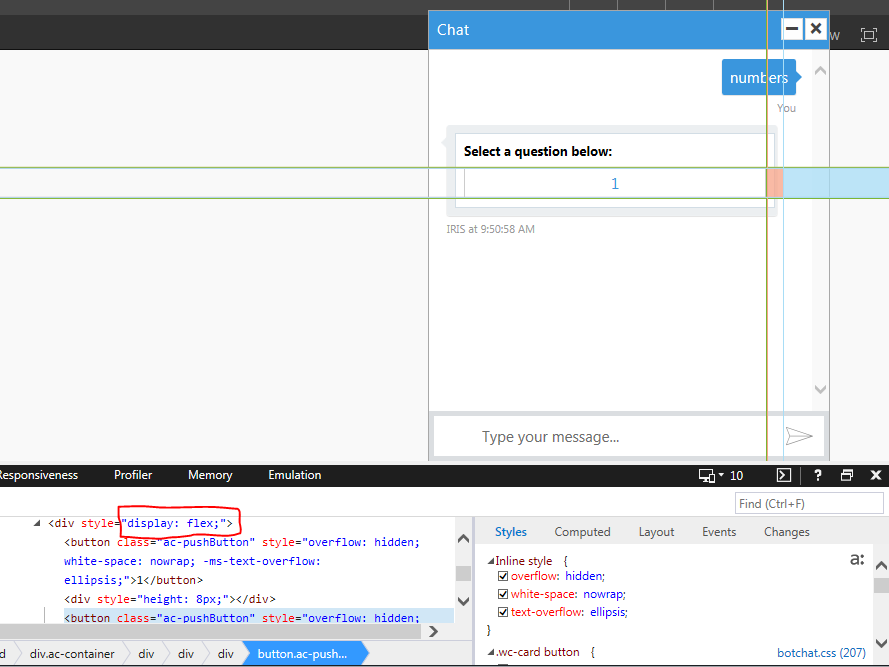
@dclaux @danmarshall My team is running into the same issue, but we are using Adaptive Cards (which is the same thing as HeroCard since HeroCard is implemented using Adaptive Cards). What I found is that there is "display: flex" style on the div that wraps the buttons which seems to be causing the buttons to not stack vertically and instead stack horizontally. If I remove this style then the buttons show up as would be expected.
Here is what I currently see. I have selected the second button so you can see where its being rendered, and I have circled the style which fixes the issue when removed.
 jfb74
on 18 Sep 2017
jfb74
on 18 Sep 2017
Thanks @jfb74 - while you're in the F12 debugger tools, can you look to see what is the iframe's document mode? I suspect that Flexbox might not be supported under older modes.
danmarshall
on 21 Sep 2017
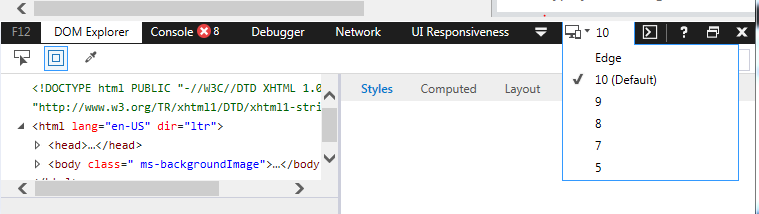
@danmarshall Not sure I specifically know how to check the iframe's document mode, but I can see in Dev tools that the parent page itself is in "10" mode. If I bump it up to "Edge" it seems to fix the issue, which leads me to believe that the iframe is basing it's document mode based on the parent. Moving the iframe into its own file and setting the document mode to 10 causes the same issue of only 1 button showing up, which means its not a Sharepoint specific issue.
jfb74
on 21 Sep 2017
@danmarshall Any update on this based on what I provided? Thanks!
jfb74
on 4 Oct 2017
@dclaux is there some test we can do in IE 10 mode to mitigate this?
danmarshall
on 4 Oct 2017
From what @jfb74 mentioned, adding the following appears to be a workaround - not sure what knock on problems it might cause though.
.ac-container  [style="display: flex;"] {
    flex-direction: column;
}
 createdincode
on 26 Oct 2017
createdincode
on 26 Oct 2017
Also running into this. SharePoint is forcing the document into IE10 mode via a tag in the header, and causing the flex style to prevent the other buttons from displaying.
 mjarmstrong
on 22 Jan 2018
mjarmstrong
on 22 Jan 2018
Thanks for the workaround!
mjarmstrong
on 22 Jan 2018
Looks like a CSS bug on SharePoint side and they leaked their CSS styles to Web Chat.
 compulim
on 15 Jun 2018
compulim
on 15 Jun 2018
Related issues
compulim
·
3Comments
 Stardox
·
3Comments
Stardox
·
3Comments
 marcasmar94
·
3Comments
marcasmar94
·
3Comments
 electrobabe
·
4Comments
electrobabe
·
4Comments
 mmalaiarasan-conga
·
3Comments
mmalaiarasan-conga
·
3Comments
Most helpful comment
From what @jfb74 mentioned, adding the following appears to be a workaround - not sure what knock on problems it might cause though.
.ac-container  [style="display: flex;"] {
    flex-direction: column;
}