Botframework-webchat: Buttons not showing complete text
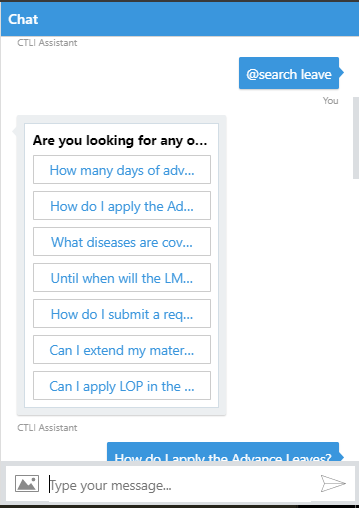
Buttons in PromptDialog.Choices() as well as in other Rich cards are not showing complete texts. But instead it only shows whatever it can fit in 1 line followed by ... in web channel meanwhile working fine in bot emulator. I went through the code and it seems that the style of button has property White-Space=nowrap;
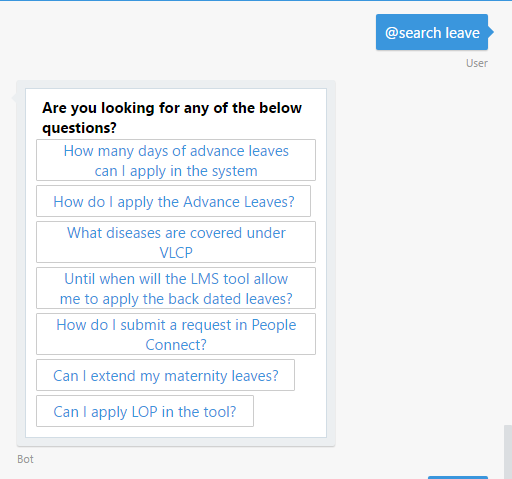
About 2 weeks ago complete text was coming on buttons in the web channel as well as in the azure test feature. But now Its not coming completely. When i remove the white-space property from button though using inspect element of browser i can see the old behavior.
So can someone please tell me why this was changed? And is it possible to get white-space property removed from the style of Button? If so i'd suggest to remove that property since it is causing unexpected behavior.
Current behavior in the web channel:
Expected as well as previous behavior in the web channel
 UtkarshBehre
All 9 comments
Hi @UtkarshBehre this changed when we integrated Adaptive Cards. This change will be rolled out in the new Emulator also.
I have filed an issue with the Adaptive Cards project to see if this can be resolved soon.
 danmarshall
on 4 Aug 2017
danmarshall
on 4 Aug 2017
Hi @UtkarshBehre, revisiting your scenario, I would not recommend using buttons with long text anyways. For example, in your computer OS, desktop or mobile, can you see many examples of buttons with long text? Buttons are best with short text.
Here is an article that may be related to what you are building: a knowledge bot: https://docs.microsoft.com/en-us/bot-framework/bot-design-pattern-knowledge-base
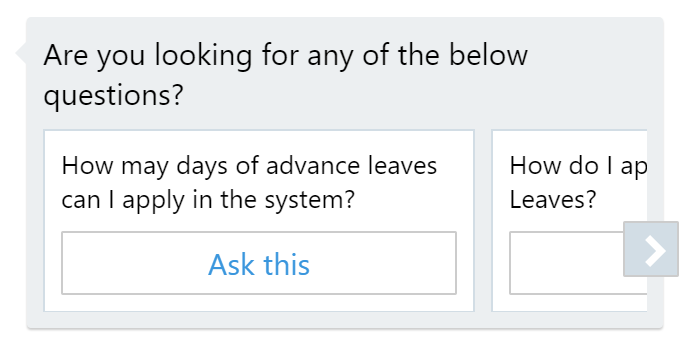
My advice is that you use a carousel control instead. This will allow you to have long descriptive text and a button to select that item. Here is an example:
danmarshall
on 7 Aug 2017
Thanks @danmarshall for the clarification and help. I will look into the carousel control and try to redesign accordingly. I hope this results in better design overall as well.
Just for information though should i expect a fix for the button display that was changed in adaptive cards? Since that was the initial proposal for my project and it'll be little better if it stays that way.
UtkarshBehre
on 9 Aug 2017
Hi @UtkarshBehre I cannot say for sure at this time if that change will go through.
danmarshall
on 9 Aug 2017
We're having this issue with the response from QnAMaker. Using cards is a nice idea, but we've found the carousel isn't always the best way to present a list (some people don't scan right to the end, weird!). Would really like text to wrap on buttons. It also means no extra dev to handle adaptive cards, and text responses by the user still work.
I thought perhaps I might be able to target the button CSS
<button type="button" class="ac-pushButton" style="overflow: hidden; white-space: nowrap; text-overflow: ellipsis; flex: 0 1 auto;">My button text goes here, it's a long bit of text</button>
This, for example, wraps the text nicely ...
<button type="button" class="ac-pushButton" style="overflow: hidden; white-space: wrap; text-overflow: ellipsis; flex: 0 1 auto;">My button text goes here, it's a long bit of text</button>
(note the 'wrap')
However, I can't seem to override the inline style in CSS.
Might a CSS workaround be possible please?
 dividor
on 26 Jan 2018
dividor
on 26 Jan 2018
@dividor - you might try experimenting with the CSS !important decorator. Otherwise, this is being set in the Adaptive Cards library - you may want to add you comments in their open issue here.
danmarshall
on 26 Jan 2018
Thanks @danmarshall, I'm not the best at CSS. :)
I fixed this issue by adding this CSS directive in the host page where I call web chat ...
.ac-pushButton {
        white-space: normal !important;
    }
This makes the text wrap.
dividor
on 27 Jan 2018
@dividor does it worked for IE also?
 Sur0611
on 30 Aug 2018
Sur0611
on 30 Aug 2018
Thanks @danmarshall, I'm not the best at CSS. :)
I fixed this issue by adding this CSS directive in the host page where I call web chat ...
.ac-pushButton {
        white-space: normal !important;
    }
This makes the text wrap.
yes it's working..great job.thanks
 nmssalman
on 13 Sep 2018
nmssalman
on 13 Sep 2018
Related issues
 Stardox
·
3Comments
Stardox
·
3Comments
 filipjakov
·
4Comments
filipjakov
·
4Comments
 compulim
·
3Comments
compulim
·
3Comments
 joshm998
·
3Comments
joshm998
·
3Comments
 GewoonMaarten
·
3Comments
GewoonMaarten
·
3Comments
Most helpful comment
Thanks @danmarshall, I'm not the best at CSS. :)
I fixed this issue by adding this CSS directive in the host page where I call web chat ...
.ac-pushButton { white-space: normal !important; }This makes the text wrap.