Botframework-solutions: Issue passing token back to skill through Teams channel in VA
What project is affected?
Virtual Assistant and Skill
What language is this in?
TypeScript
What happens?
When using authentication in the Teams channel the token comes back on a "onInvokeActivity" method instead of the "onTeamsSigninVeryfyState". This causes a problem when trying to upgrade to the bot-solutions base 1.0.0 since the veryfyState method does not receive the token to forward to the skill. When trying to use the InvokeActivity we receive a type error as the return type is not compatible.
What are the steps to reproduce this issue?
Clone the VA base 1.0.0 branch, attach skill with authentication and run dialog through the Teams channel.
Try adding the "onInvokeActivity" to the VA to pass the token through on the Teams channel
What were you expecting to happen?
The ability to receive the token back on the "onTeamsSigninVerifyState" method
Can you share any logs, error output, etc.?
Argument of type 'DefaultActivityHandler
The types returned by 'onInvokeActivity(...)' are incompatible between these types.
Type "Promise\
Any screenshots or additional context?
 tomSauret847
All 5 comments
Hi @tomSauret847, thanks for reporting this issue. We came up with some questions to narrow the issue:
- Can you confirm that you are using PR #3583, PR #3584 and PR #3585 that contains the 1.0 version of the TypeScript bots?
- If so, have you pulled the latest changes of the PR #3584 (check commit)? We fixed an issue related to Authentication in MS Teams for VA - Skill communication which was to replace the
onTeamsSignInVerifyStatetohandleTeamsSignInVerifyStatefollowing the SDK implementation and the sample of BotBuillder-Samples repository that contains Authentication - Just to confirm, are you using SSO Authentication?
As soon as we have any update for you, we will back to this issue 😊.
 Batta32
on 20 Nov 2020
Batta32
on 20 Nov 2020
Thank you @Batta32 We are using the #3583 and the #3584 pull requests in the implementation. I am sorry I had the wrong method listed above but we are using the handleTeamsSigninVerifyState method in the VA. When adding logging inside the method it is not being used when the token is returned. For the skill we are using #3583 PR for the bot-solutions package and #3585 for the base. I did have to make a change when setting up the MultiProviderAuthDialog to account for a locale that is not in the bot framework. Here is the modification I made,
const promptSettings = [{
connectionName: settings.authenticationConnections[0].name,
text: 'Please sign in for verification.',
title: 'Click to signin',
timeout: 300000
}];
const promptSettingsId = [{
connectionName: settings.authenticationConnections[0].name,
text: 'Mohon sign in untuk verifikasi.',
title: 'Klik untuk sign in',
timeout: 300000
}];
const authPromptId = new MultiProviderAuthDialog(settings.authenticationConnections,'id-id', promptSettingsId);
const authPrompt = new MultiProviderAuthDialog(settings.authenticationConnections, 'en-us', promptSettings);
Let me know if you need anymore information.
tomSauret847
on 20 Nov 2020
Hi @tomSauret847 we successfully reproduced the issue, following the repro steps that you described.
We recently pushed some changes in the PR #3583 in order to send the token to the TokenProvider as C# does. Please, pull the changes to incorporate them in your bots.
We will continue working on find a solution, we will let you know the updates 😊
_Issue reproduced_

Batta32
on 25 Nov 2020
Hi @tomSauret847, we found a solution for the issue.
Follow these steps:
- Use feature/southworks/issue-3716/solution internal branch
- Install 1.0 Bot-Solutions in the bots
- Deploy your bots using the deploy.ps1 script
- Add the OAuth settings in your Skill Web App Bot in Azure
- Update the oauthConnections settings in the appsettings of your Skill
- Enable the MS Teams channel in the Web App Bot of your Virtual Assistant
- Connect the bots
- Upload your VA app in MS Teams
- Talk with your Virtual Assistant
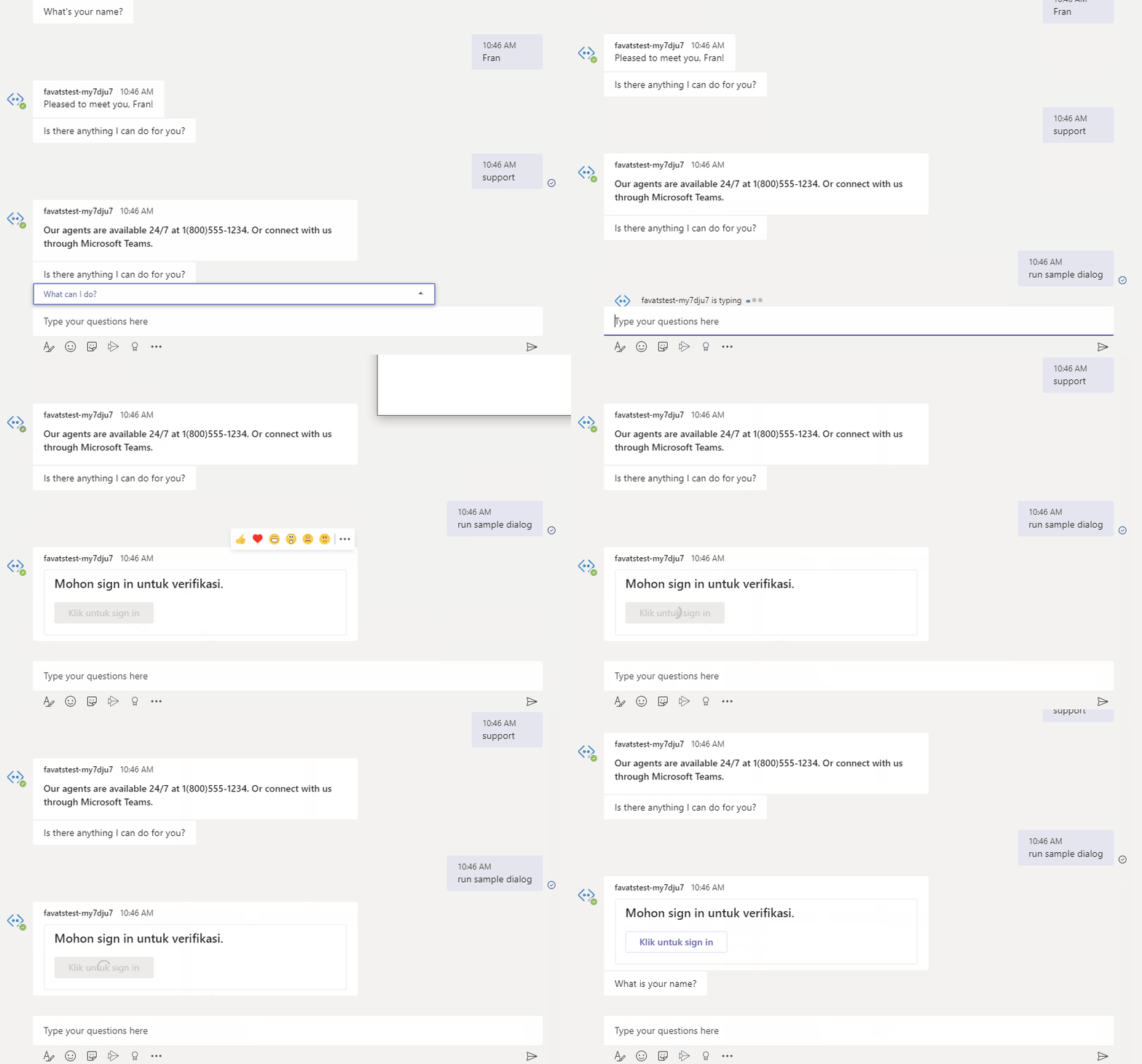
- Invoke the Skill writing run sample dialog. The OAuth card should appears
- Log in into the Skill
- Verify that the token is sent to the Skill, and the conversation continues
Verify each commit of the branch:
- Use 1.0 Bot-Solutions
- Use 1.0 Virtual Assistant
- Use 1.0 Skill
- Enable authentication in the TS Sample Skill
- Extend defaultActivityHandler from TeamsActivityHandler, add method handleTeamsSignInVerifyState
Let us know if this helps you 😊.
_Authentication successfully working in MS Teams channel using 1.0 TypeScript bots_
Batta32
on 26 Nov 2020
@Batta32 Thank you for fixing this. I have implemented the changes you provided and can confirm the token is being passed through to the skill as expected. Thank you for a timely fix for this issue!
tomSauret847
on 30 Nov 2020
Related issues
 samaea
·
3Comments
samaea
·
3Comments
 andhdo
·
3Comments
andhdo
·
3Comments
 tommyJimmy87
·
4Comments
tommyJimmy87
·
4Comments
 lauren-mills
·
4Comments
lauren-mills
·
4Comments
 igor17400
·
4Comments
igor17400
·
4Comments
Most helpful comment
@Batta32 Thank you for fixing this. I have implemented the changes you provided and can confirm the token is being passed through to the skill as expected. Thank you for a timely fix for this issue!