Botframework-solutions: Inconsistent bot response in Teams channel
- When we say 'hi', it should reply the welcome card as per our flow (which is working fine in Webchat channel). But it's giving different cards and seems this is getting cached.
Need your assistance on this.
Please let me know if you need more details on this.
Thanks,
Sreekanth
 SreekanthOAuth
All 32 comments
@Virtual-Josh at the very least we're probably going to need to make sure customer understand how to use Sidecar debugging in the Emulator so they can test against the teams environment.
 sgellock
on 11 Nov 2019
sgellock
on 11 Nov 2019
Hi @SreekanthOAuth,
There's a couple of things to know.
First, you can use the Bot Framework Emulator to debug your bot within Teams. In the Emulator you can go to "Help"-> "Get started with channels (Bot Inspector)" to see the instructions for how to set it up.
Second, the Emulator will work as documented within a one-to-one and group chat. If you are having issues with that then let us know.
Third, there's a bug in messages in a team. When you do the /inspect GUID command in a team you must respond to the thread that has the /inspect GUID if you want to see the trace activities in the Emulator. Currently the logic in the InspectionMiddleware doesn't handle activities coming from a Teams team chat. I've opened issues on our various repos to resolve the issue. You can view those issues here:
https://github.com/microsoft/botbuilder-dotnet/issues/2955
https://github.com/microsoft/botbuilder-python/issues/428
https://github.com/microsoft/botbuilder-java/issues/142
https://github.com/microsoft/botbuilder-js/issues/1406
Let me know if you have any other questions.
 Virtual-Josh
on 12 Nov 2019
Virtual-Josh
on 12 Nov 2019
Hi @Virtual-Josh, we don't see any issue in Emulator. Here Bot is working as expected.
The only place where we are seeing the issue is in Teams Channel.
Thanks,
Sreekanth
SreekanthOAuth
on 13 Nov 2019
I need you to give me a full overview of what you're doing in order to figure out what's wrong. Here are some initial questions I'm particularly interested in.
- Are you running this bot in a 1:1 chat, group chat, or team chat?
- How did you install the bot in Teams?
- Are you using one of our Samples, or is this your own code?
Alternatively you can view a sample we have for Teams (C# JS) if you want to try to self-service.
Virtual-Josh
on 13 Nov 2019
Hi @SreekanthOAuth
Teams Bots will receive a conversationupdate event when the user first adds the bot for 1:1 chat, or the bot is added to a team. Not when new conversations are created in the team or a team member messages the bot. If the welcome message is sent from ConversationUpdate's OnMemberAdded: it will not fire in Teams at the same times as it does in the emulator.
WebChat and the Emulator send a conversation update when they connect (since they both create new conversations during startup).
You could track who has messaged the bot, and respond with a welcome message on first contact. This mechanism isn't built into the sdk, so it is something custom that would need to be coded in your bot.
 EricDahlvang
on 16 Nov 2019
EricDahlvang
on 16 Nov 2019
@EricDahlvang - Sorry for the late reply.
Ok. Let me give some more details about it.
We have Virtual Assistant and custom skills. When a user request for something, the flow goes from Virtual Assistant to respective skill. Inside skill, there is dc.endDialog() method in complete(). This function is getting executing as expected in Emulator, Webchat and SMS channels. But based on our analysis, this seems not working as expected in teams. The context is not being cleared out. So that we see the same skill menu which we have requested first time on every time (even you requested different intent)
Created custom skill (of type Typescript), based below documentation,
https://microsoft.github.io/botframework-solutions/skills/tutorials/create-skill/typescript/3-create-your-skill/
And one more thing is,
- The MSTeams channel was working fine until we move to Virtual Assistant and Skill Routing. Before, Virtual Assistant used to handle all functionalities (based on intent show the dialogue) inside VA itself. So presuming this is major change to facing this issue.
Please suggest on this.
Thanks,
Sreekanth
SreekanthOAuth
on 18 Nov 2019
I see this issue which discuss similar issue and it workaround in C#bot however we need workaround for typescript bot.
 amistry79
on 18 Nov 2019
amistry79
on 18 Nov 2019
Hey @gabog since we are now talking about skills can you take a look at this ticket to help resolve?
Virtual-Josh
on 18 Nov 2019
Hey @SreekanthOAuth,
I'm going to move this issue over to the botframework-solutions repo since the core problem is the VA/Skills routing.
Virtual-Josh
on 18 Nov 2019
@SreekanthOAuth - We have updated our VA template and libs to support intro message and auth in Teams. Please try updating your project and let us know if the issues are resolved.
 lauren-mills
on 21 Nov 2019
lauren-mills
on 21 Nov 2019
@lauren-mills - Thanks for the update.
We have been working on Virtual Assistant since from 5 months. So we have a lot of updates to our VA.
It would be a great help if you can give details on what are the major changes happened to make it work.
We are on Typescript
Thanks,
Sreekanth
SreekanthOAuth
on 21 Nov 2019
The updates have been made to the C# template, and should be coming to the typescript template soon. The primary changes were to inherit from the TeamsActivityHandler instead of IBot in the DialogBot class. Here is the file in the C# template, and I believe the TypeScript changes should be the same, but let me know if you run into any issues. https://github.com/microsoft/botframework-solutions/blob/master/templates/Virtual-Assistant-Template/csharp/Sample/VirtualAssistantSample/Bots/DefaultActivityHandler.cs
lauren-mills
on 22 Nov 2019
Thanks for the update. We will try and get back to you.
Thanks,
Sreekanth
SreekanthOAuth
on 27 Nov 2019
We see the DialogBot is extending from ActivityHandler in current virtual assistant.
We don't find 'TeamsActivityHandler' in 'botbuilder' npm package.
And, below are few more queries
Is this change only for Virtual Assistant or even for skill as well?
This change is not specific to Teams channel, right? If not, how does this impact/works on other channels?
Please let me know if you need any further details on it.
Thanks,
Sreekanth
SreekanthOAuth
on 27 Nov 2019
I can see the teamsActivityHandler in the source for botbuilder-js here. Can you make sure you're on version 4.6?
This change should be made in any bot that will be directly accessed via teams. If you plan on exposing your skill directly (rather than through a VA) you would also need this change to enable Teams activity handling. Otherwise, it is not critical to update the skill project.
Also, despite the name, this activity handler will work for all the other channels in addition to Teams. It just adds additional Teams handling.
lauren-mills
on 27 Nov 2019
After installing the latest version, seeing exceptions while starting the server. Could you please suggest us on this.
errors.txt
SreekanthOAuth
on 28 Nov 2019
@Batta32 - can you take a look at the error log above and give any advice?
lauren-mills
on 2 Dec 2019
Hi @SreekanthOAuth, we came up with some questions related to the installation you made.
- Can you verify that you installed the following version?
a.botbuilderlibraries - 4.6.2
b.botbuilder-skills- 4.4.9
c.botbuilder-solutions- 4.4.9 - Have you removed the
package-lock.jsonfile and thenode_modulesfolder before the installation? If not, please remove them, update the libraries version to the latest and execute the installation again.
The issue might be related to a disparity of botbuilder version inside the Virtual Assistant against to the ones of botbuilder-solutions and botbuilder-skills.
- [email protected] uses [email protected]
- [email protected] uses [email protected]
- [email protected] uses [email protected]
- [email protected] uses [email protected]
We will be attentive to your answer 😊.
 Batta32
on 2 Dec 2019
Batta32
on 2 Dec 2019
@Batta32 , Thanks for details.
Today, we have tried these and not seeing errors while starting the server. But we are seeing an issue when we request the utterance in teams channel,
And getting staus code as 501 which means NOT_IMPLEMENTED
Error:
   at DefaultAdapter.<anonymous> (at DefaultAdapter.<anonymous> (D:\home\site\wwwroot\node_modules\botbuilder\lib\botFrameworkAdapter.js:640:27)at DefaultAdapter.<anonymous> (D:\home\site\wwwroot\node_modules\botbuilder\lib\botFrameworkAdapter.js:640:27): D:\home\site\wwwroot\node_modules\botbuilder\lib\botFrameworkAdapter.jsat DefaultAdapter.<anonymous> (D:\home\site\wwwroot\node_modules\botbuilder\lib\botFrameworkAdapter.js:640:27): 640)
   at fulfilled (at fulfilled (D:\home\site\wwwroot\node_modules\botbuilder\lib\botFrameworkAdapter.js:11:58)at fulfilled (D:\home\site\wwwroot\node_modules\botbuilder\lib\botFrameworkAdapter.js:11:58): D:\home\site\wwwroot\node_modules\botbuilder\lib\botFrameworkAdapter.jsat fulfilled (D:\home\site\wwwroot\node_modules\botbuilder\lib\botFrameworkAdapter.js:11:58): 11)
   at process._tickCallback (at process._tickCallback (internal/process/next_tick.js:68:7)at process._tickCallback (internal/process/next_tick.js:68:7): internal/process/next_tick.jsat process._tickCallback (internal/process/next_tick.js:68:7): 68)
Based on these logs and our analysis, seems the Activity Type is going as Invoke and inside below code, it's getting failed.
processActivity(req, res, logic) {
        return __awaiter(this, void 0, void 0, function* () {
            let body;
            let status;
            let processError;
            try {
                // Parse body of request
                status = 400;
                const request = yield parseRequest(req);
                // Authenticate the incoming request
                status = 401;
                const authHeader = req.headers.authorization || req.headers.Authorization || '';
                yield this.authenticateRequest(request, authHeader);
                // Process received activity
                status = 500;
                const context = this.createContext(request);
                context.turnState.set(botbuilder_core_1.BotCallbackHandlerKey, logic);
                yield this.runMiddleware(context, logic);
                // Retrieve cached invoke response.
                if (request.type === botbuilder_core_1.ActivityTypes.Invoke) {
                    const invokeResponse = context.turnState.get(exports.INVOKE_RESPONSE_KEY);
                    **if (invokeResponse && invokeResponse.value) {**
                        const value = invokeResponse.value;
                        status = value.status;
                        body = value.body;
                    }
                    **else {
                        status = 501;
                    }**
                }
                else {
                    status = 200;
                }
            }
            catch (err) {
                // Catch the error to try and throw the stacktrace out of processActivity()
                processError = err;
                body = err.toString();
            }
            // Return status
            res.status(status);
            if (body) {
                res.send(body);
            }
            res.end();
            // Check for an error
            if (status >= 400) {
                if (processError && processError.stack) {
                    throw new Error(
BotFrameworkAdapter.processActivity(): ${status} ERROR\n ${processError.stack});
}
else {
throw new Error(BotFrameworkAdapter.processActivity(): ${status} ERROR);
}
}
});
}
Could you please suggest us on this.
Thanks,
Sreekanth
SreekanthOAuth
on 5 Dec 2019
Hi @SreekanthOAuth, we came up with some questions to figure out what's wrong.
- Can you share the entire log file with the errors if it's available?
- Can you verify if this issue happens using the Emulator?
- Does this happens for every intent that you want to execute or for a specific one? (e.g an intent which requires authentication access)
- Is your dialogBot extending to ActivityHandler or TeamsActivityHandler?
Batta32
on 5 Dec 2019
Hi @Batta32 , please find the answers below
1.Can you share the entire log file with the errors if it's available?
_In log stream seeing below response_
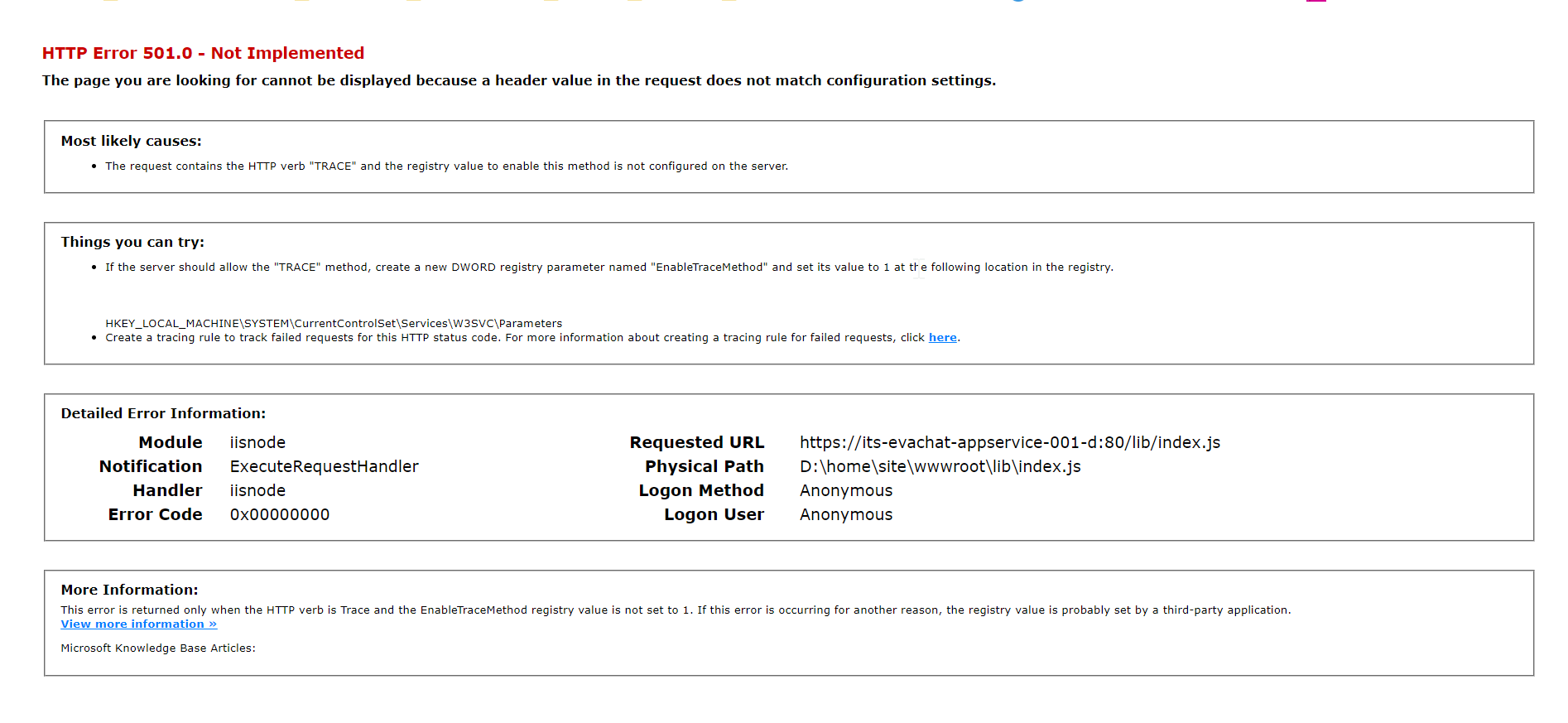
2.Can you verify if this issue happens using the Emulator?
_Yes, it's working fine in Emulator and Webchat channels_
3.Does this happens for every intent that you want to execute or for a specific one? (e.g an intent which requires authentication access)
_The first step in our bot is Sign in. Since it's getting failed first step not sure whether this case is same for all or not. But we will get back to you on this._
4.Is your dialogBot extending to ActivityHandler or TeamsActivityHandler?
_It's extending with TeamsActivityHandler_
SreekanthOAuth
on 6 Dec 2019
Hi @SreekanthOAuth, sorry for the delay. We managed to reproduce your scenario which we solved overriding the method handleTeamsSigninVerifyState on the DialogBot which extends TeamsActivityHandler. As you can see in TeamsActivityHandler, it contains some methods that are not implemented, which we should override.
With this said, could you tell us if you are implementing the method handleTeamsSigninVerifyState in the class that implements TeamsActivityHandler? If not, you can use the code of below:
public async handleTeamsSigninVerifyState(context: TurnContext, state: SigninStateVerificationQuery): Promise<void> {
    await this.dialog.run(context, this.state);
}
To accomplish this, we followed these steps using the Virtual Assistant Sample:
- Change
DialogBot.tsto extendTeamsActivityHandler - On
DialogBot, implement the methodhandleTeamsSigninVerifyStateoverriden as shown in the Teams Auth Sample - Run the Virtual Assistant Sample in Teams and make sure that it is receiving the request type
Invokein botFrameworkAdapter.
Note: This was important as the typeInvokeis received only when logging in from a Teams channel.
The overridden handleTeamsSigninVerifyState is called after signing in in Teams, instead of await bot.run(turnContext); found in index.ts.
If the method is not implemented, it would default to use the server post in the index, and it causes the context.turnState.get() in botFrameworkAdapter to return an invokeResponse with status 501, which in turn is used to create and send a response with said status.
Additional Context
- NodeJS Sample #46: Teams Auth
- NodeJS Sample #57: Teans Conversation Bot
- Add authentication to your bot via Azure Bot Service
_Scenario reproduced_
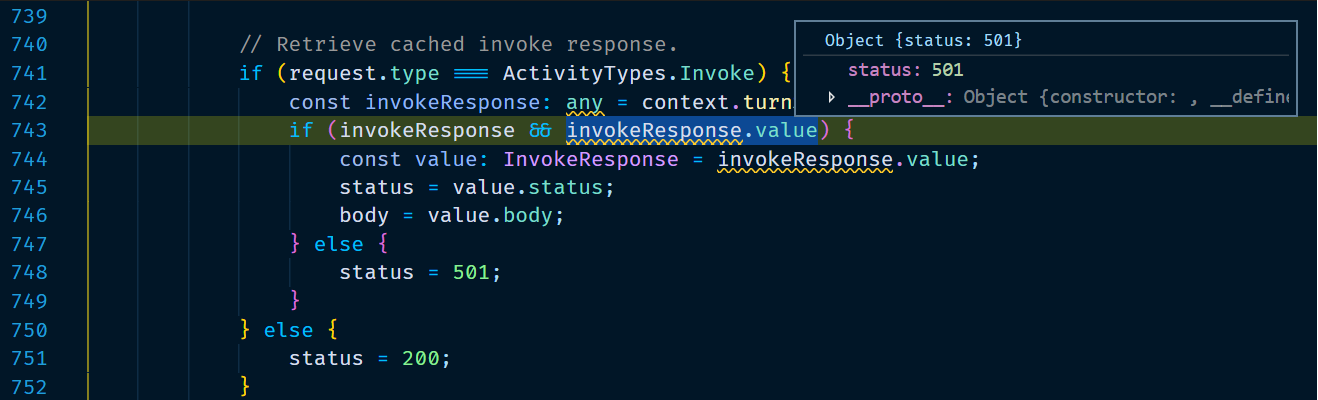
We hope this helps you 😊.
Batta32
on 17 Dec 2019
Hi @Batta32 , thanks for the update.
I have tried to adding these changes but getting some errors
After adding changes, dialogBot.ts file
`
import {
ActivityHandler,
BotTelemetryClient,
ConversationState,
EndOfConversationCodes,
Severity,
SigninStateVerificationQuery,
TeamsActivityHandler,
TurnContext,
StatePropertyAccessor} from 'botbuilder';
import {
Dialog,
DialogContext,
DialogSet,
DialogState,
DialogTurnResult } from 'botbuilder-dialogs';
export class DialogBot
private readonly telemetryClient: BotTelemetryClient;
private readonly solutionName: string = 'Ecolab Virtual Assistance';
private readonly rootDialogId: string;
private readonly dialogs: DialogSet;
private readonly dialog: Dialog;
private readonly dialogState: StatePropertyAccessor
constructor(
    conversationState: ConversationState,
    telemetryClient: BotTelemetryClient,
    dialog: T) {
    super();

    this.rootDialogId = dialog.id;
    this.telemetryClient = telemetryClient;
    this.dialogState = conversationState.createProperty<DialogState>(this.solutionName); // new one
    this.dialogs = new DialogSet(this.dialogState);
    this.dialogs.add(dialog);
    this.onTurn(this.turn.bind(this));
    this.dialog = dialog; // new one
}

//tslint:disable-next-line: no-any
public async turn(turnContext: TurnContext, next: () => Promise<void>): Promise<any> {
    // Client notifying this bot took to long to respond (timed out)
    if (turnContext.activity.code === EndOfConversationCodes.BotTimedOut) {
        this.telemetryClient.trackTrace({
            message: `Timeout in ${ turnContext.activity.channelId } channel: Bot took too long to respond`,
            severityLevel: Severity.Information
        });

        return;
    }

    const dc: DialogContext = await this.dialogs.createContext(turnContext);

    if (dc.activeDialog !== undefined) {
        const result: DialogTurnResult = await dc.continueDialog();
    } else {
        await dc.beginDialog(this.rootDialogId);
    }

    await next();
}

public async handleTeamsSigninVerifyState(context: TurnContext, state: SigninStateVerificationQuery): Promise<void> {
    await this.dialog.run(context, this.dialogState); // getting error here.
}
}
`
Here w.r.t dialog and dialogState create new attributes.
In this.dialog there is no run().
Could you please suggest.
Thanks,
Sreekanth
SreekanthOAuth
on 19 Dec 2019
Hi @SreekanthOAuth! If you are not able to use the run method, you should add a type for T which contains that method, as follows:
- Update
DialogBotclass asDialogBot<T extends MainDialog> extends TeamsActivityHandleror directly specify a concrete type for dialog asdialog: MainDialog. - Implement the run method in
MainDialog.
You can check those changes in our pushed branch with a modified Virtual Assistant Sample that implements the Teams Sign In.
Finally, you can take a look at the NodeJS Sample 46 for how it implements the run method with waterfall dialog.
Let us know if this helps or you have any other issue 😊.
Batta32
on 19 Dec 2019
Closing due to inactivity. Please reopen as needed.
lauren-mills
on 7 Jan 2020
@lauren-mills , could you please reopen the issue as the issue still exists.
We have tried your suggestions based on recent comments. However, we are still encountering with the problem.
The real issue over here is,
- MS team channel doesn't support EndOfConversation activity type which is returned from the skill bot.
Please do let us know if you need any additional information.
Thanks,
Sreekanth From Ecolab.
SreekanthOAuth
on 16 Jan 2020
Hi @SreekanthOAuth!
We are looking into this.
 VictorGrycuk
on 29 Jan 2020
VictorGrycuk
on 29 Jan 2020
Hi @SreekanthOAuth,
We were able to reproduce your issue using the master branch, but also made the same test on next and it worked without issues.
These are the steps we followed to reproduce the issue:
- Deploy a Sample Virtual Assistant
- Deploy a Sample Skill
- Create a Sample Skill, but make sure to use different utterances, questions, and answers to differentiate it from the first skills, such as:
- After deploying the Virtual Assistant and the Skills, connect both Skills to the Virtual Assistant using the command
botskills connect --remoteManifest "http://localhost:<SKILL_PORT>/api/skill/manifest" --luisFolder "<PATH_TO_LUIS_FOLDER>" --ts - Start the Virtual Assistant, and run ngrok using the same port used to run the Virtual Assistant

- In Azure Portal, go to the Virtual Assistant bot resource, Settings > Messaging Endpoint and configure the ngrok URL

- Create a
manifest.jsonof the Virtual Assistant to use it on Teams following these steps
- Alternatively, use the manifest of the sample Teams Conversation Bot as template, along with its icons
- Make sure to replace
<<YOUR-MICROSOFT-APP-ID>>with the appID of the Virtual Assistant
- Zip the
manifest.jsonand the icon files, and import it to Teams
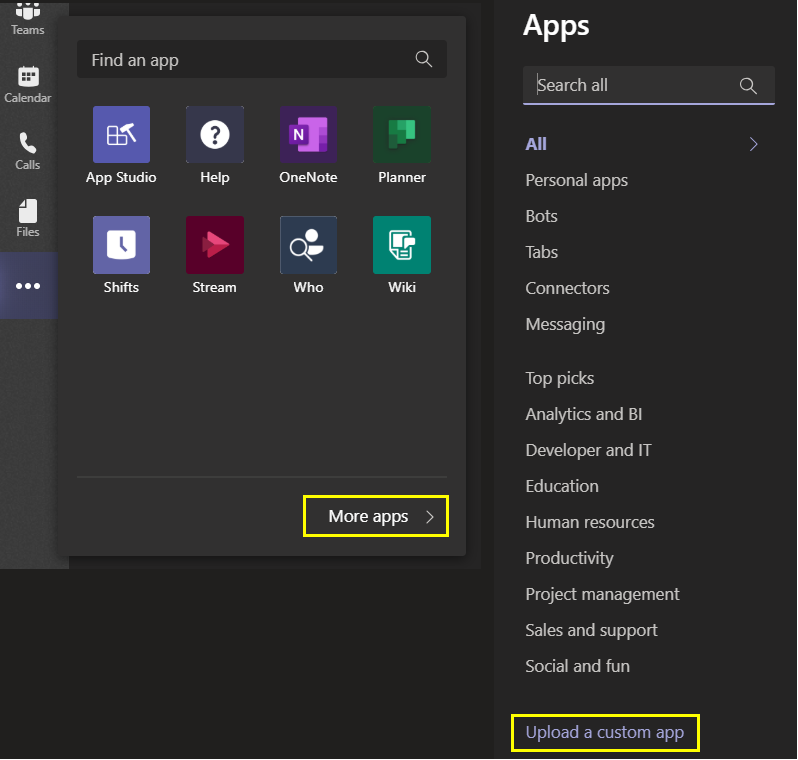
- Initialize the Virtual Assistant application and send the utterance of the first Sample Skill
- After finishing with the waterfall dialog of the Sample Skill, an exception will be thrown:
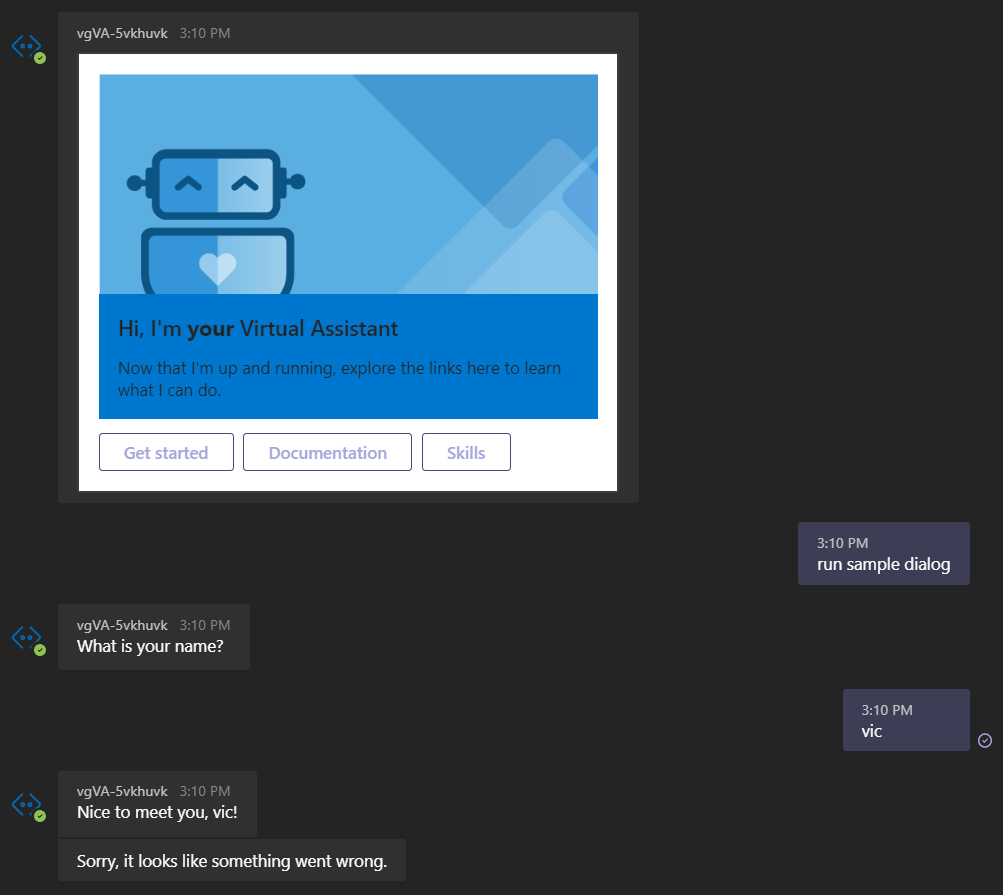
- The exception is thrown in the method
deserializeResponseBody()of the filedeserializationPolicyinms-rest-js:

We also did the same test using the next branch, and the issue was not found
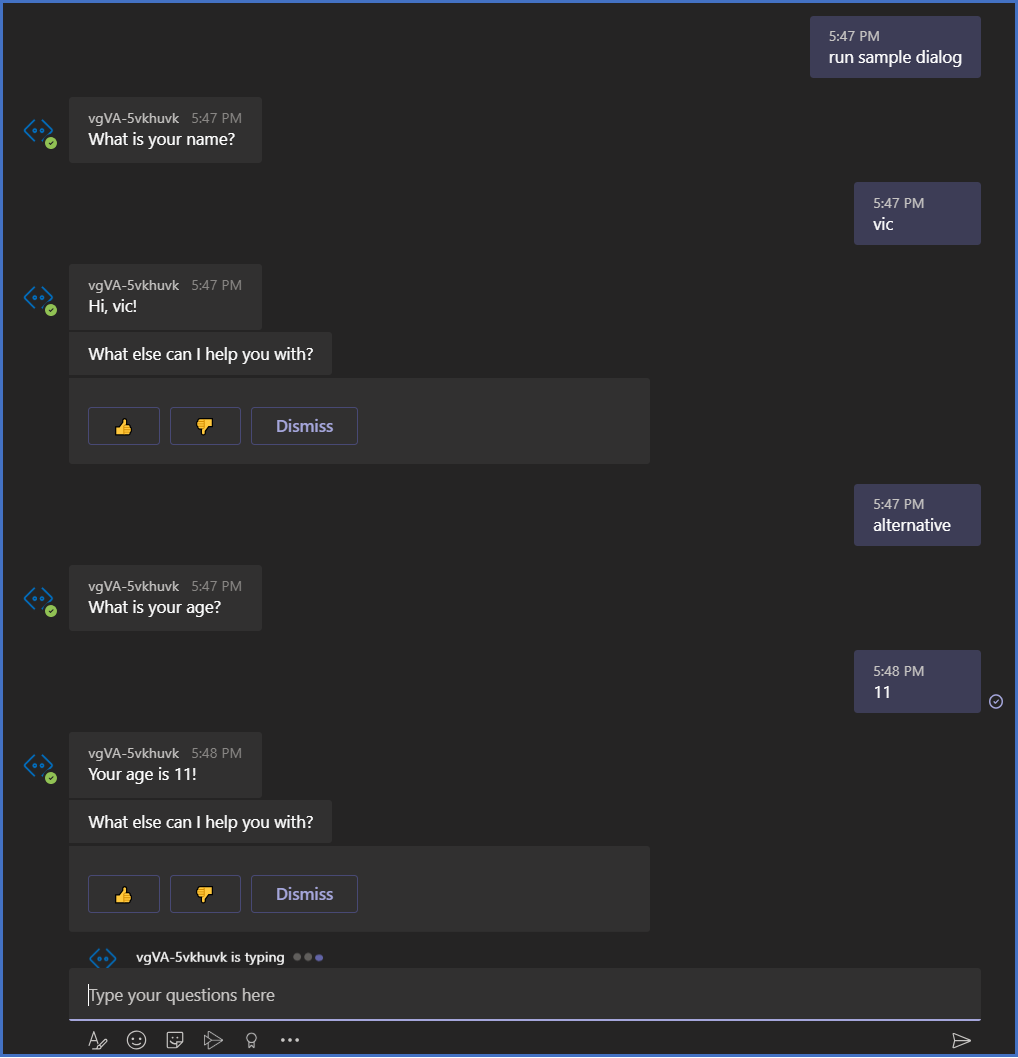
As it can be seen in the image above, after finishing the waterfall dialog, the first Skill Sample hands off the control to the Virtual Assistant, then the utterance for the second Skill Sample is sent (alternative) and it is executed successfully, as noted by the "What else can I help you with?" sent by the Virtual Assistant.
Note: To use the next branch, it is necessary to build the BotBuilder Solutions and BotBuilder Skills locally, and update the package.json of both the Virtual Assistant and Skill to use the local .tgz files, as they are not released yet.
This means that this issue will be fixed in the soon to be released version of TypeScript library.
VictorGrycuk
on 30 Jan 2020
Sorry for the late reply. I'll check and give an update.
SreekanthOAuth
on 4 Feb 2020
Hi @SreekanthOAuth,
The next branch has been merged with the master branch.
Please test again with the newly implemented changes.
VictorGrycuk
on 5 Feb 2020
Please re-open if you run into the issue again
 darrenj
on 6 Feb 2020
darrenj
on 6 Feb 2020
Please re-open this. We tried to fixed based on the suggestion "replacing" ActivityType.EndOfConversation to ActivityType.HandOff and implementing TeamActivityHander. However, the fundamental issue is EndOfConversation ActivityType is not supported by MSTeam. We are really stuck and can not promise our internal stakeholders for MSTeam bot availability.
amistry79
on 26 Feb 2020
Related issues
 manish-95
·
3Comments
manish-95
·
3Comments
 hansmbakker
·
3Comments
hansmbakker
·
3Comments
 tommyJimmy87
·
4Comments
tommyJimmy87
·
4Comments
 elaine-chang
·
4Comments
elaine-chang
·
4Comments
 andhdo
·
3Comments
andhdo
·
3Comments