Botframework-solutions: ludown : Sorry unable to open [general.lu]
Project
Name: Virtual Assistant-->
Language: C#
Description
While running the deploy_cognitive_models script, it errors unable to find the .lu files
To Reproduce
Either run deploy.ps1 or deploy_cognitive_models.ps1
Expected behavior
Finds file and deploys app
Screenshots
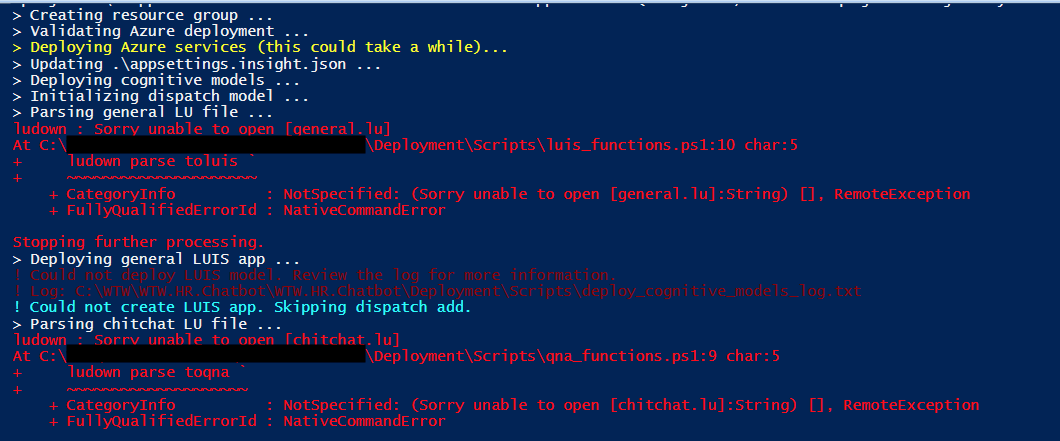
Additional context
Looks like maybe a path problem. Not sure. Here is what I'm running
.\Deployment\Scripts\deploy.ps1 -name xxxpoccbot -resourcegroup n21-xxx-poc-cbot-RGRP -subscription xxx -location centralus -luisauthoringkey xxx -luisauthoringregion westus
-parametersFile .\Deployment\Resources\parameters.xxx.json -appsettingsfile .\appsettings.xxx.json -PSScriptRoot C:\XXX\XXX.Chatbot\XXX.Chatbot\Deployment -languages en-us
-projDir .\ -appId XXX -appPassword XXX
 bfbatch
All 37 comments
Can you confirm for me the direction in which you are running the command? Also, can you verify that they file exists?
 stevkan
on 29 Jun 2019
stevkan
on 29 Jun 2019
Hi Steven,
I’m running the command from PS ISE locally against the repo root. Yes they exist in the Deployment/Resources folder.
Get Outlook for iOS
On Fri, Jun 28, 2019 at 9:15 PM -0400, "Steven Kanberg" notifications@github.com wrote:
Can you confirm for me the direction in which you are running the command? Also, can you verify that they file exists?
—
You are receiving this because you authored the thread.
Reply to this email directly, view it on GitHub, or mute the thread.
bfbatch
on 29 Jun 2019
Hi Steven,
Thanks for the reply. I'm running the script from PS ISE and using the deploy.psi in the scripts folder to deploy. Yes the .lu files are there as I've cloned the VA template.
Regards,Brian Batchelderc-850-228-5462
On Friday, June 28, 2019, 09:15:50 PM EDT, Steven Kanberg <[email protected]> wrote:
Can you confirm for me the direction in which you are running the command? Also, can you verify that they file exists?
—
You are receiving this because you authored the thread.
Reply to this email directly, view it on GitHub, or mute the thread.
bfbatch
on 1 Jul 2019
One quick question which might help @stevkan and I - Does your full path have any spaces in it (e.g. space in a user name or similar?)
 darrenj
on 2 Jul 2019
darrenj
on 2 Jul 2019
Hi Darren, neither the name nor the path to the files have spaces.
bfbatch
on 2 Jul 2019
@bfbatch, sorry for the delay. Can you also tell me which version of PS you are running this on?
stevkan
on 16 Jul 2019
@stevkan np. I'm using 5.1.1. since the client wanted this to run in Azure DevOps and that is the version running there.
bfbatch
on 16 Jul 2019
Just followed the Virtual Assistant readme as it is today, starting from scratch, and was able to get the deploy.ps1 command to run successfully. -- wasn't able to repro the behavior that @bfbatch is experiencing
I basically installed all the requirements up-to-date, used the VSIX template in Visual Studio to create the VA bot template, navigated down and ran this command, looks like 3 VA folders in:

@bfbatch, could you try installing PowerShell Core version 6, as specified in the readme, and see if that helps resolves the issue?
Also to be sure to update the other requirements as well (such as AZ CLI, and the other CLIs specified in the readme)
 Zerryth
on 17 Jul 2019
Zerryth
on 17 Jul 2019
Hi @bfbatch, have you had a chance to try the recommendation @Zerryth put forth?
 CoHealer
on 22 Jul 2019
CoHealer
on 22 Jul 2019
@CoHealer @Zerryth Thanks for the reply. I have not had a chance to test again, but will tonight and let you know.
bfbatch
on 22 Jul 2019
Hi, I am getting the same error, my user name has a space in it and hence the path has a space in it too.
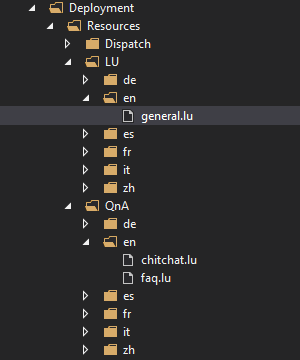
When creating the project with the template, it does not create the Deployment\Resources\LUen\general.luis,
Deployment\Resources\QnAen\chitchat.qna, and
Deployment\Resources\QnAen\faq.qna,
files.
The deploy_cognitive_models_log.txt file says these files are not found but they were not created in the first place.
 threeyay
on 23 Jul 2019
threeyay
on 23 Jul 2019
@threeyay please follow the other thread you opened with regards to the issue (#1923) you are experiencing, as the reason for not deploying correctly would be _different_ from what bfbatch is experiencing since he has the deployment resources.
This way we can separate any confusion that may arise between the resolutions to different problems
Zerryth
on 23 Jul 2019
For reference, these are the versions of the dependencies that I'm using, referenced in the readme that specify that you have updated versions:
Visual Studio 2017
Virtual Assistant Template v 4.4.4
.NET Core 2.2
npm 6.10.0
PowerShell Core Version 6
(bot) dispatch 1.5.1
ludown 1.3.2
luis-apis 2.6.0
qnamaker cli 1.3.1
luisgen 2.2.0.0
az cli 2.0.69 (minimum required is 2.0.64!)
Bot Framework Emulator v4.5
@bfbatch let us know what you find when you try again
Zerryth
on 23 Jul 2019
Hi @Zerryth I started a new VM and installed/updated to the above dependencies and cloned the 4.4.4 VA template. Currently it hangs at "Validating Azure Deployment"

bfbatch
on 29 Jul 2019
Hmm...ok. Let's try these things:
- Upgrade to Virtual Assistant VSIX template 4.5.1 (just released)
- Instead of providing all the parameters in one command as you did (which should in theory work), let's instead just try following the prompts to provide the parameters
- If deployment still fails, take a look at the deployment_log.txt file and let us know if you're getting any errors there
(Other potential issues could be perhaps in "." in path, special characters in appPassword, or your override on PSScriptRoot)
Zerryth
on 30 Jul 2019
Still no go. Same results for all of the above. I also generated a new key for the app registration to remove the '.', but still hangs at "Validating Azure Deployment". + it doesn't get far enough to create the deploy_log.txt. Anything else I can try?
bfbatch
on 31 Jul 2019
Going to circle back with the solutions team, and I'll let you know what else we could try
Zerryth
on 1 Aug 2019
@bfbatch, still waiting to hear back from the team, however before I connect with them, wanted to verify: you mentioned switching to a VM, and I noticed that in your original screen shot that you provided, it actually got passed the "Validating Azure Deployment." prompt
Did you make sure to log into your account in az cli before running the deployment script? (Quick way to check is az ccount show, which should output something like this:
{
  "environmentName": "AzureCloud",
  "id": "xxxxxxxx-xxxx-xxxx-xxxx-xxxxxxxxxxxx",
  "isDefault": true,
  "name": "Bot Framework Support Team",
  "state": "Enabled",
  "tenantId": "xxxxxxxx-xxxx-xxxx-xxxx-xxxxxxxxxxxx",
  "user": {
    "name": "[email protected]",
    "type": "user"
  }
}
If you're not logged into az cli, you can do so with the az login command, then run the deployment script.
Separately, and I don't think this is the issue, but for the sake of trying, make sure that when you're running the deployment script, you're using a unique name, as sometimes resources might have been partially created in the resource group. You can delete the resources created and "wait a while" and reuse the same name, however I do know it does take a little bit for the resources to delete
Zerryth
on 2 Aug 2019
I'm helping @Zerryth look into the issue, but I do want to emphasize something she pointed out:
Separately, and I don't think this is the issue, but for the sake of trying, make sure that when you're running the deployment script, you're using a unique name, as sometimes resources might have been partially created in the resource group. You can delete the resources created and "wait a while" and reuse the same name, however I do know it does take a little bit for the resources to delete
Please make sure you're taking the time after every failed deployment to delete anything that was partially created. You will have empty resource groups and partially created resources for every run of the script that WILL hiccup further attempts to redeploy, especially using the same names.
 jwiley84
on 6 Aug 2019
jwiley84
on 6 Aug 2019
@bfbatch, have you confirmed that you are scrubbing your resources after the failed deployments? Are you still getting a repro?
CoHealer
on 8 Aug 2019
Hi Jessica,
Thanks for the assist. Yes, I was deleting the previous resource groups. Here is the history of the scripts.
- Initial attempt was to run them from Azure DevOps. The only PS tasks I could find was for vs 5.1.1. Once I change the required version from within the scripts I was able to deploy the environment. However, I was getting the error that the .lu files were not found. 2. After submitting a issue, I was advised to make sure I was following these requirements. So I created a new VM and started from scratch. I installed all the below and then cloned the repo again. When I run the scripts now, it hangs at Validating. I have tried to initiate an error by removing the appsettings file and it did error. Problem is there is no error or deploy.txt errors, nothing to indicate what is happening. Is there anyway to get a debug or verbose during this process? Or a screen sher to make sure I'm not doing something wrong? I'g going to attempt to step through the code, but I'm not sure it will help if I can't get any process logs. Please advise.
- Visual Studio 2017
- Virtual Assistant Template v 4.4.4
- .NET Core 2.2
- npm 6.10.0
- PowerShell Core Version 6
- (bot) dispatch 1.5.1
- ludown 1.3.2
- luis-apis 2.6.0
qnamaker cli 1.3.1
luisgen 2.2.0.0
- az cli 2.0.69 (minimum required is 2.0.64!)
- Bot Framework Emulator v4.5
Regards,Brian Batchelderc-850-228-5462
On Tuesday, August 6, 2019, 11:26:19 AM EDT, Jessica Wailes <[email protected]> wrote:
I'm helping @Zerryth look into the issue, but I do want to emphasize something she pointed out:
Separately, and I don't think this is the issue, but for the sake of trying, make sure that when you're running the deployment script, you're using a unique name, as sometimes resources might have been partially created in the resource group. You can delete the resources created and "wait a while" and reuse the same name, however I do know it does take a little bit for the resources to delete
Please make sure you're taking the time after every failed deployment to delete anything that was partially created. You will have empty resource groups and partially created resources for every run of the script that WILL hiccup further attempts to redeploy, especially using the same names.
—
You are receiving this because you were mentioned.
Reply to this email directly, view it on GitHub, or mute the thread.
bfbatch
on 12 Aug 2019
Hi Brian!
I know it's annoying to get the constant "can you confirm xyz", but...
can you confirm that the deployment script IS or IS NOT creating a deploy_log.txt file? When running the script as outline in the steps (simply navigating to your project directory and running .\Deployment\Scripts\deploy.ps1) the file SHOULD be created in your Scripts folder. It would be initially empty.
jwiley84
on 13 Aug 2019
Hi Jessica,
Np, I completely understand. The deploy.txt file was created when I generated a real error once I removed the appsetting file. Prior to that, the deploy.txt file didn't get created when the script hangs at "validating deployment".
bfbatch
on 14 Aug 2019
Hi Jessica,
I've got a new update. As of just now I was able to deploy using the VA template. :-) It looks like the validation was hanging on something in the base template that the script didn't like. When I deployed using the original base template (default from VA unmodified) the environment and cognitive models deployed. My updated base template does pass JSON validation and I re-deployed the same template to the environment using a standard AzureRM deployment script and it was successful. Can someone review my template to see if they can spot what the deploy script was hanging on?
bfbatch
on 15 Aug 2019
Brian,
I apologize, I've been out of the office for the last few days. Do you mean the template.json?
jwiley84
on 15 Aug 2019
hi Jessica,
Yes I'm referring to the template.json.
bfbatch
on 15 Aug 2019
Go ahead and post it, let's see what's going on.
jwiley84
on 15 Aug 2019
Thanks Jessica
template.json.zip
bfbatch
on 16 Aug 2019
Thank you for your file. I ran it through a diff checker to see what kinds of changes (and ignore the unchanged parts), and there are 75+ changes to that file. At a glance, I can't tell which single change would have hung up the validator, and I recommend you take the generic template (which you said above works fine) and add in your new changes you made, one at a time, testing them against az group deployment validate to see the results.
jwiley84
on 16 Aug 2019
Thanks Jessica,
Yes I knew there were about 100 changes, and I run these type of templates through Azure deploy scripts all the time. Wondering what is the main difference between the validator in the chatbot depoy and Azure deploy (besides AzuerRm vs Az). This was for a client and as I mentioned I just run the same template via AzureRm deploy to deploy all the changes and we are up and running. Since I don't have access to the clients subscription, I'll need to run my validation checks in my own. Would you like to close this issue or leave it open for my feedback once I run my checks?
bfbatch
on 16 Aug 2019
Thanks for the work on this.
We're just using the standard az cli capabilities to validate (az group deployment validate so there should be no difference between the two. You might want to verify the az versions using az-v and ensure they are >=2.0.64 too.
I just ran this az group deployment validate --resource-group djrg1 --template-file template.json and given I don't have your parameter file provided a bunch of manual settings and it was able to validate.
When you call the deploy script I see you are passing a parameters file - could you provide an example of this or try calling the same CLI command we do directly:
az group deployment validate `
        --resource-group $resourcegroup `
        --template-file "$(Join-Path $PSScriptRoot '..' 'Resources' 'template.json')" `
        --parameters "@$($parametersFile)" `
        --parameters name=$name microsoftAppId=$appId microsoftAppPassword="`"$($appPassword)`"" `
        --output json
Thanks @darrenj I will run through the validation and report back.
bfbatch
on 21 Aug 2019
@bfbatch, is there any update?
CoHealer
on 23 Aug 2019
@CoHealer I've validated my parameters file, and I'm stepping through my edited template to see what is causing the validation to hang. Should have a final report later today.
bfbatch
on 26 Aug 2019
@bfbatch - Wanted to check back in and see if you had any more details. If not, we'll close this due to inactivity.
 lauren-mills
on 4 Sep 2019
lauren-mills
on 4 Sep 2019
@lauren-mills Thanks for the push. I did walk through my custom template, on resource resource at a time. I didn't hit any errors or hanging of the validation on individual resources, only when the entire template was used. We can close this as I'll be starting a new client to deploy a new environment and I'll follow up with any updates.
bfbatch
on 5 Sep 2019
Thanks, @bfbatch! Please let us know.
lauren-mills
on 5 Sep 2019
Related issues
 hansmbakker
·
3Comments
hansmbakker
·
3Comments
 waqarghani
·
3Comments
waqarghani
·
3Comments
 andhdo
·
3Comments
andhdo
·
3Comments
 samaea
·
3Comments
darrenj
·
3Comments
samaea
·
3Comments
darrenj
·
3Comments
Most helpful comment
@CoHealer @Zerryth Thanks for the reply. I have not had a chance to test again, but will tonight and let you know.