Botframework-solutions: Assistant is working in the Emulator - but not in Web
Project
Name: Virtual Assistant Deployment
Language: c#
Description
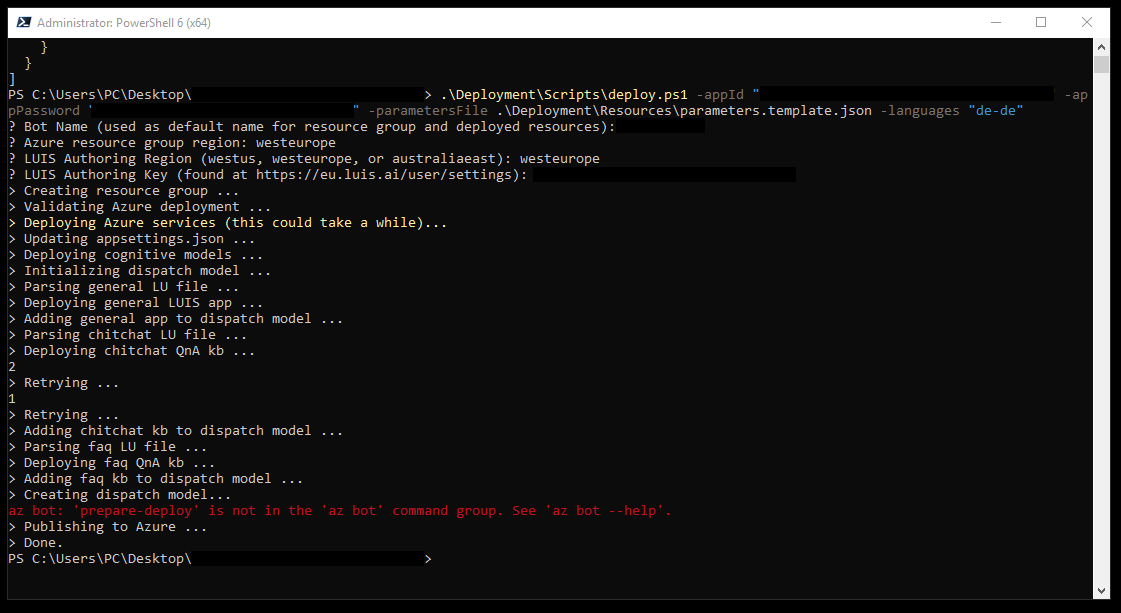
I deployed the bot to Azure and it is working in the Emulator, but if i test the bot in Web, i allways get the "couldnt send" response - i changed nothing in the code by the way.
Screenshots


Additional context
I hope you can help me out with my problem. Have a nice day.
 danieldangler
All 6 comments
Looks like you don't have a more recent version of the AZ CLI which has the prepare-deploy feature.
If you run az -v I suspect your running less than 2.0.65. If so, you need to update this. The publish doesn't appear to have worked entirely because of this so go into visual studio, right click your solution and choose publish - find the app service created during deployment and publish. Web Chat should then work.
 darrenj
on 11 Jun 2019
darrenj
on 11 Jun 2019
@darrenj in my case the Virtual Assistant works correctly in the Emulator if running as localhost with my skill endpoint in Azure, but I have one issue: if I try in the webchat my Virtual Assistant just work inside VA dialogs, if I try something like "simple dialog" or something where needs to route for skill endpoint I don't have any response.
 higoorc
on 11 Jun 2019
higoorc
on 11 Jun 2019
@higoorc can you please open another issue for your problem? It seems different than the original.
 lauren-mills
on 11 Jun 2019
lauren-mills
on 11 Jun 2019
Looks like you don't have a more recent version of the AZ CLI which has the prepare-deploy feature.
If you run
az -vI suspect your running less than 2.0.65. If so, you need to update this. The publish doesn't appear to have worked entirely because of this so go into visual studio, right click your solution and choose publish - find the app service created during deployment and publish. Web Chat should then work.
Yup, now it works - Thanks!
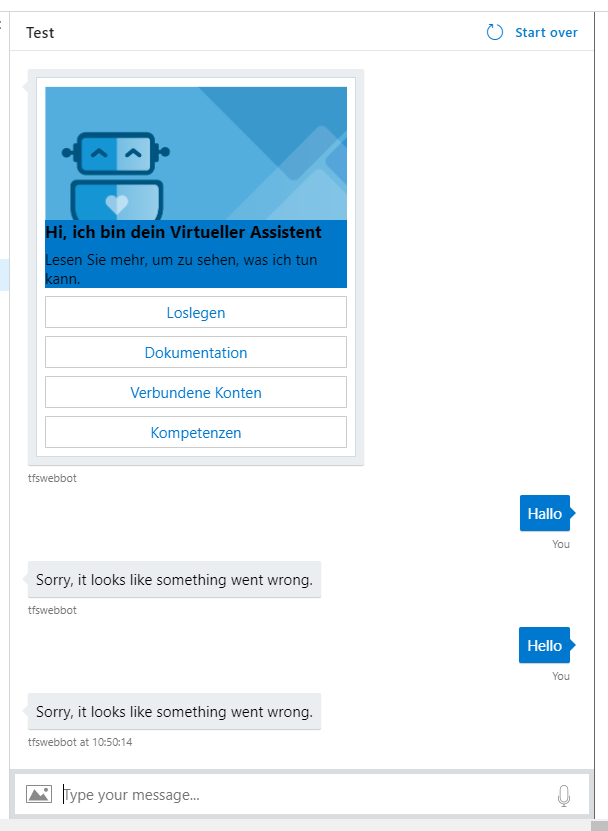
edit: But now i have another problem: If i write somehting like "Hey" the bot responses with "something went wrong ( i had a similar problem in this thread https://github.com/microsoft/botframework-solutions/issues/1464 ) I want to have it in german and in the deployment i used the -languages "de-de" command. In the Emulator everything works but the Webchat dont. hm
danieldangler
on 12 Jun 2019
up, now it works - Thanks!
edit: But now i have another problem: If i write somehting like "Hey" the bot responses with "something went wrong ( i had a similar problem in this thread #1464 ) I want to have it in german and in the deployment i used the -languages "de-de" command. In the Emulator everything works but the Webchat dont. hm
I had the same problem, it is a localisation problem it seems, your browser might be in english and your bot is in german, so there is a conflict, you can resolve this (just as a workaround for the moment) by forcing localisation:
Search and comment the SetLocalMiddleware line: //Use(new SetLocaleMiddleware(settings.DefaultLocale ?? "fr-fr")); In this way we will not get the locale from the client.
Set a static locale: in MainDialog.cs you modify
    protected override async Task RouteAsync (DialogContext dc, CancellationToken cancellationToken = default (CancellationToken)) {
            var state = await _JooxterStateAccessor.GetAsync (dc.Context, () => new JooxterSkillState ());

            // get current activity locale
            var locale = 'fr';
You can test this way, ideally you should add the utterances and cognitive models for all supported locales.
 FreddyAyala
on 12 Jun 2019
FreddyAyala
on 12 Jun 2019
You can also set locale: language on the webchat instance in your client code too. The SetLocaleMiddleware is there to "stamp" the desired default locale if the client doesn't send, in your case if you don't have english deployed then it won't have a fall-back hence important to change this.
I'll raise a task to add some multi-locale docs (#1541)
darrenj
on 13 Jun 2019
Related issues
 andhdo
·
3Comments
andhdo
·
3Comments
 gabog
·
3Comments
gabog
·
3Comments
 VladPapacostea-SM
·
3Comments
VladPapacostea-SM
·
3Comments
 tommyJimmy87
·
4Comments
lauren-mills
·
4Comments
tommyJimmy87
·
4Comments
lauren-mills
·
4Comments