Botframework-solutions: Webchat not showing auth cards
Thanks Darren for providing steps to test skill independently. Finally, I got my calendar still working but still getting bad request running via VA.
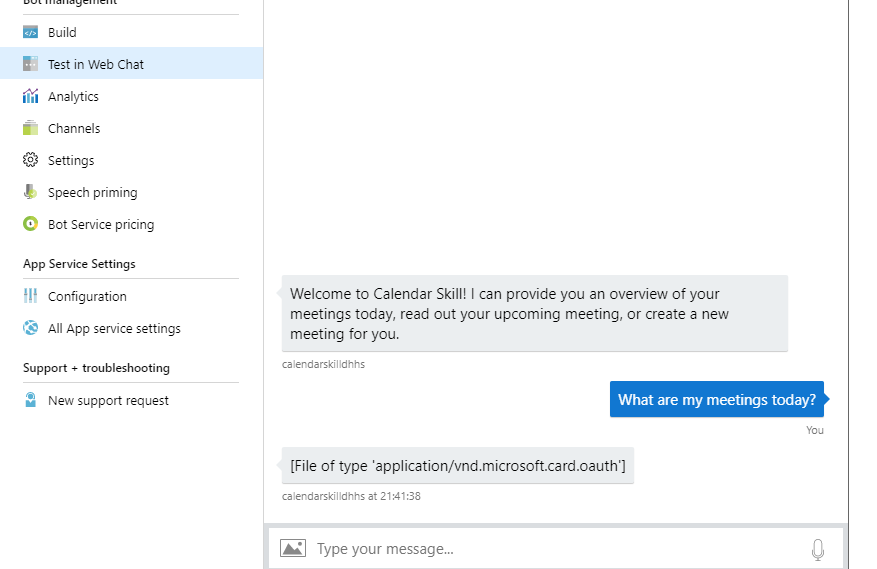
Also, when i try running bot through web chat i getting below error.
 gagankohli2000
All 25 comments
Here is my appsettings of VA
"oauthConnections": [
{
"provider": "Azure Active Directory v2",
"name": "Outlook"
}
]
Oauth Connection (CalendarSkill)
appsettings (CalendarSkill)
{
"oauthConnections": [
{
"name": "Outlook",
"provider": "Azure Active Directory v2"
}
gagankohli2000
on 29 May 2019
The WebChat example you shared above is as expected in WebChat within Azure Portal. It's an older version which doesn't support OAuthCards. Annoying I know but you'll need to configure the WebChat channel and follow the channel instructions to get that working as you might expect.
Can you confirm that Authentication completes successfully when use use the Emulator against the Calendar Skill directly? Just want to double check that part. Crucially,. you can signin and ask "what meetings do I have", etc.?
 darrenj
on 29 May 2019
darrenj
on 29 May 2019
Yes, when i'm testing Calendar Skill directly using Emulator it's working and I'm able to schedule meetings. Also, able to get all my meetings.
I registered Calendar skill with VA and it created Oauth outlook but testing directly i always get bad request.
gagankohli2000
on 30 May 2019
Here is the screenshot when i'm testing directly on Emulator.

gagankohli2000
on 30 May 2019
I'm facing same issue, I'm able to test with emulator everything works fine ..After deployment I am not able to sign in with the card support error in web chat.
Additionally, in teams in see the sign in card but nothing happens when clicked.
In my SharePoint I see the card when clicked and I sign in I get magic number ..When I provide it back nothing happens.
 premaarya
on 30 May 2019
premaarya
on 30 May 2019
Thanks for confirming, very odd! Could you both share the add_remote_skill log file from the deployment directory please?
darrenj
on 30 May 2019
Calender skill added to despatch and its getting triggered. I get login prompt which result in bad request.
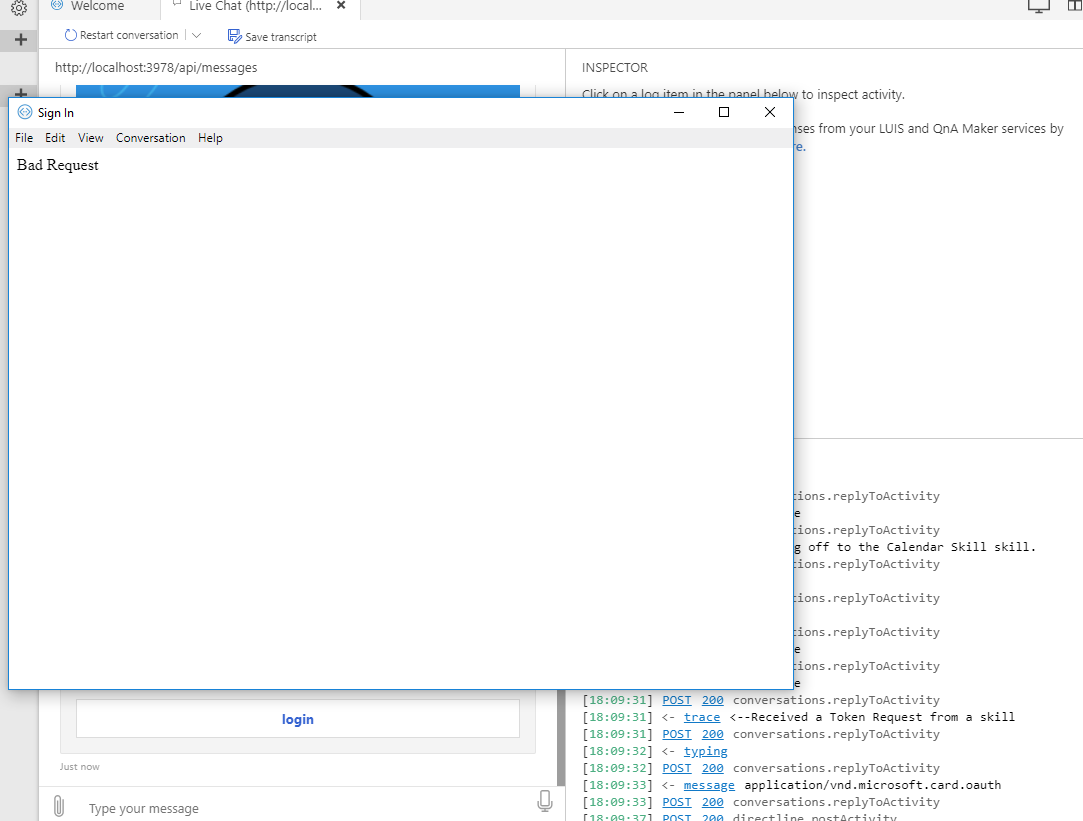
Here is the log.
File: E:\GitHub\DHHSVirtualAssistant\DHHSVirtualAssistant\DHHSVirtualAssistant\Deployment\Resources\Skills\en\Calendar.luis already added to Codeeen_Dispatch.dispatch
Exporting services for dispatch...
Exporting Teams QnA kb...
Exported QnA app JSON is at E:\GitHub\DHHSVirtualAssistant\DHHSVirtualAssistant\DHHSVirtualAssistant\Deployment\Resources\Dispatch\endata_Q_q_Teams.json
Expanding kb 7bdc1363-e314-4b8f-8940-9360b9aed4cd with word alterations
Exporting TeamsProvisioning LUIS application...
Exported LUIS app JSON is at E:\GitHub\DHHSVirtualAssistant\DHHSVirtualAssistant\DHHSVirtualAssistant\Deployment\Resources\Dispatch\endata_L_TeamsProvisioning.json
Creating dispatch LUIS model json...
Creating training data...
WARNING: Number of samples in 'E:\GitHub\DHHSVirtualAssistant\DHHSVirtualAssistant\DHHSVirtualAssistant\Deployment\Resources\Dispatch\endata_experiments\model_024\train.txt' that were used by multiple categories: 3
WARNING: Number of samples in 'E:\GitHub\DHHSVirtualAssistant\DHHSVirtualAssistant\DHHSVirtualAssistant\Deployment\Resources\Dispatch\endata_experiments\model_024\cv5\fold000\train.txt' that were used by multiple categories: 1
WARNING: Number of samples in 'E:\GitHub\DHHSVirtualAssistant\DHHSVirtualAssistant\DHHSVirtualAssistant\Deployment\Resources\Dispatch\endata_experiments\model_024\cv5\fold001\train.txt' that were used by multiple categories: 2
WARNING: Number of samples in 'E:\GitHub\DHHSVirtualAssistant\DHHSVirtualAssistant\DHHSVirtualAssistant\Deployment\Resources\Dispatch\endata_experiments\model_024\cv5\fold002\train.txt' that were used by multiple categories: 2
WARNING: Number of samples in 'E:\GitHub\DHHSVirtualAssistant\DHHSVirtualAssistant\DHHSVirtualAssistant\Deployment\Resources\Dispatch\endata_experiments\model_024\cv5\fold003\train.txt' that were used by multiple categories: 2
WARNING: Number of samples in 'E:\GitHub\DHHSVirtualAssistant\DHHSVirtualAssistant\DHHSVirtualAssistant\Deployment\Resources\Dispatch\endata_experiments\model_024\cv5\fold004\train.txt' that were used by multiple categories: 3
Updating Codeeen_Dispatch model...
Training TeamsProvisioning...
Importing Codeeen_Dispatch model...
Setting up intents to child services mapping for Codeeen_Dispatch...
Add subscription key and publish child LUIS apps...
Publishing TeamsProvisioning model...
Training Codeeen_Dispatch model...
Publishing Codeeen_Dispatch model...
Writing summary file ('test_prediction')...
Please review your updated dispatch model in E:\GitHub\DHHSVirtualAssistant\DHHSVirtualAssistant\DHHSVirtualAssistant\Deployment\Resources\Dispatch\en\Summary.html
gagankohli2000
on 30 May 2019
Interesting. Can you go into Azure find the Bot registration for your VA bot, click settings and scroll down to oauth connections and see if you have one configured please? I'm not seeing the log entries for creation of your auth connection,
darrenj
on 30 May 2019
Nope. Nothing for VA Bot. I have oauth connection on CalendarSkill bot.
gagankohli2000
on 30 May 2019
I added oauth connection in VA Bot now. It's working. Thanks a ton!
gagankohli2000
on 30 May 2019
Is Calendar Skill supported with Teams?
gagankohli2000
on 30 May 2019
That is really strange - add_remote_skill.ps1 has code to create the auth connection for you, for some reason in your scenario it failed to do this.
Could you help me out by trying a couple of further things so I can diagnose further?
- Run remove_skill.ps1 from your assistant directory to remove the calendar skill, pass the manifest using the manifestUrl property.
- Go to your Bot registration in Azure and remove the auth connection if it's not already removed.
- Delete add_remote_skill log file from deployment directory
- Run add_remote_skill.ps1 again and share the log file and see if the console output says it's configuring the auth scopes (feel free to share output in this issue)
darrenj
on 30 May 2019
@gagankohli2000 check https://github.com/microsoft/botframework-solutions/blob/master/docs/reference/knownissues.md for teams channel.
premaarya
on 30 May 2019
@darrenj this is my add_skill_log.txt
Exporting services for dispatch...
Exporting JeeoVABoten_general LUIS application...
Exported LUIS app JSON is at C:\Users\prema\Source\JeeoVSBot\JeeoVSBot\JeeoVSBot\Deployment\Resources\Dispatch\en\data\_L_JeeoVABoten_general.json
Exporting chitchat QnA kb...
Exported QnA app JSON is at C:\Users\prema\Source\JeeoVSBot\JeeoVSBot\JeeoVSBot\Deployment\Resources\Dispatch\en\data\_Q_q_chitchat.json
Expanding kb a9727cd3-5c76-4101-8878-79c5705fb9fd with word alterations
Exporting faq QnA kb...
Exported QnA app JSON is at C:\Users\prema\Source\JeeoVSBot\JeeoVSBot\JeeoVSBot\Deployment\Resources\Dispatch\en\data\_Q_q_faq.json
Expanding kb 01531265-a121-41c3-b315-fe5c0ed443a5 with word alterations
Creating dispatch LUIS model json...
Creating training data...
WARNING: Number of samples in 'C:\Users\prema\Source\JeeoVSBot\JeeoVSBot\JeeoVSBot\Deployment\Resources\Dispatch\en\data\_experiments\model_004\train.txt' that were used by multiple categories: 12
WARNING: Number of samples in 'C:\Users\prema\Source\JeeoVSBot\JeeoVSBot\JeeoVSBot\Deployment\Resources\Dispatch\en\data\_experiments\model_004\cv5\fold000\train.txt' that were used by multiple categories: 9
WARNING: Number of samples in 'C:\Users\prema\Source\JeeoVSBot\JeeoVSBot\JeeoVSBot\Deployment\Resources\Dispatch\en\data\_experiments\model_004\cv5\fold001\train.txt' that were used by multiple categories: 9
WARNING: Number of samples in 'C:\Users\prema\Source\JeeoVSBot\JeeoVSBot\JeeoVSBot\Deployment\Resources\Dispatch\en\data\_experiments\model_004\cv5\fold002\train.txt' that were used by multiple categories: 7
WARNING: Number of samples in 'C:\Users\prema\Source\JeeoVSBot\JeeoVSBot\JeeoVSBot\Deployment\Resources\Dispatch\en\data\_experiments\model_004\cv5\fold002\test.txt' that were used by multiple categories: 1
WARNING: Number of samples in 'C:\Users\prema\Source\JeeoVSBot\JeeoVSBot\JeeoVSBot\Deployment\Resources\Dispatch\en\data\_experiments\model_004\cv5\fold003\train.txt' that were used by multiple categories: 5
WARNING: Number of samples in 'C:\Users\prema\Source\JeeoVSBot\JeeoVSBot\JeeoVSBot\Deployment\Resources\Dispatch\en\data\_experiments\model_004\cv5\fold004\train.txt' that were used by multiple categories: 7
Updating JeeoVABoten_Dispatch model...
Training JeeoVABoten_general...
Importing JeeoVABoten_Dispatch model...
Setting up intents to child services mapping for JeeoVABoten_Dispatch...
Add subscription key and publish child LUIS apps...
Publishing JeeoVABoten_general model...
Training JeeoVABoten_Dispatch model...
Publishing JeeoVABoten_Dispatch model...
Writing summary file ('test_prediction')...
Please review your updated dispatch model in C:\Users\prema\Source\JeeoVSBot\JeeoVSBot\JeeoVSBot\Deployment\Resources\Dispatch\en\Summary.html
ERROR: An error occurred. ResourceNotFound: The resource with identifier '/subscriptions/7cdd4c2a-b26a-4ccd-acc4-2fa4d0649b79/resourceGroups/jeeovabot/providers/Microsoft.BotService/botServices/jeeovabot/connections/Outlook' is not found.
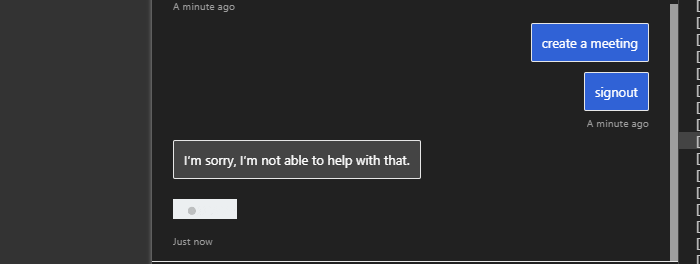
I added the Outlook connection manually.
now i cannot connect to calendar skill at all.
premaarya
on 31 May 2019
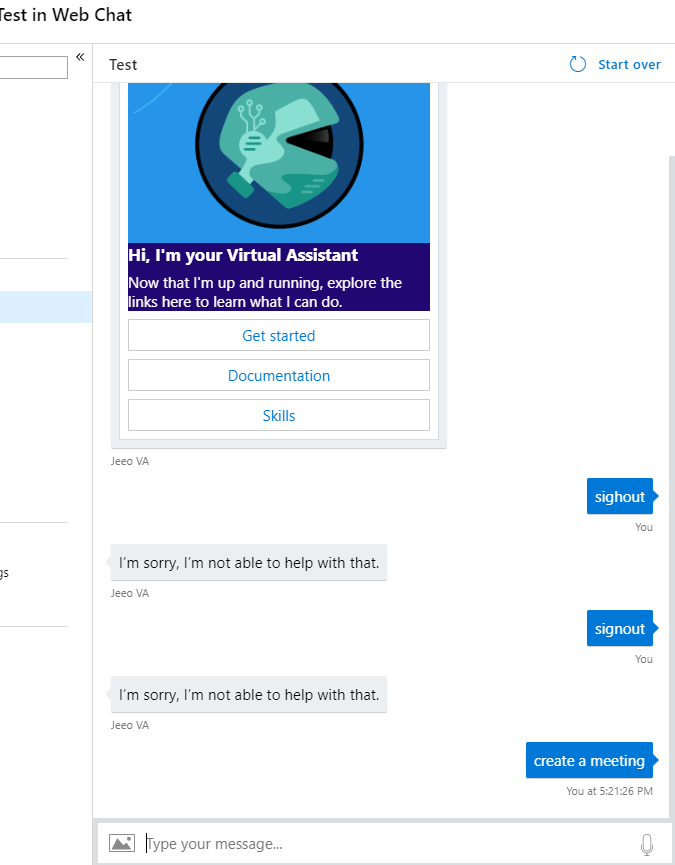
after debugging it is working as expected with the emulator, the virtual assistent and the calendar skill individually.
however once I deployed to azure, cannot use the calendar skill at all. VA luis and faq working but on asking calendar intent no response on web chat. it was better yesterday I was getting the sign-in pop with directline, is magic code prompt expected? I upgraded to 4.4.4 is that an issue? I see welcome card which was known issue.
premaarya
on 31 May 2019
@premaarya I suspect your not passing the correct botname to the add_remote_skill script, it therefore can't find your Bot in azure to add the auth connection to. This then results in the BadRequest issue.
When you deployed your VA bot initially you would have provided a name which you must use when adding a Skill. We don't have an easy way to find this out for you automatically.
Check your resource group, you should see something like the below. The Bot name is the name of your Web App Bot.
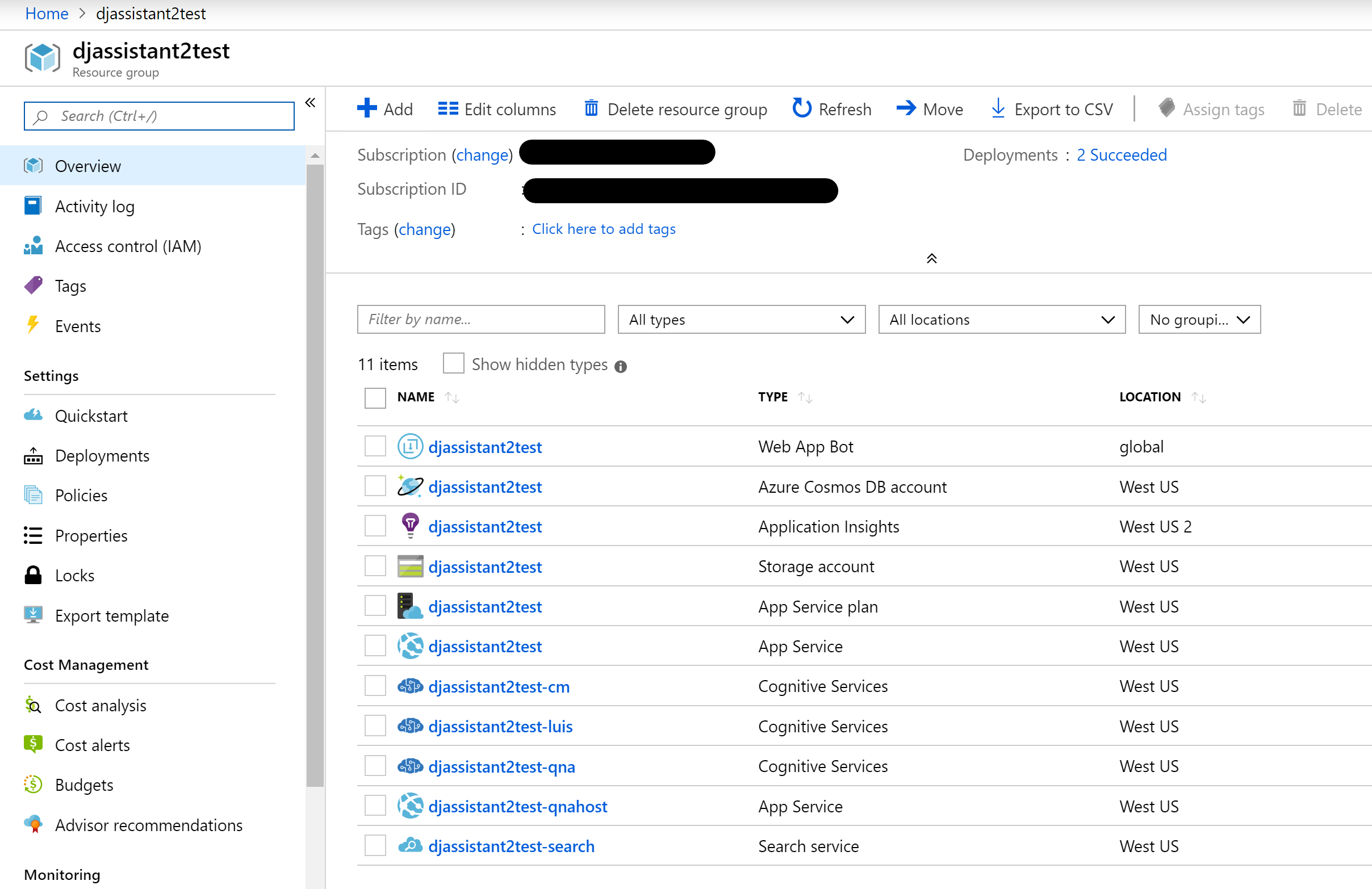
If you use the remove skill powershell, ensure the auth connection is removed and try again I would hope it is created correctly. I just reproed your issue when providing the wrong name and did see clear errors messages in the console in red?
We have also just introduced the botskills CLI. Feel free to try that if you want (from the assistant directory)
`
npm install -g botskills
botskills connect -b YOURASSISTANTNAME -r https://YOURSKILL.azurewebsites.net/api/skill/manifest --cs
darrenj
on 31 May 2019
@darrenj Thanks ! I did miss something .. create the project again and this time i get not error in the log. I also see the 11 resources created in the resource group name I provided. Here is the log for adding skill.
Exporting services for dispatch...
Exporting JeeoPABoten_general LUIS application...
Exported LUIS app JSON is at C:\Users\prema\Source\Repos\PersonalAssistent\PersonalAssistent\PersonalAssistent\Deployment\Resources\Dispatch\en\data\_L_JeeoPABoten_general.json
Exporting chitchat QnA kb...
Exported QnA app JSON is at C:\Users\prema\Source\Repos\PersonalAssistent\PersonalAssistent\PersonalAssistent\Deployment\Resources\Dispatch\en\data\_Q_q_chitchat.json
Expanding kb b6a99764-f7ad-4a03-b5a1-813db34f5d1c with word alterations
Exporting faq QnA kb...
Exported QnA app JSON is at C:\Users\prema\Source\Repos\PersonalAssistent\PersonalAssistent\PersonalAssistent\Deployment\Resources\Dispatch\en\data\_Q_q_faq.json
Expanding kb 657df8d7-b1ad-42b1-8c97-5bcb75cefa6e with word alterations
Creating dispatch LUIS model json...
Creating training data...
WARNING: Number of samples in 'C:\Users\prema\Source\Repos\PersonalAssistent\PersonalAssistent\PersonalAssistent\Deployment\Resources\Dispatch\en\data\_experiments\model_002\train.txt' that were used by multiple categories: 17
WARNING: Number of samples in 'C:\Users\prema\Source\Repos\PersonalAssistent\PersonalAssistent\PersonalAssistent\Deployment\Resources\Dispatch\en\data\_experiments\model_002\cv5\fold000\train.txt' that were used by multiple categories: 9
WARNING: Number of samples in 'C:\Users\prema\Source\Repos\PersonalAssistent\PersonalAssistent\PersonalAssistent\Deployment\Resources\Dispatch\en\data\_experiments\model_002\cv5\fold000\test.txt' that were used by multiple categories: 1
WARNING: Number of samples in 'C:\Users\prema\Source\Repos\PersonalAssistent\PersonalAssistent\PersonalAssistent\Deployment\Resources\Dispatch\en\data\_experiments\model_002\cv5\fold001\train.txt' that were used by multiple categories: 13
WARNING: Number of samples in 'C:\Users\prema\Source\Repos\PersonalAssistent\PersonalAssistent\PersonalAssistent\Deployment\Resources\Dispatch\en\data\_experiments\model_002\cv5\fold002\train.txt' that were used by multiple categories: 8
WARNING: Number of samples in 'C:\Users\prema\Source\Repos\PersonalAssistent\PersonalAssistent\PersonalAssistent\Deployment\Resources\Dispatch\en\data\_experiments\model_002\cv5\fold002\test.txt' that were used by multiple categories: 2
WARNING: Number of samples in 'C:\Users\prema\Source\Repos\PersonalAssistent\PersonalAssistent\PersonalAssistent\Deployment\Resources\Dispatch\en\data\_experiments\model_002\cv5\fold003\train.txt' that were used by multiple categories: 9
WARNING: Number of samples in 'C:\Users\prema\Source\Repos\PersonalAssistent\PersonalAssistent\PersonalAssistent\Deployment\Resources\Dispatch\en\data\_experiments\model_002\cv5\fold004\train.txt' that were used by multiple categories: 15
Updating JeeoPABoten_Dispatch model...
Training JeeoPABoten_general...
Importing JeeoPABoten_Dispatch model...
Setting up intents to child services mapping for JeeoPABoten_Dispatch...
Add subscription key and publish child LUIS apps...
Publishing JeeoPABoten_general model...
Training JeeoPABoten_Dispatch model...
Publishing JeeoPABoten_Dispatch model...
Writing summary file ('test_prediction')...
Please review your updated dispatch model in C:\Users\prema\Source\Repos\PersonalAssistent\PersonalAssistent\PersonalAssistent\Deployment\Resources\Dispatch\en\Summary.html
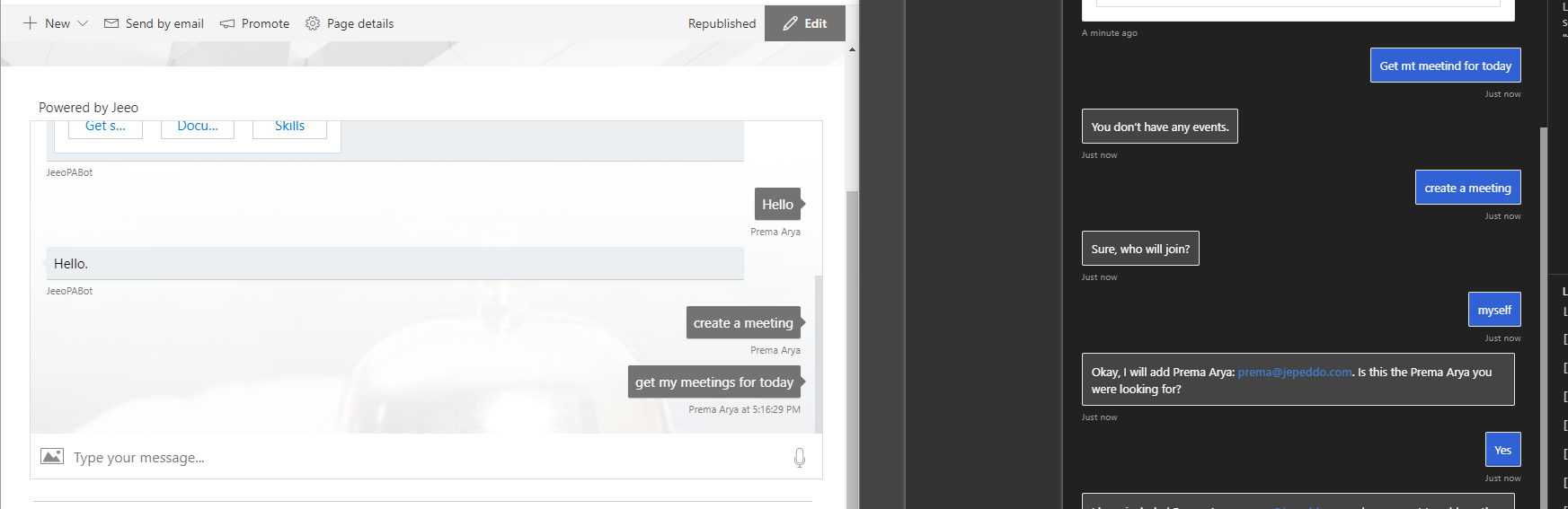
I can see everything works fine in the emulator.. however in the webchat the moment i ask any calendar intent I dont get any response.
premaarya
on 4 Jun 2019
Strange that WebChat isn't working. Can you look in AppInsights for any exceptions that might be logged?
darrenj
on 4 Jun 2019
Adding the support team to look at VA with Calendar Skill within WebChat not working. I can't repro byt hopefully @premaarya can share the webchat hosting code to see if there is something there.
Potentially oauth cards are not showing/rendering? Ignore the earlier thread of this issue that's resolved and the issue has forked a little
darrenj
on 4 Jun 2019
@premaarya If your still experiencing the issue with webchat can you share your webchat hosting code please?
darrenj
on 10 Jun 2019
@darrenge I have been testing in the web chat test client in the azure portal and I realize i am using the V3 client code to test. Can that be an issue?
 `// set new userid for each user.
        var user = {
            id: userId,
            name: username
        };
    var bot = {
        id: getQueryStringValue('botid') || 'botid',
        name: getQueryStringValue("botname") || 'botname'
    };
```
var botConnection = new BotChat.DirectLine({
secret: secret,
token: token,
domain: domain,
webSocket: webSocket && webSocket === "true" // defaults to true
});
``
        BotChat.App({
            botConnection: botConnection,
            user: user,
            bot: bot,
            locale: locale,
            resize: 'detect',
            sendTyping: true,    // defaults to false. set to true to send 'typing' activities to bot (and other users) when user is typing
            speechOptions: getSpeechOptions(),
        }, document.getElementById("BotChatGoesHere"));
premaarya
on 10 Jun 2019
I think we've found the problem with WebChat, whether it's in the "azure hosted" test webchat version or directly. If you follow my instructions here then I suspect this will resolve the issue.
darrenj
on 13 Jun 2019
Confirmed as resolved in our testing (and another customer) so closing. Let us know if the instructions in my previous comment don't resolve your issue.
darrenj
on 13 Jun 2019
@darrenj Thanks!
premaarya
on 13 Jun 2019
WebChat issues have been resolved, if you update to the latest Bot.Builder.Skills and Bot.Builder.Solutions packages there should be no further problems within WebChat.
darrenj
on 17 Jun 2019
Related issues
 VladPapacostea-SM
·
3Comments
VladPapacostea-SM
·
3Comments
 esoler-sage
·
3Comments
esoler-sage
·
3Comments
 lauren-mills
·
3Comments
lauren-mills
·
3Comments
 andhdo
·
3Comments
andhdo
·
3Comments
 edemehmetcan
·
3Comments
edemehmetcan
·
3Comments