Botframework-sdk: [FormFlow] How to successfully prompt for values?
Hello.
I've been playing a bit lately with Forms in the BotFramework, but I've not been able to work with float values.
For instance, I have a field like this:
[Prompt("¿How much money would you like to transfer?")
public float Amount { get; set; }
But the FormFlow is only recognizing when I enter an int and nothing else. (Ex: 1500)
For instance, it should recognize If I reply with:
- 1500.42
- 1500,42
- $1500
- $1500.42
- $1500,42
- The amount I want to transfer is $1500.42
- Here's it: $1500
Any suggestions?
 xjose97x
All 7 comments
Thanks for reporting this @xjose97x, we will look into this. Do you mind posting your whole form code (or minimum reproducible) so we can reproduce exactly as you are?
Our docs say this should work
 JasonSowers
on 21 Dec 2017
JasonSowers
on 21 Dec 2017
I was unable to reproduce with the same outcome. I was able to produce some very strange behavior using float type.
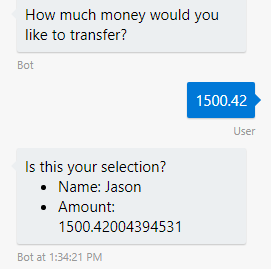
This was all remedied by using the double type.
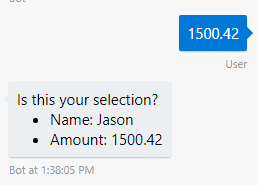
    [Serializable]
    public class ContactMessage
    {
        public string Name { get; set; }

        [Prompt("How much money would you like to transfer?")]
        public double Amount { get; set; }

        public static IForm<ContactMessage> BuildForm()
        {
            return new FormBuilder<ContactMessage>()
                .Message("I just need a few details to submit your message")
                .Build();
        }
    }
Thanks for your reply!
@JasonSowers Will provide you with an example as soon I get back to my office.
In the meantime, were you able to see what happened if you entered a float/double value with comma as decimal separator instead of dot?
Ex: 1500,50 or 12,44.
Also I'm still not sure if Formflow should be able to recognize when I enter a float value in a sentence such as:
"The answer is 1500.42"
Or with a currency indicator such as: " $ 1500,42"
xjose97x
on 21 Dec 2017
FormFlow would only be able to recognize an actual floating point number anything else will give you results like these:
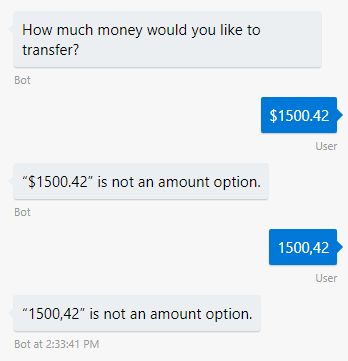
However, in the emulator if I change my locale to spanish:
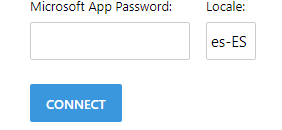
It does recognize using a comma separator:
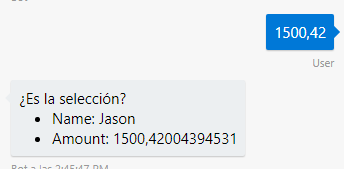
FormFlow has some regex to help it recognize things that are close to what it is looking for in the context of strings. In the case of numbers (int, double, float) it does not. This is a case in which LUIS should give you much better results, if not near perfect results. Assuming you are able to break out that part of your form into a LUIS intent.
JasonSowers
on 21 Dec 2017
@xjose97x any update?
JasonSowers
on 27 Dec 2017
Oops, sorry @JasonSowers for the late reply. Been a bit inactive due to holidays.
I decided to handle this by making the "amount" field a string, and using a validate function.
In the validate function I remove any dollar symbol (if found), and then I try to parse the string as a float. If the parse is succesful, then it's a valid amount, otherwise reprompt the field in the form.
Also when parsing the string as a float, I'm using "CultureInfo.InvariantCulture" so it can handle a comma or dot as a separator of decimal values.
I guess with a validator I should be able to handle a scenario where the user replies in a sentence such as:
"The amount is $xxxx.xx"
"The reply to that question is $xxxx.xx"
, etc.
I would just need to clean the user input in the same way as I removed the dollar symbol. Maybe iterate through the user text until I find a number.
Thanks for the help @JasonSowers !
xjose97x
on 27 Dec 2017
Glad you found a solution
JasonSowers
on 28 Dec 2017
Related issues
 daveta
·
3Comments
daveta
·
3Comments
 somprabhsharma
·
3Comments
somprabhsharma
·
3Comments
 maba4891
·
3Comments
maba4891
·
3Comments
 mattlanham
·
3Comments
mattlanham
·
3Comments
 Prybe
·
3Comments
Prybe
·
3Comments