Botframework-sdk: [Skype Web Control] User name not showing? (Not Recognizing the Email Address when user enter it)
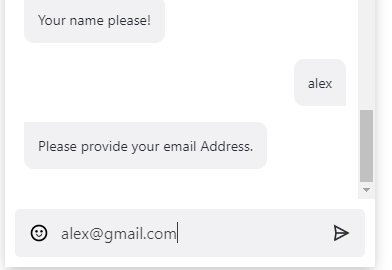
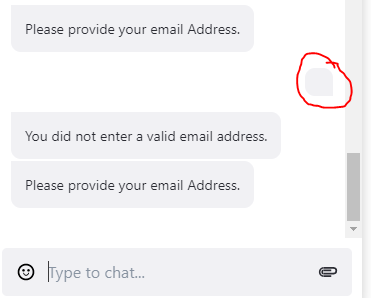
I developed a simple chat bot to process which takes user details and email address, but when I'm entering the email address in skype embedded chat control ,I a getting a empty message (empty string) as in screenshot 2. As a result, I'm unable to validate my email address. (While the same code is working fine on web chat control and facebook).
 satyansh-sagar
All 11 comments
I also have the similar issue. Hope Skype Team fixes this.
 Chitma
on 24 Nov 2017
Chitma
on 24 Nov 2017
Someone Please Help me here , i'm stuck at this point...
satyansh-sagar
on 25 Nov 2017
Hi @satyansh-sagar - Thanks for reporting the issue.
It's hard to diagnose the issue without seeing the code here. Can you post the bot code that produces this problem?
 nwhitmont
on 26 Nov 2017
nwhitmont
on 26 Nov 2017
@nwhitmont Below is the Code Snippet,
Validators().IsValidEmail is a method to validate the email address.
The code is working perfectly on bot framework web chat channel and direct line , but having issues with skype.
public async Task PhoneNoProcessAsync(IDialogContext context, IAwaitable<string> result)
{
    PromptDialog.Text(context, this.EmailAddressProcessAsync, "Enter your Email Address, Just type it below!", "Retry", 3);

}
public async Task EmailAddressProcessAsync(IDialogContext context, IAwaitable<string> result)
{
    var _emailAddress = await result;
    _emailAddress = _emailAddress.Trim().ToLower();

    bool _isEmailValid = new Validators().IsValidEmail(_emailAddress);
    if (_isEmailValid)
    {
        await context.PostAsync("Email Address is correct");
        context.Done(True);
    }
    else
    {
        await context.PostAsync("Your Email Address seems to be incorrect.");
        PromptDialog.Text(context, this.EmailAddressProcessAsync, "Just type your E-mail Address below!", "Retry", 3);
    }
}
@satyansh-sagar Thanks for the update.
For reference, what is the OS/browser/browser version in use where the Skype Web Control is having the error?
nwhitmont
on 28 Nov 2017
@brene
nwhitmont
on 28 Nov 2017
@nwhitmont Its throwing an error everywhere, in chrome, Edge and IE.
satyansh-sagar
on 28 Nov 2017
@satyansh-sagar I'm the PM for the Skype Web Control. I'm sorry that you're experiencing this bug. We're trying to get it fixed ASAP. I'll keep you updated
 renebrandel
on 28 Nov 2017
renebrandel
on 28 Nov 2017
Thanks @brene , Will awaiting your response
satyansh-sagar
on 29 Nov 2017
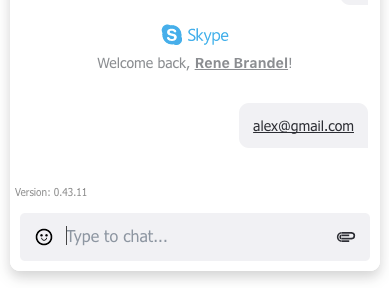
@satyansh-sagar we've fixed this issue in our dogfood environment (see img). You can expect this to be on production by the end of this week. Keep the feedback coming!
renebrandel
on 5 Dec 2017
@brene Great Job , Hope to see it live soon.
satyansh-sagar
on 6 Dec 2017
Related issues
 verdysh
·
3Comments
verdysh
·
3Comments
 kenyeung128
·
3Comments
kenyeung128
·
3Comments
 peterbozso
·
3Comments
peterbozso
·
3Comments
 stijnherreman
·
3Comments
stijnherreman
·
3Comments
 Vigneshramkumar
·
3Comments
Vigneshramkumar
·
3Comments
Most helpful comment
Hi @satyansh-sagar - Thanks for reporting the issue.
It's hard to diagnose the issue without seeing the code here. Can you post the bot code that produces this problem?