Botframework-sdk: Google OAuth - disallowed_useragent on Mobiles using SignIn Card
Bot Info
- App ID: a11040e1-1284-49da-a94b-3cf380bc4097
- SDK Platform: .NET
- SDK Version: 3.5
- Active Channels: Skype
- Deployment Environment: Auzure App Service,
Issue Description
Till recently everything is great.
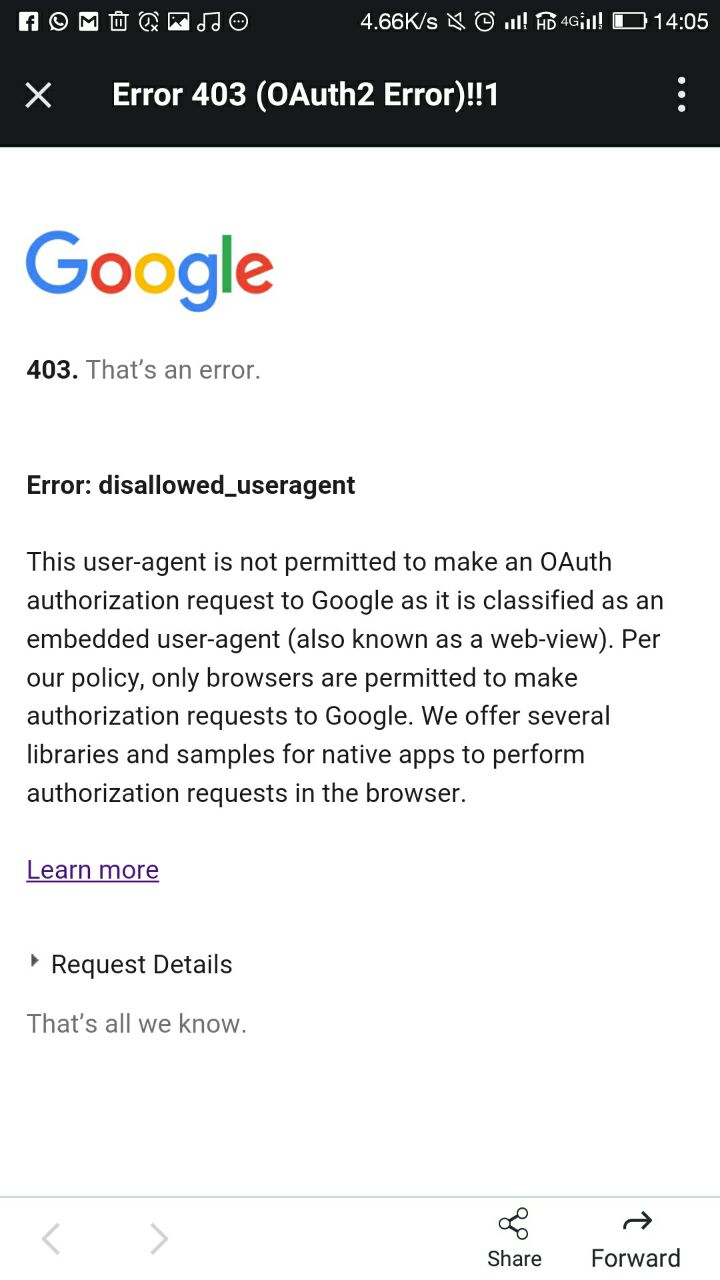
Recently Google disallowed all the embedded WebViews. This primarily impacts Mobile Apps. So on Skype Mobile, when I click on the Signin Card to get authenticated with Google OAuth, it now fails with disallowed_useragent. The screenshot is shown below. Now what is a neater way to work around this ?
Reproduction Steps
- Open Bot on Skype Mobile App (iOS or Android)
- LogIn using the signin card
- We see disallowed_useragent error. If I open this url on a browser everything works.
Expected Behavior
Able to login using an existing session or allow the user to key in the gmail id and password in the google oAuth credentials screen and logs in with right set of credentials.
Actual Results
Well this is the error i get
 varunreddycs
All 6 comments
This is probably a better question for stack overflow since the change by Google effected more than just the use in bot framework. A broader audience may prove better at finding a workaround.
 JasonSowers
on 24 Oct 2017
JasonSowers
on 24 Oct 2017
@varunreddycs This error is not specific to Bot Framework or BotBuilder SDK. The change to Google's policy was announced in August 2016.
For more information, try a quick Google search, or check the notes on this Stack Overflow post:
https://stackoverflow.com/questions/40591090/403-error-thats-an-error-error-disallowed-useragent
 nwhitmont
on 24 Oct 2017
nwhitmont
on 24 Oct 2017
@JasonSowers @nwhitmont The link that was given above is to go ahead and tweak the App itself (iOS or Andrioid). How can we do that for Skype on iOS or Android as the Bot is hosted by Skype App on the Mobile platform. But @varunreddycs probably wants to know how to hit the Google APIs on a button click of the SignIn Card of the Bot Framework. Is there a way to change the user-agent such that we could directly launch a browser in the Mobile as opposed to the default WebView ? Any API from within the BotFramework ? Any work around is probably what @varunreddycs might be needing. So the question is kind of on the cusp more inclining towards botframework. Because one should be able to set it without doing any code specific to iOS or Andriod from within the Bot code. I hope I am not missing anything quite basic. If it is valid, we should reopen this issue.
 Vkrish-Nimmagadda
on 25 Oct 2017
Vkrish-Nimmagadda
on 25 Oct 2017
@JasonSowers @nwhitmont what @Kris-Nimmagadda commented is exactly i was looking for.Any way to launch a browser other than WebView or other way around.I hope this issue will reopen
varunreddycs
on 25 Oct 2017
 egiesem
on 18 Jun 2018
egiesem
on 18 Jun 2018
@egiesem ..
You saved a life ;) . but try this public static final String USER_AGENT = "Mozilla/5.0 (Macintosh; Intel Mac OS X 10.13; rv:61.0) Gecko/20100101 Firefox/61.0"; mWebView.getSettings().setUserAgentString(USER_AGENT);
 gowrav
on 19 Jun 2018
gowrav
on 19 Jun 2018
Related issues
 RaoVenka
·
3Comments
RaoVenka
·
3Comments
 kenyeung128
·
3Comments
kenyeung128
·
3Comments
 somprabhsharma
·
3Comments
somprabhsharma
·
3Comments
 verdysh
·
3Comments
verdysh
·
3Comments
 bluekite2000
·
4Comments
bluekite2000
·
4Comments
Most helpful comment
@egiesem ..
You saved a life ;) . but try this public static final String USER_AGENT = "Mozilla/5.0 (Macintosh; Intel Mac OS X 10.13; rv:61.0) Gecko/20100101 Firefox/61.0"; mWebView.getSettings().setUserAgentString(USER_AGENT);