Botframework-sdk: [WebChat] iframe code is working on Google Chrome , But Facing issue in Firefox and IE
Hi Team ,
I have created HTML Page , Inside HTML page I have used Iframe Web chat code.
For example :
In Google chrome Application works fine.
user Types "Hi" meaasge and click on Submit button

Bot responses the specific query and give below output.

But the same i tried to run the application in Fire Fox and Internet Explorer ,
User Types "Hi" Message and click on send button , it's not allowing to send the messages . I have faced Issue like " t.textInput is null.

I have checked developer tool (FireFox ) and found below issue.
Please find below screen shot for the same.

Could you please provide some samples for how to overcome this above issue in Firefox and internet Explorer.
 RaoVenka
All 13 comments
@RaoVenka Hello, are you using .NET or Node SDK? For the bot that is having the problem, what is the bot name, bot handle, and App ID as registered in the Bot Portal
 nwhitmont
on 24 Jul 2017
nwhitmont
on 24 Jul 2017
@nwhitmont Hi , I am using .NET,
Below are the details.
Bot Name : Harmony
Bot handle : Harmony
APP ID : bffcee4d-86f8-4723-afd2-c8ee73ed5e8e
RaoVenka
on 25 Jul 2017
This looks like it may be a problem with the webchat control it self, @danmarshall any thoughts?
 JasonSowers
on 27 Jul 2017
JasonSowers
on 27 Jul 2017
Any update on this ? Please let me know
RaoVenka
on 2 Aug 2017
Hi @RaoVenka - I cannot repro this in Firefox 54 or IE 11. Can you give me specific browser versions and repro instructions?
 danmarshall
on 2 Aug 2017
danmarshall
on 2 Aug 2017
Hi ,
I am using Firefox 54.0.1(32 bit) Version.
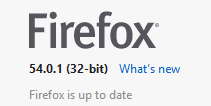
Steps : I have opened Firebox web-chat window and tried to post "Hi" message in chat window which is not allowing to post due to below js problem.
Please find below screen shot

RaoVenka
on 3 Aug 2017
I am also facing same issue with Firefox(54.0.1) and IE(11.0.44) @danmarshall
 sridharbm1991
on 3 Aug 2017
sridharbm1991
on 3 Aug 2017
Thank you @RaoVenka - can you also provide your platform? I still am not able to repro. Can you also send a URL to your bot chat? Or is it happening in the Bot Framework Dev Portal?
danmarshall
on 3 Aug 2017
Thanks @sridharbm1991 - can you alos provide a link to your bot chat? Or, your bot handle in the Bot Framework Dev Portal.
danmarshall
on 3 Aug 2017
Hi,
This issue is not showing in Bot Framework Dev Portal.
We are using .net code and hosted on cloud platform. Please find below the link
http://sonataharmonysite.azurewebsites.net/#
RaoVenka
on 4 Aug 2017
Hi @RaoVenka , thank you providing the URL to your WebChat. This was crucial in determining your issue. It seems that your WebChat implementation is not visible at the time that you initialize it. WebChat needs to be able to measure itself at the time it is initialized. There are 2 approaches you might take from here:
- Instead of using "display:none" use "visibility:hidden" or render the WebChat off screen.
- Do not initialize the WebChat control until the containing DIV is visible.
There is a related issue here
I am going to close this issue here, since it is not a bug with BotBuilder. Please follow up in the WebChat repo.
danmarshall
on 4 Aug 2017
Web Chat is not working in internet explorer 11 browser.Could you please help me on this.
Please find below error screenshot.

RaoVenka
on 10 Aug 2017
Hi @RaoVenka , I took another look, and I believe it is the same issue I described above.
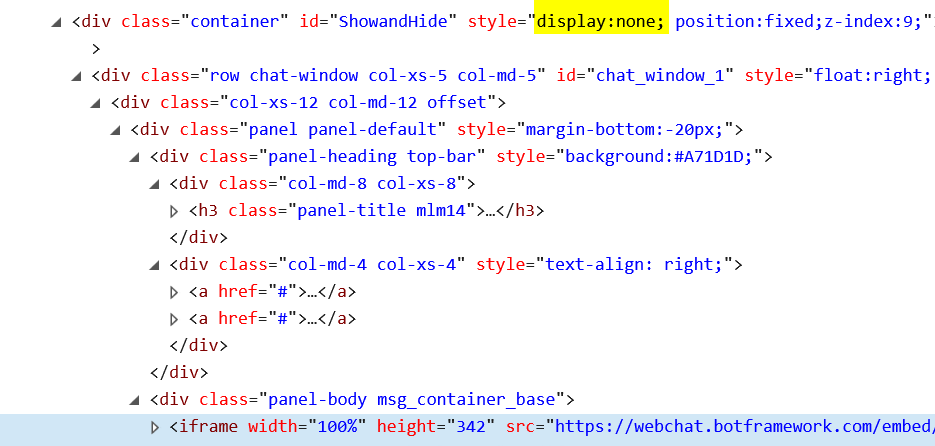
The iframe is inside a display:none container. Please see my message above, thanks!
danmarshall
on 10 Aug 2017
Related issues
 akakoychenko
·
3Comments
akakoychenko
·
3Comments
 kenyeung128
·
3Comments
kenyeung128
·
3Comments
 sebsylvester
·
3Comments
sebsylvester
·
3Comments
 vaditya04
·
3Comments
vaditya04
·
3Comments
 jschristophe
·
3Comments
jschristophe
·
3Comments
Most helpful comment
Hi @RaoVenka , thank you providing the URL to your WebChat. This was crucial in determining your issue. It seems that your WebChat implementation is not visible at the time that you initialize it. WebChat needs to be able to measure itself at the time it is initialized. There are 2 approaches you might take from here:
There is a related issue here
I am going to close this issue here, since it is not a bug with BotBuilder. Please follow up in the WebChat repo.