Botframework-sdk: Microsoft Bot Framework Channel Emulator Proxy Settings
Hi, when I use Microsoft Bot Framework Channel Emulator at work network, I get error (407) Proxy Authentication Reuired. Will you update that emulator for proxy settings?

 mecitsem
All 10 comments
I am getting same issue. If my proxy is on, BOT doesn't talk.. If I turn it off, BOT Talks but API calls doesnt work.
 ashay-88
on 3 Aug 2016
ashay-88
on 3 Aug 2016
Hi @mecitsem and @ashay-88, we've added this to our list of feature proposals for the emulator. Thank you!
 dandriscoll
on 18 Sep 2016
dandriscoll
on 18 Sep 2016
Hi, below is a sample node.js app. Where exactly do we need to add the below proxy settings so that all traffic goes through the proxy. Reason we're doing that is that we're having a bot behind proxy and that we're getting a 407 error when the node.js app tries to access luis on http://api.projectoxford.ai:443
Code:
var globalTunnel = require('global-tunnel');
process.env.http_proxy = 'http://proxy:80';
process.env.https_proxy = 'http://proxy:80';
globalTunnel.initialize();
globalTunnel.end();
Node.js App:
var builder = require('botbuilder');
// Create bot and bind to console
var connector = new builder.ConsoleConnector().listen();
var bot = new builder.UniversalBot(connector);
// Create LUIS recognizer that points at our model and add it as the root '/' dialog for our Cortana Bot.
var model = 'https://api.projectoxford.ai/luis/v1/application?id=c413b2ef-382c-45bd-8ff0-f76d60e2a821&subscription-key=3e25eb6738844fdca4414b8c0a498cd0&q=';
var recognizer = new builder.LuisRecognizer(model);
var dialog = new builder.IntentDialog({ recognizers: [recognizer] });
bot.dialog('/', dialog);
// Add intent handlers
dialog.matches('builtin.intent.alarm.set_alarm', [
function (session, args, next) {
// Resolve and store any entities passed from LUIS.
var title = builder.EntityRecognizer.findEntity(args.entities, 'builtin.alarm.title');
var time = builder.EntityRecognizer.resolveTime(args.entities);
var alarm = session.dialogData.alarm = {
title: title ? title.entity : null,
timestamp: time ? time.getTime() : null
};
    // Prompt for title
    if (!alarm.title) {
        builder.Prompts.text(session, 'What would you like to call your alarm?');
    } else {
        next();
    }
},
function (session, results, next) {
    var alarm = session.dialogData.alarm;
    if (results.response) {
        alarm.title = results.response;
    }

    // Prompt for time (title will be blank if the user said cancel)
    if (alarm.title && !alarm.timestamp) {
        builder.Prompts.time(session, 'What time would you like to set the alarm for?');
    } else {
        next();
    }
},
function (session, results) {
    var alarm = session.dialogData.alarm;
    if (results.response) {
        var time = builder.EntityRecognizer.resolveTime([results.response]);
        alarm.timestamp = time ? time.getTime() : null;
    }

    // Set the alarm (if title or timestamp is blank the user said cancel)
    if (alarm.title && alarm.timestamp) {
        // Save address of who to notify and write to scheduler.
        alarm.address = session.message.address;
        alarms[alarm.title] = alarm;

        // Send confirmation to user
        var date = new Date(alarm.timestamp);
        var isAM = date.getHours() < 12;
        session.send('Creating alarm named "%s" for %d/%d/%d %d:%02d%s',
            alarm.title,
            date.getMonth() + 1, date.getDate(), date.getFullYear(),
            isAM ? date.getHours() : date.getHours() - 12, date.getMinutes(), isAM ? 'am' : 'pm');
    } else {
        session.send('Ok... no problem.');
    }
}
]);
dialog.matches('builtin.intent.alarm.delete_alarm', [
function (session, args, next) {
// Resolve entities passed from LUIS.
var title;
var entity = builder.EntityRecognizer.findEntity(args.entities, 'builtin.alarm.title');
if (entity) {
// Verify its in our set of alarms.
title = builder.EntityRecognizer.findBestMatch(alarms, entity.entity);
}
    // Prompt for alarm name
    if (!title) {
        builder.Prompts.choice(session, 'Which alarm would you like to delete?', alarms);
    } else {
        next({ response: title });
    }
},
function (session, results) {
    // If response is null the user canceled the task
    if (results.response) {
        delete alarms[results.response.entity];
        session.send("Deleted the '%s' alarm.", results.response.entity);
    } else {
        session.send('Ok... no problem.');
    }
}
]);
dialog.onDefault(builder.DialogAction.send("I'm sorry I didn't understand. I can only create & delete alarms."));
// Very simple alarm scheduler
var alarms = {};
setInterval(function () {
var now = new Date().getTime();
for (var key in alarms) {
var alarm = alarms[key];
if (now >= alarm.timestamp) {
var msg = new builder.Message()
.address(alarm.address)
.text("Here's your '%s' alarm.", alarm.title);
bot.send(msg);
delete alarms[key];
}
}
}, 15000);
 1blkhawk1
on 12 Oct 2016
1blkhawk1
on 12 Oct 2016
NEW VERSION OF EMULATOR
To get it working again I still used CNTLM and set the proxy in the Web.config for the bot. You will have to remove this during deployment. I've also had it in Internet Options, but it works without that setting now. In case of issues try setting it there too.
  <system.net>
    <defaultProxy>
      <proxy usesystemdefault="true" proxyaddress="<PROXY ADDRESS>"/>
    </defaultProxy>
  </system.net>
OLD VERSION OF EMULATOR
I've had luck getting around the corporate proxy by using CNTLM and setting a proxy in my Internet Options -> Connections -> LAN settings.
Then also editing the Bot Framework Channel Emulator config by adding proxy config:
<system.net>
    <defaultProxy>
      <proxy
            usesystemdefault="true"
      />
    </defaultProxy>
</system.net>
Initially I tried by only setting the proxy in the config, but that would return Internal Server Error when using the Emulator. I assume that was from LUIS integration. After specifying it in both places, its working fine.
 ZanderAdam
on 18 Nov 2016
ZanderAdam
on 18 Nov 2016
If anyone still has this issue, I got around it by installing Fiddler 4 and selecting "Rules > Automatically Authenticate"
 iparry7979
on 2 Dec 2016
iparry7979
on 2 Dec 2016
@ZanderAdam: could you please tell where you made this setting? In your bot project or?
 adekola
on 23 May 2017
adekola
on 23 May 2017
@adekola that setting applied to the old version of the emulator. I've edited my answer above with changes for the new version. Had to also edit the Web.config for the bot.
ZanderAdam
on 23 May 2017
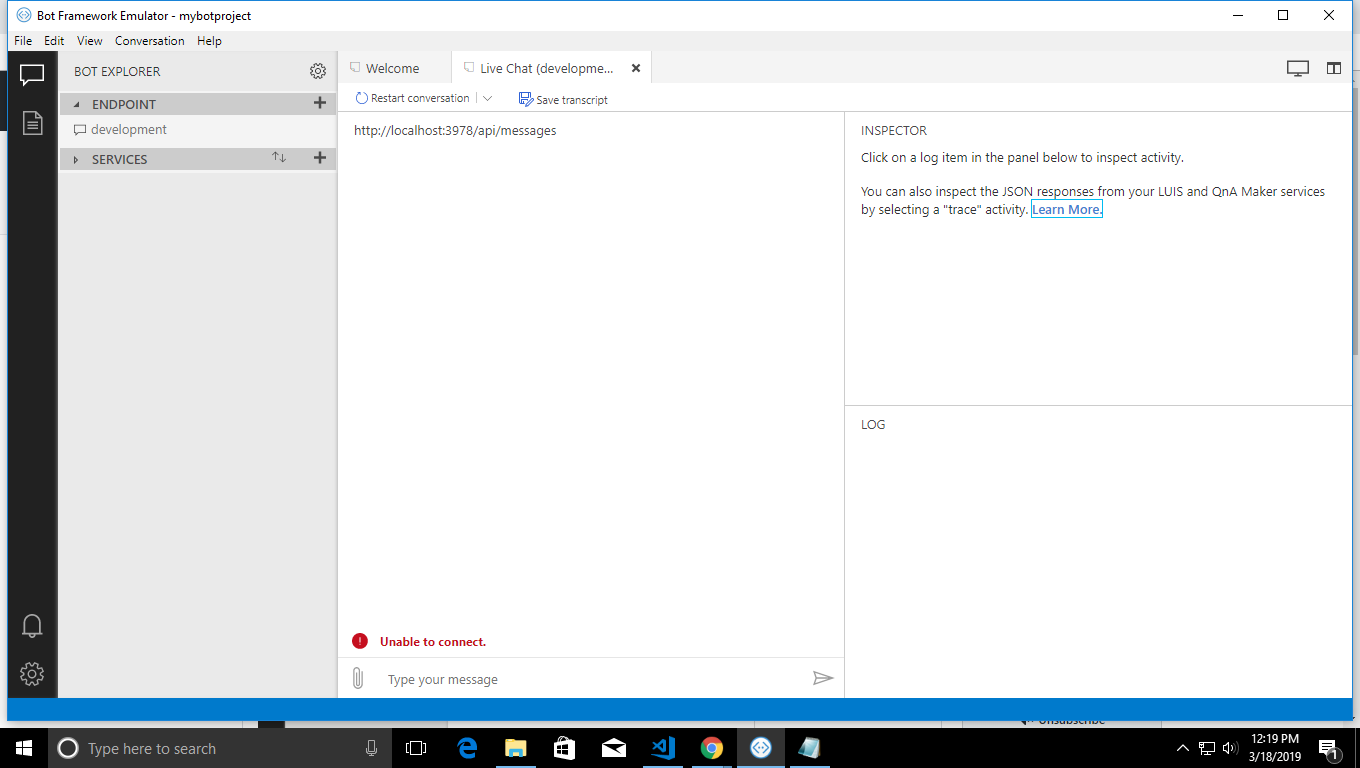
can you tell me about my error how to resolve?
 vansh187
on 18 Mar 2019
vansh187
on 18 Mar 2019
I have the same problem. I am using node.js for my bot framework. I am behind the proxy. If I delete my http_proxy and https_proxy from environmental variables the new simulator works fine but my bot cannot access the external world from the bot..
 marcinwal
on 12 Apr 2019
marcinwal
on 12 Apr 2019
@marcinwal This is a closed issue. Please direct your issue to the Emulator repository: https://github.com/Microsoft/BotFramework-Emulator/issues
Also, you can find some proxy configuration information here:
https://github.com/Microsoft/BotFramework-Emulator/blob/master/packages/extensions/debug/client/README.md#proxying-api-requests-in-development
 EricDahlvang
on 16 Apr 2019
EricDahlvang
on 16 Apr 2019
Related issues
 hailiang-wang
·
3Comments
hailiang-wang
·
3Comments
 peterbozso
·
3Comments
peterbozso
·
3Comments
 kenyeung128
·
3Comments
kenyeung128
·
3Comments
 maba4891
·
3Comments
maba4891
·
3Comments
 vaditya04
·
3Comments
vaditya04
·
3Comments
Most helpful comment
I am getting same issue. If my proxy is on, BOT doesn't talk.. If I turn it off, BOT Talks but API calls doesnt work.