Botframework-emulator: [LUIS] Access denied error when clicking on a trace in emulator
What project is affected?
VA
What language is this in?
C#
What happens?
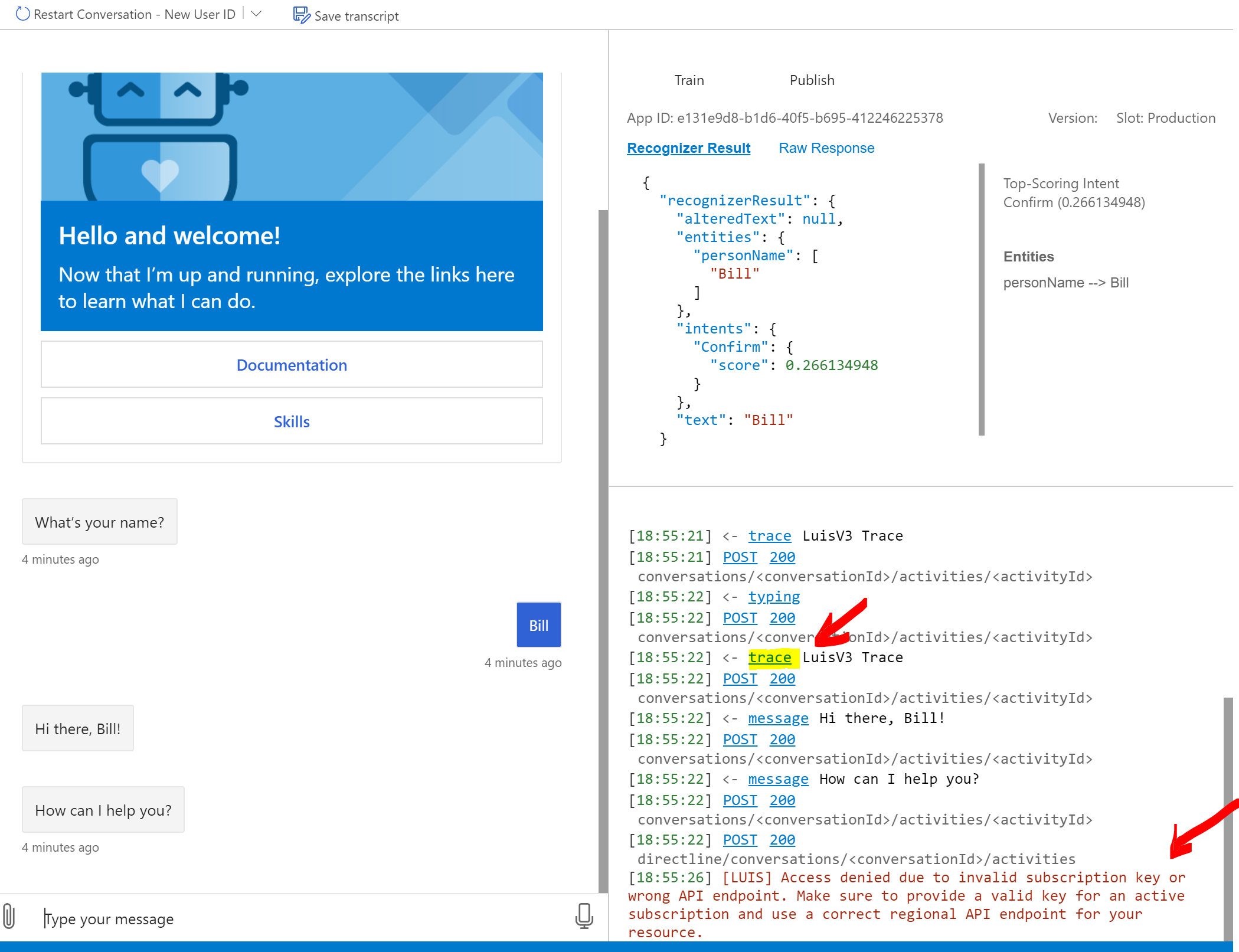
[LUIS] Access denied error shown when clicking on a trace in emulator
What are the steps to reproduce this issue?
1) Deploy the bot using proveded script
./Deployment/Scripts/deploy.ps1 -name "MyAssistant1" -location "southcentralus" -appPassword "XXX" -luisAuthoringKey "XXX" -luisAuthoringRegion "westus" -luisEndpoint "https://westus.api.cognitive.microsoft.com/" -parametersFile "./Deployment/Resources/parameters.template.json" -languages "en-us,es-es"
2) Run emulator using the link from the script output and enter your name
3) Click on "trace" (see screenshot)
What were you expecting to happen?
Not sure what should I expect but definitely not the error
Can you share any logs, error output, etc.?
[LUIS] Access denied due to invalid subscription key or wrong API endpoint. Make sure to provide a valid key for an active subscription and use a correct regional API endpoint for your resource.
Any screenshots or additional context?
 turbozapekanka
All 11 comments
To use this, you should sign in the emulator via 'File' -> 'Sign in with Azure'.
See details here https://github.com/microsoft/BotFramework-Emulator/wiki/Login-to-Azure
 xieofxie
on 21 May 2020
xieofxie
on 21 May 2020
Would be great if the Emulator could provide some initial guidance on this error and how to resolve within the Emulator?
 darrenj
on 21 May 2020
darrenj
on 21 May 2020
@turbozapekanka did that resolve the issue for you?
 benbrown
on 21 May 2020
benbrown
on 21 May 2020
Sort of.
I had to manually provide the keys though
I signed in and then clicked + to add luis services but it didn't automatically find the luis models for some reason:
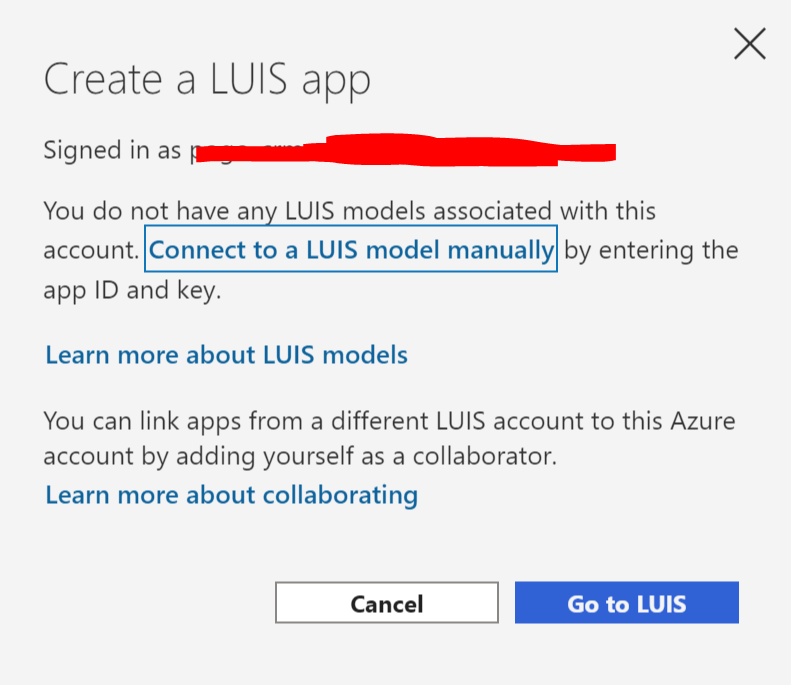
After I added one luis model manually it worked (for all models, which is strange.)
turbozapekanka
on 21 May 2020
I'd just remove that red error from the emulator and instead show a hint in the top right part (where intent is shown) saying "sign in for reassigning the intent" (I guess this all it does, right?)
That red thing just scares people.
turbozapekanka
on 21 May 2020
@turbozapekanka what version of the Emulator are you using?
 cwhitten
on 26 May 2020
cwhitten
on 26 May 2020
4.9.0
turbozapekanka
on 26 May 2020
Thanks. The heuristic used that is causing this behavior is that you are using a .bot file to connect to the bot. Can you confirm?
In the above scenario, the assumption is that the appropriate LUIS credentials are also serialized into that .bot file.
cwhitten
on 26 May 2020
Yes I do use a .bot file
turbozapekanka
on 26 May 2020
@cwhitten As a part of this PR we https://github.com/microsoft/BotFramework-Emulator/pull/2074 we had addressed this scary message from not showing up when connecting to a bot through a URL whereas when connected through a bot file we do show the missing credentials error message. We might need a a design update to make sure a visual friendly message.
 srinaath
on 27 May 2020
srinaath
on 27 May 2020
The design update we will be making is showing the error message with the amber font color to make it less blaring for now.
srinaath
on 13 Jun 2020
Related issues
 giorgobiani
·
3Comments
giorgobiani
·
3Comments
 Kumar2608
·
4Comments
Kumar2608
·
4Comments
 saiteja21
·
4Comments
Kumar2608
·
3Comments
saiteja21
·
4Comments
Kumar2608
·
3Comments
 Jay-study-nildana
·
4Comments
Jay-study-nildana
·
4Comments
Most helpful comment
The design update we will be making is showing the error message with the amber font color to make it less blaring for now.