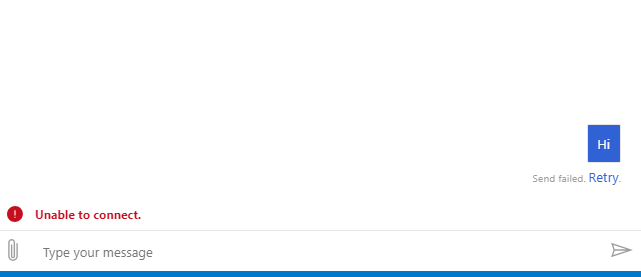
Botframework-emulator: Latest emulator could not connect to a local bot
Describe the bug
Give a clear and concise description of what the bug is.
TO reproduce
- Create new V4 bot project from Echo or Core template
- start bot locally
- start Emulator
- connect to bot
- for echo bot type and send a message
Other info
- ngrok is configured and bypass for local checkbox checked
- postman post reaching controller
[14:33:41]Emulator listening on http://localhost:57870
[14:33:41]ngrok not configured (only needed when connecting to remotely hosted bots)
[14:33:41]Connecting to bots hosted remotely
[14:33:41]Edit ngrok settings
[14:33:41]
[14:33:41]POST403directline.conversationUpdate
[14:33:41]
[14:33:41]POST403directline.conversationUpdate
[14:33:41]POST200directline.startConversation
 ygizhitsa
All 16 comments
Hi @ygizhitsa ,
Does your bot code happen to use a Microsoft App ID and Microsoft App Password? If so, make sure to provide the credentials when connecting to your bot via the open bot dialog.
Also, do you happen to be on a corporate network or behind a proxy?
 tonyanziano
on 5 Sep 2019
tonyanziano
on 5 Sep 2019
No, this bot is out of the template (VS 2017 Echo bot template) . BTW, I have tested it with old emulator 3.5.36 and it is able to communicate
ygizhitsa
on 5 Sep 2019
Interesting there there were on 200 response, but it looks like it is not connecting

ygizhitsa
on 5 Sep 2019
Hmm, yeah that seems weird that starting the conversation returns a 200, but trying to post any activity returns a 403.
I'll try and repro the issue using the same template.
tonyanziano
on 6 Sep 2019
Thank you and yes I'm behind firewall, but everything is running locally - localhost:port ... Also, what is the "cannot pass an activity Unauthorized" message is about?
ygizhitsa
on 6 Sep 2019
That means when the Emulator tried to send your message "hi" to your Bot by POST'ing to your bot's endpoint (http://localhost:3978/api/messages) that it received a 403 FORBIDDEN or a 401 UNAUTHORIZED in response.
This caused the message to never be delivered to your echo bot.
===
I just tried to reproduce it with a brand new Echo Bot VS 2017 template and was able to connect to the bot and send / receive messages, so I'm not sure what's happening on your machine.
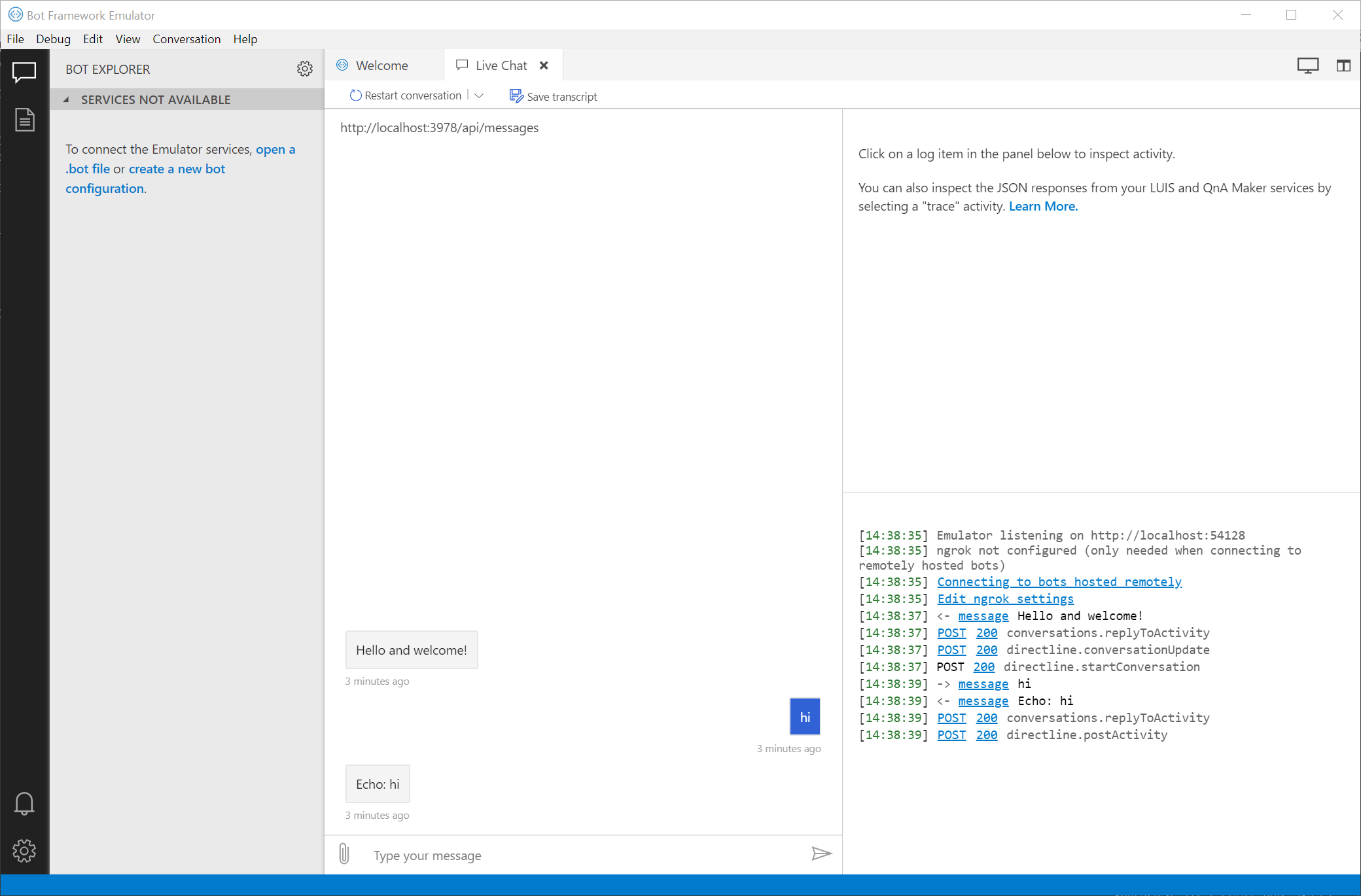
Usually issues like these are related to some sort of local networking configuration issue, but the 401 / 403 response seems strange to me.
I'll try and do some more investigation and see if anything sticks out to me.
tonyanziano
on 9 Sep 2019
After looking at the code, the error message you are seeing "Cannot pass an activity Unauthorized" should only be generated after trying to send the message activity to your bot. So it seems to me that the Emulator is trying to post the activity to your bot, which is then sending the Unauthorized response back to the Emulator.
Can you set a breakpoint in your bot's code in the OnMembersAddedAsync method and see if it ever gets hit when trying to connect to your bot?
tonyanziano
on 9 Sep 2019
I have put breakpoint on the _OnMemberAddedAsync_ and it never get there. However, I have realized that when I start bot process, I'm getting following trace:
info: Microsoft.AspNetCore.DataProtection.KeyManagement.XmlKeyManager[0]
      User profile is available. Using 'C:\Users\gellery\AppData\Local\ASP.NET\DataProtection-Keys' as key repository and Windows DPAPI to encrypt keys at rest.
Hosting environment: Development
Content root path: C:\Users\gellery\source\repos\EchoBot1\EchoBot1
Now listening on: https://localhost:3979
Now listening on: http://localhost:3978
Application started. Press Ctrl+C to shut down.
dbug: HttpsConnectionAdapter[1]
      Failed to authenticate HTTPS connection.
System.IO.IOException: Authentication failed because the remote party has closed the transport stream.
   at System.Net.Security.SslState.StartReadFrame(Byte[] buffer, Int32 readBytes, AsyncProtocolRequest asyncRequest)
   at System.Net.Security.SslState.StartReceiveBlob(Byte[] buffer, AsyncProtocolRequest asyncRequest)
   at System.Net.Security.SslState.ForceAuthentication(Boolean receiveFirst, Byte[] buffer, AsyncProtocolRequest asyncRequest)
   at System.Net.Security.SslState.ProcessAuthentication(LazyAsyncResult lazyResult)
   at System.Net.Security.SslStream.BeginAuthenticateAsServer(SslServerAuthenticationOptions sslServerAuthenticationOptions, CancellationToken cancellationToken, AsyncCallback asyncCallback, Object asyncState)
   at System.Net.Security.SslStream.<>c.<AuthenticateAsServerAsync>b__51_0(SslServerAuthenticationOptions arg1, CancellationToken arg2, AsyncCallback callback, Object state)
   at System.Threading.Tasks.TaskFactory`1.FromAsyncImpl[TArg1,TArg2](Func`5 beginMethod, Func`2 endFunction, Action`1 endAction, TArg1 arg1, TArg2 arg2, Object state, TaskCreationOptions creationOptions)
   at System.Threading.Tasks.TaskFactory.FromAsync[TArg1,TArg2](Func`5 beginMethod, Action`1 endMethod, TArg1 arg1, TArg2 arg2, Object state, TaskCreationOptions creationOptions)
   at System.Threading.Tasks.TaskFactory.FromAsync[TArg1,TArg2](Func`5 beginMethod, Action`1 endMethod, TArg1 arg1, TArg2 arg2, Object state)
   at System.Net.Security.SslStream.AuthenticateAsServerAsync(SslServerAuthenticationOptions sslServerAuthenticationOptions, CancellationToken cancellationToken)
   at Microsoft.AspNetCore.Server.Kestrel.Https.Internal.HttpsConnectionAdapter.InnerOnConnectionAsync(ConnectionAdapterContext context)
info: Microsoft.AspNetCore.Hosting.Internal.WebHost[1]
      Request starting HTTP/1.1 GET https://localhost:3979/
info: Microsoft.AspNetCore.StaticFiles.StaticFileMiddleware[6]
      The file /default.htm was not modified
info: Microsoft.AspNetCore.Hosting.Internal.WebHost[2]
      Request finished in 69.4649ms 304 text/html
info: Microsoft.AspNetCore.Hosting.Internal.WebHost[1]
      Request starting HTTP/1.1 GET https://localhost:3979/favicon.ico
info: Microsoft.AspNetCore.Hosting.Internal.WebHost[2]
      Request finished in 160.1931ms 404
That was Kestrel core 2 http host. Running the same with IIS Express . This host does not produce any error messages, but result is the same. Again postman POST allows call a controller.
EchoBot1> info: Microsoft.AspNetCore.DataProtection.KeyManagement.XmlKeyManager[0]
EchoBot1>       User profile is available. Using 'C:\Users\gellery\AppData\Local\ASP.NET\DataProtection-Keys' as key repository and Windows DPAPI to encrypt keys at rest.
EchoBot1> Hosting environment: Development
EchoBot1> Content root path: C:\Users\gellery\source\repos\EchoBot1\EchoBot1
EchoBot1> Now listening on: http://127.0.0.1:21919
EchoBot1> Application started. Press Ctrl+C to shut down.
EchoBot1> info: Microsoft.AspNetCore.Hosting.Internal.WebHost[1]
EchoBot1>       Request starting HTTP/1.1 DEBUG http://localhost:3978/  0
EchoBot1> info: Microsoft.AspNetCore.Hosting.Internal.WebHost[1]
EchoBot1>       Request starting HTTP/1.1 GET http://localhost:3978/
EchoBot1> info: Microsoft.AspNetCore.Hosting.Internal.WebHost[2]
EchoBot1>       Request finished in 50.3468ms 200
EchoBot1> info: Microsoft.AspNetCore.StaticFiles.StaticFileMiddleware[2]
EchoBot1>       Sending file. Request path: '/default.htm'. Physical path: 'C:\Users\gellery\source\repos\EchoBot1\EchoBot1\wwwroot\default.htm'
EchoBot1> info: Microsoft.AspNetCore.Hosting.Internal.WebHost[2]
EchoBot1>       Request finished in 75.5238ms 200 text/html
EchoBot1> info: Microsoft.AspNetCore.Hosting.Internal.WebHost[1]
EchoBot1>       Request starting HTTP/1.1 GET http://localhost:3978/favicon.ico
EchoBot1> info: Microsoft.AspNetCore.Hosting.Internal.WebHost[2]
EchoBot1>       Request finished in 100.9412ms 404
What happens if you use a client like Postman or use cURL to POST an empty request to your bot's endpoint? Do you get a response back?
tonyanziano
on 11 Sep 2019
@ygizhitsa any updates? Following up from @tonyanziano above,
What happens if you use a client like Postman or use cURL to POST an empty request to your bot's endpoint? Do you get a response back?
 carlosscastro
on 23 Sep 2019
carlosscastro
on 23 Sep 2019
@ygizhitsa we're closing this out due to inactivity. If you run into any other issues please let us know.
 stevengum
on 3 Oct 2019
stevengum
on 3 Oct 2019
getting stuck with same situation, no errors, no logs
User said, hello. Sent at: January 28, 09:30
hello
Sent at: January 28, 09:30A minute ago
Connectivity status: Connected
Suggested Actions container: is empty
Type your message
[09:28:23]ngrok configured but not running
[09:28:34]
[09:28:34]POST401directline.conversationUpdate
[09:28:34]POST201directline.conversations
[09:30:41]-> messagehello
[09:30:42]Cannot post activity. Unauthorized.
[09:30:42]POST401directline.conversations.:conversationId.activities
How to resolve this issue ?
 infact
on 28 Jan 2020
infact
on 28 Jan 2020
@infact does your local bot use an Microsoft App ID & PW?
tonyanziano
on 28 Jan 2020
@ygizhitsa Hey try again by disabling the proxy... i got the same issue when i was using proxy, Now it's working for me
 SriRakesh
on 3 Feb 2020
SriRakesh
on 3 Feb 2020
I have the same issue and resolved by setting Enviroment Variable "NO_PROXY=localhost,127.0.0.1"
 khiemng
on 9 Apr 2020
khiemng
on 9 Apr 2020
Related issues
 iMicknl
·
6Comments
iMicknl
·
6Comments
 giorgobiani
·
3Comments
giorgobiani
·
3Comments
 Jay-study-nildana
·
4Comments
Jay-study-nildana
·
4Comments
 Kumar2608
·
3Comments
Kumar2608
·
3Comments
 madenwala
·
6Comments
madenwala
·
6Comments