Botframework-emulator: Sign in card doesn't open the oauth url after update
Github issues should be used for bugs and feature requests. Use Stack Overflow for general "how-to" questions.
Version
4.5.1
4.5.2
Describe the bug
After update emulator to 4.5.* version, AuthenticationBot sample can't open the right OAuth URL anymore. When I use 4.2.1 (my old version), OAuth card works fine.
To Reproduce
Steps to reproduce the behavior:
- Using AuthenticationBot, go to "appsettings.json" file and fill the fields: MicrosoftAppId, MicrosoftAppPassword, and ConnectionName.
- Open the Emulator
- Create a simple ".bot" file just to call the bot url (http://localhost:3978/api/messages)
- Open the Emulator
- Start chatting to show Sign in card.
- Tap to Login.
- Observe the URL that Emulator is trying to open.
Expected behavior
Emulator must open the URL set up on Azure Portal, correctly.
Screenshots
If applicable, add screenshots to help explain your problem.
Additional context
Emulator 4.2.1

Emulator 4.5.*

Add any other context about the problem here.
[bug]
 antonioFlavio
All 11 comments
Hi @antonioFlavio,
I'm unable to repro this issue using sample 18 with Emulator v4.5.2:

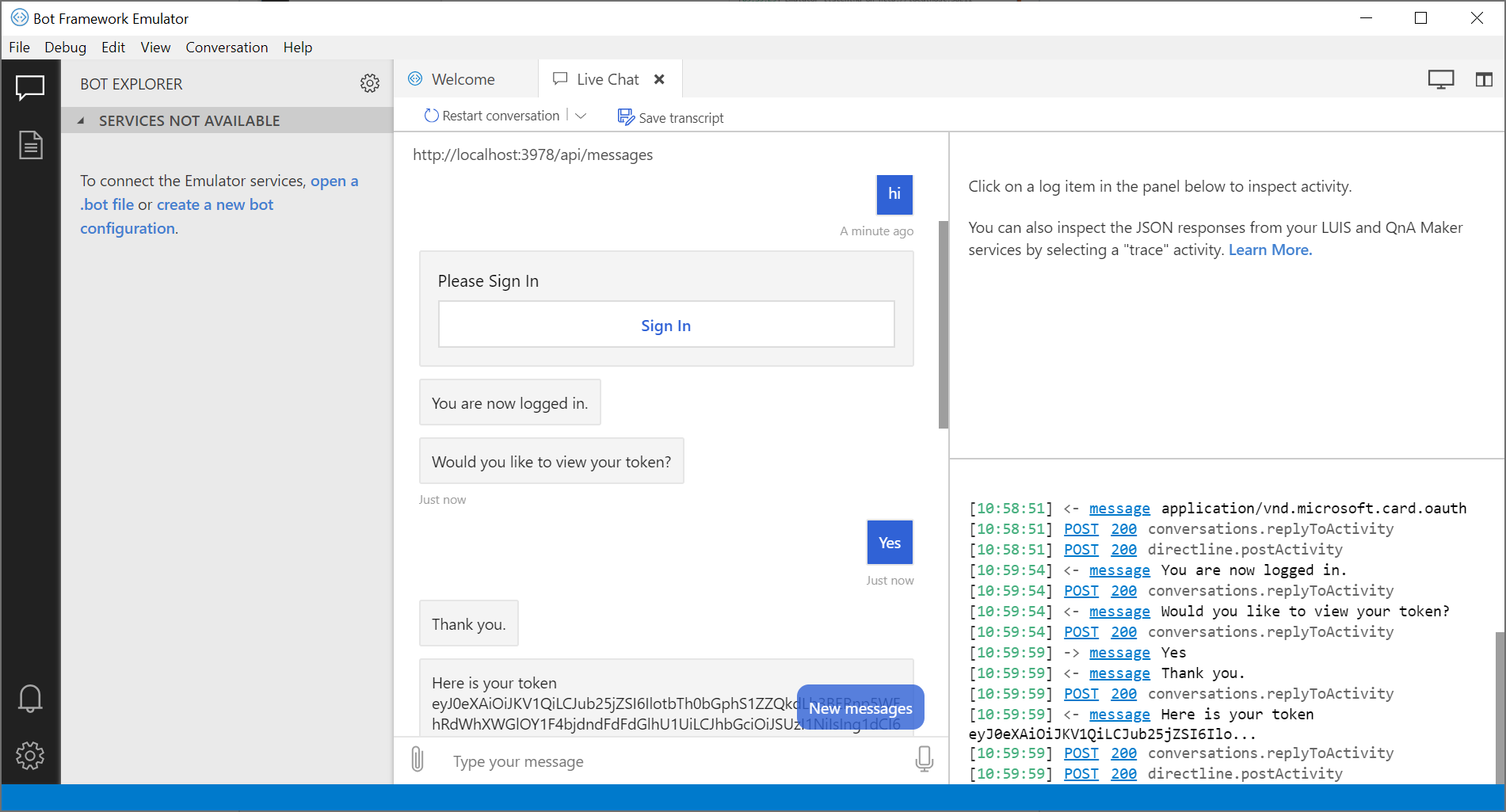
It looks like in 4.5.* your OAuth card signin link is being generated via this code path. So I assume your oauth connection name is LG then.
However, in 4.2.1, your signin link is being generated via this code path.
In the former case, if you follow the link, the Emulator should still send your bot an emulated token in the form of emulatedToken_<guid>. The source for that can be found here.
===
I'm trying to understand why, at least in your case, the links are being generated differently between different versions, because there has not been much of a delta in the code responsible for generating the link over the last few updates.
 tonyanziano
on 2 Aug 2019
tonyanziano
on 2 Aug 2019
Thanks for replying @tonyanziano.
Yes, my connection name is LG.
Any emulator setting is necessary? I tried just "Use Sign-in verification code" option because at version 4.2.1 I can't proceed to OAuth authentication without magic code. But even with this option was unchecked, the problem still occurs.
There is a way to able emulator logs or something like that?
antonioFlavio
on 2 Aug 2019
After some investigation, it looks like the url of format:
oauth://<connection-name>&&&<conversation-id>
is generated as a fallback, when the
oauthlink://<signinurl>&&&<conversation-id>
link cannot be generated.
One notable change in the recent updates is that we now try to spawn a separate instance of ngrok when generating an oauth signin link. I'm thinking that it's possible that this somehow silently failed.
Do you have ngrok installed and the Emulator configured in the app settings so that it points to the ngrok executable?
Also, is it possible that you are running multiple instances of ngrok and are on a free account when trying to test the auth bot? It could be possible that when we try to spawn a new instance of ngrok you are hitting your tunneled connection limit.
tonyanziano
on 2 Aug 2019
Hmm
About this recent update, if ngrok is not configured on Emulator, how signin link is generated?
I'm not using ngrok, but I have it installed.
antonioFlavio
on 2 Aug 2019
@antonioFlavio if ngrok is not configured in the Emulator settings, then the Emulator will generate a signin link that looks like:
oauth://<oauth-connection-name>&&&<conversation-id>
which is what you are seeing in 4.5.*. Since you do not have ngrok configured, there is no way for the Bot Framework token service (external) to send the token over the network to the Emulator.
This means that when you follow the oauth link, you won't actually get a genuine token from the token service, but instead, you will get an emulated token from the Emulator that looks like this:
emulatedToken_<guid>
===
If you want to get a genuine token, you need to configure ngrok in the Emulator app settings:
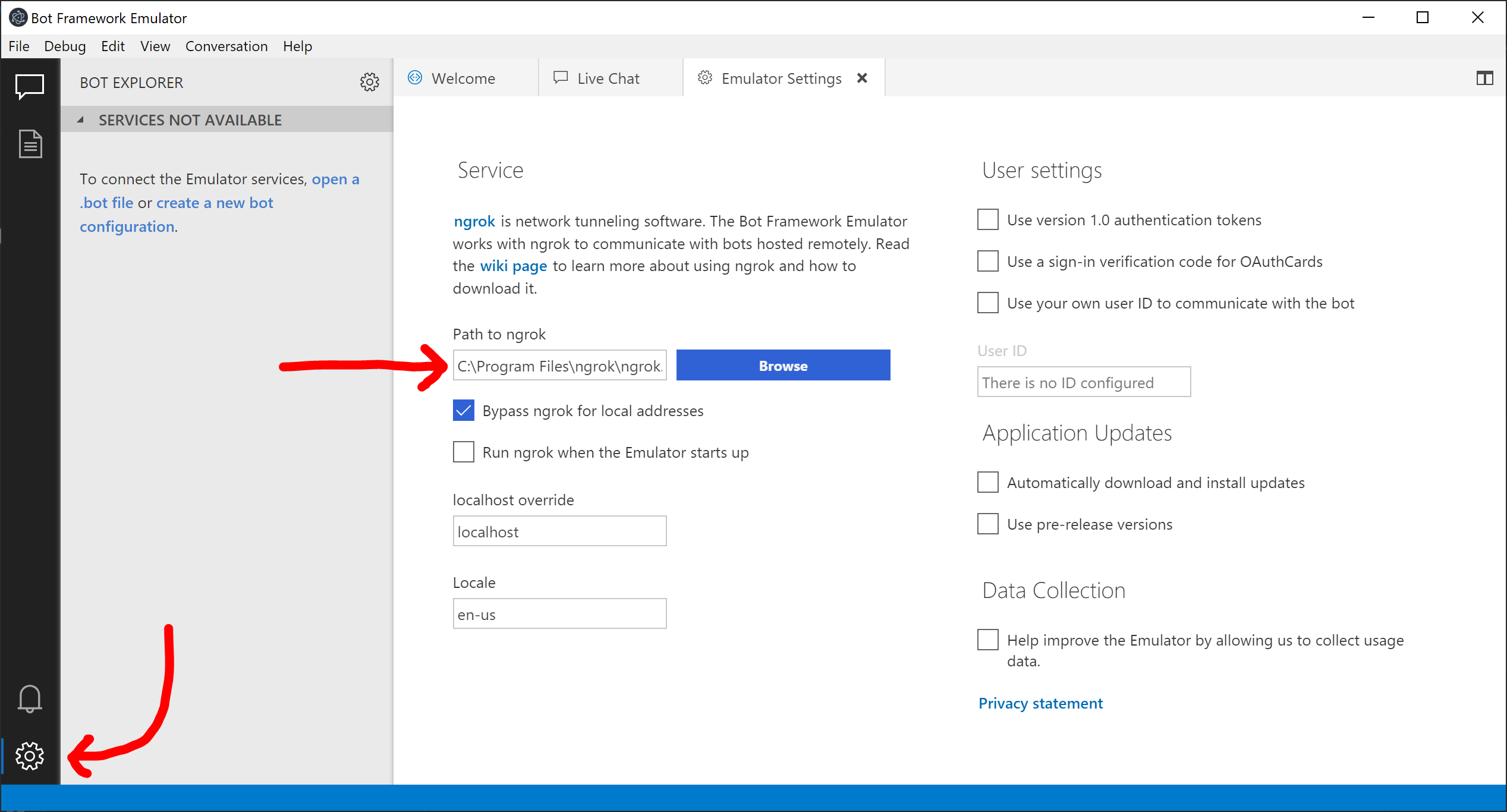
tonyanziano
on 5 Aug 2019
Yes, I always need to get a genuine token.
I'll try with the ngrok configured and I let you know.
antonioFlavio
on 5 Aug 2019
Hello, I can confirm that we are also experiencing the same issue with the latest emulator. Originally I thought that it was something we had changed in our bot code, glad that I found this.
I shall also test ngrok to see if this resolves our problem.
 uniper-scott
on 6 Aug 2019
uniper-scott
on 6 Aug 2019
@tonyanziano the emulator is now generating the authentication correctly. In the end, was just a configuration problem between the versions. Thank you a lot about your support!
antonioFlavio
on 6 Aug 2019
@tonyanziano the emulator is now generating the authentication correctly. In the end, was just a configuration problem between the versions. Thank you a lot about your support!
Hi, are you able to provide some insight into what was not configured on your side. I am pretty sure ours was working fine before the emulator update, however we now get this:
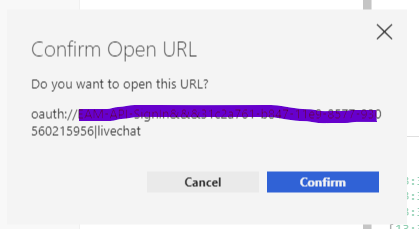
When I click on the link, no browser windows opens and the bot does not login.
uniper-scott
on 6 Aug 2019
When I click on the link, no browser windows opens and the bot does not login.
Hi @ uniper-scott. If you are using emulate code, it looks like right. But as @tonyanziano said, if you need the genuine token, you must add ngrok on the settings as described above and mark to "by pass local address".
After the user complete the oauth authentication, the bot will receive a new Event activity with the access token.
antonioFlavio
on 6 Aug 2019
When I click on the link, no browser windows opens and the bot does not login.
Hi @ uniper-scott. If you are using emulate code, it looks like right. But as @tonyanziano said, if you need the genuine token, you must add ngrok on the settings as described above and mark to "by pass local address".
After the user complete the oauth authentication, the bot will receive a new Event activity with the access token.
@antonioFlavio Thank you very much, this was exactly the problem. We have now updated our developers and asked them to start using ngrok.
uniper-scott
on 7 Aug 2019
Related issues
 cwhitten
·
5Comments
cwhitten
·
5Comments
 stephanbisser
·
4Comments
stephanbisser
·
4Comments
 martinoss
·
4Comments
martinoss
·
4Comments
 hpksp
·
5Comments
hpksp
·
5Comments
 mark-szabo
·
6Comments
mark-szabo
·
6Comments
Most helpful comment
@antonioFlavio if ngrok is not configured in the Emulator settings, then the Emulator will generate a signin link that looks like:
oauth://<oauth-connection-name>&&&<conversation-id>which is what you are seeing in 4.5.*. Since you do not have ngrok configured, there is no way for the Bot Framework token service (external) to send the token over the network to the Emulator.
This means that when you follow the oauth link, you won't actually get a genuine token from the token service, but instead, you will get an emulated token from the Emulator that looks like this:
emulatedToken_<guid>===
If you want to get a genuine token, you need to configure ngrok in the Emulator app settings: