Botframework-emulator: Getting Forbidden error when connecting to bot emulator - 01
please find the details as requested.
Steps to reproduce:
1.Installed Bot Framework SDK v4 template for C# in visual studio 2019.
2.Created a new echo bot template project.
3.Click on Run in IIS Express.
4.I get the message as
Your bot is ready!
You can test your bot in the Bot Framework Emulator
by connecting to http://localhost:3978/api/messages
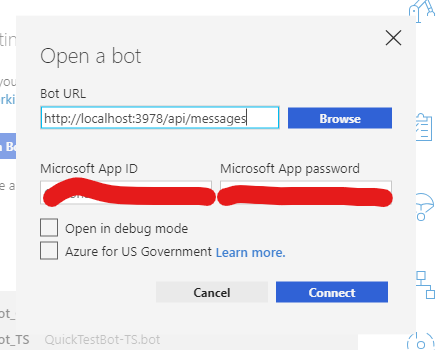
- I then opened my bot emulator, in welcome page i clicked on Open bot and I gave bot URL as
http://localhost:3978/api/messages and clicked on connect.
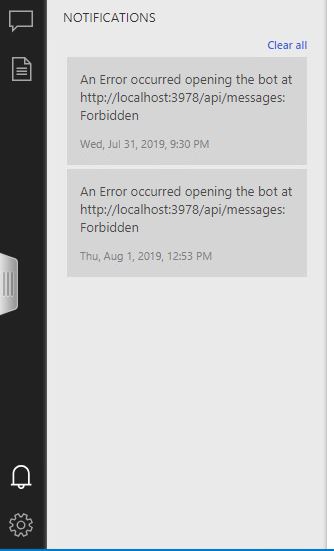
6.I get an error 'Error occuered opening the bot at http://localhost:3978/api/messages : Forbidden. in Notifications window
Kindly help on this issue.
 ragavendrach13
All 9 comments
ragavendrach13
on 1 Aug 2019
@ragavendrach13 Can you confirm that the MicrosoftAppId/MicrosoftAppPassword you input into Emulator match the ones found in appsettings.json of your bot?
 mdrichardson
on 2 Aug 2019
mdrichardson
on 2 Aug 2019
@ragavendrach13 any update on the question our support team asked above? If not, I'm going to close the issue. Let us know
 sgellock
on 8 Aug 2019
sgellock
on 8 Aug 2019
Hi there, I was not keeping well and took off.
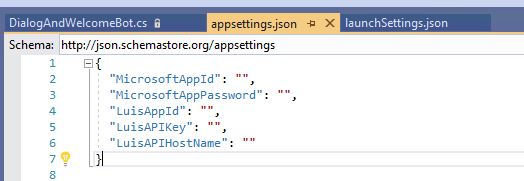
I have checked my appsettings.json. This does not have any APP id or password hence i had left it blank.
I wanted to know if we need to any thing on the port 3978. Please note that both ports localhost:3978 and visual studio are in the same PC.
I tried the same with a different pc at home and it's working well. I'm not sure where else to check to solve this issue.
Thanks for your support.
ragavendrach13
on 8 Aug 2019
@mdrichardson can you please assist?
 CoHealer
on 8 Aug 2019
CoHealer
on 8 Aug 2019
@ragavendrach13 You did the right thing leaving appId/pass blank since it's blank in your appsettings.json. Can you clarify what you mean by:
I wanted to know if we need to any thing on the port 3978. Please note that both ports localhost:3978 and visual studio are in the same PC.
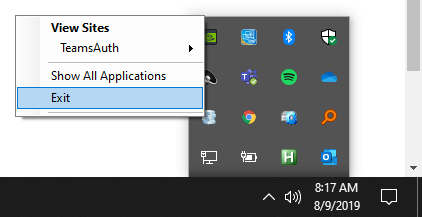
You shouldn't need to set anything up differently. What OS are you using? My guess is that IIS server had something cached for :3978. Sometimes it can help to fully exit Emulator and IIS server and try running the bot again. To close IIS server (on Windows), right-click the icon and click Exit:
Is it possible you have another app interfering with port 3978?
mdrichardson
on 9 Aug 2019
Dear CoHear and Richardson,
The issue has been resolved. Some times the solutions are very simple and It made me think like,
why i didn't think about this.
I work in a network behind a proxy which has caused this issue.
I have added the below line in my internet settings as exception and the emulator started working.
Goto> Chrome>Settings>open proxy settings>lan settings>Advance
Edit the Exceptions :
10.;localhost;.ai
ragavendrach13
on 12 Aug 2019
I thank you very much for the support and response.
ragavendrach13
on 12 Aug 2019
@ragavendrach13 😄 Ah, yes! The proxy makes a big difference!. Glad you got it working!
mdrichardson
on 12 Aug 2019
Related issues
 ravriel
·
3Comments
ravriel
·
3Comments
 hpksp
·
5Comments
hpksp
·
5Comments
 iMicknl
·
6Comments
iMicknl
·
6Comments
 mark-szabo
·
6Comments
mark-szabo
·
6Comments
 Jay-study-nildana
·
4Comments
Jay-study-nildana
·
4Comments
Most helpful comment
Dear CoHear and Richardson,
The issue has been resolved. Some times the solutions are very simple and It made me think like,
why i didn't think about this.
I work in a network behind a proxy which has caused this issue.
I have added the below line in my internet settings as exception and the emulator started working.
Goto> Chrome>Settings>open proxy settings>lan settings>Advance
Edit the Exceptions :
10.;localhost;.ai