Botframework-emulator: Emulator doesn't recognize localhost
Github issues should be used for bugs and feature requests. Use Stack Overflow for general "how-to" questions.
Version
4.4.2
Describe the bug
My bot is run though http://localhost:3978/api/messages, which I can confirm through trying to connect to the port in browser. However, the emulator is not recognizing the port. Regardless of whether or not the bot is running, I get the same error log:
[08:52:02]Emulator listening on http://localhost:61074
[08:52:02]ngrok not configured (only needed when connecting to remotely hosted bots)
[08:52:02]Connecting to bots hosted remotely
[08:52:02]Edit ngrok settings
[08:52:02]The bot's Microsoft App Id or Microsoft App Password is incorrect.
[08:52:02]POSTdirectline.conversationUpdate
[08:52:02]The bot's Microsoft App Id or Microsoft App Password is incorrect.
[08:52:02]POSTdirectline.conversationUpdate
[08:52:02]POST200directline.startConversation
[08:53:17]-> messagehello
[08:53:17]POST400directline.postActivity
To Reproduce
Steps to reproduce the behavior:
- Get EchoBot sample code (from either Azure or Framework Template)
- Start debugging
- Obtain localhost address shown by browser page
- In bot emulator, press "Open Bot" and enter localhost address, as well as AppId and password obtained from appsettings.json file.
- Click connect
Expected behavior
The log appears as above, with any input messages giving the same POST 400 error.
Additional context
I have tried the following potential solutions with no luck:
- Download clean version of the echo bot
- Leave blank, comment out, or delete AppId and Password
- Reinstall Visual Studio
- Reinstall packages
- Build the echo bot from command line instead of Visual Studio
- Try "create a new bot configuration", which just gives an infinite "connecting" message
- Try previous versions of the emulator
I have also documented the problem on Stack Overflow: https://stackoverflow.com/questions/56529611/bot-emulator-error-post-400-directline-postactivity
[bug]
 dcmesh
All 22 comments
Hi @dcmesh ,
What language EchoBot are you using? C# or JS?
Also, please double check you are using the correct credentials (AppId & Password) enabled in your bot code, and passing those same credentials into the Emulator, because in the logs you posted, I can see the message:
[08:52:02]The bot's Microsoft App Id or Microsoft App Password is incorrect.
I tried to reproduce this with a fresh install of the v4.4.2 emulator, and a clean clone & build of the JS echobot sample and was unsuccessful:


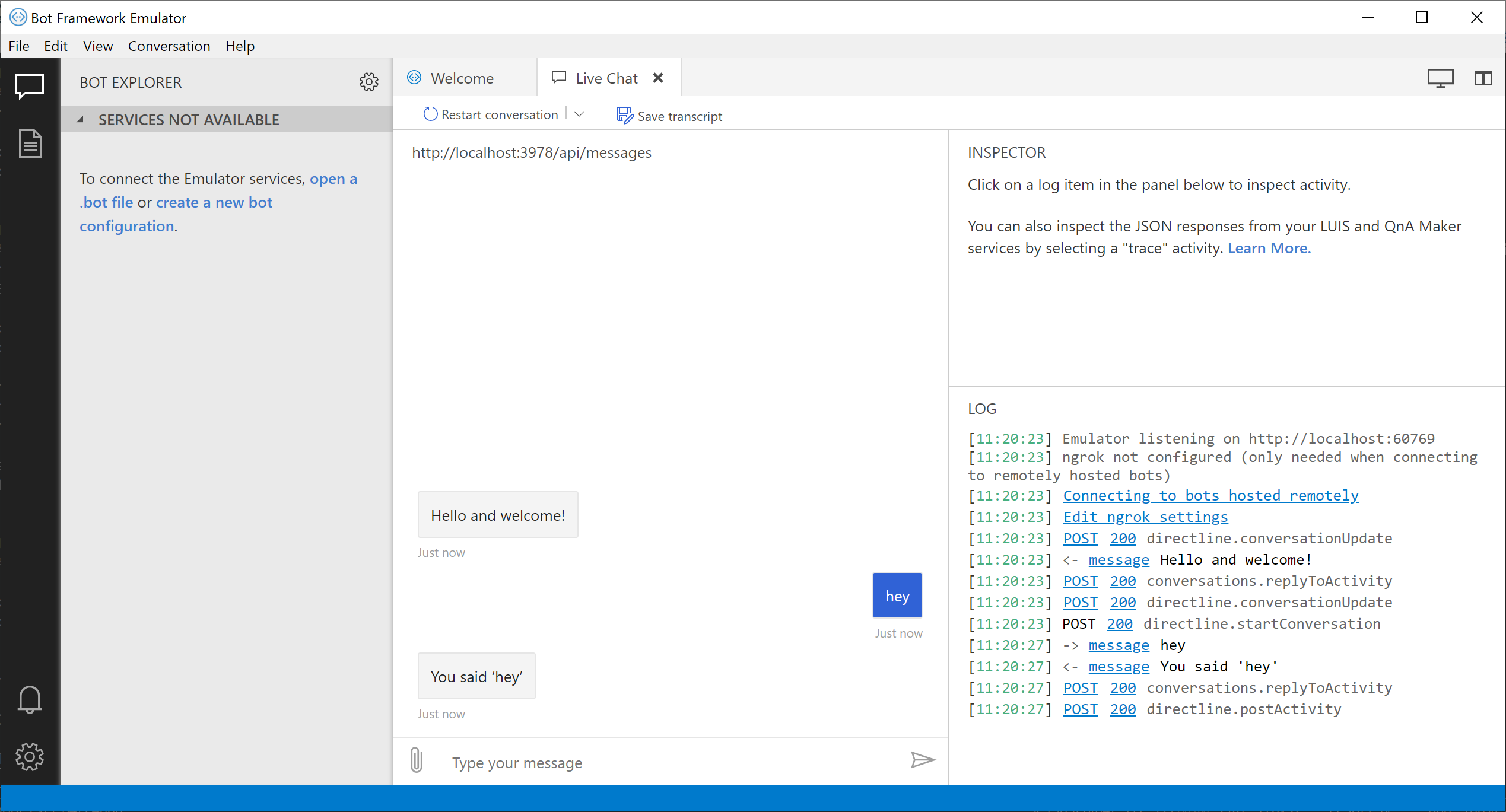
It would be helpful if you could show us a screenshot of the emulator when you try to connect to the bot, as well as the open bot dialog before connecting (with credentials censored).
Here are some things you can try:
- Make sure you add the correct route if necessary to your endpoint (
ex: /api/messages) - Make sure that if your bot code is being initialized with credentials, that you enter the same credentials into the emulator
- Make sure that "Bypass ngrok for localhost" is enabled in the app settings page
- Make sure that if you are not passing credentials into the Emulator, that you delete those credentials from your bot initialization code:
- JS: Make sure that
process.env.MicrosoftAppId&process.env.MicrosoftAppPasswordare unset link to source - C#: Make sure that
MicrosoftAppId&MicrosoftAppPasswordare unset in appsettings.json
- JS: Make sure that
 tonyanziano
on 13 Jun 2019
tonyanziano
on 13 Jun 2019
Thank you for replying. I am using the C# version of the bot. With regards to MicrosoftAppId and Password, I have ensured that they are correct, both by copying/pasting them from the appsettings.json file and also changing them to be simpler and manually entering them. I have also ensured that the endpoint I enter is correct, as my browser is able to connect to it and trying to connect to the ~/api/messages URL in my browser prompts a response in the execution terminal. The "Bypass ngrok for localhost" option has been enabled the entire time. Finally, regardless of whether I actually run the bot, the emulator gives the same error log.
The stackoverflow link I placed in the question also documents several unsuccessful attempts to resolve the problem.
dcmesh
on 13 Jun 2019
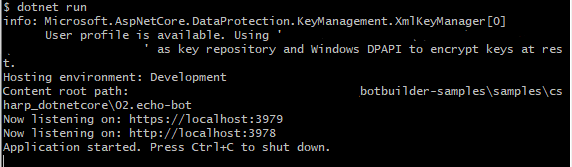
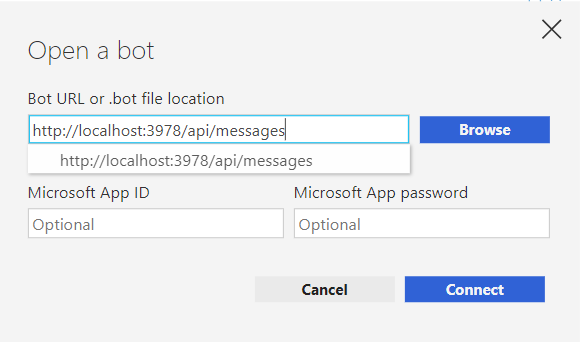


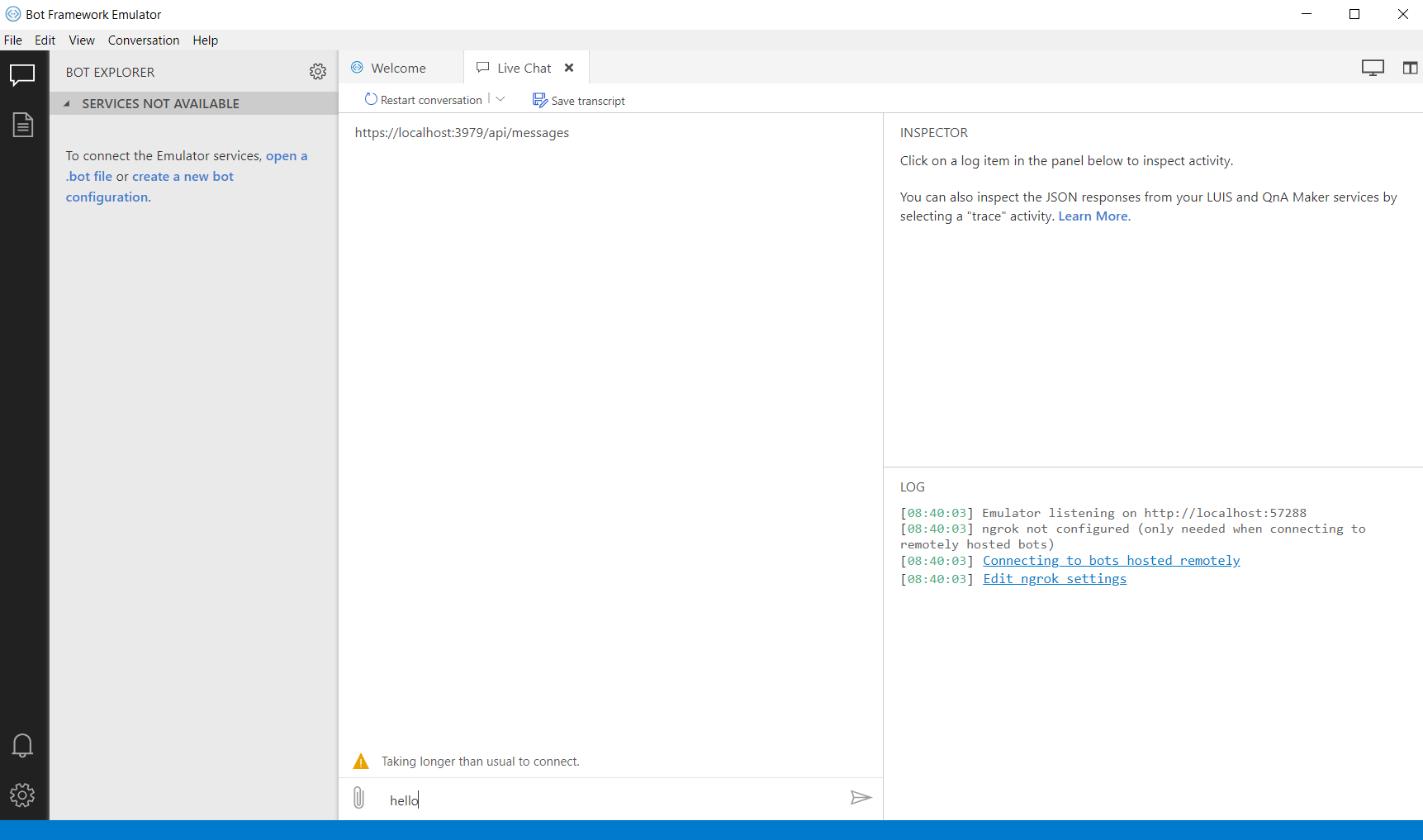
My screenshots. I am unable to submit the text that I enter into the messaging section of the emulator. Also, in this version of the echo bot, there was no app id or password. The same result occurs if I preform these actions with an echo bot that has those two elements.
dcmesh
on 14 Jun 2019
@dcmesh Thanks for providing screenshots. I'm not entirely sure why the WebChat control won't connect in your case, but I'll look into it. It seems like you are doing everything correctly.
tonyanziano
on 14 Jun 2019
@tonyanziano Save doing a clean install of Windows and reconfiguring my entire computer, are there any other options?
dcmesh
on 21 Jun 2019
@dcmesh , sorry I haven't gotten back to you recently. I have been busy looking at another issue of high priority.
Have you tried deleting your Emulator app folder (%APPDATA%/@bfemulator) as well as your Emulator install folder (Program Files/Bot Framework Emulator) and done a clean install of the Emulator?
Maybe the app somehow got into a faulty state.
If that doesn't fix it, I will eventually return to looking at this once I'm finished with the other task.
tonyanziano
on 21 Jun 2019
I tried doing that with both the Emulator app, as well as Visual Studio itself (in case that it was the source of the problem), and neither fixed the problem. Thank you so much for your help so far on this issue.
dcmesh
on 24 Jun 2019
Hi @dcmesh,
Did you happen to resolve this issue, or can you still not connect to localhost bots?
tonyanziano
on 2 Jul 2019
No, the issue has not been resolved.
dcmesh
on 2 Jul 2019
@tonyanziano On the Stack-Overflow question, an answer I received was to switch to version 3.5.36, and when I do that, it somehow works. I don't know what changed between that version of the emulator and v4.4.4, and the user who posted the suggestion didn't seem 100% certain as to why as well. The conversation thread in it might be useful.
dcmesh
on 2 Jul 2019
I think the issue was with how the Emulator deals with http addresses. Even though its a localhost, the emulator was still going through my proxy environmental variable, which was then blocking it. The newer versions of the emulator must have included something to that respect.
dcmesh
on 2 Jul 2019
@dcmesh so then I assume you have some combination of the following environment variables configured: HTTP_PROXY, HTTPS_PROXY, NO_PROXY?
We did have some changes a while back related to handling proxies, so it would be interesting to see if the problem would persist on a version of the Emulator before those changes went in.
Also could you please post a link to the discussion on Stack Overflow?
tonyanziano
on 2 Jul 2019
Stack Overflow: https://stackoverflow.com/questions/56529611/bot-emulator-error-post-400-directline-postactivity
dcmesh
on 2 Jul 2019
To help debug this, could you download a network traffic sniffing tool such as Fiddler or Wireshark, and then have the tool run while you try to connect to the localhost bot using the newer version of the Emulator?
When a request fails you should see it highlighted in red and it should show a 4* / 5* status code:
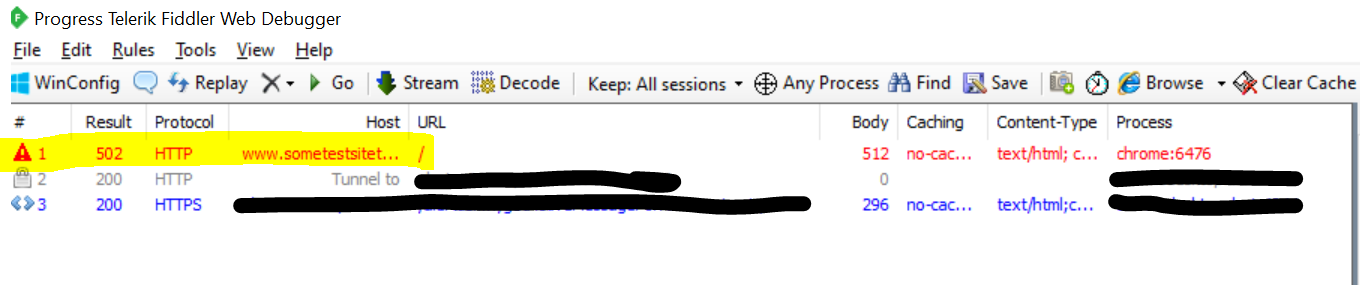
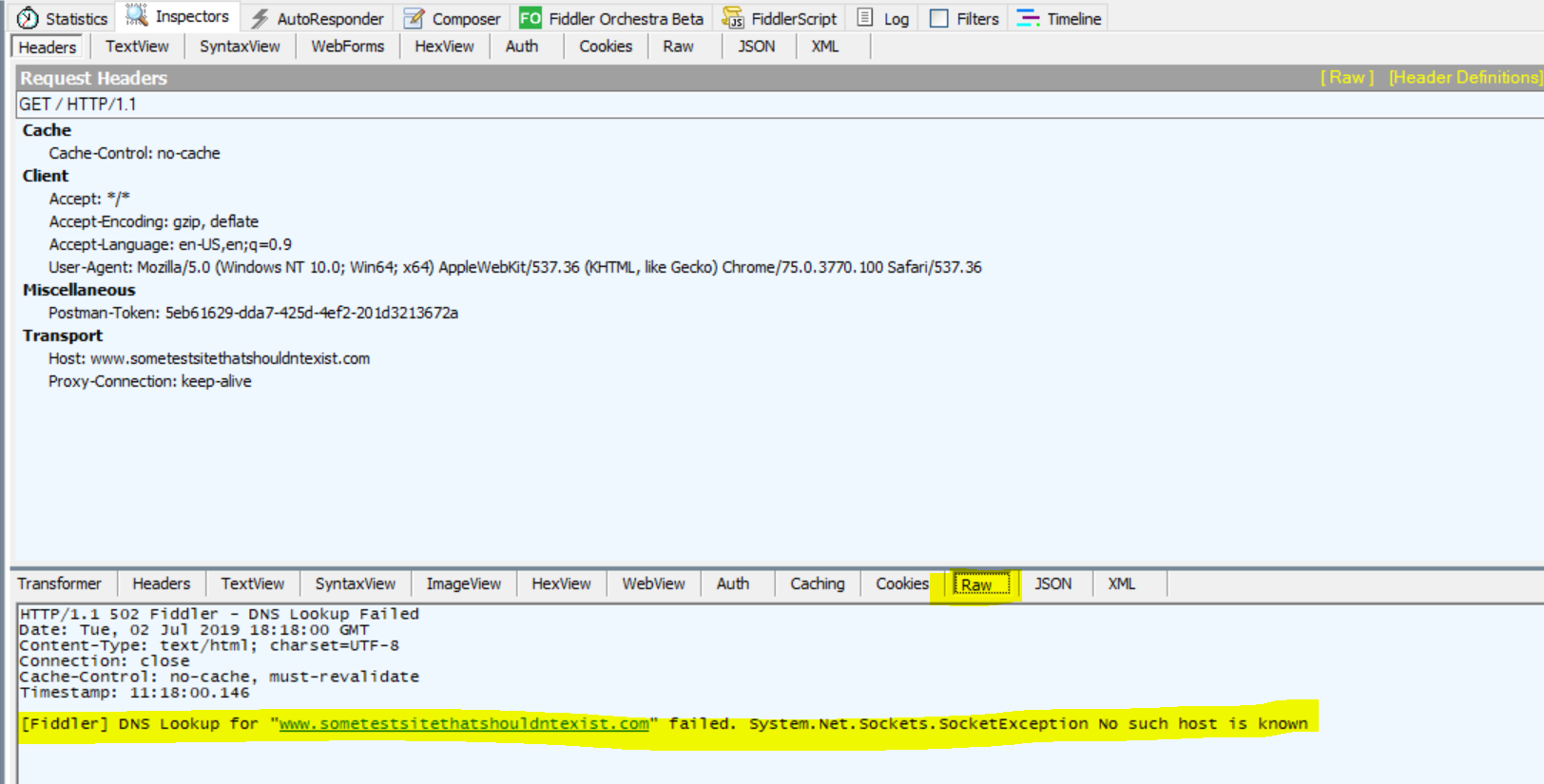
Once you have done that can you post the resulting bad request, you should be able to click the request, and in the bottom half of the inspector, click the "Raw" tab to see the request body.
tonyanziano
on 2 Jul 2019
I'm actually having the same issue. Version 3.5.36 of the emulator works like a charm. But any version after that seems to give 500s.
I know this may be slightly unrelated to your issue. But I was having a similar error. Whereby my localhost couldn't communicate with my emulator.
For whatever reason, localhost wasn't being resolved to 127.0.0.1 in the windows hosts file. I managed to resolve this by adding the following entry under:
C:\Windows\System32\Drivers\etc\hosts
127.0.0.1 localhost
With this now added. It should now be able to resolve the localhost DNS entry.
Hope this helps.
 peterratkinson
on 9 Jul 2019
peterratkinson
on 9 Jul 2019
Hey @peteratkinson,
Thanks for your input! When you added the entry to your hosts file did it fix the issue in v4.x?
tonyanziano
on 9 Jul 2019
Hi @tonyanziano
It did - I'm not sure what even caused it.

This causes the service URL to become skewed on the postback.
peterratkinson
on 9 Jul 2019
Oh, very strange. Thanks for the screenshot.
I'll look through the code and see if there's something on our end that might be causing that.
tonyanziano
on 9 Jul 2019
@dcmesh judging from your screenshots it looks like you're on Windows.
Could you open a command prompt and try typing nslookup localhost and see if it resolves localhost correctly to 127.0.0.1?
My output:
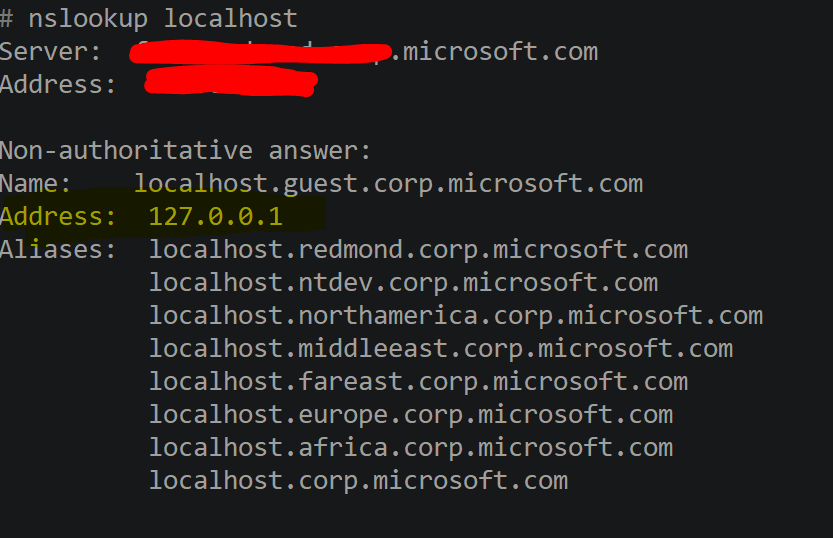
From what @peteratkinson said, I suspect there might be a chance that your localhost isn't resolving correctly either.
tonyanziano
on 9 Jul 2019
Closing due to inactivity.
tonyanziano
on 16 Jul 2019
Closing due to inactivity.
Hi @tonyanziano ,
Sorry for opening the issue. I have the same issue. I think the issue come from behind proxy. How can I config by pass proxy in Bot Framework Emulator?
I'm using version 4.6.0.
It works fine on version 3.5.36.
 khiemng
on 20 Nov 2019
khiemng
on 20 Nov 2019
Hi @khiemnvd ,
Try setting the HTTPS_PROXY environment variable with the address of your proxy, and then try using the Emulator to connect to your bot. (I would recommend restarting the Emulator after setting the variable)
Ex: set HTTPS_PROXY=http://[proxy-address][:port]
tonyanziano
on 20 Nov 2019
Related issues
 textminer
·
5Comments
textminer
·
5Comments
 Jay-study-nildana
·
4Comments
Jay-study-nildana
·
4Comments
 Revolyze
·
4Comments
Revolyze
·
4Comments
 pkirch
·
4Comments
pkirch
·
4Comments
 Spydernaz
·
5Comments
Spydernaz
·
5Comments