Botframework-emulator: OAuth emulation presents a blank child window when clicking the authenticate button of the OAuth card
Version
4.2.1
Describe the bug
So I started reporting this bug on the back of the initial issue where the OAuth endpoint was not working at all, but it's clear now that this needs to be its own bug. The details are as follows:
Clicking the authenticate button of the OAuth card results in a blank child window being popped up which dead ends the entire authentication process making the OAuth emulation unusable.
To Reproduce
Steps to reproduce the behavior:
- Have the bot send out the OAuth card
- Click on the authenticate button in the card
- Stare at the blank child window and wonder what you did wrong 😜
Expected behavior
I would expect the same, default behavior as the v3 emulator which would be to generate an emulated auth token and trigger the TokenResponse event within the bot with that token. No actual sign in UI need be popped up.
Screenshots

Additional context
Users are also experiencing this as is evidenced by this StackOverflow Question.
[bug]
 drub0y
All 17 comments
I am able to repro this. The root cause is due to a bad oauthlink specifically the connectionName
"attachments": [
    {
      "content": {
        "buttons": [
          {
            "title": "Sign In",
            "type": "openUrl",
            "value": "oauthlink://{\r\n  \"error\": {\r\n    \"code\": \"ServiceError\",\r\n    \"message\": \"Invalid Connection Name\"\r\n  }\r\n}&&&915be7f0-2976-11e9-a8e4-21ad67272814|livechat"
          }
        ],
        "connectionName": "",
        "text": "Please Sign In"
      },
      "contentType": "application/vnd.microsoft.card.oauth"
    }
  ],
  "channelId": "emulator",
  "conversation": {
    "id": "915be7f0-2976-11e9-a8e4-21ad67272814|livechat"
  },
  "from": {
    "id": "118",
    "name": "Bot",
    "role": "bot"
  },
  "id": "93e74dc0-2976-11e9-bdfe-936857275638",
  "inputHint": "expectingInput",
  "localTimestamp": "2019-02-05T10:48:07-08:00",
  "locale": "en",
  "recipient": {
    "id": "5e1f1c4c-6a89-4880-8db0-0f222c07ae9a",
    "role": "user"
  },
  "replyToId": "939f6f50-2976-11e9-bdfe-936857275638",
  "serviceUrl": "https://87c37ac9.ngrok.io",
  "showInInspector": true,
  "timestamp": "2019-02-05T18:48:07.580Z",
  "type": "message"
}
 justinwilaby
on 5 Feb 2019
justinwilaby
on 5 Feb 2019
This can be solved by adding authentication to your bot and configuring your bot with the CONNECTION_NAME that results.
justinwilaby
on 5 Feb 2019
Ok, that's actually a diff bug, but then you didn't repro it exactly if that's the problem you're having.
I am _absolutely_ specifying a connection name for my bot. Here's the full activity that ends up getting sent out:
{
  "attachments": [
    {
      "content": {
        "buttons": [
          {
            "text": "Please authenticate yourself...",
            "title": "Authenticate",
            "type": "openUrl",
            "value": "oauthlink://&&&40c08e40-29a3-11e9-9cfe-410ff69edcc7|livechat"
          }
        ],
        "connectionName": "Facebook",
        "text": "Please authenticate yourself..."
      },
      "contentType": "application/vnd.microsoft.card.oauth"
    }
  ],
  "channelId": "emulator",
  "conversation": {
    "id": "40c08e40-29a3-11e9-9cfe-410ff69edcc7|livechat"
  },
  "entities": [],
  "from": {
    "id": "1",
    "name": "Bot",
    "role": "bot"
  },
  "id": "4a2be6f0-29a3-11e9-880c-bb3f67799996",
  "inputHint": "expectingInput",
  "localTimestamp": "2019-02-05T16:08:11-08:00",
  "locale": "",
  "recipient": {
    "id": "69e70503-bbc1-4547-b8e1-5309b71c06aa",
    "role": "user"
  },
  "replyToId": "49c9a2b0-29a3-11e9-880c-bb3f67799996",
  "serviceUrl": "http://localhost:54697",
  "showInInspector": true,
  "timestamp": "2019-02-06T00:08:11.231Z",
  "type": "message"
}
I should also note that this is still happening and I'm on the pre-release builds and this is still happening in 4.2.148513 (which I think just released a little while ago).
drub0y
on 6 Feb 2019
@justinwilaby I'm tagging you because the issue is closed and I'm concerned nobody will pay attention to it now. Can you read my earlier comments and make sure to re-open this if you can actually repro? I don't want it to get lost because its closed.
If you can't repro, I will find a way to get you a simple repro. This is _definitely_ happening... I had another internal developer who has repro'd this issue at our OpenHack last week.
drub0y
on 6 Feb 2019
@drub0y - that would be good to get an exact repro. I am using the 18.bot-authentication and was able to repo when not specifying a connectionName then it worked when specifying one.
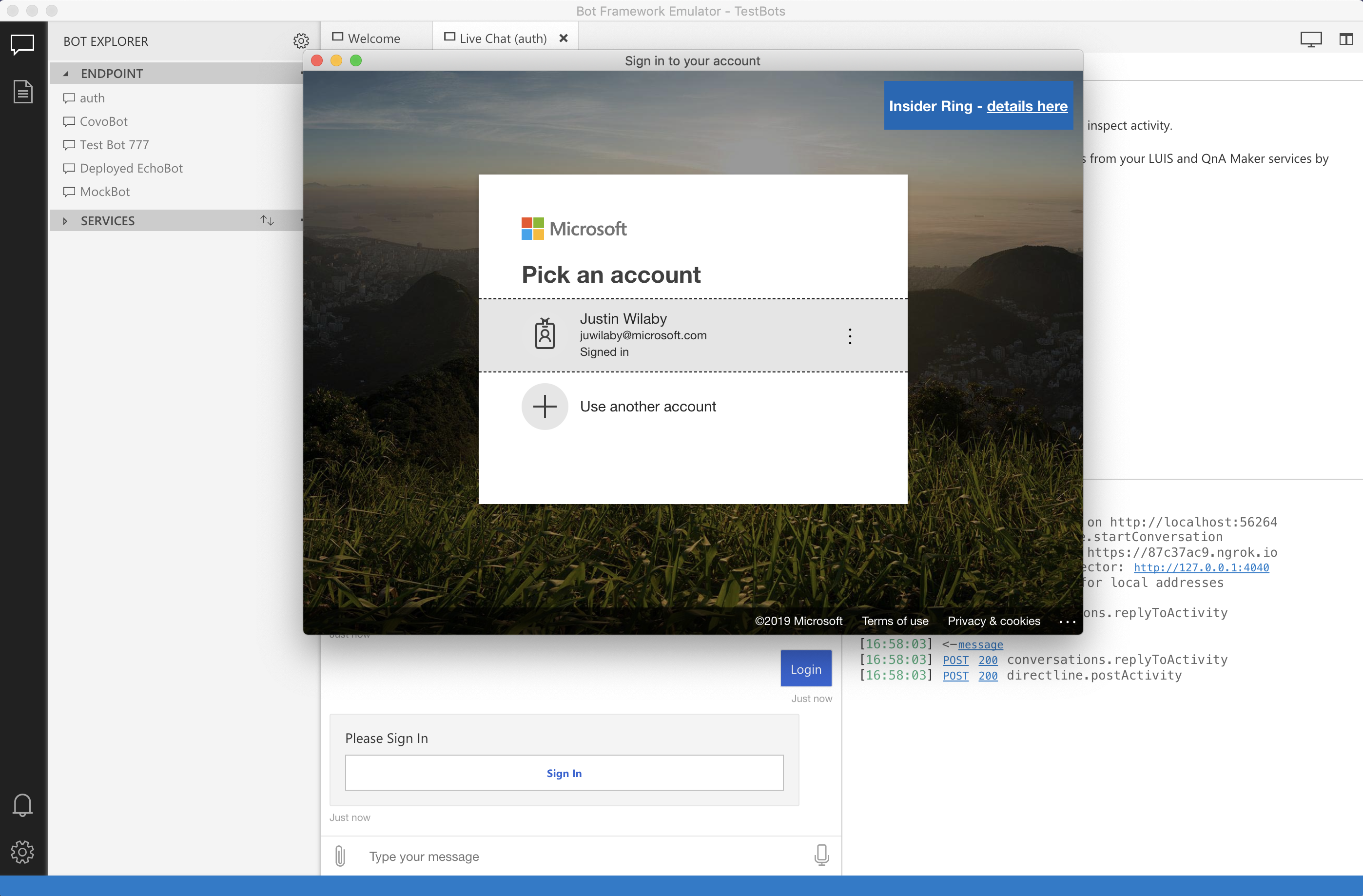
I can see that your oauthlink is malformed for sure. I'm assuming the appId and password are set in your botfile. The code that generates this card (as well as the link) is called from oauthPrompt.ts:143 which then calls into cardFactory.ts:171.
can you set a breakpoint at oauthPrompt.ts#L143 to see if these values are set?
settings.connectionName,
settings.title,
settings.text
Either way, I have a very high level of confidence this is not an emulator issue.
justinwilaby
on 6 Feb 2019
"value": "oauthlink://&&&40c08e40-29a3-11e9-9cfe-410ff69edcc7|livechat"
Is missing the connectionName which occurs before the &&& in this string.
justinwilaby
on 6 Feb 2019
Well first, just to make sure we're on _exact_ same page, I'm in .NET. Honestly I don't think the language/platform matters, I'm going to try and continue making the case that this is the emulator and see if we can agree or I give enough details where you can definitively tell me it a problem with both SDKs.
Why do I think it's the V4 emulator?
The same code, pointed at the live Bot Framework Service, works just fine. Similarly, the same code, pointed at the v3 emulator works just fine.
Bot code doesn't actually generate the oauthlink://
First, let's just search the codebase.... no oauthlink in sight.
So, as a typical developer using the SDK would, I am just using OAuthPrompt and I've set the ConnectionName property on the OAuthPromptSettings instance that I pass in during construction of that class:
AddDialog(new OAuthPrompt(
                "adminLogin",
                new OAuthPromptSettings
                {
                    ConnectionName = "Facebook",
                    Text = "Please authenticate yourself...",
                    Title = "Authenticate",
                    Timeout = (int)TimeSpan.FromMinutes(1).TotalMilliseconds,
                }));
Here's the code from the TS SDK since that seems to be your preferred lingua franca:
NOTE: I don't know why GitHub doesn't want to inline this particular code block link... it's inlining the others just fine. Tried a couple things, nothing working... just gotta click through it, sorry. 😕
What you'll notice is that there's no value set on the button. In fact, if you sniff the HTTP POST between the bot and the emulator you'll see that the payload never contains a value, yet when you see the message activity arrive in the emulator, sure enough it has that value and it's the oauthlink://.
Where's oauthlink:// come from then?!?
Ok, so what's adding that on then? Well, a little spelunking through the emulator codebase yields the answer: the OAuthClientEncoder class visits the incoming activity and enriches it before it's delivered through to the WebChat. Check it out here:
And that is called here from Conversation:
The flip side, handling the oauthlink://
Now, that's link generation, how about link processing when it's invoked?? That's here in hyperlinkHandler.ts.
Looking over that code, a major problem that stands out is that there's handling of the oauth: protocol and that's the one we actually want 'cause that's what triggers the emulated token to be sent back. The handling of the oauthlink: protocol on the other hand actually opens the window.
Wrap-up
Alright, so, given all that... it actually seems to me that the problem is that the visitor is applying an oauthlink: when it should be applying an oauth: link instead. Knowing that v3 emulator is working correctly, I just double checked what it does and sure enough:
{
      "contentType": "application/vnd.microsoft.card.oauth",
      "content": {
        "text": "Please authenticate yourself...",
        "connectionName": "Facebook",
        "buttons": [
          {
            "type": "openUrl",
            "title": "Authenticate",
            "text": "Please authenticate yourself...",
            "value": "oauth://Facebook"
          }
        ]
      }
    }
So, that's what I got. What else can I do to help this move forward?
drub0y
on 6 Feb 2019
The code in oauthClientEncoder never gets hit because the card already has the value property set. When settings a breakpoint just before that block, you can see the card it already populated with the oautlink. Here is a screenshot.
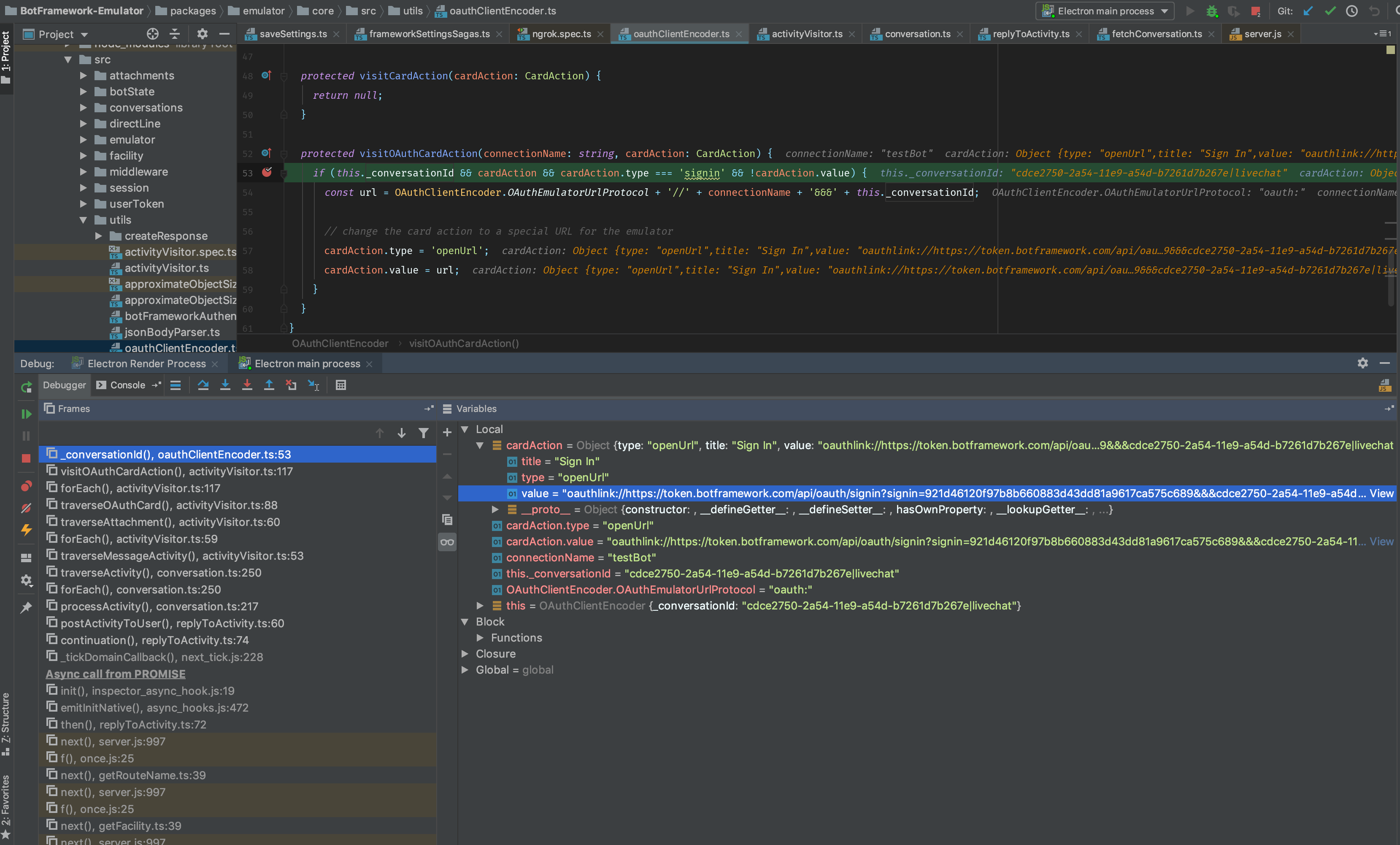
The card comes from the bot in an Activity posted to the user. The emulator is merely passing it along to webchat for rendering. If for some reason the value field on the card is not being set by the bot, this block is entered and the connectionName property is expected to be on the oauthCard JSON and non-empty. See activityVisitor.ts:117. If the connectionName and the value is not being set by the bot, the emulator will not know how to properly format the oauthlink. I'm not sure why this seems to work in v3 and it probably should not since a lot of data is missing that is needed for the bot to know who is authenticating and for which application.
I'm happy to setup a screenshare with a debug instance on the emulator to track down the root cause. Feel free to contact me if this is something that interests you.
justinwilaby
on 6 Feb 2019
The connectionName _is_ being sent through on the activity as shown in earlier comments, but here it is again:
"attachments": [
    {
      "content": {
        "buttons": [
          {
            "text": "Please authenticate yourself...",
            "title": "Authenticate",
            "type": "openUrl",
            "value": "oauthlink://&&&40c08e40-29a3-11e9-9cfe-410ff69edcc7|livechat"
          }
        ],
        "connectionName": "Facebook",
        "text": "Please authenticate yourself..."
      },
      "contentType": "application/vnd.microsoft.card.oauth"
    }
  ],
To re-iterate, the activity sent from the bot does not contain value on the button, yet v3 works and puts the oauth: link in there and Bot Framework Service works and puts a "real" endpoint in there (e.g. Facebook's endpoint).
drub0y
on 6 Feb 2019
If the activity from the bot does not contain a value, how is this supposed to work in production?
justinwilaby
on 6 Feb 2019
My understanding of the protocol, based on everything I've seen, is that certain channels (e.g. DirectLine, v3 emulator, etc.) have an understanding of application/vnd.microsoft.card.oauth attachements and enrich them with the value based on the connectionName. For example, Bot Framework Service's DirectLine channel will set the value to something like: https://token.botframework.com/api/oauth/signin?<querystring omitted for brevity>
This is what the OAuthClientEncoder visitor implementation in the v4 code I linked you does. It's just that v4 is generating oauthlink: when it should be generating oauth: so that the value is interpreted correctly by hyperLinkHandler.ts's navigate function.
Additionally, the Bot Builder SDK actually detects the channels that are known to _not_ support OAuth cards and for those it uses Sign-In cards instead (i.e. application/vnd.microsoft.card.signin) and, in that scenario, there is actually a call out to the "botsignin" set of REST APIs to actually pre-emptively get the signin link from the channel, specifically via /api/botsignin/GetSignInUrl, and _then it will_ fill in the value with that result. You can see that logic here:
What I'll commit to doing now is getting you a minimal node bot that repros this, but can I please ask that you reopen this issue until we've truly reached resolution? Thanks.
drub0y
on 7 Feb 2019
Ok sure. Let's also setup a time where we can debug locally on the Emulator so I can zero in on the root cause and solve this today.
justinwilaby
on 7 Feb 2019
@justinwilaby Thanks for giving me some of your time today. I just want to follow up with what we discovered so the details are here whenever you're able to return to this issue.
At first, when I attempted to repro this for you, suddenly everything worked as expected. I later determined this was because I was not connected to the network and this must be triggering some behavior to fail which then causes the correct behavior to succeed.
What we determined is that there are two pieces of code responsible for enriching an OAuth card coming from the bot:
oauthLinkEncoderwhich is the one that is setting theoauthlink:protocol and fetching the signin link by calling through thegetUserSignInprocess. This encoder is run as part of thereplyToActivitymiddleware.oauthClientEncoderwhich is the one that sets theoauth:protocol and correctly takes theconnectionNameout of the Activity and embeds it in the link. The encoder is run as part of theConversation::processActivity.
When the emulator is online, #1 - oauthLinkEncoder always wins. When offline, #2 - oauthClientEncoder always wins.
The expectation is that, in this specific scenario, #2 - oauthClientEncoder should always be winning.
drub0y
on 7 Feb 2019
So it looks like the workaround is to make sure you're online. Is that correct?
justinwilaby
on 8 Feb 2019
The root cause has been located thanks to the hard work and persistence from @drub0y. Starting the fix now.
justinwilaby
on 11 Feb 2019
I can confirm this is now working. Thanks for hanging in there with me @justinwilaby!!! 👍 🙌
drub0y
on 13 Feb 2019
Related issues
 Kumar2608
·
3Comments
Kumar2608
·
3Comments
 giorigor
·
4Comments
giorigor
·
4Comments
 saiteja21
·
4Comments
saiteja21
·
4Comments
 giorgobiani
·
3Comments
giorgobiani
·
3Comments
 stephanbisser
·
4Comments
stephanbisser
·
4Comments
Most helpful comment
@justinwilaby Thanks for giving me some of your time today. I just want to follow up with what we discovered so the details are here whenever you're able to return to this issue.
At first, when I attempted to repro this for you, suddenly everything worked as expected. I later determined this was because I was not connected to the network and this must be triggering some behavior to fail which then causes the correct behavior to succeed.
What we determined is that there are two pieces of code responsible for enriching an OAuth card coming from the bot:
oauthLinkEncoderwhich is the one that is setting theoauthlink:protocol and fetching the signin link by calling through thegetUserSignInprocess. This encoder is run as part of thereplyToActivitymiddleware.oauthClientEncoderwhich is the one that sets theoauth:protocol and correctly takes theconnectionNameout of the Activity and embeds it in the link. The encoder is run as part of theConversation::processActivity.When the emulator is online,
#1 - oauthLinkEncoderalways wins. When offline,#2 - oauthClientEncoderalways wins.The expectation is that, in this specific scenario,
#2 - oauthClientEncodershould always be winning.