Botbuilder-js: Typing indicator shows up even after the bot sends a message
Versions
Node v12.18.4
botbuilder v4.13.4
Describe the bug
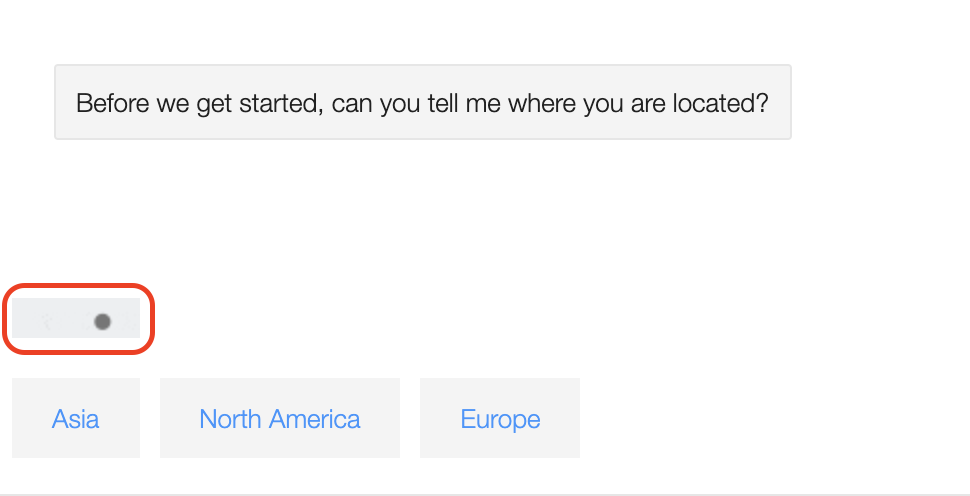
Typing indicator shows up even after the bot sends a message when using ShowTypingMiddleware
This could be an issue with the Emulator/Webchat itself where it's not stopping the typing indicator from showing once the bot responds.
To Reproduce
Steps to reproduce the behavior:
Add the ShowTypingMiddleware and set the delay to 0 to show up immediately.

Expected behavior
The bot should only show the typing indicator till the bot responds. It should disappear as soon as it responds.
Screenshots
From Bot Framework Emulator - The bot sent the prompt to select location, but it still showed the typing indicator
 ryub3n
All 10 comments
Was trying the solution mentioned here.
ryub3n
on 31 May 2021
@ryub3n, I am able to repro the issue you are experiencing. It seems that a delay value of 0 produces the issue, a near 0 value (i.e. 20) is intermittent, with a high(er) value resulting in the typing indicator being completely ignored. I tested in Web Chat as well as Emulator with the same results.
Out of curiosity, I tested sending a 'typing' activity in the adapter.processActivity() method. In this case, the typing activity is always displayed regardless of the delay value. However, like the middleware, it is always showing after the bot has already sent a message.
I'm doing some additional research on this and will provide an update when I know more.
 stevkan
on 1 Jun 2021
stevkan
on 1 Jun 2021
Thank you @stevkan.
I did notice another issue that could be related to this.
So while the bot connects and before it sends the welcome message I'm sending a typing indicator activity to stall the user. But sometimes the typing indicator appears even after the welcome message was sent.
ryub3n
on 1 Jun 2021
@ryub3n, thank you for your patience while I continue to look into this. Regarding the user experience described above, can you post the code you are using for implementing the typing indicator 'delay'?
stevkan
on 14 Jun 2021
@stevkan, below is the code I used to implement the middleware. I'm using a delay of 0 as I want it to be immediately sent.
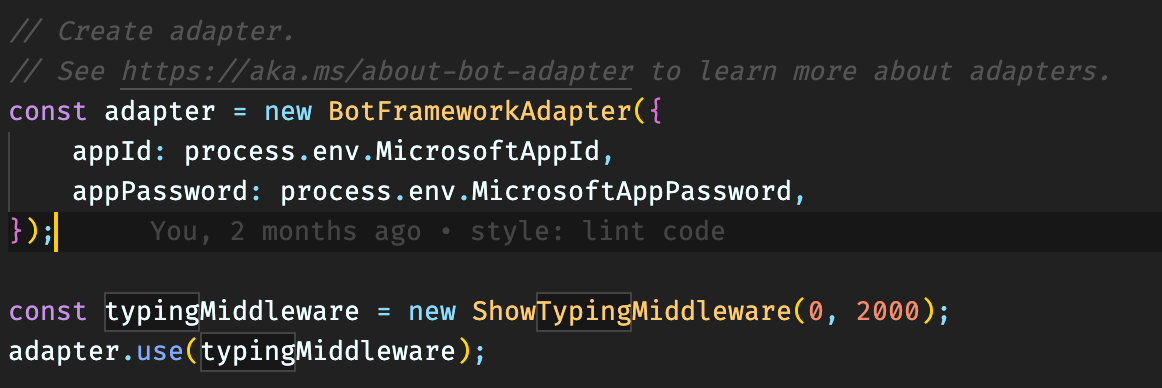
And since this didn't work I started sending typing activity before sending the message at certain places.
For e.g. before sending the welcome message I'm sending a typing activity.
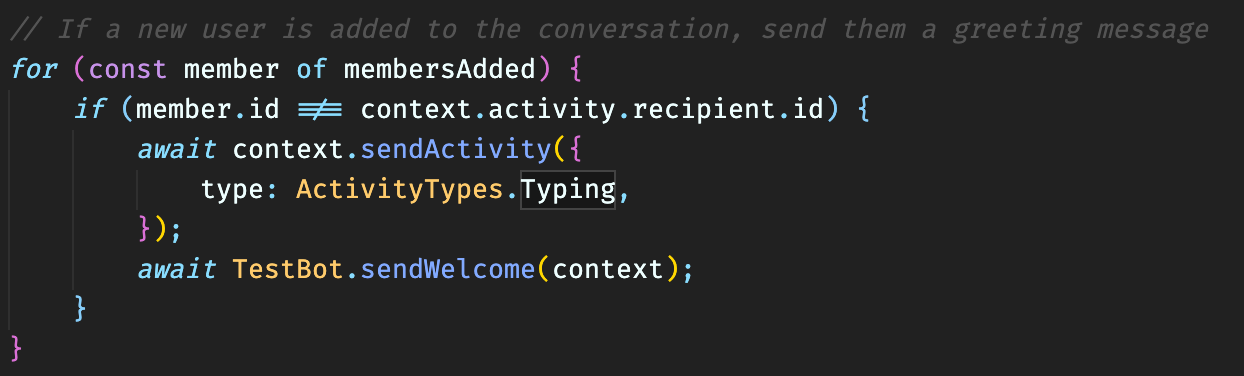
I haven't added any delay as I assume it should timeout/stop (using default value) when the other messages arrive.
Thing is sometimes the messages don't come in order. But when they do come BotFrameWork Webchat displays the messages in order strangely. But as I said sometimes the typing activity appears after the messages are visible (not able to capture this as it's random). I would expect the typing activity to follow the order of activities and not appear out of turn.
Update: A user has also raised this issue here so I guess I'm not the only one facing this.
ryub3n
on 14 Jun 2021
@ryub3n, thank you for your patience. I am working on connecting with a colleague regarding this. I should have an update for you by EOD, today.
stevkan
on 28 Jun 2021
@ryub3n, I was just testing the ShowTypingMiddleware and typing activity options around some ideas I had and I am finding the typing activity option to work, as expected, now. The ShowTypingMiddleware option is still acting out of sorts (no pun intended). To be clear, I am using the latest version of Web Chat, v4.13.0.
Can you test the below and see how it works for you? I have the below placed in adapter.processActivity() in the index.js file.
await turnContext.sendActivities([
  { type: ActivityTypes.Typing },
  { type: 'delay', value: 500 },
]);
It's important to note that sorting of messages in Web Chat, and potentially in Emulator as it utilizes Web Chat, has been an issue for some time. As you can see from the two linked posts below, designing a proper solution has been of on-going consideration.
https://github.com/microsoft/BotFramework-WebChat/pull/1107
https://github.com/microsoft/BotFramework-WebChat/issues/2991
stevkan
on 8 Jul 2021
@stevkan, I've tested the code and it works. But it doesn't have the ability to automatically send the indicator again after a period for say when a query from QnAMaker takes time. I did try implementing it but the issue of the indicator showing even after the message is sent exists. I wonder if this is because of the sort order issue of the messages that you mentioned.
ryub3n
on 14 Jul 2021
At this point, this is appearing to be the most likely culprit. I would recommend you comment or otherwise show your support for issue #2991 (linked above). The more interest there is, the more likely it will receive higher prioritization for inclusion in a future release.
As for the typing activity, I think this is likely your best bet. Typically, with long running processes, the best practice is to send a proactive message once the value is returned. This protects against timeouts occurring when the bot (or other service) is taking too long to respond. However, this idea can be used to repeatedly send a typing activity until the query is done running and the answer is sent as the final message. I haven't tested this exact scenario, but I did test sending seven 1-second typing activities back-to-back and they visually looked like one instance having been sent.
It's not a perfect solution, but it may serve as a workaround until the sorting issue is resolved.
stevkan
on 22 Jul 2021
Closing as resolved.
stevkan
on 27 Jul 2021
Related issues
 saranyuavh
·
5Comments
saranyuavh
·
5Comments
 atishayv
·
6Comments
atishayv
·
6Comments
 ctstone
·
8Comments
ctstone
·
8Comments
 VictorGrycuk
·
7Comments
VictorGrycuk
·
7Comments
 qpongo
·
10Comments
qpongo
·
10Comments