Botbuilder-js: [botbuilder] If localTimestamp comes from a different time zone the original time zone is lost after conversion to date object
Versions
What package version of the SDK are you using. 4.7.0
What nodejs version are you using v10.8.0
What browser version are you using none
What os are you using Windows 10 Pro
Describe the bug
The property activity.localTimestamp does not retain the original time zone when the activity comes from a different time zone than where the bot is running.
When the parseRequest method is executed, the property activity.localTimestamp is converted to Date() but the date time offset is lost as JavaScript works solely on UTC.
We thought a couple solutions to fix or circumvent this problem:
- Augment the date object to include the original timezone, either as global namespace or by exporting.
- Keep
localTimestampas Date, but before the conversion extract the time zone and store it in localTimezone property. - Remove the conversion to
Dateobject and keep the original date as string. This will introduce a breaking change on user already operating onlocalTimestampas Date.
Our preferred solution would be the first one as it will retain the Date compatibility while offering the expected information as in the .Net Library.
To Reproduce
- Go to the Virtual Assistant's folder
- Install the dependencies with
npm install - Compile the solution with
npm run build - Deploy the Virtual Assistant using the following command:
pwsh.exe -File deployment\scripts\deploy.ps1 -name "<BOT_NAME>" -location "<LOCATION>" -appId "<APP_ID>" -appPassword "<APP_PASSWORD>" -luisAuthoringKey "<LUIS_AUTHORING_KEY>" -luisAuthoringRegion "<LUIS_AUTHORING_REGION>"
Open the Bot Framework Emulator and configure it to connect the Virtual Assistant running locally

Set a breakpoint in the line 1004 of botFrameworkAdapter.ts inside Botbuilder library

Change the
System Time zoneto a different one (e.g. UTC+03:00 Minsk)
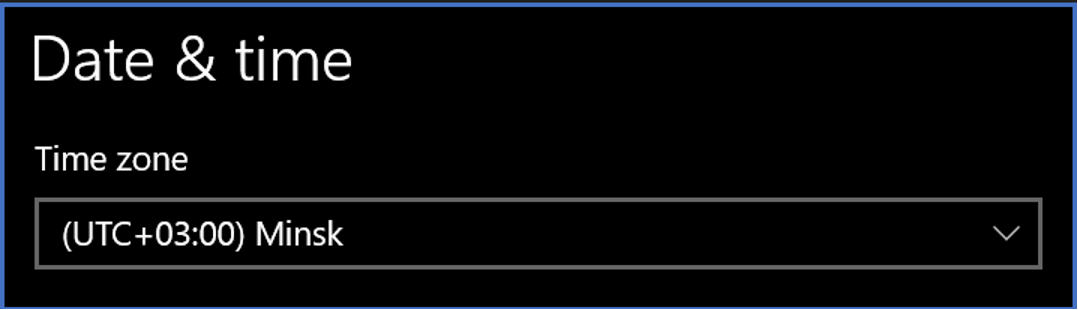
Debug the Virtual Assistant
- Start the chat with the Virtual Assistant using the emulator
The execution will stop at the breakpoint. The
activity.localTimestampwill show the datetime with the previous Local Server Timezone
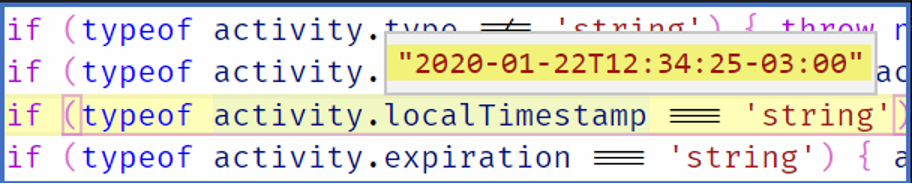
After the assignment, the new datetime of
activity.localTimestampwill have the new User's Timezone

Expected behavior
The original time one of activity.timeStamp should not be lost if it comes from a different time zone.
Screenshots
Before the conversion to Date
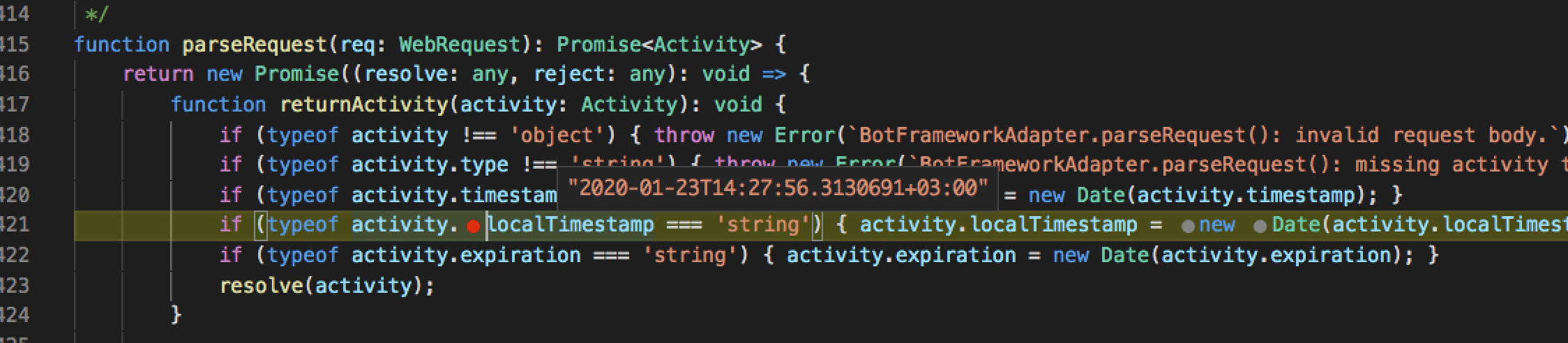
After the conversion to Date
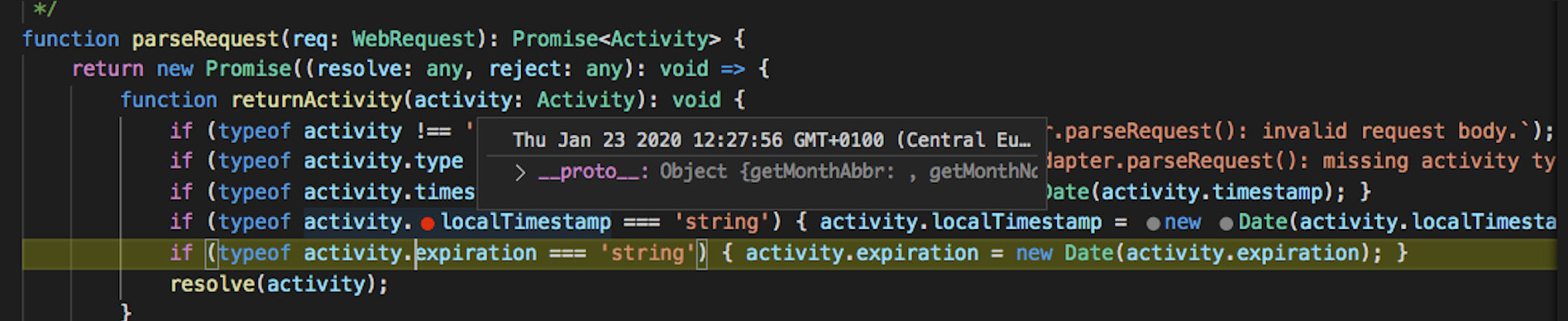
Additional context
As an user pointed out in the BotFramework Solutions issue #2903, when the localTimestamp is received it is converted to the time zone running the bot, not the original time zone.
[bug]
 VictorGrycuk
All 7 comments
I'm going to look into what the expected value _should_ be for both localTimestamp and timestamp as the docs aren't too specific. It seems to me that localTimestamp is supposed to represent the location of the bot / service given the locale also represents that. For the activity below, I deployed a bot in the PST timezone (-08:00) and changed the system time to Greenland (-03:00). The localTimestamp still represented the bot's location ("westus2" region) as does the locale ("en-US").
Are you finding the same to be true when you look over activity.timestamp?
{
  "channelData": {
    "clientActivityID": "1580204381878wkj3zr3pam",
    "clientTimestamp": "2020-01-28T09:39:41.878Z",
    "state": "sent"
  },
  "text": "hi",
  "textFormat": "plain",
  "type": "message",
  "channelId": "emulator",
  "from": {
    "id": "84122cfe-8dd7-4ab6-a5b2-8bc55270a741",
    "name": "User",
    "role": "user"
  },
  "locale": "en-US",
  "timestamp": "2020-01-28T09:39:41.880Z",
  "entities": [
    {
      "requiresBotState": true,
      "supportsListening": true,
      "supportsTts": true,
      "type": "ClientCapabilities"
    }
  ],
  "conversation": {
    "id": "19de61d0-41b2-11ea-9b16-1f823e728192|livechat"
  },
  "id": "1c0cb380-41b2-11ea-b4ef-23ec64df19a4",
  "localTimestamp": "2020-01-28T01:39:41-08:00",
  "recipient": {
    "id": "b75ee300-41b0-11ea-9b16-1f823e728192",
    "name": "Bot",
    "role": "bot"
  },
  "serviceUrl": "https://2270ad31.ngrok.io"
}
 stevkan
on 28 Jan 2020
stevkan
on 28 Jan 2020
Hi @stevkan,
The issue here is the loss of the original localTimestamp timezone. This happens in TypeScript (not in C#) during the conversion from string ISO 8601 to Date.
According to the code comments the expected values would be as follow:
timestamp: Contains the date and time that the message was sent, in UTC, expressed in ISO-8601 format.localTimestamp: Contains the local date and time of the message, expressed in ISO-8601 format.
As you can see, the localTimestamp represents the time zone where the messages originated from. In your example it should be the system time Greenland (-03:00); in our example Minsk (+03:00). It is "local" to the client, not the bot service.
The JSON activity generated as string format is corrrect since it includes the localTimestamp of the client in ISO 8601.
You can test this by sending a message using the Bot Framework Emulator and checking the JSON generated in the right panel. The bot will receive this activity with the localTimestamp that is shown indenpendently of the bot service deployment time zone.
However, after the conversion to Date(), the time zone of the localTimestamp is lost, as JavaScript works only on UTC.
What you see as localTimestamp is just the way the IDE represents time in the local time zone by default.
In contrast, in .NET the date time is converted to DatetimeOffset type, which includes additional information:
The DateTimeOffset structure includes a DateTime value, together with an Offset property that defines the difference between the current DateTimeOffset instance's date and time and Coordinated Universal Time (UTC).
This is why we initially suggested a couple of solutions to avoid the loss of the time zone.
VictorGrycuk
on 5 Feb 2020
In v3, localTimestamp was a string: https://github.com/microsoft/BotBuilder-V3/blob/master/Node/core/src/interfaces.d.ts#L55
The spec specifically mentions that localTimestamp is a string:
The value of the localTimestamp field is an ISO 8601 encoded datetime within a string.
 EricDahlvang
on 10 Feb 2020
EricDahlvang
on 10 Feb 2020
@VictorGrycuk, thank you for your patience. Your 2nd solution, to extract the time zone prior to conversion, would be the best approach. There is some discussion already ongoing around this topic, internally. However, there is no fix on the horizon, at this time.
I'm closing this issue as resolved. If you have further concerns or new information to provide, please feel free to reopen.
stevkan
on 12 Feb 2020
hey @stevkan , could we keep this issue open till the fix for extracting the timezone and putting it in the localTimezone property is implemented in parseRequest() in botbuilder-js? This seems like an easy non-breaking fix for this issue and would eliminate our current use of hacks to get to the user's original timezone.
 marawanshalaby
on 13 Feb 2020
marawanshalaby
on 13 Feb 2020
@stevkan while we wait for a fix for this, is there a temporary workaround for this from a bot framework user's perspective other than getting to the original localTimestamp from the body of the raw request ? This is what we are currently doing to circumvent this issue, but it's really messy and we'd prefer a proper fix if there is one
marawanshalaby
on 17 Feb 2020
Hi @marawanshalaby
Reopening, since there are multiple reports and requests regarding this issue.
Hopefully we can address this in the sdk, as you've mentioned. Thank you for your suggestions above. I prefer option 2, however:
The value of the localTimezone field is a time zone name (zone entry) per the IANA Time Zone database.
ref: local-timezone
IANA Time Zones do not correlate 1:1 to a timezone offset. It seems we would need to store this somewhere other than localTimezone (or attempt to convert the timezone offset to a localTimezone ... which is not reliable).
@christopheranderson do you have any recommendations for addressing this?
EricDahlvang
on 18 Feb 2020
Related issues
 Weirwolf
·
9Comments
Weirwolf
·
9Comments
 christopheranderson
·
6Comments
christopheranderson
·
6Comments
 atishayv
·
6Comments
atishayv
·
6Comments
 jovanmilenkoski
·
5Comments
jovanmilenkoski
·
5Comments
 juharris
·
3Comments
juharris
·
3Comments
Most helpful comment
Hi @stevkan,
The issue here is the loss of the original
localTimestamptimezone. This happens in TypeScript (not in C#) during the conversion from string ISO 8601 to Date.According to the code comments the expected values would be as follow:
timestamp: Contains the date and time that the message was sent, in UTC, expressed in ISO-8601 format.localTimestamp: Contains the local date and time of the message, expressed in ISO-8601 format.As you can see, the
localTimestamprepresents the time zone where the messages originated from. In your example it should be the system time Greenland (-03:00); in our example Minsk (+03:00). It is "local" to the client, not the bot service.The JSON activity generated as string format is corrrect since it includes the localTimestamp of the client in ISO 8601.
You can test this by sending a message using the Bot Framework Emulator and checking the JSON generated in the right panel. The bot will receive this activity with the localTimestamp that is shown indenpendently of the bot service deployment time zone.
However, after the conversion to
Date(), the time zone of thelocalTimestampis lost, as JavaScript works only on UTC.What you see as
localTimestampis just the way the IDE represents time in the local time zone by default.In contrast, in .NET the date time is converted to
DatetimeOffsettype, which includes additional information:This is why we initially suggested a couple of solutions to avoid the loss of the time zone.