Botbuilder-js: Unable to send a proactive group message and reply to that message from the bot
In response to a signal coming from an external source, I need to create a new conversation and reply to that conversation proactively in a team chat.
Following https://github.com/microsoft/BotBuilder-Samples/tree/master/samples/javascript_nodejs/58.teams-start-new-thread-in-channel I was able to send a message and it's reply but only when a user of the chat is messaging the bot first. I would like to do so proactively, unprovoked by the user.
I have tried storing the activity in a DB from the conext object sent through the bot's onMembersAdded event (when the bot is added to the channel). When the external signal arrives, I pull the activity from the DB that corresponds to that chat. Then I use getConversationReference and adapter.continueConversation to get the turnContext that I then use add a new message to the chat. At that point though I am unable to reply to that new message and subsequent calls to sendActivity on the turnContext create new messages instead of replying to the first.
If I try something along the lines of
const conversationParameters = {
            isGroup: true,
            channelData: {
                channel: {
                    id: teamsChannelId
                }
            },
            activity: message,
        };
        const connectorClient = context.adapter.createConnectorClient(context.activity.serviceUrl);
        const conversationResourceResponse = await connectorClient.conversations.createConversation(conversationParameters);
        const conversationReference = TurnContext.getConversationReference(context.activity);
        conversationReference.conversation.id = conversationResourceResponse.id;
        return [conversationReference, conversationResourceResponse.activityId];
to create a new conversation using the turnContext returned from the adapter.continueConversation, I get an error in
connectorClient.conversations.createConversation(conversationParameters);
because the "bot" parameter is missing from the conversationParameters.
When I add
const conversationParameters = {
            bot: <instance of my bot>,
            isGroup: true,
            channelData: {
                channel: {
                    id: teamsChannelId
                }
            },
            activity: message,
        };
The call to createConversation freezes and eventually times out.
 OferLahav
All 10 comments
This is a brand new sample, so let me see if I can repro your issue.
 jwiley84
on 27 Jan 2020
jwiley84
on 27 Jan 2020
Just to make sure I'm on the right track:
When you get your external call, are you trying to proactivley message the whole team, or just one user, or multiple users?
Also, when you say:
At that point though I am unable to reply to that new message and subsequent calls to sendActivity on the turnContext create new messages instead of replying to the first.
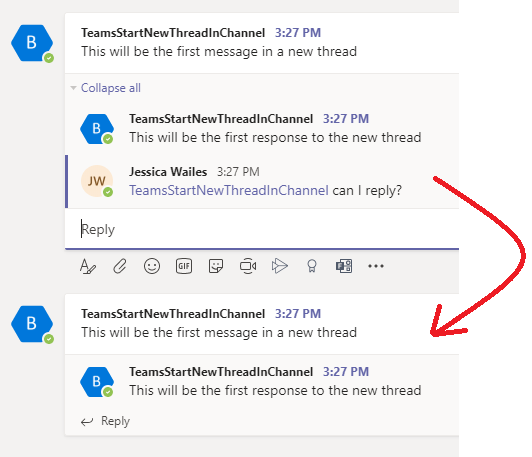
Do you mean this behaviour? When I type a reply to this message, it starts a new message:
jwiley84
on 30 Jan 2020
What we are receiving is an SMS and we would like to notify the members of a channel when the SMS arrives. We would like to have a new SMS received start a new conversation where the first message contains information about the contact and have a "reply" that contains the actual message. At first glance it might appear that the bot is replying to itself.
This behavior exist with current ms teams application called mailClark where an incoming email shows a card with a reply containing the contents of the email.
So in the screen shot that you pasted with the red arrow. We are trying to show the bottom (the one that the arrow is pointing at) conversation as a result of an incoming SMS.
Subsequent replies sent by any member of the channel or the sender of the SMS would then append new replies to the same chat. It would ideally continue appending replies indefinitely without creating a new conversation.
Thank you!
OferLahav
on 30 Jan 2020
Hi - Can you help us understand a bit more what you've tried? The sample you've linked to doesn't require that the user message the bot first. When the bot is installed in the team your bot will receive a conversationUpdate event that contains all the necessary information for sending a proactive message to a channel in that team.
For additional information on proactive messaging you can look at:
- https://docs.microsoft.com/en-us/microsoftteams/platform/bots/how-to/conversations/send-proactive-messages?tabs=dotnet
- https://github.com/clearab/teamsProactiveMessaging
If you're still stuck after reviewing the above, please post a snippet of the code you're using.
 clearab
on 10 Feb 2020
clearab
on 10 Feb 2020
Thank you for your reply!
To be clear; I am and have been able to successfully send proactive messages to the channel.
The issue is that I want the bot to reply to it's own conversation. The conversation that the bot initialized by using proactive messaging. I want the bot to reply multiple times to its own proactive message unprovoked by the user(s) of the channel. I want the replies to appear as described above, were it appends a box to the bottom of the first box generated by the initial proactive message.
In other words, I would like to send proactive replies.
Here is the code that I am using to successfully send a proactive message:
const conversationReference = TurnContext.getConversationReference(teamActivity);
        return this.adapter.continueConversation(conversationReference, (turnContext) => {
            MicrosoftAppCredentials.trustServiceUrl(turnContext.activity.serviceUrl);
            return turnContext.sendActivity({ attachments: [card] });
        });
I have not yet figured out proactive replies and I have feel like I tried dozens of approaches.
The sample in the link that I provided, only works with the "context" provided by the "onMessage" event. Storing the context doesn't appear to work, and getting the turnContext from the activity (as shown in the code above) does not appear to work either for the purposes of this sample.
As far as the links that you have pasted, I believe that the first only deals with a proactive message which, again, I am not having an issue with. The second is in C#, since I'm working in node I did not dig any deeper to try and get value out of it.
I found these C# solutions:
https://stackoverflow.com/questions/53534445/how-to-send-out-of-turn-messages-and-replies-in-bot-builder-framework-4-0
https://doumer.me/proactive-message-bot-in-teams-with-the-botframework-v4-csharp/
I need the same functionality except in nodeJS.
OferLahav
on 12 Feb 2020
Maybe this example will provide clarification...
``
        const conversationReference = TurnContext.getConversationReference(teamActivity);
        this.adapter = new BotFrameworkAdapter({
            appId: process.env.MicrosoftAppId,
            appPassword: process.env.MicrosoftAppPassword
        });
        return this.adapter.continueConversation(conversationReference, async (context) => {
            MicrosoftAppCredentials.trustServiceUrl(context.activity.serviceUrl);
            const message = MessageFactory.text(
Hello. I'm a Teams conversation bot.`);
const teamsChannelId = teamsGetChannelId(context.activity);
        const conversationParameters = {
            isGroup: true,
            channelData: {
                channel: {
                    id: teamsChannelId
                }
            },

            activity: message,
        };

        const connectorClient = context.adapter.createConnectorClient(context.activity.serviceUrl);
        const conversationResourceResponse = await connectorClient.conversations.createConversation(conversationParameters);
        const conversationReference = TurnContext.getConversationReference(context.activity);
        conversationReference.conversation.id = conversationResourceResponse.id;
        return [conversationReference, conversationResourceResponse.activityId];
The above code throws "[onTurnError]: Error: Incorrect conversation creation parameters" when calling createConversation
OferLahav
on 23 Feb 2020
This sample should show how that is done:
clearab
on 25 Feb 2020
That's the example I followed (and pasted the link to on the first message of this thread). The problem is that this only works when using the "context" parameter sent through the onMessage event not on any other context.
I need to take the onMembersAdded context and store it in the DB. Then, at a later point in time, using getConversationReference to get the turnContext from the activity. It does not work when I do this.
OferLahav
on 25 Feb 2020
Hi @oferdekel
I took a look and I know what the problem is. In the onTeamsMembersAdded event the teamsChannelId is null because a member added event isn't tied to a specific channelID. The below code will post the activity into the general channel. If you were interested in having the bot post to a non-general channel you would need to call the TeamsInfo.getTeamChannels method and then pull the ID off of whatever channel you want. You'd then need to update the
const teamsChannelID = channelIdOfTheChannelYouWantToPostTo;
and then it should work. If this doesn't solve your problem let me know.
this.onTeamsMembersAddedEvent(async (membersAdded, teamInfo, context, next) => {
            context.activity.membersAdded.forEach(async (teamMember) => {
                if (teamMember.id !== context.activity.recipient.id) {
                    const teamsChannelId = teamsGetTeamId(context.activity);
                    const message = MessageFactory.text(`Welcome to the team ${ teamMember.givenName }`);
                    const newConversation = await this.teamsCreateConversation(context.adapter, context.activity, teamsChannelId, message);
                    await this.adapter.continueConversation(newConversation[0],
                        async (t) => {
                            await t.sendActivity(MessageFactory.text('This will be the first response to the new thread'));
                        });

                    await next();
                }
            });
            await next();
        });

async teamsCreateConversation(adapter, activity, teamsChannelId, message) {
        const conversationParameters = {
            isGroup: true,
            channelData: {
                channel: {
                    id: teamsChannelId
                }
            },

            activity: message
        };

        const connectorClient = adapter.createConnectorClient(activity.serviceUrl);
        const conversationResourceResponse = await connectorClient.conversations.createConversation(conversationParameters);
        const conversationReference = TurnContext.getConversationReference(activity);
        conversationReference.conversation.id = conversationResourceResponse.id;
        return [conversationReference, conversationResourceResponse.activityId];
    }
 Virtual-Josh
on 27 Feb 2020
Virtual-Josh
on 27 Feb 2020
Thank you!
The problem was in fact with the teamsChannelID where _teamsGetChannelId_ was failing for some reason I don't understand. The code you provided did not work for me as is (_teamsGetTeamId_ also returned null), but it definitely provided me the guidance needed to resolve this. I ended up grabbing the channel ID from activity.conversation.id.
OferLahav
on 1 Mar 2020
Related issues
 luspac
·
9Comments
luspac
·
9Comments
 atishayv
·
6Comments
atishayv
·
6Comments
 VictorGrycuk
·
7Comments
VictorGrycuk
·
7Comments
 christopheranderson
·
6Comments
christopheranderson
·
6Comments
 jovanmilenkoski
·
5Comments
jovanmilenkoski
·
5Comments
Most helpful comment
This is a brand new sample, so let me see if I can repro your issue.