Botbuilder-dotnet: delay text output
Is your feature request related to a problem? Please describe.
When trying to fake the interaction with a real human, the user expects that the other end needs some time to write the response. The send response settings should allow a non-zero delay in the answer.
Describe the solution you'd like
Either allow new Activity { Type = ActivityTypes.Typing } and new Activity { Type = "delay", Value= xxx } as separate dialog elements, or add a parameter in the send an activity UI to include this
Additional context
The framework allows the use of a typing indicator https://docs.microsoft.com/en-us/azure/bot-service/bot-builder-howto-send-messages?view=azure-bot-service-4.0&tabs=csharp
 LucaCerina
All 18 comments
Thanks for the feedback. we are addressing this issue through https://github.com/microsoft/BotFramework-Composer/issues/2471
 hibrenda
on 13 Apr 2020
hibrenda
on 13 Apr 2020
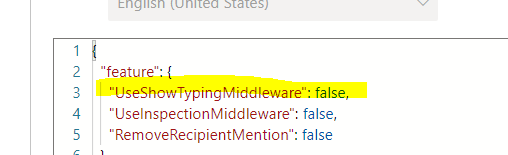
I saw that the mentioned issue was merged and that there is a "UseShowTypingMiddleware" boolean in the bot settings. I set this to true but it's still unclear to me how to make it actually do something. Is there documentation on this feature?
 reinoldus
on 20 Aug 2020
reinoldus
on 20 Aug 2020
Thanks for the comments. Could you try out to set "true" in bot setting as below ?
hibrenda
on 20 Aug 2020
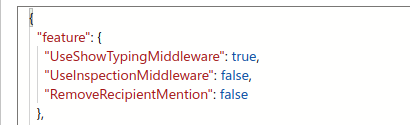
Thank you for your reply. I did, but the message still come in instantly in the emulator. I also don't see any options. I would expect it somewhere in the "send response" tiles in the dialog tree.
reinoldus
on 20 Aug 2020
This based on the bot latency. if this is an immediate response, it won't show up.
hibrenda
on 20 Aug 2020
I am sorry I do not understand. What does that mean?
My objective is: I want to delay the responses to the user a bit, so they do not all come instantly. Is that possible with the composer? If not how can I achieve it?
reinoldus
on 20 Aug 2020
@reinoldus , could you try to eject your runtime and add a sleep function before every turn?
In Core/ComposerBot.cs/OnTurnAsync()
Thread.Sleep(*); <------- *Add this line before OnTurnAsync
await this.dialogManager.OnTurnAsync(turnContext, cancellationToken: cancellationToken);
Will this met your requirement?
 luhan2017
on 20 Aug 2020
luhan2017
on 20 Aug 2020
@luhan2017 It kind of does what I am looking for. Only issue is that I would want it on a message basis.
The idea is to send 5 messages one by one with a e.g. 1 sec delay. This solution sends all of the messages after the wait.
Additionally since this is not an async call, I am worried that the bot blocks and no other conversations would be possible in that time frame, but I do not know if that would be the case.
reinoldus
on 20 Aug 2020
Can we maybe reopen this issue? I don't think it was addressed by microsoft/BotFramework-Composer#2471, because having a typing indicator does not solve the actual delay problem.
Right now the only way to delay a message is through "In Core/ComposerBot.cs/OnTurnAsync()", but that delays an entire turn, which then sends 5 messages at once. Our bot though has an educational character and sends multiple rather short messages one by one, so the user is not overwhelmed with the information.
The solution that @LucaCerina described would be perfect. I don't think it was addressed by the mentioned issue. If I am just not seeing it, I would appreciate to be pointed in the right direction.
reinoldus
on 24 Aug 2020
@reinoldus I will re-open and transfer to https://github.com/microsoft/botbuilder-dotnet for continued discussion.
 cwhitten
on 24 Aug 2020
cwhitten
on 24 Aug 2020
Consider a general purpose delay action that can be added prior to specific bot operations.
 vishwacsena
on 24 Aug 2020
vishwacsena
on 24 Aug 2020
@jwiley84, any update on this?
 tsuwandy
on 15 Sep 2020
tsuwandy
on 15 Sep 2020
@jwiley84, any update on this?
 ninggao
on 28 Sep 2020
ninggao
on 28 Sep 2020
@reinoldus it sounds like you're asking for an Action that sends a Typing Activity, which would be called before each message activity is sent. Is this correct?
 stevengum
on 14 Oct 2020
stevengum
on 14 Oct 2020
Incoming calls from a channel have a timeout of 8 to 15 seconds depending on channel. This limitation inhibits most thread wait or long processing scenerios, without background activity processing. A dotnet experimental example of this, with various ways of pausing and resuming processing of bot activities, can be found here:
Once incoming activities are processing on a background thread in the exported runtime of composer, implementing a "WaitAction" dialog with a configurable timer period would work for the purpose of the use case described above (if i'm understanding the problem correctly).
The dialog could determine the length of the last message, and wait an appropriate amount of time based on length of text sent perhaps.
 EricDahlvang
on 14 Oct 2020
EricDahlvang
on 14 Oct 2020
I switched to writing the bot in code entirely in the meantime.
What I am doing in my "code bot" is the following:
async def send_message(context, message: Dict[str, str]):
    if isinstance(context, WaterfallStepContext):
        context = context.context
    text = message['text']
    await context.send_activity(MessageFactory.text(text))
    sleep_time = (len(text.split(" ")) / 5)
    await asyncio.sleep(sleep_time)
In conjunction with:
ADAPTER.use(ShowTypingMiddleware(delay=0.5, period=2.0))
So after each message has been sent, the bot waits len(text.split(" ")) / 5 seconds. The reasoning behind that is:
This time frame is approximately the time an average reader needs to read the message just sent (https://capitalizemytitle.com/reading-time/1000-words/). In my tests that worked pretty well, because you do not want to wait for the bot to type, you just don't want to be flooded with messages. So this is pretty much what @EricDahlvang described.
With all my new experience with implementing the bot in code, I would have loved to see these features in the composer:
- Have a general option that does what @EricDahlvang described.
- Have the option to delay each activity individually, because if you "quiz" a user about something, it feels more natural if the next question is delayed by a second or something (just my UX-experience)
- It would probably be helpful if one could set all these options by message type, so you can globally set a delay of e.g. 1 second for every "Prompt"-type.
- It is vital that all of these delays can be disabled easily so you can test it quickly without any waiting time.
I hope that clears up what I was looking for.
Thank you for your support!
reinoldus
on 14 Oct 2020
I've re-read this thread, and tested out the 'delay' activity type from composer. This works as expected on channels, but not the emulator (i think because the emulator is holding the calling thread, and waiting for completion):
[Activity
    Value = ${3000}
    Type = ${"delay"}
]

The typing indicator does not include a delay, as it is a client side indicator that something is occurring on the server side. However, the delay activity type will pause server processing for the specified number of milliseconds before proceeding.
Javascript:
https://github.com/microsoft/botbuilder-js/blob/main/libraries/botbuilder/src/botFrameworkAdapter.ts#L1230
@reinoldus The delay activity type is also provided in the Python sdk:
https://github.com/microsoft/botbuilder-python/blob/main/libraries/botbuilder-core/botbuilder/core/bot_framework_adapter.py#L692
I hope this helps. I think we can close this, since the sdk does provide a method for accomplishing the desired goal. We could potentially improve support for this, by providing a 'delay' time period to SendActivity, which would just queue up a 'delay' activity, enabling a pause afterwards.
EricDahlvang
on 19 Oct 2020
Re-opening this.
@garypretty can we consider simplifying and supporting some form of this more directly from Composer?
EricDahlvang
on 21 Dec 2020
Related issues
 drub0y
·
5Comments
drub0y
·
5Comments
 digitaldias
·
6Comments
digitaldias
·
6Comments
 markbeau
·
6Comments
markbeau
·
6Comments
 MarekLani
·
4Comments
MarekLani
·
4Comments
 ivorb
·
6Comments
ivorb
·
6Comments