Botbuilder-dotnet: Same email received multiple times by the bot
Hi
When I send an email to the Bot registered email address, i get between 3 to 5 replies from the bot. When I debug the bot locally I can see it receives the same email multiple times. The Activity has the same ID every time so I know I can check the ID before replying to avoid these multiple replies. However this behavior sounds like a bug and I'm not sure what causes it.
Here's the code from the OnTurnAsync and the EmailDialog:
OnTurnAsync:
 public async Task OnTurnAsync(ITurnContext turnContext, CancellationToken cancellationToken = default(CancellationToken))
        {
            if (turnContext.Activity.Type == ActivityTypes.Message && turnContext.Activity.ChannelId != "email")
            {


                // Establish dialog state from the conversation state.
                DialogContext dc = await _dialogs.CreateContextAsync(turnContext, cancellationToken);

                // Get the user's info.
                UserInfo userInfo = await _accessors.UserInfoAccessor.GetAsync(turnContext, () => new UserInfo(), cancellationToken);

                await _accessors.UserInfoAccessor.SetAsync(turnContext, userInfo, cancellationToken);

                // Continue any current dialog.
                DialogTurnResult dialogTurnResult = await dc.ContinueDialogAsync();

                // Process the result of any complete dialog.
                if (dialogTurnResult.Status is DialogTurnStatus.Complete)
                {
                    var i = 0;
                    await turnContext.SendActivityAsync("Thank you, see you next time");

                }

                // Every dialog step sends a response, so if no response was sent,
                // then no dialog is currently active.

                else if (!turnContext.Responded)
                {
                    var h = 0;

                    await dc.BeginDialogAsync(MainDialogId, null, cancellationToken);


                }

                // Save the new turn count into the conversation state.
                await _accessors.ConversationState.SaveChangesAsync(turnContext, false, cancellationToken);
                await _accessors.UserState.SaveChangesAsync(turnContext, false, cancellationToken);
            }
            else if (turnContext.Activity.Type == ActivityTypes.Message && turnContext.Activity.ChannelId == "email")
            {
                // Establish dialog state from the conversation state.
                DialogContext dc = await _dialogs.CreateContextAsync(turnContext, cancellationToken);

                // Get the user's info.
                UserInfo userInfo = await _accessors.UserInfoAccessor.GetAsync(turnContext, () => new UserInfo(), cancellationToken);

                await _accessors.UserInfoAccessor.SetAsync(turnContext, userInfo, cancellationToken);

                // Continue any current dialog.
                DialogTurnResult dialogTurnResult = await dc.ContinueDialogAsync();

                // Process the result of any complete dialog.
                if (dialogTurnResult.Status is DialogTurnStatus.Complete)
                {


                }

                // Every dialog step sends a response, so if no response was sent,
                // then no dialog is currently active.

                else if (!turnContext.Responded)
                {

                    var h = 0;
                    // if the user attempted to many times to enter an invalid ticket, this condition is met and the if should open a Too many attempts dialog.

                    await dc.BeginDialogAsync(EmailDialogId, null, cancellationToken);


                }


                // Save the new turn count into the conversation state.
                await _accessors.ConversationState.SaveChangesAsync(turnContext, false, cancellationToken);
                await _accessors.UserState.SaveChangesAsync(turnContext, false, cancellationToken);
            }

            else
            {
                // Commenting this to avoid "event detected" message over the chat.
                // await turnContext.SendActivityAsync($"{turnContext.Activity.Type} event detected");

            }
        }
EmailDialog:
using EchoTest.Utils;
using MarvinModels;
using MarvinServices;
using Microsoft.Bot.Builder;
using Microsoft.Bot.Builder.Dialogs;
using Microsoft.Bot.Builder.Dialogs.Choices;
using Newtonsoft.Json;
using System;
using System.Collections.Generic;
using System.Linq;
using System.Threading;
using System.Threading.Tasks;

namespace EchoTest.Dialogs
{
    public class EmailDialog : ComponentDialog
    {
        private readonly BotAccessors _accessors;

        // Nested Dialog Id, required to be used with the ReplaceDialog
        private const string EmailDialogId = "emailDialogId";

        public EmailDialog(string id, BotAccessors accessors) // id inhereted from the parent Dialog.
            : base(id)
        {
            // The InitialDialogId needs to be set to the ID of a dialog in the nested/child dialog, the one to start when the waterfall starts
            InitialDialogId = EmailDialogId;
            _accessors = accessors;


            // Define the conversation flow using a waterfall model.
            WaterfallStep[] waterfallSteps = new WaterfallStep[]
            {
                CheckQuestionAsync,
                FAQChoicePromptAsync,

            };
            AddDialog(new WaterfallDialog(EmailDialogId, waterfallSteps));


        }

        private async Task<DialogTurnResult> CheckQuestionAsync(
        WaterfallStepContext stepContext,
        CancellationToken cancellationToken = default(CancellationToken))
        {


            stepContext.Values["emaildata"] = stepContext.Context.Activity.ChannelData;

            var json = stepContext.Values["emaildata"];


            var h = 0;
            var strings = json.ToString();
            var j = 0;
            ChannelDataJson EmailObject = new ChannelDataJson();

            EmailObject = JsonConvert.DeserializeObject<ChannelDataJson>(strings);
            await stepContext.Context.SendActivityAsync(EmailObject.TextBody.Text);
            return await stepContext.ContinueDialogAsync();
        }


        private static async Task<DialogTurnResult> FAQChoicePromptAsync(
       WaterfallStepContext stepContext,
       CancellationToken cancellationToken = default(CancellationToken))
        {


            return await stepContext.EndDialogAsync();


        }


    }
}
 DanteNahuel
All 17 comments
Out of curiosity, because I'm tracking both this issue and your other one here (https://github.com/Microsoft/botbuilder-dotnet/issues/1331), why do you have 'h' and 'j' declared?
 jwiley84
on 31 Jan 2019
jwiley84
on 31 Jan 2019
hi Jessica
h and J are just breakpoints I'm using to check everything is going ok.
I remove them when I push the bot.
DanteNahuel
on 31 Jan 2019
@jwiley84 Any update here? I suspect it's one of 2 things:
1) a minor local code bug
2) a bug in our email service
If it's 2, we should get it assigned over to that team ASAP. Please let me know.
 cleemullins
on 1 Feb 2019
cleemullins
on 1 Feb 2019
Hi
The only way I found to workaround this is, as I mentioned, to save the activity ID in an accessor and compare it every time an email arrives . However this is not optimized at all and I don't think it's the correct approach.
DanteNahuel
on 4 Feb 2019
Hihi @DanteNahuel ! Attempting to repro this. Apologies for the delay.
jwiley84
on 4 Feb 2019
@cleemullins It is 100% a code error. I'm not sure where, but there's an infinite loop I'm going to track down. I just repro'd the bot (without connecting it to email), and got this:
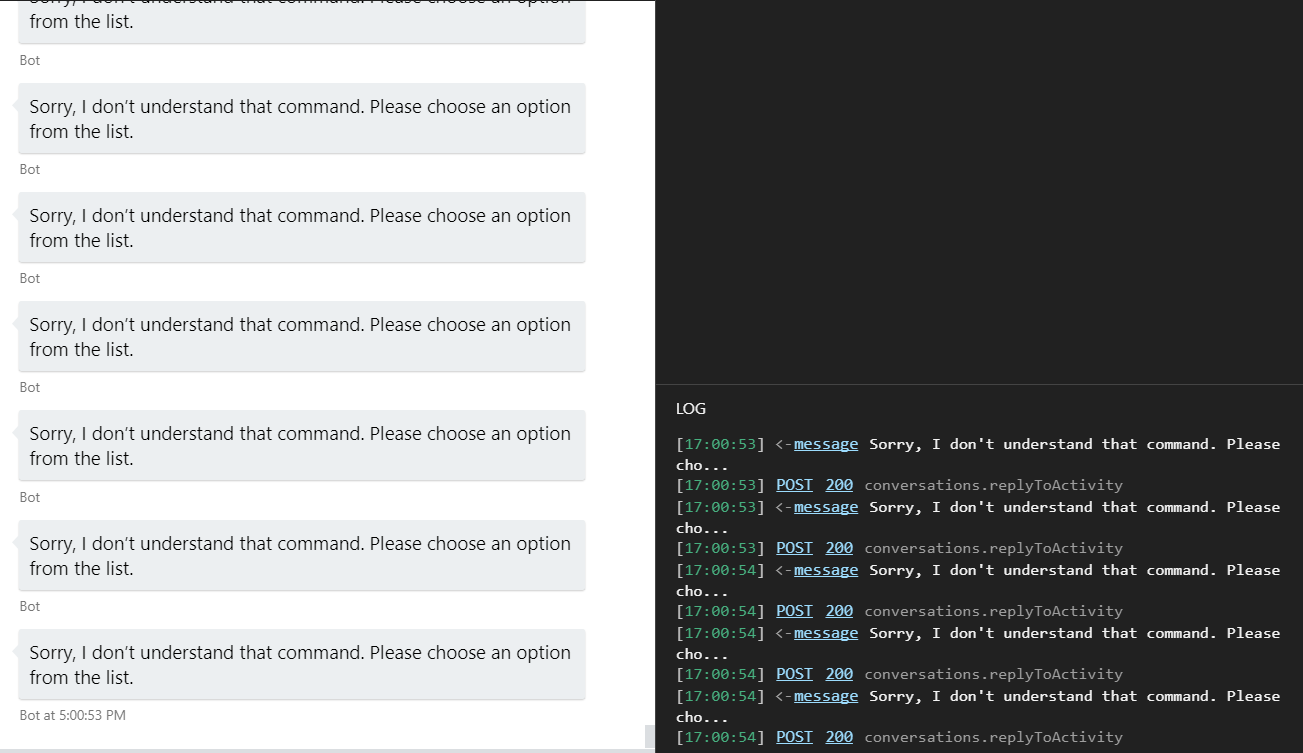
@DanteNahuel : I have to do a bit more digging, but I'm pretty sure I know what's going on.
jwiley84
on 5 Feb 2019
@jwiley84 Jessica, thanks for the help. However let me ask you: Are you using the code provided in this post or the one I provided for #1331 ?
The "Sorry I don't understand that command" loop happened for #1331 but I completely reworked the code and now i'm using the one stated here. They are completely different.
Using the code here doesn't cause the infinite Error loop you posted. The bot can be chatted without any errors and the emails are replied. The issue is different: the problem is when one email is sent, the bot receives it 3 to 5 times and so it replies up to 5 times to the same single email.
This is different to the previous behavior in which the loop never ended.
Just stating this so you don't waste time checking the other issue code, since that was for certain a code error.
DanteNahuel
on 5 Feb 2019
Here's ChannelDataJson
using System;
using System.Collections.Generic;
using System.Linq;
using System.Threading.Tasks;
namespace EchoTest.Utils
{
public class ChannelDataJson
{
public string Subject { get; set; }
public int Importance { get; set; }
public DateTime DateTimeSent { get; set; }
public Id Id { get; set; }
public List<ToRecipient> ToRecipients { get; set; }
public List<object> CcRecipients { get; set; }
public TextBody TextBody { get; set; }
public Body Body { get; set; }
public string ItemClass { get; set; }
}
public class Body
{
public int BodyType { get; set; }
public string Text { get; set; }
}
public class TextBody
{
public int BodyType { get; set; }
public string Text { get; set; }
}
public class ToRecipient
{
public string Name { get; set; }
public string Address { get; set; }
public string RoutingType { get; set; }
public int MailboxType { get; set; }
public object Id { get; set; }
}
public class Id
{
public string UniqueId { get; set; }
public string ChangeKey { get; set; }
}
}
Hi @DanteNahuel!
The problem is in the end of your waterfall steps. The inifinite loop was caused by this code in your MenuStepAsync:
if (stepContext.Context.Activity.ChannelId == "email")
            {
            //    // This checks if an email accidentally got into the main waterfall dialog
                stepContext.Values["channelData"] = JsonConvert.DeserializeObject<ChannelDataJson>(stepContext.Context.Activity.ChannelData.ToString());
                var h = 0;
                await stepContext.BeginDialogAsync(EmailDialogId, stepContext.Values["channelData"]);
                return await stepContext.EndDialogAsync();
            }
            else
            {
                await stepContext.ContinueDialogAsync();
            }
The else block is actually continuing to send the same message over and over to your endpoint (in my case, I tested it by saying 'hi', which wasn't an option). There's really no need for any of this code, since you've already done a check in OnTurnAsync to see if you're using the email channel, so no emails should hit this waterfall.
The duplicate emails is being caused by this, in your EmailDialog:
private async Task<DialogTurnResult> CheckQuestionAsync(
        WaterfallStepContext stepContext,
        CancellationToken cancellationToken = default(CancellationToken))
        {


            stepContext.Values["emaildata"] = stepContext.Context.Activity.ChannelData;

            var json = stepContext.Values["emaildata"];


            var h = 0;
            var strings = json.ToString();
            var j = 0;
            ChannelDataJson EmailObject = new ChannelDataJson();

            EmailObject = JsonConvert.DeserializeObject<ChannelDataJson>(strings);
            await stepContext.Context.SendActivityAsync(EmailObject.TextBody.Text);
            return await stepContext.ContinueDialogAsync();
        }
The duplicate emails are because that same ContinueDialogAsync. It's basically resending the initial message to your endpoint, though in this case, not infinitely, only every time a new email is sent to the bot.
replacing
return await stepContext.ContinueDialogAsync();
with
return await stepContext.NextAsync();
will push your dialog to the next step of the waterfall, which I believe was your intention. While WaterfallDialogContext inherits from DialogContext, it's methods don't work the same in waterfalls. ContinueDialogAsync is used to continue the execution of the entire active dialog, if there is one. It's not meant to push a waterfall dialog to it's next waterfall step.
I'm going to leave this issue open, because I want to ask a coworker tomorrow about this behaviour and get his input. But if you make the above changes, your bot should stop repeating.
jwiley84
on 6 Feb 2019
@jwiley84
Thank you for your comprehensive analysis and answer. I'll test this tomorrow and let you know!!
DanteNahuel
on 6 Feb 2019
@jwiley84
Sadly this didn't work.
I changed the ContinueDialogAsync for NextAsync but the email keeps getting received and processed by the bot after the first Send, so the bot replies between 3 and 5 times to the same first email I send.
It's as if the Bot Channel Service wasn't filtering the email's activity ID (which is the same all the time, because the email received by the bot is the same) and it loops through the same single one email over and over again.
This is not the Infinite Loop issue . The bot stops processing the same email after 3-5 times and the replies stops, but it shouldn't process the activity more than once.
DanteNahuel
on 7 Feb 2019
To add more info:
The incoming activity is the very first activity, like it's been duplicated. Same Activity ID, same other characteristics ( type message channel email, etc)
The mysteries are two:
1) Why does a single email produce 3-5 received (and duplicated) activities by the Bot?
2) Why do the duplicated activities stop after 5-6 times?
- This ONLY happens when using email channel.
- I'm using office365 email address, both to send the email to the bot and as the email channel registered email account
- I'm using Outlook to send the email to the bot
- I've tried registering three different office365 email accounts
DanteNahuel
on 8 Feb 2019
If the email channel's Bot Connector Service (which is what is sending the activity to your bot) does not receive an ack (HttpStatusCode.OK: 200) within 15 seconds, it will resend the email. I think it will retry up to three times.
 EricDahlvang
on 8 Feb 2019
EricDahlvang
on 8 Feb 2019
If the email channel's Bot Connector Service (which is what is sending the activity to your bot) does not receive an ack (HttpStatusCode.OK: 200) within 15 seconds, it will resend the email. I think it will retry up to three times.
Ohhhhh
Very interesting. I see. It's an interesting feature that it would explain a lot. I'm debugging locally and using breakpoints. And the code I made does a DB query to get info from it.
15 seconds isn't a lot.
Could I create a suggestion to increase this timeframe? Or is it a silly suggestion and the 15 seconds timeframe is justified??
DanteNahuel
on 8 Feb 2019
You cannot increase the 15 second timeout (it is in the connector services). But you can process the message on a different thread, ack the call, and proactively message the user from the background thread (email channel allows proactive messaging).
EricDahlvang
on 8 Feb 2019
This is looking like it's a code bug, rather than an SDK or Bot Service issue. I'll close this issue tomorrow (Feb 12), if no additional issues arise.
cleemullins
on 11 Feb 2019
Closing it. Thanks for the support. This was indeed the case.
DanteNahuel
on 19 Feb 2019
Related issues
 Savvato
·
6Comments
Savvato
·
6Comments
 v-kydela
·
4Comments
v-kydela
·
4Comments
 ivorb
·
6Comments
ivorb
·
6Comments
 nrandell
·
6Comments
nrandell
·
6Comments
 drub0y
·
3Comments
drub0y
·
3Comments
Most helpful comment
Hi @DanteNahuel!
The problem is in the end of your waterfall steps. The inifinite loop was caused by this code in your MenuStepAsync:
The else block is actually continuing to send the same message over and over to your endpoint (in my case, I tested it by saying 'hi', which wasn't an option). There's really no need for any of this code, since you've already done a check in OnTurnAsync to see if you're using the email channel, so no emails should hit this waterfall.
The duplicate emails is being caused by this, in your EmailDialog:
The duplicate emails are because that same ContinueDialogAsync. It's basically resending the initial message to your endpoint, though in this case, not infinitely, only every time a new email is sent to the bot.
replacing
return await stepContext.ContinueDialogAsync();with
return await stepContext.NextAsync();will push your dialog to the next step of the waterfall, which I believe was your intention. While WaterfallDialogContext inherits from DialogContext, it's methods don't work the same in waterfalls. ContinueDialogAsync is used to continue the execution of the entire active dialog, if there is one. It's not meant to push a waterfall dialog to it's next waterfall step.
I'm going to leave this issue open, because I want to ask a coworker tomorrow about this behaviour and get his input. But if you make the above changes, your bot should stop repeating.