Botbuilder-dotnet: CardAction Value is displayed when clicked
Github issues should be used for bugs and feature requests. Use Stack Overflow for general "how-to" questions.
Version
Microsoft.Bot.Builder 4.0.7
Bot Framework Emulator (V4 PREVIEW) version: 4.0.0-preview.40025
Describe the bug
I'm using a carousel with many ThumbnailCard, and each thumbnail has a CardAction button, to add the item to the basket. The code for the creating the CardAction goes like this:
CardAction addToBasketButton = new CardAction()
{
    Value = $@"{{ 'ActionType': '{BotActionTypes.AddBasket}', 'ProductId': '{catalogItem.Id}' , 'ProductName': '{catalogItem.Name}', 'PictureUrl': '{catalogItem.PictureUri}', 'UnitPrice': '{catalogItem.Price}'}}",
    Type = ActionTypes.ImBack,
    Title = "Add to cart",
    DisplayText = $"{catalogItem.Name} added to cart"
};
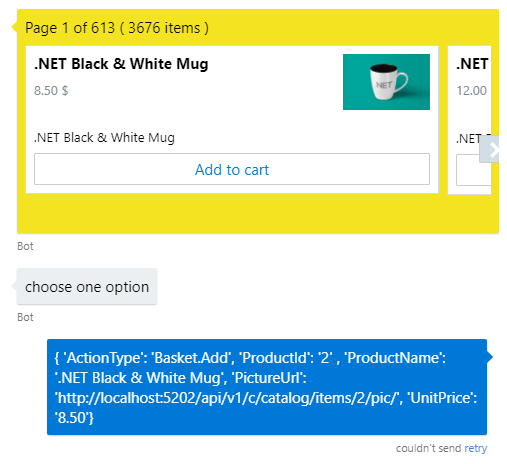
In previous BotFramework version, I could use this "trick" to get back to the bot the item that was clicked in the carousel. But in v.4, when you click in the button, the Value is then displayed in the emulator (see attached screenshot), what doesn't look nice at all. I tested with several settings, removing/setting values in Title, DisplayText, Value and Type, but to no avail. Is this a bug or a feature?
To Reproduce
Steps to reproduce the behavior:
Check code in previous section
Expected behavior
In v.3 and old emulator, when the CardAction was clicked, the Value was not print out. I was expecting same behaviour now. I'd better to show Title or DisplayText values
Screenshots
Additional context
Add any other context about the problem here.
[bug]
 franperezlopez
All 13 comments
Is there a reason you want to use a ThumbnailCard instead of an AdaptiveCard?
 v-kydela
on 11 Oct 2018
v-kydela
on 11 Oct 2018
I can ask you the same thing: is there any reason you advise me to use an AdaptiveCard? In my case, I use a ThumbnailCard because I don't need anything else but the thumbnail, a couple of lines and the button.
Although this doesn't hide the fact that the value is displayed in the emulator: is this a bug or is by design?? And the problem is that maybe I'm not the only one using this approach in the Value field, so this could provoke a bug when migrating bots to the new framework.
But also I really appreciate your help and suggestions, and by that, if you suggest me I could solve this problem using an AdaptiveCard, I can take another approach to solve problem
thanks
franperezlopez
on 11 Oct 2018
As I understand it, Adaptive Cards were meant to unify and replace the other types of rich cards and are recommended in all cases. Therefore we might expect them to be better supported. Go ahead and give them a try and see if that fixes things.
v-kydela
on 11 Oct 2018
@FrancescaLazzeri sorry for the delay. You should be using PostBack not ImBack if you don't want the value displayed.
 Stevenic
on 16 Oct 2018
Stevenic
on 16 Oct 2018
I'm testing with the release version 4.0.7, and I tested with PostBack and ImBack, and the result is the same: the Value is displayed when the button is clicked. Are you testing the nightly version?
franperezlopez
on 16 Oct 2018
adding @compulim to comment as PostBack should definitely not be rendering the value to the user.
Stevenic
on 19 Oct 2018
@franperezlopez even if it's marked as "postBack", if the value is a string, it will be echoed on the user side just like "imBack".
In order to hide the value, you will need mark it as "postBack" and put an object in the CardAction.Value property. It should hid it properly (in Web Chat). Please note that some channels do not have capability to hide post back values.
 compulim
on 23 Oct 2018
compulim
on 23 Oct 2018
@compulim that's not the behavior of postBack on other channels. Other channels either echo the "title" field to the user or show nothing at all. The value field should never be displayed when using postBack.
Stevenic
on 29 Oct 2018
Thanks @Stevenic for the clarifications.
We have the correct behavior in Web Chat v4. But it repro on v3, will ask PM to prioritize on this.
https://github.com/Microsoft/BotFramework-WebChat/issues/1431
compulim
on 3 Dec 2018
@franperezlopez @stevenic I checked postBack is working properly and will hide the result.
Background
After clicking on postBack, it must not show up in the transcript.
After clicking on imBack, it must show up in the transcript.
Repro
This repro is tested using Web Chat v3, which Emulator v4 is currently using.
We ran another test on Web Chat v4 earlier, and it is also no repro. As this bug is targeting Emulator v4, I am only including Web Chat v3 repro steps here.
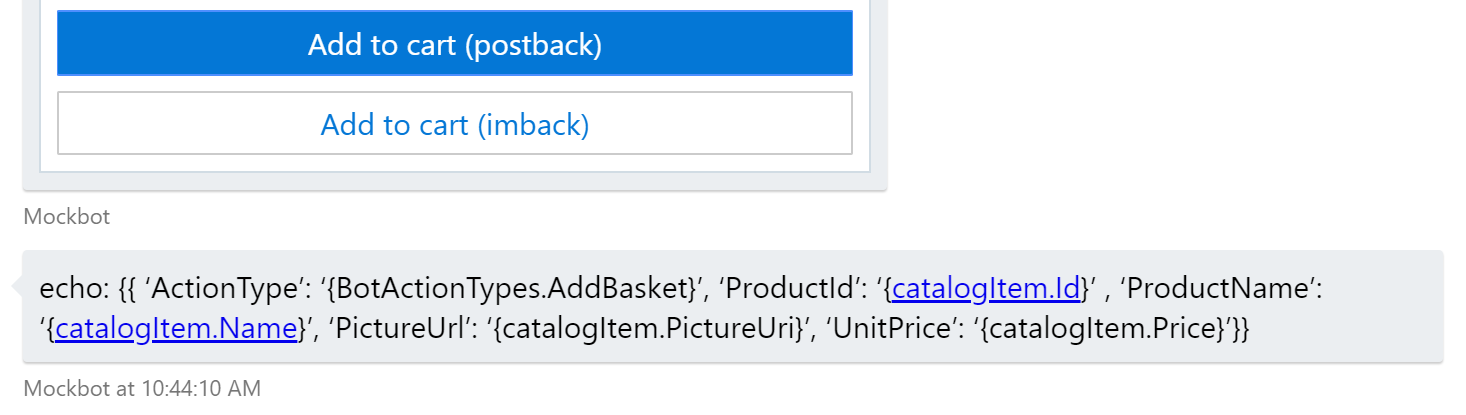
postBack card action
postBack card action does not show the JSON value appears to be sent by the user. After clicking on the button, MockBot v3 will echo back the post back value, as the second bubble.
Note this bubble is from the bot and is a feature from MockBot v3 (echo-ing back everything it receive from the user).
{
"value": "{{ 'ActionType': '{BotActionTypes.AddBasket}', 'ProductId': '{catalogItem.Id}' , 'ProductName': '{catalogItem.Name}', 'PictureUrl': '{catalogItem.PictureUri}', 'UnitPrice': '{catalogItem.Price}'}}",
"type": "postBack",
"title": "Add to cart (postback)",
"displayText": "{catalogItem.Name} added to cart"
}
````
> Please note that this JSON is `CardAction` but not `Activity`.
### `imBack` card action
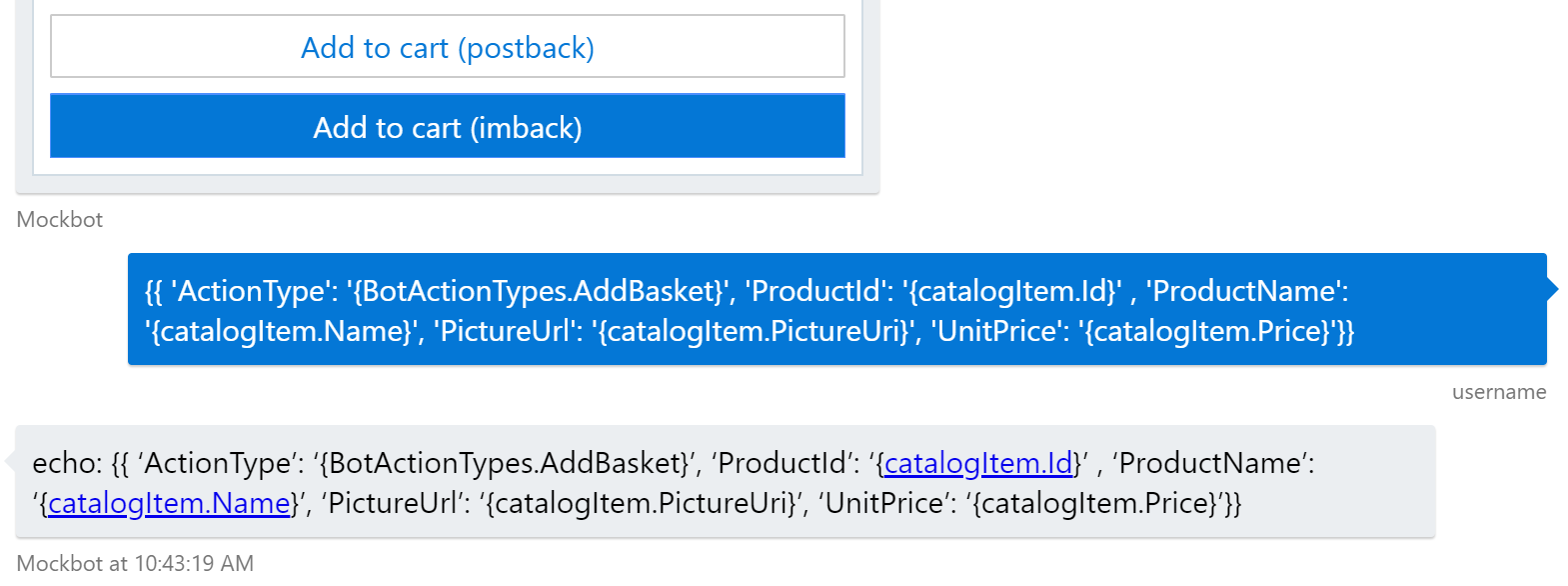
`imBack` card action do show the JSON `value` appears to be sent by the user. After clicking on the button, the second bubble is the JSON value sent by the user. And the third bubble is what MockBot echoed back.
```json
{
"value": "{{ 'ActionType': '{BotActionTypes.AddBasket}', 'ProductId': '{catalogItem.Id}' , 'ProductName': '{catalogItem.Name}', 'PictureUrl': '{catalogItem.PictureUri}', 'UnitPrice': '{catalogItem.Price}'}}",
"type": "imBack",
"title": "Add to cart (imback)",
"displayText": "{catalogItem.Name} added to cart"
}
One more thing, you can use anonymous type object as the value to simplify your code. The value property support any types, not only strings.
Closing as no repro.
compulim
on 7 Dec 2018
@compulim @Stevenic @cleemullins I see this has been closed? However, I am still seeing this behaviour - can you let me know if this is a known issue at least with the emulator?
I am using a choice prompt as below and when I click one of the choice, the value is displayed back in the chat window, instead of the text or displayText.
                return await sc.PromptAsync(DialogIds.GuidedChoicePrompt, new PromptOptions()
                {
                    Prompt = sc.Context.Activity.CreateReply("Which one would you like?"),
                    Choices = categoriesToPrompt.Select(c => new Choice
                    {
                        Value = c.Id.ToString(),
                        Action = new CardAction(ActionTypes.ImBack, title: c.Name, value: c.Id.ToString(), displayText: c.Name),
                    }).ToList()
                });
Thanks - and happy new year!
 garypretty
on 2 Jan 2019
garypretty
on 2 Jan 2019
Hi @garypretty
I've learned a bit more about cards since the time I was originally assigned this issue in October :)
I've found that a lot of people have this confusion because it seems like the Value property of a CardAction should correspond to the Value property of an Activity. This is not the case. The Value property of a card action serves the purpose of providing an argument that pertains specifically to whatever the action type is. As William said, the ImBack action is intended to send a message on the user's behalf as though the user typed that message, so in that case the Value property provides the text for that message. This is expected behavior and by design.
Happy New Year!
~ Kyle
v-kydela
on 2 Jan 2019
Thanks for the response. Very helpful and makes sense.
Gary
Get Outlook for Androidhttps://aka.ms/ghei36
From: Kyle Delaney notifications@github.com
Sent: Wednesday, January 2, 2019 10:11:04 PM
To: Microsoft/botbuilder-dotnet
Cc: Gary Pretty; Mention
Subject: Re: [Microsoft/botbuilder-dotnet] CardAction Value is displayed when clicked (#1020)
Hi @garyprettyhttps://github.com/garypretty
I've learned a bit more about cards since the time I was originally assigned this issue in October :)
I've found that a lot of people have this confusion because it seems like the Value property of a CardAction should correspond to the Value property of an Activity. This is not the case. The Value property of a card action serves the purpose of providing an argument that pertains specifically to whatever the action type is. As William said, the ImBack action is intended to send a message on the user's behalf as though the user typed that message, so in that case the Value property provides the text for that message. This is expected behavior and by design.
Happy New Year!
~ Kyle
—
You are receiving this because you were mentioned.
Reply to this email directly, view it on GitHubhttps://github.com/Microsoft/botbuilder-dotnet/issues/1020#issuecomment-451001182, or mute the threadhttps://github.com/notifications/unsubscribe-auth/ADuE6VhN3q6yUSuHgxwYkImpBt9y4xjmks5u_S54gaJpZM4XX9io.
garypretty
on 3 Jan 2019
Related issues
 MarceloRGonc
·
6Comments
MarceloRGonc
·
6Comments
 EricDahlvang
·
4Comments
EricDahlvang
·
4Comments
 lauren-mills
·
6Comments
lauren-mills
·
6Comments
 drub0y
·
3Comments
drub0y
·
3Comments
 ivorb
·
6Comments
ivorb
·
6Comments
Most helpful comment
I'm testing with the release version 4.0.7, and I tested with
PostBackandImBack, and the result is the same: theValueis displayed when the button is clicked. Are you testing the nightly version?