Bot-docs: Bot is not valid, The bot name is already registered
Following the documented steps, I get this error
"The resource operation completed with terminal provisioning state 'Failed'."
"InvalidBotData message "Bot is not valid. Errors: The bot name is already registered to another bot application..."
I only end up on the portal with a new AppService resource.
Document Details
⚠ Do not edit this section. It is required for docs.microsoft.com ➟ GitHub issue linking.
- ID: 096d934c-2856-e868-efeb-6622e2a5eafb
- Version Independent ID: 8bf74926-6a35-5753-0a1a-6663ba5965b2
- Content: Deploy your bot - Bot Service
- Content Source: articles/bot-builder-deploy-az-cli.md
- Service: bot-service
- GitHub Login: @ivorb
- Microsoft Alias: kamrani
 tarabishy2020
All 9 comments
Hi -Thanks for your feedback.
Could you please provide more details such as after which step did you get this error?
Usually, if you got the error message like "The bot name is already registered to another bot application..." might because you execute some commands multiples times.
Please if you could provide more details so that we can better help address your issue.
Thanks!
Yan
 zxyanliu
on 15 Aug 2019
zxyanliu
on 15 Aug 2019
@zxyanliu ,
Thanks Yan for the quick reply.
$ az ad app create --display-name "EchoBottest" --password "AtLeastSixteenCharacters_0" --available-to-other-tenants
In the next step, botId parameter requires id or bot name so I use display-name.
$ az deployment create --name "EchoBotDeployment" --template-file "template-with-new-rg.json" --location "uksouth" --parameters appId="id-from-previous-step" appSecret="AtLeastSixteenCharacters_0" botId="EchoBottest" botSku=F0 newAppServicePlanName="EchoBotSP" newWebAppName="EchoBottest" groupName="EchoBotTestGN" groupLocation="uksouth" newAppServicePlanLocation="uksouth"
Here I end up with a new service plan and a new app service called "EchoBottest" and the error I posted above.
On the other hand working from the portal by adding a bot service, I end up with a bot-service instead of the app service and everything works fine.
tarabishy2020
on 16 Aug 2019
Hi Sherif Tarabishy,
Thanks for providing all the details.
I have a suggestion after I tested your command: I think _botId_ and _display-name_ can be the same names. In theory, _newWebAppName_ can be the same name, too. If you came across the error as you described, it might be because you already created one earlier that has the same name. If you could change the name of your _newWebAppName_ parameter and try again.
Here are some details I tested and some follow up info that might be helpful when you proceed to the next few steps:
I tested the way you described on my Azure portal.
1. I executed the following command:
az ad app create --display-name "EchoBottest_yan" --password "AtLeastSixteenCharacters_0" --available-to-other-tenants
By executing the above command we create an app registration in Azure. We will need to use the appId and appSecret generated in this step to create our Azure resources for deployment in the next step.

2. After the first step, I executed the following command:
az deployment create --name "EchoBotDeployment_yan" --template-file "C:\Users\v-liyan\Desktop\Test\CSharp\02.echo-bot\DeploymentTemplates\template-with-new-rg.json" --location "uksouth" --parameters appId="bf031539-c891-4e5d-91a5-9b89e6eca133" appSecret="AtLeastSixteenCharacters_0" botId="EchoBottest_yan" botSku=F0 newAppServicePlanName="EchoBotSP" newWebAppName="EchoBottestyan" groupName="EchoBotTestGN" groupLocation="uksouth" newAppServicePlanLocation="uksouth"
Yes, you are right. When executing this command, we choose to Deploy via ARM template (with new Resource Group). These are the three new Azure resources I got in my portal:

3. After you create all the resources in Azure for deployment, you still need to prepare your source code for deployment.
You need to 1) Retrieve or create necessary IIS/Kudu files, after which you will see a .deployment in your bot project folder, and 2) Zip up the code directory manually, be sure to be inside your project folder and select all the files and zip them up while in that folder.
4. The last step is to deploy your prepared source code (as described in the last step) to your Azure application. After success deployment, you can test your bot in Web Chat.
Let me know if it helps. Thanks!
Yan
zxyanliu
on 16 Aug 2019
Thanks for the detailed response Yan.
I will try again, but I see another problem still.
As mentioned, now your "EchoBottestyan" is of type "App Service", this is different than if you manually create a Bot Service from the online portal, which shows up in your resources list as a resource of type "Bot Service".
The main difference will be in the commands you have access to inside. So if you open now your "EchoBottestyan"of type "App Service", you will not have access to the "Bot Management" section, which gives access to features like "Test in Web Chat" and more.
tarabishy2020
on 16 Aug 2019
Hi Sherif,
You are right. There are some difference here.
If you create a bot in Azure portal,
you create both a Web App Bot and an App Service

"Bot Management" sits in your "Web App Bot".

If you deploy a bot using Azure cli,
you got three things:

"Bot Management" sits in your "Bot Channels Registration".
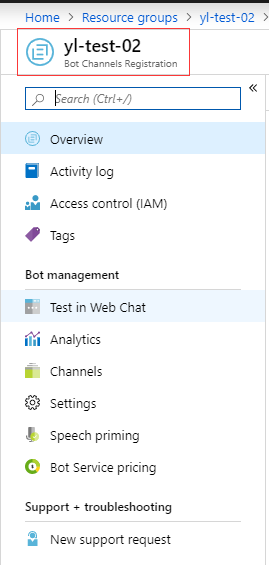
Helpful? any further confusion? Thanks.
Yan
zxyanliu
on 16 Aug 2019
Excuse me for the ugly screenshot. -:)
Let me know if you have any further questions. Thanks!
Yan
zxyanliu
on 16 Aug 2019
That clears things up. Thanks for the help Yan.
I think its worth mentioning in the documentation the difference between the two approaches, using the CLI and the portal.
tarabishy2020
on 16 Aug 2019
hi,
I have the same problem and getting the error below;
Deployment failed. Correlation ID: 4ce3bd34-8dcb-4c87-9250-a1be34bacf0e. {
"status": "Failed",
"error": {
"code": "ResourceDeploymentFailure",
"message": "The resource operation completed with terminal provisioning state 'Failed'.",
"details": [
{
"code": "DeploymentFailed",
"message": "At least one resource deployment operation failed. Please list deployment operations for details. Please see https://aka.ms/arm-debug for usage details.",
"details": [
{
"code": "Conflict",
"message": "{\r\n \"Code\": \"Conflict\",\r\n \"Message\": \"Website with given name HRBOTApp already exists.\",\r\n \"Target\": null,\r\n \"Details\": [\r\n {\r\n \"Message\": \"Website with given name HRBOTApp already exists.\"\r\n },\r\n {\r\n \"Code\": \"Conflict\"\r\n },\r\n {\r\n \"ErrorEntity\": {\r\n \"ExtendedCode\": \"54001\",\r\n \"MessageTemplate\": \"Website with given name {0} already exists.\",\r\n \"Parameters\": [\r\n \"HRBOTApp\"\r\n ],\r\n \"Code\": \"Conflict\",\r\n \"Message\": \"Website with given name HRBOTApp already exists.\"\r\n }\r\n }\r\n ],\r\n \"Innererror\": null\r\n}"
}
]
}
]
}
}
using the command
az deployment create --name hr-bot --template-file ./deploymentTemplates/template-with-new-rg.json --location "centralus" --parameters appId="
please help. There is no app Name with the name . tried with different names too got the same error.
any help would be appreciated. thank you
 sindhugururaj
on 29 Oct 2019
sindhugururaj
on 29 Oct 2019
Same here, anyone who got this fixed?
 Jordinthecloud
on 24 Apr 2021
Jordinthecloud
on 24 Apr 2021
Related issues
 BeigeBadger
·
3Comments
BeigeBadger
·
3Comments
 olucafont6
·
5Comments
olucafont6
·
5Comments
 justinbarias
·
5Comments
justinbarias
·
5Comments
 ceuk
·
4Comments
ceuk
·
4Comments
 emgrol
·
4Comments
emgrol
·
4Comments